All Activity
- Past hour
-
I have multiple video and photo editing programs. When I want to make quality clips/adjustments quickly, Video Optimizer is my tool. With a Desktop shortcut. I don't use it all the time, but sometimes I use it a bunch all at once. So glad I bought it.
- Today
-
 Hi, Good idea. Technically, everything is ready to notify V11 users about the release of the new version 12.0 via this function. However, it is currently configured to display the notification to all V11 users simultaneously (upon program startup). I planned to enable this message a bit later so that the rollout of version 12.0 would happen gradually. You’ve given me an idea - to separate the automatic notification and the notification shown during a manual check. I will implement this for a future version. In any case, there is also our website https://www.wnsoft.com/ and AI chatbots are already aware of the latest version of the program
 -
Have you investigated STYLES? You can create a series of styles based on your needs and if a new combination occurs, create a Style from it. The only thing to remember about Styles is that they are not cumulative.I Templates are another option. A couple of examples of what you need would help. DG
-
 pan054 joined the community
 -
Hi, I'm a beginning PTE AV Studio Pro user, but an experienced slideshow developer. The PTE AV Studio Pro is a very complete and feature-rich app, but the one thing I really miss is the option to define caption styles. I often use 3 or four such as Title, Caption, Date, scientific name. A 150 slides 'show' is not uncommon and it is a lot of work to keep changing the various captions per page manually. The offered 'copy and paste' suggestion only really covers one style and is not very practical as many other things will be using the clipboard, thus erasing the definition. My question is wheter others have the same needs and if somebody has found a way to make this easier?
-
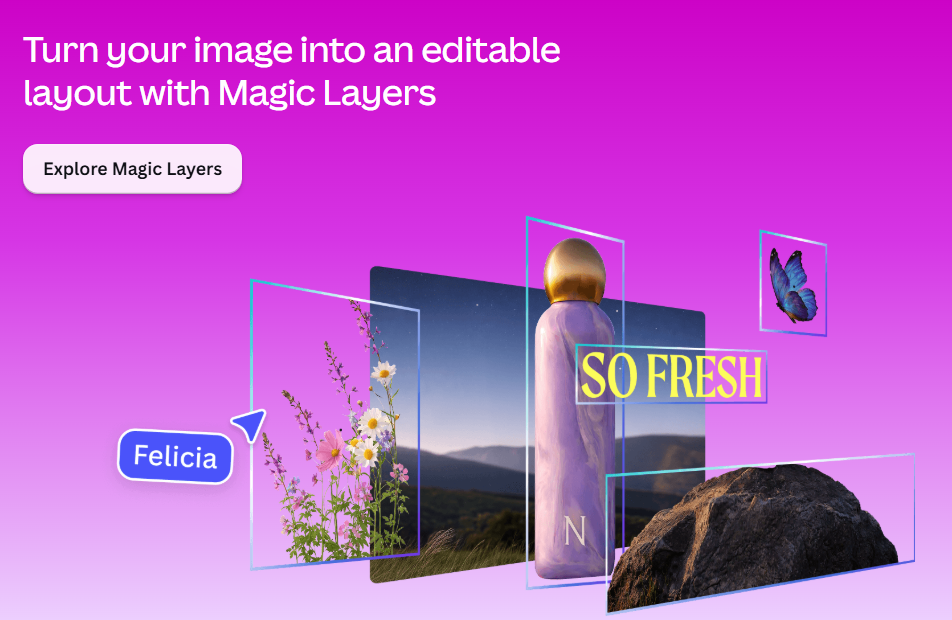
I understood so my explanation was also misunderstood as I was thinking of something similar to what Igor suggested. I asked AI and got the following reply. The first 2 are only available in PS. Compatible Text Editing File Formats PSD / PSB: Adobe Photoshop formats that store individual elements, effects, and text vectors on separate, editable layers. TIFF: A flexible bitmap image format that can optionally save Photoshop layers intact if compatibility settings are enabled. XCF: The native layered image format used by GNU Image Manipulation Program (GIMP). PDN: The native file type for Paint.NET which preserves unflattened layers. SVG / AI: Scalable vector graphics and Adobe Illustrator files where text remains vector-based and editable. [1, 2, 3] Interestingly, Canva (an Australian company who purchased Affinity) have release a product called Magic Layers. I don't subscribe to Canva Pro but here is some info showing a flattened image and editable layout created. Cheeers Mark
-
Let me see if I can explain this clearly: if I provide the style and you want to change "Halloween Party" to "Halloween Night"—well, if I create the style in PNG format, you won't be able to edit the file. However, if I create it in TIFF format, anyone who wants to can edit it to their liking—using an editing program like Photoshop or GIMP, for example.
-
Imagine you own PTE V11 and you're going to check if a new version or update is available. If your version is up to date you will see "You are using the latest version of PTE AV Studio Pro 11 ..." when clicking on Help / Check for free update menu. And when clicking on Help / Check for new version you can see "You are using the latest version of PTE AV Studio Pro 11" There is nothing to indicate that a new version of PTE is available. It would be relevant to display a message stating that version 12 of PTE is available. (For example, Audacity displays this type of message for version 4). For users who frequently visit the WNSOFT forum, it's obvious that a new version of PTE is available; however, for others, there is no information regarding the availability of V12.
- 1 reply
-
- 2
-

-
Hi Ken, Firstly, click the "Add Mask" icon on the top toolbar. 2. Choose "Add Blend Mask" and choose one of the blend modes (Screen, Overlay, etc). 3. You'll see a Mask container with two objects: Mask Stencil and Mask Content. 4. Put one image into the Mask Stencil, and another image into the Mask Content: Simply drag'n'drop an Image object into the Mask Stencil/Content with the mouse cursor in the Tree of objects. Or select Mask Stencil and click the Add Image button - the image will be inserted into the Mask Stencil. You can change blending mode later in the Properties tab for the Mask Container.
-
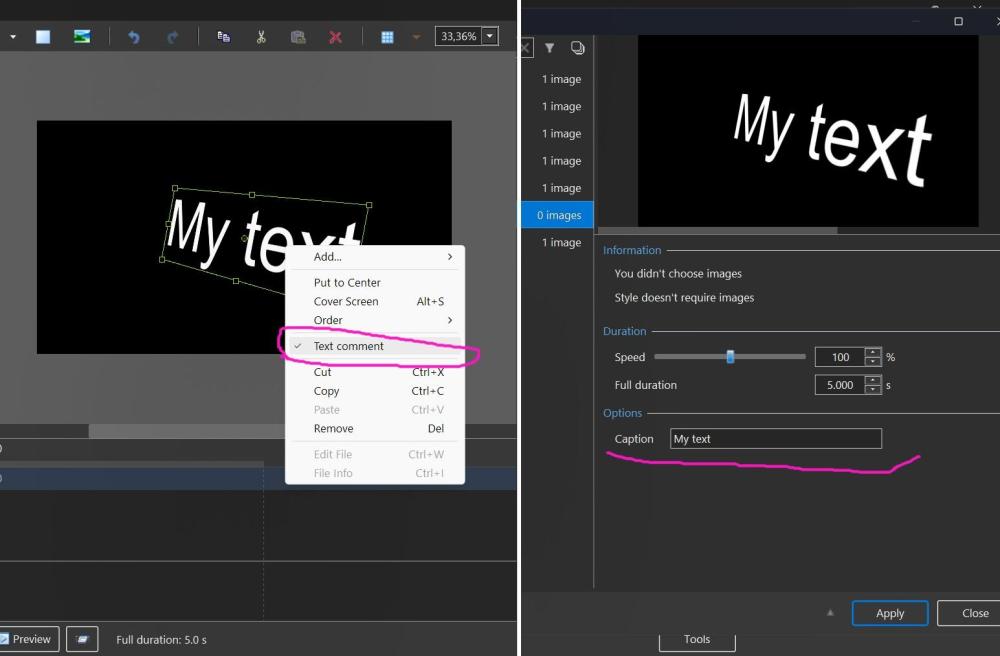
One more idea for your style. It's possible to create a slide style with a text object which can be changed when user apply your style. You need to select a Text object, call the popup menu and choose "Text comment". Then create a slide style. Yes, the choice of fonts and decoration will be limited.
-
Honestly, I don't understand the advantage of TIFF over PNG for this particular case?
-
So I am guessing you want that particular style and edit and a normal text box in O & A would not work. The other thing is will the viewer be actuaslly able to edit a TIFF file either with access to software or knowledge? If you just replaced the Image in O & A they could add the text they liked?
- Yesterday
-
Miange joined the community
-
Thanks for confirming the issue. I’ve reduced the TIFF file as much as possible, but the problem persists. I know the file size is much smaller in PNG and doesn't cause issues, but if I want to share it with others so they can edit it, PNG wouldn't work.
-
Hi, I confirm the issue with this TIFF image. We'l check the code tomorrow. Thanks. However, I recommend you optimize this TIFF file. Because this file is 50 MB for 2213 x 1246 image! After converting to PNG (lossless compression) you get only 1.2 MB. A good optimization for the slide style.
-
You will have to ask Igor. It is not a straight forward TIFF. It has transparency. DG
-
Right, but the intention was for it to be editable—hence the TIFF file. It supports that format in principle, so why the error?
-
Try converting the TIF to a PNG - it works then. DG
-
Hello everyone, I am creating a style and using a .tiff file (among others). Creating the style causes no issues, but when I apply it, the .tiff file does not appear, even though the system shows it as present. Before creating the style: After applying the style: Style: https://www.mediafire.com/file/kicqmqlvbzpqsii/Halloween.ptestyle/file
-
Hi, This feature (timeline scaling) is already on our TODO list, and I agree that it would be very useful. Let me say a few thoughts. We have many ideas for improving the product (PTE), so we constantly have to choose what to build now and what to implement later. Some ideas or features might look simple but are actually very difficult to implement, because they are deeply integrated into complex old code. Sometimes we wait to rewrite a whole large section of code so we can add several new features at the same time. We have a small team. For example, one person writes the code for slide styles, another work on the Objects and animation editor, and a third works on effects and custom transitions. There is also important ongoing work - refactoring (restructuring) old code - that is not immediately visible to users but is very impotant to ensure the legacy code doesn't break down under the weight of new features and effects. Then there is the matter of cross-platform support (PC and Mac). Sometimes we spend a long time working on a new feature or effect and hit a "dead end" - it doesn't work as intended, so we have to delay it, and time is lost. Yes, we might also make mistakes when prioritizing which features to include in a new version. We're trying to make the program better with every release, but we aren't perfect, and we ask you excuse us, if we don't always meet your expectations! In any case, I always welcome all constructive criticism and reminders about the features you’d like to see. Thank you!
-
Free Music / SFX Resource - Over 2000 Tracks
Eric Matyas replied to Eric Matyas's topic in General Discussion
Greetings Fellow Creatives, This week's new music track is a looping one: "PUZZLES IN FARAWAY LANDS " You can listen to it here: https://soundimage.org/wp-content/uploads/2026/09/Puzzles-in-Faraway-Lands.ogg And freely download it here: https://soundimage.org/fantasy-13/ As always, it's completely free to use in your projects with attribution, just like my thousands of other music tracks. HELPFUL LINKS: My Game Music Mega Pack https://soundimage.org/ogg-game-music-mega-pack/ My Genre Music Packs https://soundimage.org/ogg-music-packs-2/ Attribution Information https://soundimage.org/attribution-info/ Enjoy! 🙂 -
 ken woods changed their profile photo
 -
IMO, the arguments against the suggestion for "Timeline-Scaling in O&A" are based on supposition (German: Vermutung). But there are situations in which this feature would be very helpful. So, I would regard it as appropriate (angemessen) to ask for this feature.
-
I am still unsure of the process to use the new blending modes in the objects an animation tab. must I first create a blank mask to create a mask container and then follow adding images to the mask stencil and mask content as you show above thanks KEN wOODS
-
In my experience I agree with Nelson and JKB. I have owned PTE for many years (probably V1 in the 90's) and always found the developers very reasonable, responsive, supportive and I am not aware of any other applications that have this contact with the developer support from. One of the other major competitors is no longer being developed or availalble so I appreciate the support and development assistance of PTE. Sometimes in life we don't always get what we want. Furthermore, while not a developer, I do know some software has some legacy platform problems and what is requested may not actually be viable/possible using the existing code/platform. I certainly appreciate the time and effort by the developers in implementing the recent changes for V12 and the updates since. Also compatibility with new hardware is a problem. I do notice updates and changes to suit Apple OS changes regularly even though I am not an Apple user. There is an old saying, you attract more flies to honey than you do to vinegar. Seeking support for changes in an empathetic manner I have found is more productive. Thank you to Igor and the team for your assistance and support, I certainly appreciate it.
- Last week
-
ken woods joined the community
-
Irmel Dunaiski joined the community
-
Well, let's welcome the other updates.
-
Lots of features have been added over the years at users requests. If it was easy to add the Zooming in for O&A then it would have been done. So it may not be easy to add. WnSoft are a very small company with limited resources & PTE is continually being developed. Other changes are constantly being worked on & will appear when ready, Jill
-
I don't know, but I still don't understand why they wouldn't update an app with new features that users are asking for, to make it better, just to avoid raising the price. You don't necessarily have to raise the price to improve the app. I have apps that get updated with very powerful features, in some cases, they’ve even had to almost completely overhaul how the app works to add them, and they haven’t complained about the work involved, nor have they raised the price because of it. Maybe they figure that the better the app is, the more people will buy it because it offers more and better features than other apps.