All Activity
- Past hour
-
Hi vrt51, I haven't been able to use my PC for a while, and I still won't be able to, but when I created them, I didn't have any issues with that window freezing, and before posting them, I tested them on another computer and didn't run into any problems. I'm sorry, but for now I can't run any tests on my PC. Send a PM to Igor in case he hasn’t read your comment on this post, and let him know what’s happening.
- Today
-
FixMonitorUniformity - Free tool to fix uneven monitor brightness
digartal replied to Igor's topic in General Discussion
Thanks Igor. Will be interesting when I get to load it as I have 4 monitors on my video card.- 1 reply
-
- 1
-

-
Thanks Tom for sharing. I used to apply this filter a lot with my IR images and this will come in handy. Thanks for sharing. Mark
-
 Greetings! Maybe i'm making something wrong, but this pack isn't working for me. It entirely freezes/blocks my Slide Options window, Task Manager remains the only option.. Same for SoCu's Transitions (4K Geometric Shape Transitions, Light Leaks Transitions 2, and Free PTE AV Studio 12 Paper Transitions ).
-
@SoCu: i tried to use 2 of your transition packs (geometric shapes and this one), and both of them freeze/block the Slide Option window. Can you test it a little deeper please ? No error, but i can't even close that window, i must use Task Manager to close the software. Also tried Light Leaks - the same problem. Other works from tom95521 or SeismicGuy run just fine. Hardware : 5900X, 32GB RAM, M.2 SSD , RTX A5000
- Yesterday
-
Thanks. Blend modes are very powerful feature of PTE. The ability to create a custom style makes it easy to apply to images and videos. Tom
-
Hi Tom, Thanks for sharing! Interesting visual effect. Glad that you're using the new blend modes in V12.
-
Dave, Thanks for sharing.
- Last week
-
Some of the members here might be aware of the French site "Diapositif" where many PTE shows are available for download. The whole site can be translated into English. Here is one example of a great show in the traditional Audio Visual style that I have just enjoyed. Just music in the BG - no narration. https://diapositif.org/forum/viewtopic.php?t=45707 DG
- 1 reply
-
- 2
-
-
I'm pretty sure that everyone would benefit and be grateful if you posted your theme here? DG
-
Would you mind sharing your Theme with me too? I do miss the slide styles from Producer. Thanks, Rosemary
-
VRT51--I messaged you the Theme.
-
@SeismicGuy: could you send me this theme, too, please ? I miss that effect from Proshow.
-
You can create the Orton Effect in PTE AV Studio 12 using layers and screen blend mask. I created a style that makes it easy to duplicate on many slides. You can adjust opacity of the Mask Content to change the effect. For higher contrast night mages and text graphics I think the bokeh version works the best. Some layer based image editors might have an Orton filter. It might also be named glow. I think it might make and interesting transition so I will try to create and post. Update: I have included the transition below. https://www.capturelandscapes.com/orton-effect-explained/ Thanks, Tom Orton Gauss.ptestyle Orton Bokeh.ptestyle Orton.pteeff
-
No word only “atmosphere” make it 15 years ago for personal screenplay with Pte. Exe, a tiny software as a switzerland knife.. Note: in end movie the name: Man. Yes I'm an old nick name Ghulya photographer, cine-maker, director of photography since 1969
-
- 4
-
-
Funny thing I do have Styles and Transitions folder in the Documents > PicturesToExe folder and I ALSO have Slide Styles folder in Documents > PTE AV Studio folder along with a bunch of other stuff in that folder. In any case it looks like PTE AV did find the various Styles but not the couple of Themes I had created but I can re-import those.
-
I saw that you fixed the problematic style related to the folder size, but you didn’t explain why the folder size increased when the style was created.
-
Thanks Igor, I wasn't aware of the reason; now it's clear.
-
Thanks Igor - great info! DG
-
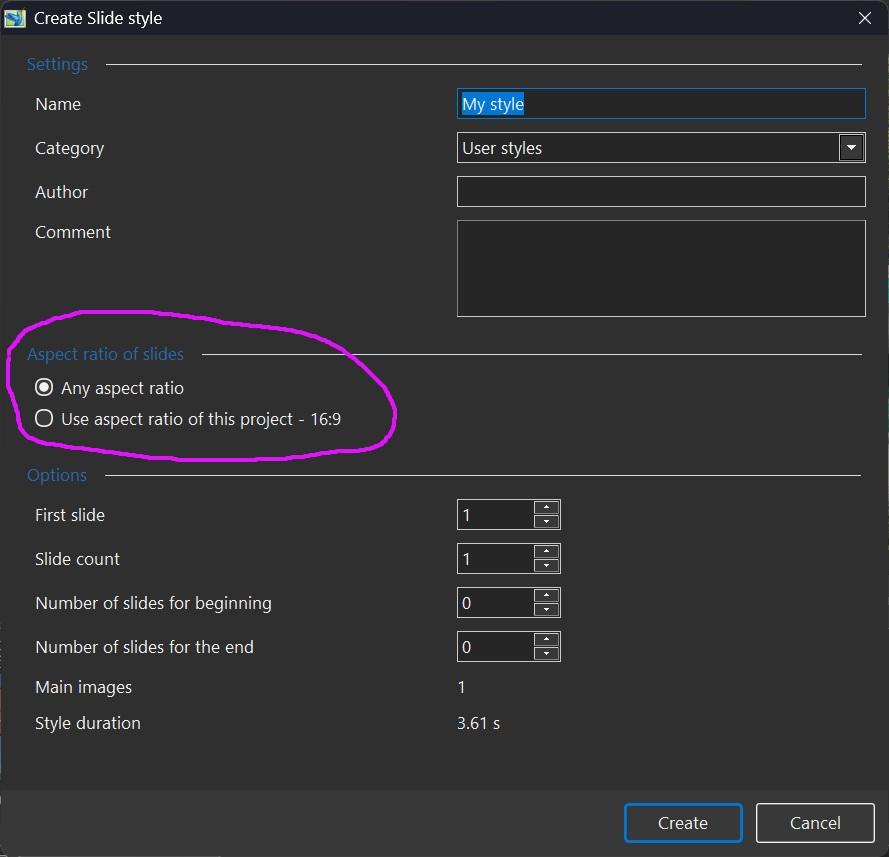
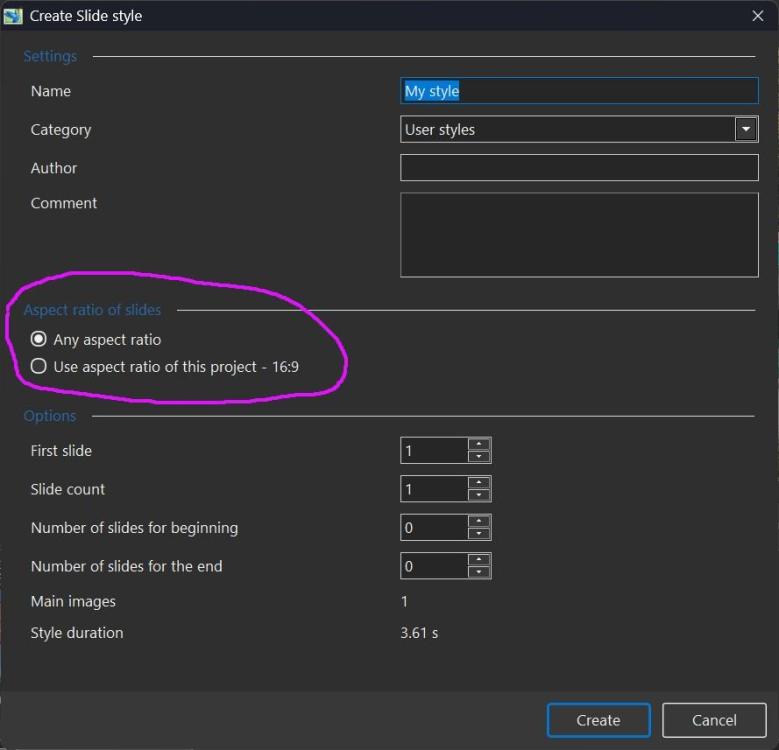
A created slide style (and exported style) contains TWO variants if the author chooses the "Use aspect ratio of this project.." option and then creates another slide style under the same name with a different aspect ratio option ("Any aspect ratio" or "Use aspect ratio of this project - 4:3", for example). The two styles will be combined and displayed as one virtual style. In other words, author creates 2-3 visually optimized slide styles for "16:9" projects and for “1:1” (or 4:3, etc.) projects under the same name. When the user applies this smart style, PTE will automatically choose the optimized version according to the current project’s aspect ratio (or the nearest variant for a non-standard aspect ratio). Generally, I recommend to create a single universal style with the "Any aspect ratio" option. The exported style will then contain only one version, for projects with any aspect ratio.
-
This I have already done, please see above. When building a Style it is inevitable that there will be interim versions. Instead of overwriting, it is probably best to give each a unique number. DG
-
Thanks for checking!
-
By default, all custom slide styles, themes and transitions are located in the folder: Documents > PicturesToExe > Styles and Transitions To transfer them, find the location of the "Styles and Transitions" folder on your old computer and copy all of its contents to the "Styles and Transitions" folder on your new computer. Note that PTE AV Studio must be closed when you make any changes to this folder.
-
No, there will be only one style in the PicturesToExe folder. The files will not be overwritten. Instead, the existing files will be added to the folder, causing its size to double. To prevent this from happening, you need to start a new project.
-
Windows update crashed my maching and needed to go back to pretty much fresh install of Windows. I also had to reinstall PTEAV Studio but it does not have all of the various styles, transitions, themes, etc that were there before. Do I need to import everything again or was there some INI file somewhere that has this info. I have disk backup from a day ago so maybe there are some files or folders that can be moved to the new WNSOFT PTEAV12 program folder??