All Activity
- Today
-
Hi Alex, another very complex and highly successful style. Thank you for sharing it with us. All the resources will be invaluable to me for creating variations. Well done!
-
SeismicGuy, Thanks for the comments! Well, if you look closely there's nothing but sets of Masks.(I call them Compositions) Inside them we have Animation, either by Keyframing or using Video. I'm not the expert by any meaning, but these 2 are the major power of this app, to my mind. Hope some day we'll have tool like Pen. That moves Mask power much further. Anyway, thanks again. Best Alex
- Yesterday
-
 Thanks Igor! I think maybe some video editing programs refer to them as "proxy" files. That might work well. At this moment, the vast majority of videos that I use are from my Galaxy phone at 4K resolution (3840 x 2160), 60 fps (sometimes 30 fps). The project I previously sent you is typical except that I would use many additional clips. HOWEVER, what I don't understand is that this exact same video/project works and displays just fine in version 11! The speed up is not displayed in the Trim dialog, but it definitely shows the speed up in the O&A window, in the main program preview window and in the preview accessed by pressing the "Preview" button (none of which show the speed up in version 12). I even added a second similar video clip and speeded it up 2X and the same is true with both clips in the project. Try opening my project in version 11 and see if that is the case for you also. I understand that the "Trim and Adjust" window is probably all brand new code in version 12, but I assume the code for the other windows hasn't changed that much. Let me know if you need me to try something else.
 -
I am always astounded by the clips you create. I wouldn't even know where to start. Thanks as always.
-
Hi everybody, Love this song. Had some Styles composition in mind and here's how it looks. There's link to the Styles. Like always replace Files "replace Me" with your images or videos. Best
-
I have attached the image, let's see if you can see it now.
-
-
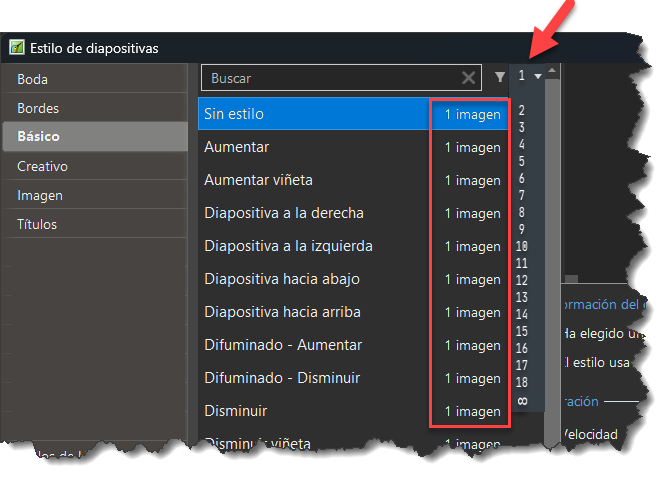
Hello, is it possible to add an option to the slide styles window where you can choose to display styles that have or require a certain number of photos? For example: (the layout is a bit messy, but I hope you get the idea) Thank you
- Last week
-
 fmike61 joined the community
 -
very easy, just copy & paste the slides to a new project. If you want the sound as well then you need to Link the Sound Clips to the Slides first. You can then unlink them afterwards if needed. Or another option, but may take longer is to save the Project under a new name & then delete the Slides & sounds that you don't want. Jill
- 1 reply
-
- 1
-

-
I would like to lift a 3 minute section from a longer sequence to form the basis for a new, different , sequence. Is this possible please and if so how to do it ? This would be a good short cut and save the time of starting the new one from scratch. Thank you
-

Changing the speed of a video is broken in several ways [SOLVED]
Igor replied to mhwarner's topic in PTE AV Studio 12 Beta
Hi Mary, Thank you for checking. I wanted to write to you in detail. Earlier you've sent me a short project with one sample video object. I see this problem: preview doesn't show doubled video speed when you set the speed to 200% (i.e., 2x acceleration). The problem is that the video file is too large - 4K resolution (3840 x 2160), 60 fps. PTE AV Studio can't play it at doubled speed, sorry! Only when exporting a MP4 video. I see a possible solution: professional video editors usually create a simplified copy of the video at a lower resolution and use it for previews. PTE AV Studio currently always works with original video files. We probably need to consider a similar solution. -
Increasing the speed of a video clip to 200% does not properly display yet in ANY window inside of PTEAV (Beta 6). Not in the trim and adjust speed window, not in the O&A viewing window, not in the main viewing window in the timeline and not in the window activated by pressing the "Preview" button. It does, however, show the speed increase when I save the project to an .mp4. Maybe your team is still working on this.
-
Hello, yes, it seems to have exported correctly now. Thank you.
-

Free Music / SFX Resource - Over 2000 Tracks
Eric Matyas replied to Eric Matyas's topic in General Discussion
Hi All, Here's a brand new free-to-use-with-attribution music track that I want to share with the community: "ARID ALIEN BADLANDS" (Looping) You can listen to it here: https://soundimage.org/wp-content/uploads/2026/02/Arid-Alien-Badlands.ogg And freely download it here: https://soundimage.org/sci-fi-14/ Just like my thousands of other music tracks and sounds, this track is 100% free to download and use in your projects with attribution. OTHER HELPFUL LINKS My Game Music Mega Pack (over 1400 tracks and growing) https://soundimage.org/ogg-game-music-mega-pack/ My Genre Music Packs: https://soundimage.org/ogg-music-packs-2/ Custom Work: https://soundimage.org/custom-work/ Support: https://soundimage.org/donate/ Enjoy, stay safe and keep being creative! 🙂 -
Hi, please try new Beta 6. We fixed this problem.
-
Beta 6 is available See the download links above. Added voice recording support for macOS. Many improvements in the Trim and Adjust speed window (for a video object). Fixed an issue with export of a category with multiple custom transitions.
-

Slide duration after applying style/theme
SeismicGuy replied to SeismicGuy's topic in General Discussion
Bringing up the suggestion again to create a way to to have mp4 clips stand out distinctly from jpg's in the slide view. I have made the mistake a number of times now of selecting what I thought were a number of consecutive slides to apply a style or theme only to find out later that one of more of these were mp4 clips rather than jpg's. An alternative would be to have some option buttion that applies styles/themes ONLY to jpg slides and skip any mp4 slides if that makes sense. -
Thanks very nice
-
Yes I think that is a carryover from "DOS" legacy foundation. It used to be limted to 31 characters also from memory but that has now changed. A bit like "space bar" in HTML which is 4 characters in programming from memory. Long time since I re-engineered any programming.
-
Thanks Alex, lucky to have it on my doorstep not far from home.
-
Beautiful spot! Many thanks Mark!
-
Thanks for the prompt reply. I don’t think it is vital to modify PTE to accommodate as it was only that as all the other files were useable in the folder threw me in finding the reason. One feature they would be useful is the ability to use the mouse scroll wheel in the file list. Thanks again Tony
-
-
There is no doubt the straight dissolve would work well on this very linear/geometric landscape, especially when an O & A zoom/move is used also. Thanks for commenting.
-
I find it best not to use any special characters at all, keep things with just AtoZ and numbers. I have found that filenames containing special characters or characters with accents will not always work when used in a Menu. Keep it simple & you shouldn't have any problems Jill