All Activity
- Past hour
-
Hi Igor, When I click the play button in the preview window and let the video play all the way to the end, then I click on a view. (The first time, everything works normally.) If I repeat the process, when I select a view, the video starts playing without me pressing the play button. Can you reproduce this issue? Test-3.webm
- Today
-
Some photographers will walk a kilometre to a carefully planned location 4.5 kilometres from the Byron Lighthouse, then wait 45 minutes for the Moon to rise perfectly behind it—because apparently disappointment needs good composition too. Right on cue, the clouds staged a flawless photobomb, hiding the Moon at the exact moment of truth. Then, just as surrender seemed the only sensible exposure setting, the Moon popped above the clouds and lit them up brilliantly, proving Mother Nature enjoys delivering punchlines more than photographers enjoy sticking to the plan. Made into a timelapse style with PTE.
-
- 1
-

-
Hi, I'm glad you resolved this technical issue. PTE AV Studio uses the default audio device (configured in Windows settings). In other words, it's the same audio device used by your browser (YouTube) or VLC video player. Usually, restarting the program (PTE AV Studio) is sufficient if you've changed the audio output device. In rare cases, restarting your computer (Windows) may be necessary.
-
Thanks for your comments and help, I'm glad you like it. I've re-uploaded it so I don't have to update all four files. Cheers.
-
Hi Javier as Mark explained, I updated the the location in Object and animations and all is OK when opening the project the next time. The reference PTE expects is: %store%\Slide Styles\{2D6CA3B3-323E-44B9-A88F-B177039985A2}
-
Hi jienense I can confirm the missing images are in the new downloaded file. Just ran the project and got the error message to say there are missing. I browsed to the folder they were located in and got the ticks to show they were found on a Windows PC. Thanks Mark PS The 4 missing files although they are located, the reference to the location in Slide 7 also needs to be updated in the Objects and Animations Tab Once I saved the project it updated when opened the next time. Thanks again for sharing this detailed project.
- Yesterday
-
Glad you have solved it. Problems like that are always tricky. Jill
-
Thanks for responding Jill, but I updated my post a few minutes ago. The issue is resolved. I did in fact try everything you mention in your post to no avail. Again, it turned out that PTEAV was sending its sound to my monitor, which actually has no speakers. When it was connected to my laptop by a display port, that worked fine. Now I have a new computer and a set of standalone speakers. Trying to keep things consistent, I had copied some of the PTEAV settings files from my laptop before installing the program on my new computer instead of doing a completely new install. I was about to uninstall and reinstall, which would likely have fixed the issue, but my partner fiddled with the sound object in Windows and discovered and remedied the problem. All is well now!
-
What type of sound files are you using - Mp3, Wav, Ogg ? Have you tried a new Project with just 1 Slide & that sound file? It must be something to do with the actual file if you have tried both 11 & 12. Does the original sound file play ok in other Programs? Jill
-
PTEAV was sending sound to my monitor, which has no speakers. Made the monitor default sound output and then changed it back to my actual speakers. Sadly there was no way to change the sound output device within the program. The problem most likely was a result that I installed the program on a new computer BUT I copied all of PTEAVs files and settings from my old laptop. Next step was going to be uninstalling and reinstalling, which would probably have worked, but my IT nerd partner fixed it before having to do a reinstall. Tearing my hair out here! I can't get any sound out of PTEAV even though there is a sound track and it is not muted. The sound is obviously there as I can export the audio track to an .mp3 file and it plays fine in Windows Media player. I can create an .mp4 of a project (tried several different ones) and they played the sound just fine. I have looked at every menu and every setting and can't find anything which would allow me to turn audio/sound off within PTEAV. I tried it with the latest version 12.0.2 and also went back and reinstalled version 11.0.7. And had the same problem there as well. Would be grateful for any assistance!
-
un Grand Merci jienense superbe montage ! félicitations ! bonne Vacances !! Henry --- "A huge thank you, jienense, superb editing! Congratulations! Have a great vacation!! Henry" (Google Translate)
-
Free Music / SFX Resource - Over 2000 Tracks
Eric Matyas replied to Eric Matyas's topic in General Discussion
Greetings Fellow Creators, Please be sure to check out my Ogg Game Music Mega Pack. It has over 1400 tracks in it (looping and non-looping) so you can download all of my video game music at once...a huge time-saver. Here's the link: https://soundimage.org/ogg-game-music-mega-pack/ You can also download my smaller genre packs here: https://soundimage.org/ogg-music-packs-2/ That said, this week's brand new free-to-use-with-attribution music tracks are on my Fantasy 13 page. They are: "THE WIZARD'S CONCOCTION" "VILLAGE IN ASHES" Here's a link to that page: https://soundimage.org/fantasy-13/ I can't believe July is almost over...summer is going by so fast! Well, see you in August then! -
Hola chanfi22 Gracias por avisarme. Hice la copia de seguridad como siempre. Usé esos cuatro archivos de una plantilla que ya estaba instalada en PTE. Hice otra copia, pero el problema persiste. Lo comentaré con Igor. Los agregué manualmente. Si pudieras verificar que no haya otros problemas, te lo agradecería.
-
Hello Javier, Excellent work. It’s original and very well done. Bravo, and a big thank you for sharing the project. However, it’s a shame that 4 files are missing: 1) ramkao2-2.png 2) snow_mount-8.png 3) snow_mount-3.png 4) tree-2.png
-
Hello everyone! My vacation season is almost here, and I've already dipped my toes in the water... Good vacation !!! https://javier-pteavstudio.blogspot.com/
- Last week
-
Milky Way over The Byron Lighthouse Timelapse
digartal replied to digartal's topic in Slideshows & AV Shows
Thanks -

Milky Way over The Byron Lighthouse Timelapse
JRR replied to digartal's topic in Slideshows & AV Shows
Nicely done time lapse Mark -
Hi everybody, I 've built my first Project using PTE AV Studio V. 12.1 recently. Here's a short summary. Overall the App fills much more responsive. The export movie render time is decreases significantly. Finally we got rid of that pesky problem locating same file in different locations. .That's great! Blend Mode works wonderfully to me, opening much more possibilities . The creating backup project takes less time. The only one problem I've found so far was randomly unresponsive timeline head while Stop and Go playing the timeline. While manual scrubbing the timeline goes smoothly. I still run Quad core on Win7, so that's might be the reason. I'd appreciate if someone try to feedback me. I think the Team made a great job on keeping move this great App ahead of competitors. Thank you! Alex55
-
- 3
-
-
Sometimes you may have keyframes that differ only by a few milliseconds in time 😊
-
Yes, i know i can use the buttons. But when my cursor is at the very end, and i need to jump over upon 7 keyframe points? That involves at least ONE unnecesarry step, to drag the cursor quite near my desired position (otherwise i must click 7 times), and then click the left or right arrow button. Wouldn't make more sense to snap in place while still dragging ? L.B.
-

Ticket to the Tropics: Cinematic Style Slideshow
Alex55 replied to Alex55's topic in Styles & Templates
digartal, Thanks for the comment. Best Alex -
 Curl Noise Color Backgrounds Free Downloads, No Strings Attached Here is the web links to my web site: These Wave Curl Noise Backgrounds Files are in Zip Format. Curl Noise Backgrounds Demo: https://www.pnwhiker.org/CurlNoiseBkg/CurlNoiseBackgroundsDemo.htm Curl Noise Backgrounds Zips: https://www.pnwhiker.org/CurlNoiseBkg/Zips/CurlNoiseBackgroundsZips.htm Note: These Gif's will loop endlessly no matter the time length of the clip. Hope you enjoy the show.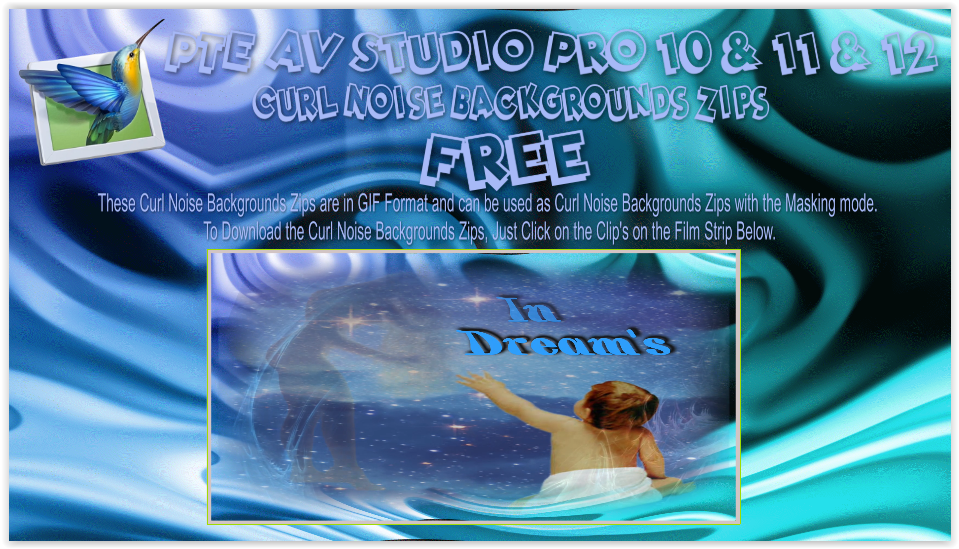
-
Ticket to the Tropics: Cinematic Style Slideshow
digartal replied to Alex55's topic in Styles & Templates
Love it - very well done. Great use of the new features. Thanks for sharing. -
Hi everybody, The idea of the Slideshow was the illustration one of the new PTE V.12 feature-Blending Modes. This is basically variations of the one Style--Screen Blending Mode. The set of pictures placed in the Stencil Container and the Background Composition-in the Mask Content. There's some whistles and bells here and there also to make it looks more cinematic. To my mind, of course. If you like it--there's The Link. Just replace the files marked "Replace Me" with yours Media. Best Alex55
- Earlier
-
"Spots" can be made into a separate customizable effect applied to any layer. This effect will allow you to create animated waves on the surface of water, clouds, rain, light reflections, and more. And also the "Page Curl" effect for the layer. I am confident that this effect will be very popular among slideshow creators. Sincerely, BD.