All Activity
- Today
-
chanif22, Thank you very much! Appreciate the comment. Best Alex
-

Digitizing Slides with a Kodak Slide Projector
goddi replied to goddi's topic in Equipment & Software
Greetings, If you are referring to the SlideSnap Pro setup, I don't know what they used. However, for my setup here is what I used for the camera mount: Decade mini Tripod Base (but does not seem to be available as far as I can tell). I paid $39.99. https://www.amazon.com/Lightweight-Universal-Mounting-Olympus-Mirrorless/dp/B071ZNTWJF?s=gateway&tag=visadventures-20&language=en_US For the rail, Neewer Pro 4-way Rail, I paid$29.49, also hard to find. www.newegg.com/p/1W7-00T2-00NT9?item=9SIB2TTJUK1095&utm_source=google&utm_medium=organic+shopping&utm_campaign=knc-googleadwords-_-cables - internal power cables-_-ruth's sister-_-9SIB2TTJUK1095&source=region&srsltid=AfmBOopR7OGGqdzUdSMpmuwjI12VApvz2iRikDDJifnLyyDQVl3--iGuNoI Or, this one: https://neewer.com/products/neewer-4-way-macro-focusing-rail-slider-66601385?variant=42346971398337&country=US¤cy=USD My setup did not have a 'cover' for the lens. Hope this helps... Gary -
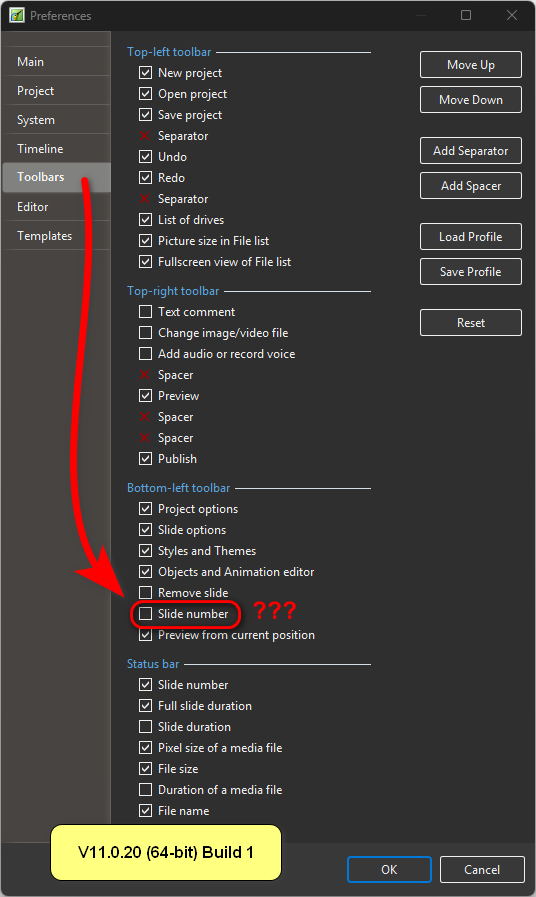
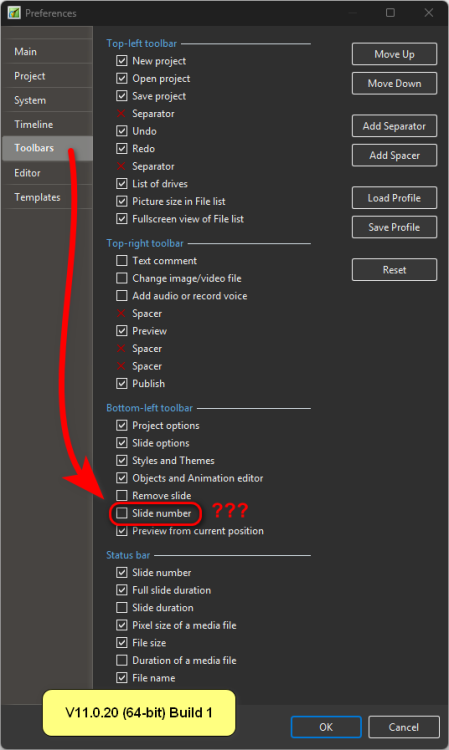
Hi, Thanks, it's a duplicate option that no longer used. We'll remove the second 'Slide number' option from the default Bottom-left toolbar in future V12 release.
-
Hi Judy, I can share it, but keep in mind that when changing photos, the masks will need to be readjusted. There is no example, it is a demonstration. Regards Javier
-
Hi Alex, Once again, a very beautiful piece of work, and it's really nice of you to share it. Thank you so much.
-
 Brett joined the community
 -
Digitizing Slides with a Kodak Slide Projector
Brett replied to goddi's topic in Equipment & Software
Hello, I like the slide projector setup. Could you provide the slide base link for the camera, and the hood on the projector. What mount are you using for the projector and camera mount ?? - Yesterday
-
Hi, I have an idea on how to improve it. I'll write about it later.
-
jmc, Thanks for the comment. Yes, I'm doing this just for pleasure too. By the way, speaking of sport you might be interesting in this one I've done not so long ago: There's The Link over there too. Best Alex
-
Video example on YouTube dont' work...why? Regards Ghulya
-
V11.0.20 In the settings, I can select the “Slide Number” option for the status bar. The same option is also available for the Bottom-left toolbar. What is this used for in the toolbar? If I set the option no additional button will appear.
-
I agree, it would be very helpful to adjust the volume with the keyboard. It is not always easy to get 2 points to have the same volume. Even being able to use the arrow keys would be better. But other sound editing programs I have used are also the same. So maybe it is not an easy task to do this. Jill
-
Hello, As far as I understand, the problem is occurring with PTE AV Studio 11 on Windows. Please answer: 1. What exact version is installed? 11.0.21 or older. Check in the About window (Main menu > Help menu). 2. Did you recently start using PTE AV Studio and the problem occurred immediately? Or have you been using the program for a long time and it worked correctly before? 3. What files did you add to the Slide List in your project: JPEG, PNG, TIFF, or video files? 4. Check how the slides are displayed in the Sample Project (open it via the main menu > Help > Open Sample Project). 5. Describe your computer configuration: - Windows version. - Graphics card (NVIDIA, AMD, or Intel), preferably the exact name. This is important. 6. Try the newest V12 Beta on Windows to compare with V11: https://www.pteavstudio.com/forums/topic/52130-pte-av-studio-12-beta-10/
-
Hi JudyKay, no, that's not what I'm asking. I know you can use those little dots to turn the volume up and down, and there's also an option to set keyframes at a specific position. What I'm asking for is an option to adjust the volume level using the keyboard.
-
Why is it that everytime I make a project in PTE AV Studio for Windows (version 11) I end up with some empty slides? I tried the beta Mac version 12 for the first time this weekend and on the first try my project has no empty slides. I made the same project in Windows again and sure enough: empty slides. Very happy with the Mac-version. (Oh, and I made the Windows-project on a windows computer.)
-
I Will. Thanks.
-
Probably way over my head, but I hope we get to see the project.
-
There is so much to know that I don't know. Yet. But am learning.
-
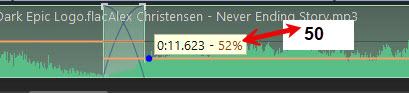
Looks like you figured it out. Just raise or lower the yellow line. Add points for more control. Is that what you are asking?
- Last week
-
Wuaahhh, simply magnificent, and a big thank you for sharing. Really original and creative, I don't think I'll ever be able to do that. I like PTE, but I mainly use it for family or sports montages, etc. Tank you
-
Hi, I recommend you start a new topic (thread) on the forum. If you use V11 start here: https://www.pteavstudio.com/forums/forum/67-troubleshooting/ For V12 Beta write here (new topic): https://www.pteavstudio.com/forums/forum/91-pte-av-studio-12-beta/ Also let us know the exact version number from the About window. And try with the simple new project. Add 3-5 images, check out how it works. You can also check the Sample Project (from the main menu > Help > Open Sample project command).
-
Why is it that everytime I make a project in PTE AV Studio for Windows I end up with some empty slides? I tried the Mac version for the first time this weekend and on the first try my project has no empty slides. I made the same project in Windows again and sure enough: empty slides. Very happy with the Mac-version. (Oh, and I made the Windows-project on a windows computer.) Excuse me if this is the wrong topic to submit such remarks. :)
-
Hi, is there a way to set or adjust the audio volume level? If it’s not there, would it be possible to add it? That way, we could have more control over the volume. There are times when the volume control is a bit off, and you end up spending half an hour turning it up and down until you get it right, 😁
-
Hi Jill, Thank you for checking the new Beta 10! I've replied you by email. We'll try to improve this editor to make it easier for you to determine the final video playback time. Currently, editing focuses on working with the original video's timing.
-
HAL2001 joined the community
-
Hi Igor, Thanks for the new Beta. However I am still having problems, please see email with a description. Jill
-

Free Music / SFX Resource - Over 2000 Tracks
Eric Matyas replied to Eric Matyas's topic in General Discussion
Hi Everyone, This week's new free music track is on my City/Urban 3 page: "WANDERING AT 3AM" https://soundimage.org/city-urban-3/ As always, it's 100% free to use with attribution, just like my thousands of other music tracks and sounds. HOW TO SUPPORT MY EFFORTS You can grab one of my Ogg Music Packs. They're a great time-saver and help to support my site. 🙂 Genre Packs are here: https://soundimage.org/ogg-music-packs-2/ My Game Music Mega Pack contains all of my game music...1400 tracks and growing. You'll find it here: https://soundimage.org/ogg-game-music-mega-pack/ You can make a small donation (every little bit helps!) https://soundimage.org/donate/ Custom Music for Your projects https://soundimage.org/custom-work/ Thank you, fellow creatives, for all your support. I sincerely hope some of my work is helpful in your projects!