

canaro99
-
Posts
69 -
Joined
-
Last visited
-
Days Won
7
Everything posted by canaro99
-
A break well done, Aleina!
-

Filmstrip Symbol in Slide List View
canaro99 replied to SeismicGuy's topic in Suggestions for Next Versions
While the image/video is listed in blue, we can ascertain that the image is, in fact, in the show. It would be nice to see by a small number if the image/video is used more than once. Another useful feature would be "Go to selected image..." in the Right Click menu when point to and right clicking a particular image. John -
Last night was a lot of fun. Show and Tell of my grandkids with the Wizard (I cheated here with a version of "Over The Rainbow" after the cottage crashes). Finally, I showed a PTE show of our latest trip. After all three, I finally untied our friends from the sofa and everyone went home with a big smile on their face! I like the rendition above! A final note (for today): Aleina responds quickly with help should you get stuck on using any of the templates. John
- 6 replies
-
- 2
-

-
- congratulation
- children
- (and 1 more)
-
Hi all, I've been playing with this Minion template from Aleina. I thought, why just for kids?? I've close friends coming to dinner Saturday to see my "Cecil B DeMille" version of our last trip. It's the birthday of one of our guests, so I thought, "As long as I'm torturing them with travel shows, why not inflict my "Wizard of Oz and "Minions" of the birthday girl while they're strapped to our sofa and can't get away? Fun stuff. If I'm alive after Saturday, I'll tell you what adults think when they have a "Minions'" treatment for their birthday. I'm attaching the adult rendition for your rave reviews, or not. Lightheartedly, John Laura's Minions
- 6 replies
-
- 1
-
-
- congratulation
- children
- (and 1 more)
-
Insert Blank Slide not inserting at start of slideshow
canaro99 replied to tonyb's topic in General Discussion
Tony, For whatever it's worth, I like to start most shows with a blank. So, I made a simple "New Show Blank Slide Template." Shazam! If I want a new project, I go to templates, select "New Show Blank Slide Template" and I look (to myself) like a genius. Excuse me, my arm hurts from patting myself on the back. John -
Good advice, I didn't know this.
-
All templates I have seen require some editing. I don't know what others do, but I will try to spend time to understand how the presentation works. For example, if I want a "30-page" book, I try to see how this can be done and still maintain the integrity of the original work. I did this last year for a couple of the book templates. (Note: always work on a copy of the template when trying to "doctor" it up.) Rather than making two versions with different endings, I've tried this and it seems to work (comments and suggestions welcomed!): I created two slide styles (1) 4 Second Fade to Black, and (2) 12 Second Fade to Credits. Now, adjust the music timing to fit, replace the image as needed and the final comment. I've attached the styles I created, if you're interested. 4 Second Fade to Black.ptestyle 12 Second Fade with Credits.ptestyle Finally, a big thank you to Barry Beckham for the teaching videos! John
- 6 replies
-
- 2
-
-
- aleina
- gifting ideas
- (and 1 more)
-
I think Aleina may include this in her template. No credit to me. She is the master!!
- 6 replies
-
- 1
-
-
- aleina
- gifting ideas
- (and 1 more)
-
I originally posted this in "Templates." Aleina, if this post is premature, feel free to delete it (or tell me). Her newest template is the Wizard of Oz. Her artistic skills are amazing. I've purchased a number of her templates for family gifts and I still hear about them. I stopped the preview I was watching and immediately purchased the template. I do a little of my own customization for the final product, e.g. Love Grandpa, etc., but no changes to her work. Her new purchase portal is easy. I have no financial interest in this at all, I just can't help sharing to those who may be looking for the perfect gift. Here is a preview link, if you care to look. John
-
Great. I added a "From" slide as the last slide. I like the recipient to know who the show is from. It's pretty easy to do.
- 6 replies
-
- 1
-
-
- aleina
- gifting ideas
- (and 1 more)
-
Aleina, if this post is premature, feel free to delete it (or tell me). Her newest template is the Wizard of Oz. Her artistic skills are amazing. I've purchased a number of her templates for family gifts and I still hear about them. I stopped the preview I was watching and immediately purchased the template. I do a little of my own customization for the final product, e.g. Love Grandpa, etc., but no changes to her work. Her new purchase portal is easy. I have no financial interest in this at all, I just can't help sharing to those who may be looking for the perfect gift. Here is a preview link, if you care to look. (I edited the link, it was not correct in my original post.) John
- 6 replies
-
- 2
-
-
- aleina
- gifting ideas
- (and 1 more)
-
I agree with Aleina. That said, I've learned the hard way to check it every time I start a new project. Again, thank you to everyone on the forum for their input! John
-
BTW, sorry for my lag in getting back. Some unforeseen health problems (on their way to resolution).
-
Thank you for the earlier suggestion, Igor. And thank you to everyone who took the time to offer suggestions! I did go ahead and rebuilt the show. I like it better. ....and I learned a lot. John
-
Wonderful. Thank you, Igor.
-
Very nicely done, Alex. I like the that your styles and transitions do not distract from your presentation. Thank you for the download link. John
-
Yes, it was. And appeared to be blank. I redid the project last night. The good thing about this process is I learned some lessons--the hard way. Thank you for taking a look. John
-
This is the first time I saw this. I have been lamenting a "check mark" or something to do that is already available. Thanks!! This forum has many undiscovered gems!!
-
Hi Igor, Thank you for taking the time to write. A little history first: I first started with PTE around 2002, I shifted to Proshow Producer and stayed with them until the end. I "re-discovered" PTE at that time and bought the Pro version. While the learning curve was a little steep at first, I have never looked back. I really feel your program is the best on the market. Anyone looking to transition from other programs and is serious about their AV work should immediately by the Pro version. The Forum is top-notch, Barry's YouTube work is extremely helpful, and your personal involvement and responses are commendable. (You can quote me on this.) Now to the personal problem. The recovery file is blank. The only blame in this is mine. I thought I had check two CRITICAL choices in Preferences (see the attached screen shot)! >Suggestion: make these choices by default in future releases so knuckleheads like me won't cry later at their oversite. I just glad I made an abbreviated version of this show so I'm not starting completely from scratch. Thank you again. I look forward to future releases! John {1461006E-9E00-44BF-B450-EC166562AE6E}.pte
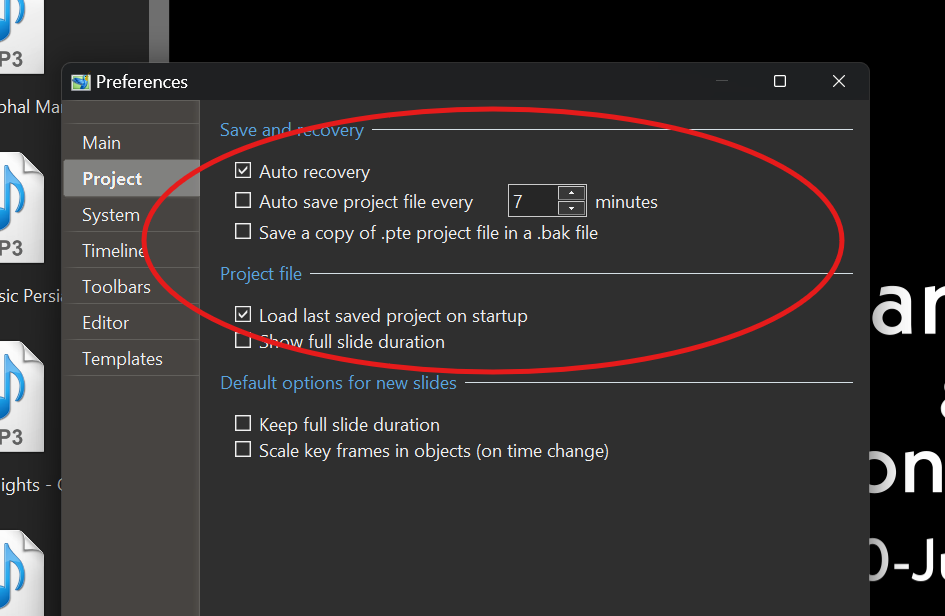
-
I was nearly finished with a project when pte av 11 pro "hung up" and then crashed. I cannot find the "recovered" project. The one listed opens as a blank project. Any ideas or suggestions? Thank you. John
-
Nice work!
-
Fashion show in the street, in Montauban (France)
canaro99 replied to Aginum's topic in Slideshows & AV Shows
Nice presentation. -
JRR, while not an expert myself, I agree with your observations. I've put several PTE shows on my photo site and I've been pleased with the final product. Sometimes I've chosen to use Adobe Media to "redo" the mp4 with another preset, but mostly the PTE shows come out fine. BTW, nice work on your photo site.
-
Two styles of 3d Balls for Christmas tree
canaro99 replied to AleAle5025's topic in Styles & Templates
Thank you! Attached is a pdf I made of your directions for easy future reference for anyone that is interested. Rotating Balls Directions.pdf -
Very nice work and an interesting niche to enjoy the artwork. Thank you.
