All Activity
- Past hour
-
You now have an understanding of why some used images are highlighted in blue and others not. If you are not going to create Styles you need not worry about the rest. Most people should be able to manage with "Quick Styles" (or not use Styles at all) and in these cases the Main Object numbering need not worry you. If you have a specific problem you are welcome to Message me - there are lots of others who will be willing to help. Good luck, DG
-
Yes I played around with that and I see what it did. But I am still not entirely clear about the Main Object designation and/or the number assigned to each of the Main Objects. But I guess I have survived without understanding this with the various shows I have created thus far so no harm/no foul as they say.
- Today
-

Free Music / SFX Resource - Over 2000 Tracks
Eric Matyas replied to Eric Matyas's topic in General Discussion
Greetings Fellow Creatives! My quest continues to make every looping track on my site available in higher-quality Ogg format, so this week we have: "THE ITALIAN HEIST" You can listen to it here: https://soundimage.org/wp-content/uploads/2026/06/The-Italian-Heist.ogg And freely download it here: https://soundimage.org/world/ "CHUGGIN' THROUGH COLOMBIA" You can listen to it here: https://soundimage.org/wp-content/uploads/2026/06/Chuggin-Through-Columbia.ogg And freely download it here: https://soundimage.org/world/ As always, all of my music and sounds are 100% free to use in your projects with attribution. PLEASE CONSIDER SUPPORTING MY EFFORTS Here are some cool ways you can help: https://soundimage.org/ogg-game-music-mega-pack/ https://soundimage.org/ogg-music-packs-2/ https://soundimage.org/donate/ See you in July! 🙂 -
Here's an extremely simple Style showing two different ways of applying a Style and determining the order of objects appearing. 1. In a 16/9 Project add 4 images to the slide list. Their order in the slide list will determine the order in which they appear. Highlight all 4 and apply the Style. The Style creates 3 slides - slides 1 and 3 can be deleted. 2. In a 16/9 project, create a blank slide and add 4 Images to it in O&A. Use the "Main Object" to number each image in the order (1 to 4) that you want them to appear. Apply the Style. The Style creates 3 slides - slides 1 and 3 can be deleted. Demo Style - Object Numbering.ptestyle For demo purposes only.
-
Also useful for creating Transitions? DG
-
I've added a video demonstration and test project (ZIP archive) in the 1st post above.
-
Thanks a lot Igor!!! This option is great! My dream
-
Hi, Glad that your like the new blending effect in V12
-
It's fine to have this new feature that I have waited for quite long 😉
- Yesterday
-
I have now had a chance to play with Blend Modes. As I no longer use Photoshop & do all of my image editing within PTE, this opens up so many new creative possibilities. Thank you so much for this great new feature. PTE just gets better & better. Jill
-
Although I never use Slide Styles, as I understand it - If your Slide Style needs 4 images that appear in a certain order, then if you number the images 1, 2, 3, 4 then they will appear in that order. If you don't use or create Slide Styles, then don't worry about it. Jill
-
Yes I read the description of there needing to be a "main image" but it still doesn't make sense to me about the description about a style including more than one main image and indexing of the images 1,2,3, 4.... Something is not sinking in with me as to the consequences of the numbering.
-
The first image/object that you drag into the slide list is automatically designated "Main Object 1" and its name turns blue in the File List. All subsequent object in the same slide are left blank and are not turned blue in the File List. You can manually assign an Object number in O&A and these are used when creating a Style. The way in which multiple images are applied in a Style is determined by the order of the Main Object designations. See Styles in the OH. DG
-
Thank You Igor. I look forward to testing this later Jill
-
I have to admit it has never been quite clear to me as to how or why something is designated "Main Object" in the O&A properties tab and/or the number of the object.
-
Thanks a lot!!!
-
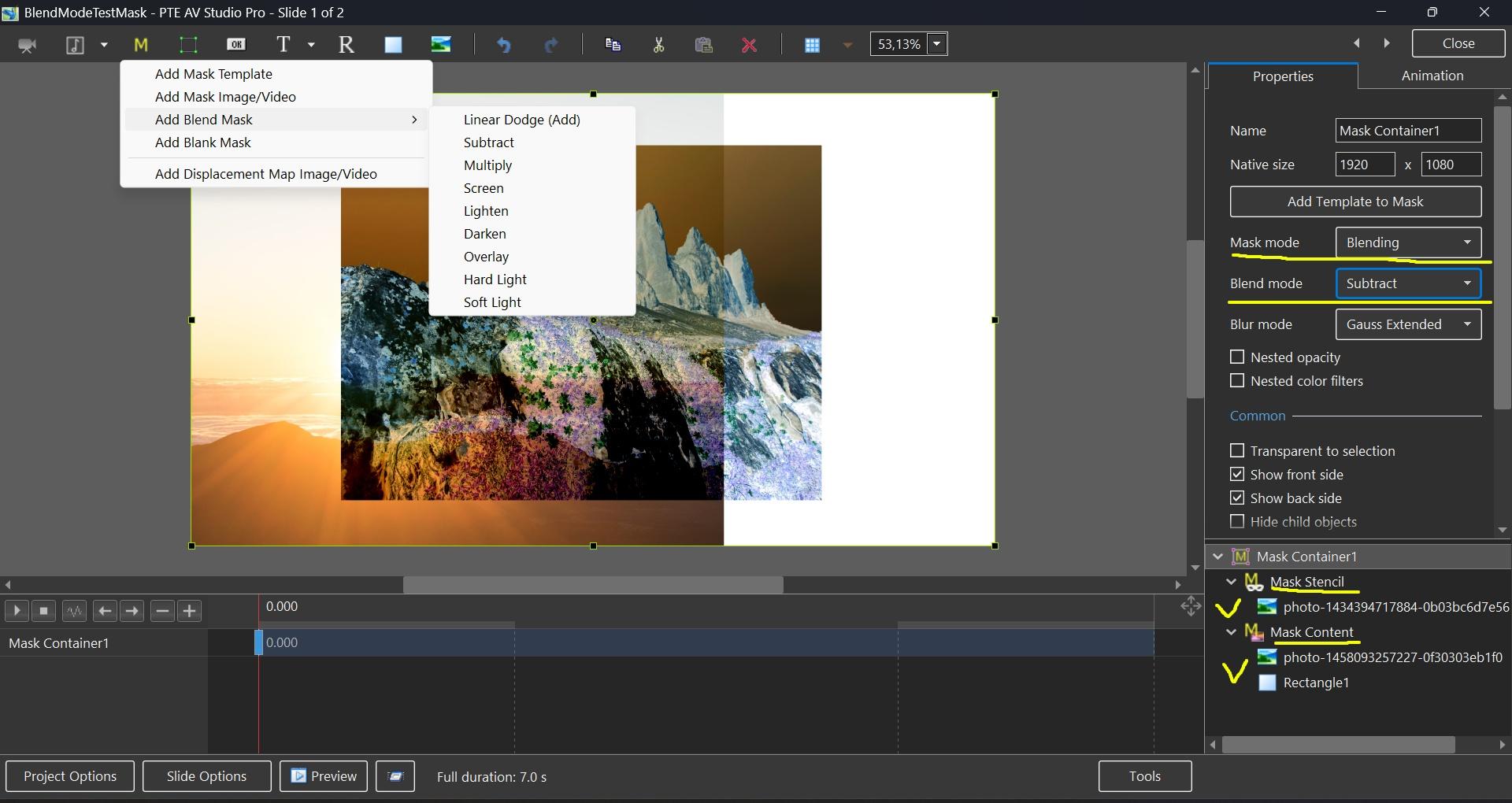
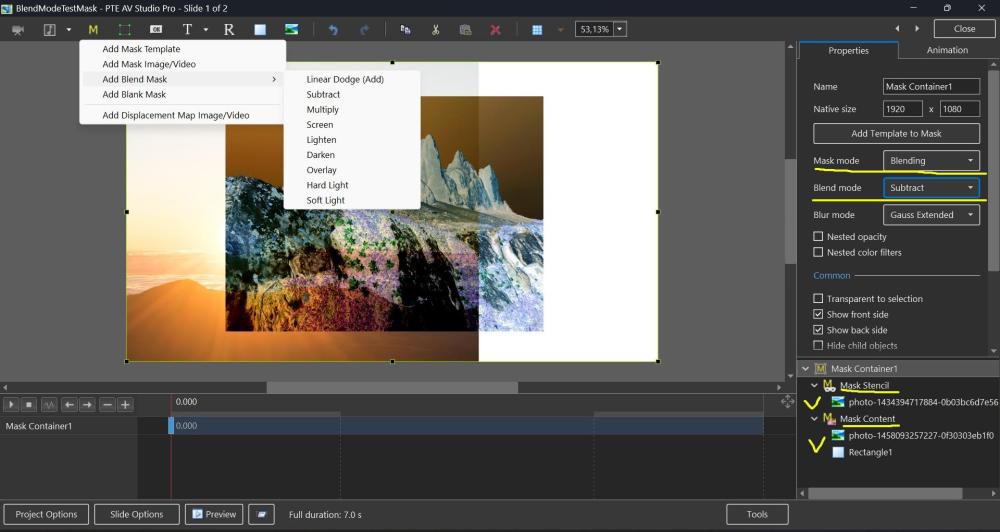
Hi, In PTE AV Studio 12 (Beta 15+) we've added a new "Blending" mode to the Mask container with support for 9 blend operations: Linear Dodge (Add), Subtract, Multiply, Screen, Lighten, Darken, Overlay, Hard Light, and Soft Light. To use: place the first image into the Stencil, and the second image into the Content of the Mask container. You can add video, text object, rectangle object, or multiple objects (several images, for example). Watch a video example. Click the play button: BlendMode.mp4 BlendMode.zip
-
Hi, We've added Blend modes in PTE AV Studio 12 (Beta 15) today: https://www.pteavstudio.com/forums/topic/55029-blend-modes-in-pte-av-studio-12/
-
Beta 15 is available See the download links above. Added a new "Blending" mode to the Mask container with support for 9 blend operations: Linear Dodge (Add), Subtract, Multiply, Screen, Lighten, Darken, Overlay, Hard Light, and Soft Light. Learn more To use: place the first image into the Stencil, and the second image into the Content of the Mask container. You can add video, text object, rectangle object, or multiple images.
-
Dave, you are absolutely correct! That didn’t occur to me at all! We can always count on you to get us back on track! Thank you so much, Robert.
-
Could it be that what you are both seeing is the fact that ONLY Main Object 1 Images are shown as used by the Blue Text? If you have a BG Image, it will be Main Object 1 and any Images added (on top) will not be designated as being Main Object. DG
-
 IcropLess joined the community
 -
Downloaded from TheDom yesterday the "Trio slideshow". The issue I'm finding, when loading 20 images, every second slide has only half the time allow from the previous slide ... therefore only starts animation, but fails to complete. Anyone else finding this issue ... any suggests how to correct the style? Cheers, Peter
-
Hi SeismicGuy, thank you for your reply. That really confuses things with the approach I am taking by adding more photos and not being able to see the ones I have already added. I got it done but it would have been easier with the indicator present. Thanks again for your help.
-
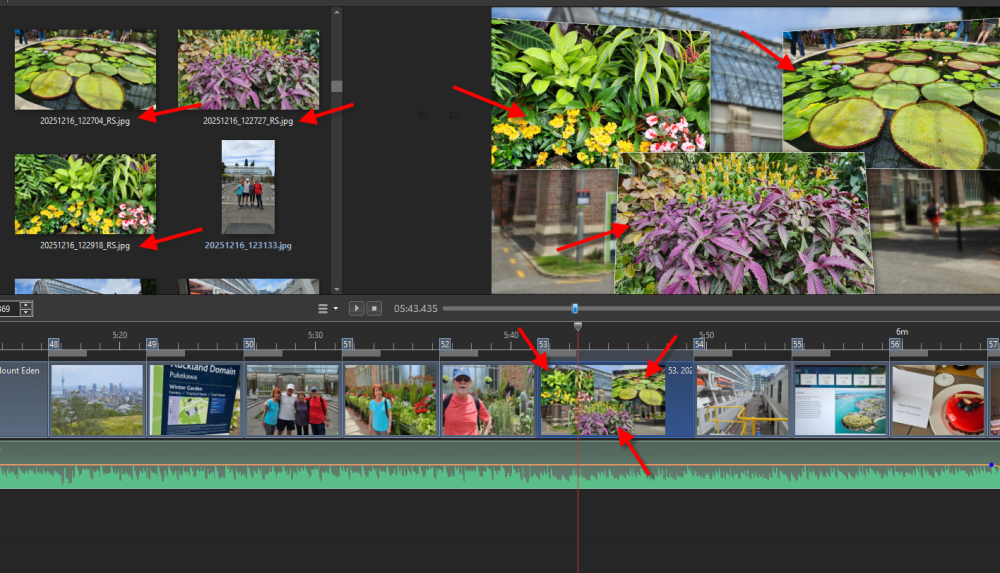
On a tangential issue similar to this is that I found that when you have a slide with a style that includes some of your jpg images, those images in the image area do not have a BLUE indicator to show they are actually being used already--see below: