All Activity
- Past hour
-
In my opinion, PTE shoul behave in a similar way as Photoshop (PS). In PTE we have nested structures using the Parent-Child-Construction. In PS we obtain nested structures of layers using (nested) Groups, and we have a kind of correspondence between the PTE-Parent-Objects and the PS-Groups. It seems to me that PTE could use the PS blending mechanism. Regarding blending, groups of PS seem to be rendered independently if you avoid "Pass through". Furthermore, blending of parent objects in PTE and blending of the corresponding groups in PS should be the same. Perhaps, as a first step, you may study the situation where all groups and all parent objects have mode "Normal". Applying this method to your example above, Img2 would be multiplied with Img1 (overlapping parts) inside the Parent-Child-Group, but not with the black background image. It would just cover the background, provided that the blending mode of Img1 ist "Normal".
-
Could this then be placed inside another Mask? It is a long time since I have used Blend modes, I do all of my photo editing inside PTE & have not used Photoshop for several years. But it would be good to have them within PTE. As long as we can still use Masks within Masks then I think either option will work ok. Jill
- Today
-
Jill, For option A it means the Mask container where image(s) acting as the Stencil for color blending with Content. In other words, Stencil object(s) will not cut unwanted parts of Mask content (no opacity masking mode). Only color blending between pictures/videos in Content and Stencil (according Blend mode "Multiply" or "Screen" or "Add", etc.) So need to choose between option A and option B... or find something else.
-
View it in full screen and see the difference.
-
?? Works fine for me and I see an obvious difference.
-
Hi Igor, Either option would work for me. With A. will you still have a Mask shape? Circle/Square etc? Or would it just be an image acting as the Stencil? I use Masks a lot to merge images or with the same image to remove unwanted parts. To have Blend Modes would be really useful Jill I think that usually I would only want to Blend a part of an image, so would be using Masks anyway
-
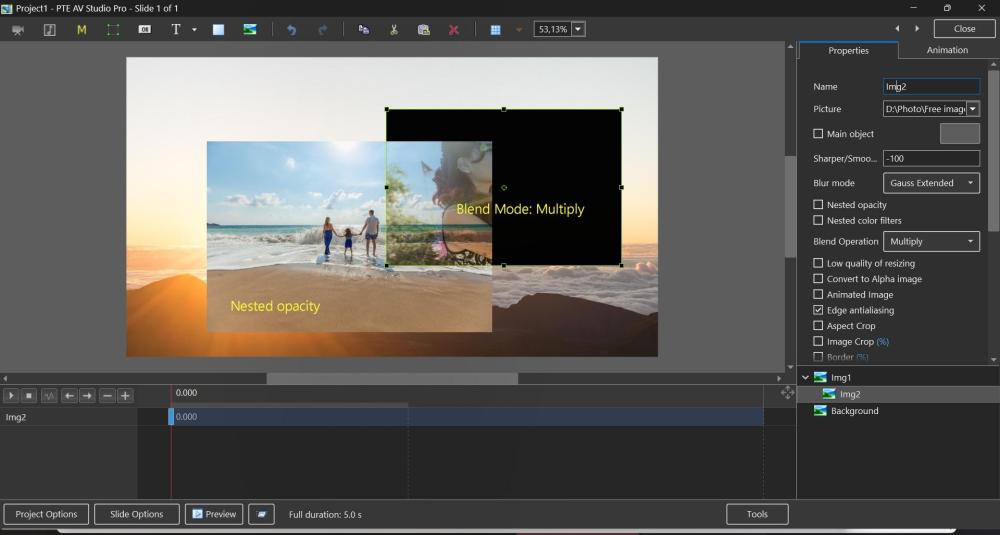
Here is a screenshot for Option B (Blend Mode for individual image object). If a parent image has Nested opacity mode (or Blur/Unsharp mode), Blend mode for a child image will look partially incorrectly. Because objects with Nested opacity or Blur are being rendered independently from the main scene and then the result inserted into the slide. In other words, Blend mode will work correctly only images placed without Blur or Nested opacity modes.
-
More than just agreeing or disagreeing, there are certain views and expectations that I’m not convinced by. Of course, the final beta will clear things up, but in the meantime, I’d like to understand if the Video Optimizer will remain a standalone feature or if it will be effectively integrated into V12? Thanks Ghulya
-
Problem to see example. Ghulya
-
Hi, What if we implement the Blend effect as a new mode of a Mask container? A. Simple example: you place one image in the "Stencil" and another in the "Content", and the Mask container blends both images using Multiply, Screen, Add or another mode. One Mask container can use only one kind of Blend mode. B. Or you expect to see Blend mode as a parameter of an Image object or Video object? Without any Mask container. We found that last Option B sometimes doesn't produce the correct visual result when working with blurred images or objects with nested opacity mode, where the objects partially overlap (but don't completely overlap). This is because such objects are rendered independently.
-
 It's good that past bugs are being addressed. Features should work as they should. As the feature indicates, a color correction filter should solve or at least improve the problem; one should be able to rely on it being done correctly. The hue, saturation, and brightness settings are useful to have, and although they work like Photoshop, for in-depth adjustments, they only become worthwhile when color profile management is also used. I don't think the average user is concerned with these, and those who are truly involved in photography will likely have made relevant adjustments in photo editing software before. Moreover, it's also possible to connect PTE to external editing programs for those who wish. Regarding your question, "I need to know how often this parameter (Saturation) was used this way in V11 or earlier by different users." The answer might be that these features (although undoubtedly very valuable in combination with other features in PTE) are used very little by the average PTE user. Probably also the reason why "the old bug" did not immediately receive much attention and remained somewhat under the radar. Greetings, Cor
 -

Free Music / SFX Resource - Over 2000 Tracks
Eric Matyas replied to Eric Matyas's topic in General Discussion
Hey Everyone, I've created a couple of brand new music tracks for your projects....they're 100% free to use with attribution, just like my thousands of other music tracks and sounds: "ENGINEERING STARS" - (Looping) Listen here: https://soundimage.org/wp-content/uploads/2026/01/Engineering-Stars.ogg "PLANETARIUM" - (Looping) Listen here: https://soundimage.org/wp-content/uploads/2026/01/Planetarium.ogg Both tracks can be downloaded from my Sci-Fi 14 page: https://soundimage.org/sci-fi-14/ MUSIC PACKS Please don't forget to check out my genre music packs as well as my Game Music Mega Pack. They're huge time-savers: https://soundimage.org/ogg-game-music-mega-pack/ https://soundimage.org/ogg-music-packs-2/ NEED SOME CUSTOM MUSIC FOR YOUR PROJECT? I create custom music for content creators all the time...mostly indie video game developers. Information is here: https://soundimage.org/custom-work/ Please share! 🙂 -
In PTE AV Studio 12 we have added a frame interpolation option (dissolve) when slowing down a video object. Objects and animation editor > Properties tab > Trim and Adjust speed button > Interpolate Frames. It works in real time, including in EXE shows and video export. Please see the example for 7% speed (0.07x) with frame interpolation and without: slo-mo.mp4
-
 Pascal, thank you for your comment. I agree that backward compatibility is important. I need to know how often this parameter (Saturation) was used this way in V11 or earlier by different users.
 -
 Hello all, Thank you for the detailed explanation. That makes sense. I agree that the behavior in v12 is actually more logical than in v11 when working with grayscale images, Hue and Saturation should not introduce any color tint. That said, this change does mean I’ll need to adapt a number of existing styles and transitions where I previously relied on the Color Correction filter to colorize elements. Fortunately, it looks like this can be handled by switching to the Coloration filter instead, so an adaptation on my side should be possible. Thanks again for the clarification, and for pointing out the intended approach going forward. Pascal.
 - Yesterday
-
This audiovisual presents Amsterdam through a different spectrum of light, where monochrome infrared images are converted into false colour. Streets, canals, and trees shift from the familiar into the surreal, revealing hidden contrasts and unexpected tones. By translating the invisible into colour, the city is reimagined as a dreamlike landscape, inviting viewers to experience Amsterdam beyond ordinary sight. Mark
-
Pascal, it's an interesting case! We actually fixed an old bug in Hue/Saturation for V12. Previously, Saturation incorrectly changed the color tint of a black&white (grayscale) images - in version 11.0, you could see a green tint. Now in V12 Saturation parameter doesn't change grayscale images. As I know, Photoshop works the same way. We fixed this bug back in PTE Video Optimiser (when someone noticed that the Saturation filter was incorrectly changing the color tint of grayscale pictures in videos). If you needed to change the color tint/cast of a black&white image, you need to use a different color filte - Coloration. Let me know what you think about this. I'd also be glad to hear opinions from other users.
-
A selection of migratory shore birds that visit a local beach near my home from as far away as Siberia. All images taken in around 2 hours on Friday Janaury 9, 2026.
-
- 1
-

-

2025 Light and Flight - A Twitching Review
digartal replied to digartal's topic in Slideshows & AV Shows
Interesting and I value you leaving a comment, thank you. I tried the "shutter sound" only and without music but did not like this option. It remind me of the old slideshow of the slide cassette changing without music. I also tried different volumes for each track. I guess in the end, my approach of not letting good get in the way of perfect presided and I finalised this project. I appreciate that as an art form, not everybody likes the same thing and it is very subjective. For me, the end result was good, and hence I released it to the world. Thanks for commenting and I appreciate your POV. Ciao Mark -
I had a client who wanted me to put every line of a poem on a different slide, and animate it, I was doing that manually, but was wondering if it's possible to add a feature to automate it, as in, you give PTE your text, and tell it to map every line with a different slide/video in the slideshow as well as adding random transitions to the text.
-
I think it would be helpful to add a one click photo creation like Proshow has with a wizard, or manually, as some like the quick creation as opposed to doing everything manually.
-
ibay770 joined the community
-
2025 Light and Flight - A Twitching Review
jt49 replied to digartal's topic in Slideshows & AV Shows
We hear two strong rhythms, the music and the clicks. Unfortunately, they don't match, which makes it difficult to listen to. A sequence perhaps for non-musicians and bad dancers. Sorry! - Last week
-
2025 Light and Flight - A Twitching Review
digartal replied to digartal's topic in Slideshows & AV Shows
Thanks Bert glad you enjoyed them. I guess the amount of images is the problem, too many shots and too much time to decide what to include and what to leave out. The slideshow above was a selection of the images from 2025 only and I wanted to limit the show length. For me personally, I try to keep the show length to under 5 minutes, probably a carryover from my old slide AV days. Thanks again Mark -
Gulya, I respect your opinion, but I cannot agree. Version 12.0 includes significant improvements, new features, and effects, with 1-2 more major features which we plan to include before the final release. Multiple slide tracks are complex feature that affects PTE's core. We're working on it, and it will arrive when it's ready. The upgrade price for V12 will be reasonable ($36-49), and unlike many others, we don't use subscriptions. Users can choose to upgrade to V12 or continue to use V11, which we actively maintain.
-
So, should I assume that V 12 is, in fact, a sort of general upgrade (bug fix?) while we wait for an XYZ version to be released in a few years with more video/image tracks and the ability to mix layers like in Photoshop? Thanks Ghulya