Leaderboard



Popular Content
Showing content with the highest reputation on 01/08/2026 in all areas
-
Moscow's stunningly beautiful streets, squares, parks, and plazas, decorated for New Year and Christmas. Enjoy watching.3 points
-
Captured throughout 2025, these images depict birds in their natural environments, shaped by the seasons, light, and their surroundings. Some frames celebrate the poetry of flight, where wings intersect with shifting light, while others rest in quiet observation. Together, they explore the artistic relationship between movement and illumination in the living landscape.1 point
-
Nice collection of bird images Dave I'd like to see your selected top bird images of 2025 produced in a slower format. (I'm not sure the music really worked with images. Might just be an issue with my watching it at 5am and my brain not fully functional) Jim1 point
-
Hi, for the styles, it would be possible to add a filter by number of slides involved and by orientation (horizontal-vertical)?1 point
-
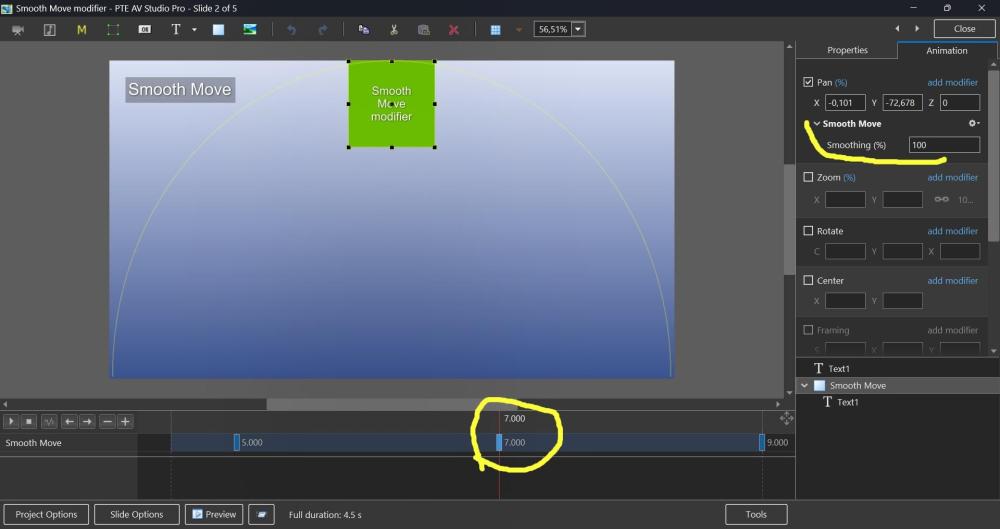
Hi, Smooth Move modifier was introduced in V11, but probably not everyone may know how useful it can be. This demo shows how the Smooth Move modifier improves animated panoramas when you change a direction of motion at a middle keyframe. Without the Smooth Move modifier, you'll see a sharp, unnatural break in the movement direction. With the Smooth Move modifier, the image smoothly changes trajectory with natural momentum, gently rounding the sharp corner. If you have 3 keyframes and a direction of motion changes at the 2nd keyframe (in the middle), you need to add the Smooth Move modifier to that 2nd keyframe. The "Smoothing (%)" parameter controls how much the motion is smoothed. I recommend to keep the default value 100%. Note that Smooth Move also creates smooth starts and stops, giving the motion a natural, momentum-based feel. If you're using simple motion between just 2 keyframes, use the Smooth speed modifier on the 1st keyframe instead. In this case, don't use Smooth Move. Download the demo project: Smooth Move modifier.zip Video example: Smooth Move modifier.webm Screenshot:
 1 point