

AlexRoma
-
Posts
70 -
Joined
-
Last visited
Everything posted by AlexRoma
-
Hi Igor, I understand the technical difficulties. Sound and image files (often thousands) are well organized in a group of folders. The problem is that (as you well know) the .pte file contains the "absolute" path to the file, for example: ImageName=C:\tmp\test\Photos\Sea\Waves10.jpg If I unzip the zip file to a different drive/folder, I have to tell PTE where the files are located. My projects reference an E: drive. When I work on a PC that doesn't have an E: drive, things get more complicated. A relative address would be needed starting from a "main" folder in which to save the project files. It's clearly not a vital function and can easily be bypassed. I'd like to take this opportunity to thank you and your team for the work you're doing. I've been working in IT for a few decades and have never had such a positive experience using software, and especially having such close and effective contact with technical support. This alone makes it worth the cost of the program. Please excuse my Google Translate's English...
-
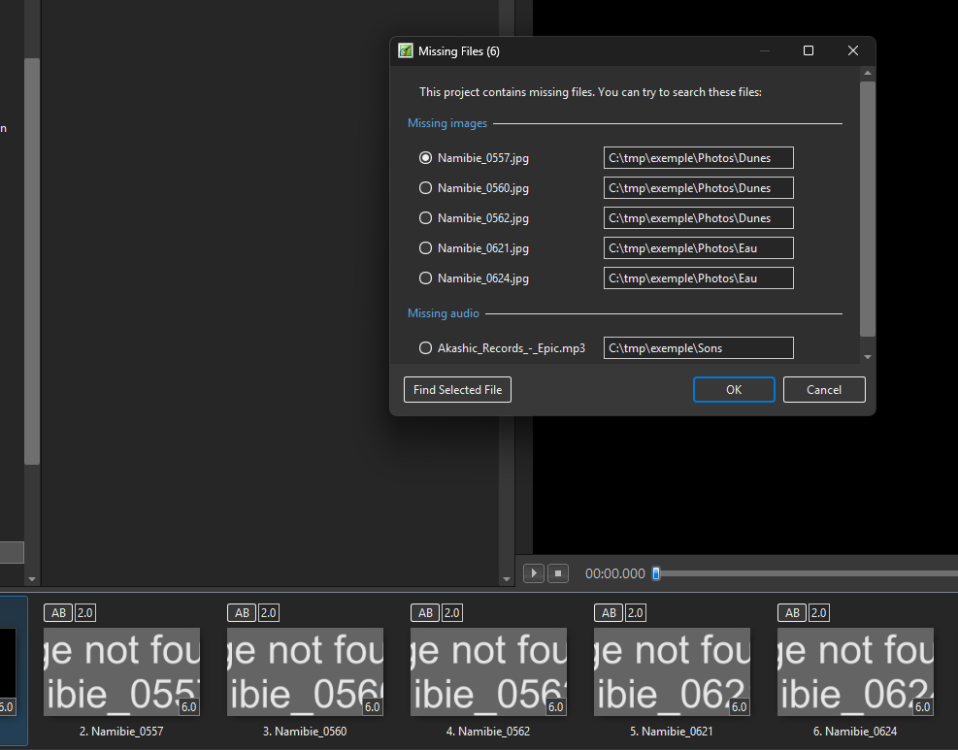
I'm afraid it's my problem, PTE can't even find your photos
-
Denis, that's exactly what I do. It's just that every time I restore an older version of the presentation (yes, it happens to me...) I have to recreate the same path so that PTE can find all the files on its own. I would have preferred to use PTE's backup function, which would have made my job easier (and it also saves styles and transitions, which Windows doesn't do.). That's all.
-
251 Jill, obviously I don't work on backups, but years after completing a presentation, I've had the need/want to change something. If I could find the original structure, it would be easier to revisit an older production. It's my taste, I understand... moreover, by saving the original folder structure, there would be no need to rename the various duplicate files
-
Hi, a comment about the backup function. I usually organize my files by dividing them into various folders based on their intended use (photos, other images, maps, tables, music, sounds, etc.). When I unzip the backup zip file, all the hundreds of files are grouped into a single folder, making it nearly impossible for me to make any changes. Wouldn't it be more convenient, if possible, for the backup zip file to replicate the same tree structure as the original folders?
-
+1
-
Quick Search in Styles and Transitions in V12
AlexRoma replied to Igor's topic in General Discussion
Amazing! Thanks to Igor and all the staff. -
Quick Search in Styles and Transitions in V12
AlexRoma replied to Igor's topic in General Discussion
Hi, for the styles, it would be possible to add a filter by number of slides involved and by orientation (horizontal-vertical)? -
+1 especially in the presence of frequent dialogues (like in a documentary), it would be an extremely interesting function
-
Include Fonts in .zip Project Backup
AlexRoma replied to Jimcamel's topic in Suggestions for Next Versions
+1 I think it's a great idea -
Perfect. Slide Options and Project Options appear almost immediately. Many thanks Igor
-
I agree, it would be very helpful
-
The problem seems to have been solved by uninstalling a transition... Thanks to jt49 for the feedback and to Igor for the always fast and precious assistance.
-
The problem also occurs with a single image project. I created a project with 5 slides and also from the timeline view, with version 11, the opening of "project option" "slide Option" and "Styles an Themes" windows is considerably slower than with version 10.5.8... how strange... could it be because i'm using the trial version? intel i5-12600K 32Gb RAM Nvidia RTX 3060 Ti SAMSUNG 980 PRO 500GB Interne M.2 windows 11 pro 22H2
-
hello, I noticed a rather strange fact in version 11 (RC2 and RC3). In O&A, the opening of the "slide option" or "project option" windows takes about 3 seconds while with version 10.5.8 and earlier the opening was practically immediate. It happens on 2 computers (win 10 and win 11). Does this only happen to me?
-
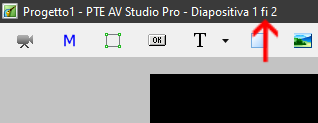
Hello everyone. I point out a "minor error" in the Italian translation. in the O&A window, in the title bar, it says, for example, "Diapositiva 1 fi 2" when it should be "Diapositiva 1 di 2"
-
+1 fully agree
-
+1
-
A thousand thanks. Your relationship with users and the attention you have to all users' needs is truly incredible and unique. An added value to an extraordinary software.
-
I found an interesting trick ... I rename the folder where the audio files are stored. Then I open the PTE project and, in the window that warns that it has not found some files, I indicate the new name of the folder with the audio files... and all the waveforms become visible again...
-
If I use one of the audio files in a new project, the waveform is perfectly visible. Even if I rename the files in windows and replace the files in the old project, the waveform is recreated, but doing this work for hundreds of files ...
-
version 10.5. I tried to restart windows (before, after, before and after deleting the contents of the folder) but... nothing, the waveforms do not reappear...
-
Hello everybody, many of my projects have the problem that, in the timeline, the waveform is not displayed and the message Error appears. The solution of deleting the contents of the folder 'WnSoft-WaveCache' does not work. Audio files are not locked by other programs. I would like to avoid renaming and importing the over 400 audio files again... Igor, in https://www.pteavstudio.com/forums/topic/22909-audio-track-shows-error-solved/?tab=comments#comment-147114 you were talking about introducing a button to clear the cache. In a future version a function could be inserted that "forces" pte to redraw the waveform
-
really macian? this is very interesting. how you do it?
-
it would also be interesting to be able to have balance control... yes, I know, it can be done in audacity... but having dynamic balance control (in some situations, for example sound effects) would be remarkable


