Leaderboard


Popular Content
Showing content with the highest reputation on 11/12/2026 in all areas
-
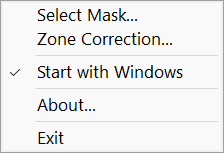
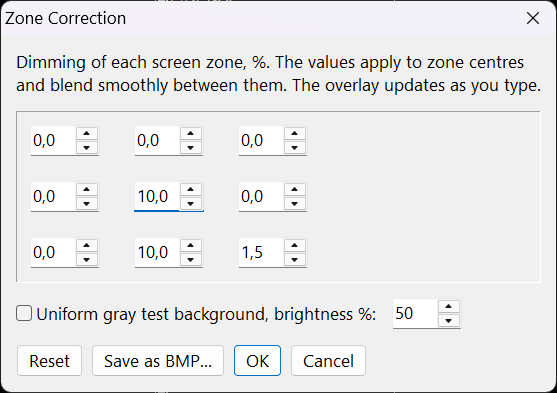
Hi, Many monitors are unevenly lit, a corner, an edge or the center is brighter than the rest. It's easy to see on a white background. I wrote a small free utility for Windows 10/11 that fixes this in software. It puts a transparent, click-through layer over the screen and darkens only the areas that are too bright, so the screen looks more even. I have used it for several years with my Dell U2417H, which has a bright spot in the center of the screen. - Easy setup: set the dimming for 9 screen zones, with a live preview. - For advanced users: load your own grayscale mask (BMP). - Works in all programs. No noticeable effect on speed. - Turns off automatically in fullscreen games and doesn't appear in screenshots. - Free and open source (MIT). Portable, no installation. Digitally signed (by WnSoft). Note: it fixes brightness only, not color tints, and only on the main monitor. Download (Windows 10/11): https://github.com/Aleksid1/FixMonitorUniformity/releases/latest/download/FixMonitorUniformity.exe More info and screenshots: https://github.com/Aleksid1/FixMonitorUniformity Igor
 3 points
-
Snowing 16_9.ptestyle Please see Rebuilt version lower down. DG3 points
-
Thank you very much for sharing this style; it’s always a great choice, especially for the upcoming season. While I’m at it, I’d like to mention something—I’ve run into the same issue quite a few times: the file size is 10.75 MB, even though it should be about half that. I’m not sure why it sometimes ends up duplicating the style. It’s not a major problem, but since I don’t know why it happens, I thought I’d bring it up. I’ve included an image.1 point
-
Thanks. I also created a dissolve version. I promise not to make a pan version. 😀 Tom Step Dissolve.pteeff1 point