thedom
-
Posts
2,323 -
Joined
-
Last visited
-
Days Won
6
Everything posted by thedom
-
Sorry for those restrictions of access. Actually, I receive more and more emails asking to use my templates for commercial purpose. That's why I finally decided to do not share them for free anymore. I will sell the best ones for a reasonable price (I still have to think about it). My demos, masks, photoshop actions, etc... will continue to be free. I hope you will understand my decision. I have to build a new site (something like "TheDom Shop" ) I will let you know.
-
Peter, That's really weird. It means that your web browser do not display some images. I don't have a clue why. Attached is what you should see.
-
What I did recently is to convert the PTE show into a video and upload it on http://www.youtube.com. Once the show is processed, youtube provides the html code to insert into your website. People can watch the streaming video and do not have to download the file. Of course, the quality of the video is not as good as an exe but it's a good way for people to have a quick look at what you make. And if they are interested in downloading the file, they can do it with a link to a file, as Ken and Al already explained. Example on my website : http://www.thedom.fr/share/viewtopic.php?t=175
-
Peter, I'm not sure to understand. What do you mean by "PTE site" ? What problem/difficulty do you exactly have ? When and where do you have it ? Is it when you click on the download button on my website ? I have tried on several computers and I never had a problem. Thanks for you help. Ken, do you have this pop-up as soon as you browse my website ? And only on my website ? Thank you. Does anybody experiment the same problem(s) ?
-
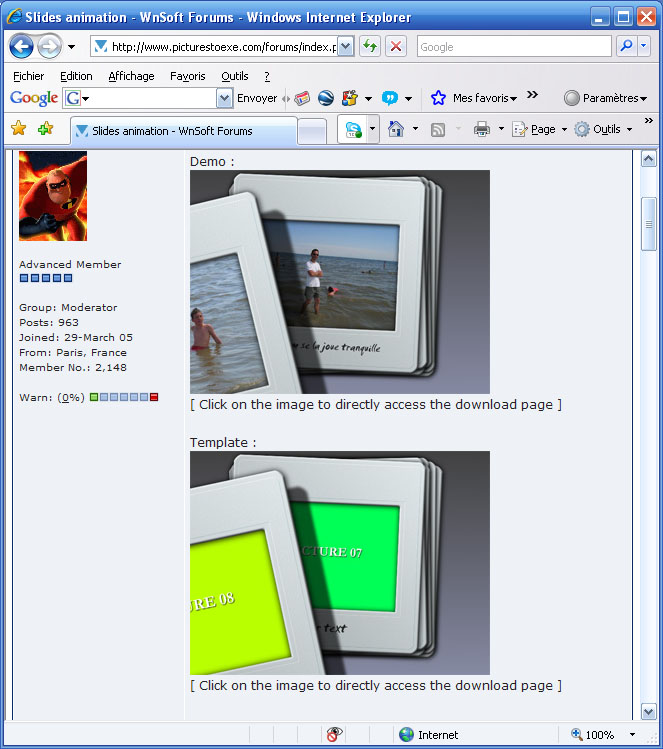
Demo : [ Click on the image to directly access the download page ] Template : [ Click on the image to directly access the download page ]
-
Demo : [ Click on the image to directly access the download page ] Template : [ Click on the image to directly access the download page ]
-
Hi Igor, I'm wondering if I didn't find a new bug. Unless I did something wrong, I think we shoudn't notice the transition of the text between slide #1 and slide #2. But the jerk is really visible. May be I made something silly and didn't realize. text_prb.zip
-
I think eveything is in the topic title.
-
And it would be nice if you could choose a custom grid instead of the standard one.
-
Somebody made the suggestion (sorry don't remember who ) but I think it has not been posted in the suggestions section : Instead of having a still shadow, the ability to assocoiate keypoints to the shadows for a 3D effect. Of course, you can add an image ( .png file) right now but it would much more convenient. Igor, do you think you can make it ?
-
Igor, do you know in what future version this feature will be added ? May be you already gave the information but I didn't visit the forum a lot in the past few months.
-

Integration of "Customize synchronization" to main window
thedom replied to Igor's topic in General Discussion
I love the idea, it sounds like a major improvement for the interface. In the "synchronisation" mode, I guess : - the user will see the transition effects in this window ? - the user will hear the background music and sound files ? And if you can add Al's suggestion (display transition time and slide duration time), it would be perfect ! -
Mike, Thank you for showing what can be done with this template. To put two portrait pictures per page is a possibility I showed in my "photo album template" demo : http://www.thedom.fr/share/dload.php?actio...amp;file_id=182 There are two exe in the archive : - a standard demo - an extended demo The exe I am refering to is the second demo. I tried to build the template to make this kind of modifications quite easily done for somebody who has already some experience with PTE. You can change the size of the image, pan them, add pictures on a page, add text, change the pages, change the cover, pan/zoom the whole album, etc. Your imagination and your skills to use PTE are the limits.
-
The idea was discussed a long time ago but I think the suggestions was not posted in this section. So here it is : in the O/A window, ability to add or remove n,nnn seconds. The user select an object in the object list, click anywhere in the timeline of this object and with a right click, specify how much time he wants to add or remove. This would move all the following keypoints. He can also tell if this time is applied to this object only or to all objects of this slide. As I couldn't find the original suggestion, I don't know if Igor told if it was feasible or not. I think this option would be very useful, for me at least.
-
Ken, I'm not sure the post you are refering to answers Stevie's question. Anyway, there is a method to copy a slide with its objects and keypoints and you just have to change the image. Even if it can not be automated, it can be very quickly done. Here is a flash tutorial which show you how to do it : [ Click on the image to access the download page ]
-
Mike, I really appreciate that somebody take time to write tutorials on my templates. Ron already wrote excellent guides and I am very grateful to him. It's quite difficult for me to write explanations because english is not my mother tongue and to be honest, writing tutorials is not what I prefer to do. Ray, thank you very much for posting your shows. It's really the best compliment I can receive to see somebody using my work. No matter the show uses my templates as they are or modifies it more or less, I watch them with a lot of pleasure and it is the best reward I can receive. In addition it can be a source of inspiration for somebody who has the skill to improve them. Again, thank you very much.
-
I had to solve exactly the same problem to make my "pick a card" demo (mouse select which picture to watch). I started with this solution : at the end of the slide, automatically run the (same) exe. It ran perfectly, except that there is a quick return to the desktop. I finally used the solution Al describes (the second solution) but the problem is that it multiplies the number of slides and if you want to modify the intro slide, you have to do it on all slides you duplicated. That's why I was wondering if a new option couldn't be added : at the end of a slide, go to slide # n ?
-
Hi Silvia, I have no doubt about your honesty. But as Morasoft, I'm wondering if sharing those files is legal. It would be a problem if Wnsoft would be accused of piracy. Could you please send a PM to the people who posted those masks in the other forum and ask them. Thanks.
-
Lin, Ron, thank you for your comments. As suggested, I will spread the deck a little. But I don't think I will add an icon on the back of the cards because I'm afraid it will look a little bit strange. But as usual, the template will only be a start and people can modify it as they want. What I plan to do is, once the card has been turned over, to leave it on this side (instead of turning it on its back side over again) when I put it back in the deck. What do you think of it ? I will probably release an "automatic" template only because I guess there is not a lot of people interested in the manual version (allow the viewer to mouse-select a card) and it would be a lot of work to release both.
-
Very inspired idea, the wings of the windmill are great. Thanks for sharing.
-
Ron, I never attended a camera club but is it what you would like (see file attached) ? I very quiclky made the exe for 20 pics and the selection only works for pic01 to pic05 but you will get the idea... I used exactly the same idea for my "Pick a card !" demo ... 50_pics.zip
-
Tracy, The new version of my photo album does not have background images and is much improved imho. I recommend you to use it. It is available here. If you want to have a single background image : In "Project Options", in "Screen" tab, for the "Background", select "Tiled image" and set the "Size of the image" to 100%. Hope it helps.
-
This demo is still work in progress, waiting for your suggestions. As Lumenlux suggested here, I worked to allow the viewer to mouse-select which photo he wants to bring forward and zoom. That's what I did with this demo : with your mouse, select a card. Please note that only the 4 cards on the left can be selected for the moment. I noticed that once you select a card, it may take some time for the slideshow to present the card. I don't know why... I would like to have your feedback about this demo. I plan to release two templates : one with the mouse select option and one without. Thank you for your comments. [ Click on the image to access the download page ]
-
Wow, wonderful slideshow and amazing pictures ! The time and the work you put in this slideshow to present it in a personal and an original way are really enjoyable. In my opinion, it's art and not a succession of pictures.
-
Hi Johnny, Welcome on the forum and in the wonderful world of PTE. About your problem, didn't you rename the image, move it in an other folder or didn't you rename the folder in which your picture is ? What you can do is to try to find your image manually. do the following : - in main window of PTE, select the slide with the problem (I guess it's slide #1) - click on "objects and animation" button. - in the "objects" window, select the image which has the problem (if PTE can't find it, it replace it with a blue rectangle "Image not found") - in "properties" tab (upper right of the screen), click on the folder icon (= ) and browse your HD to find the image you want to display. It should work. Good luck.