mhwarner
-
Posts
709 -
Joined
-
Last visited
-
Days Won
18
Everything posted by mhwarner
-
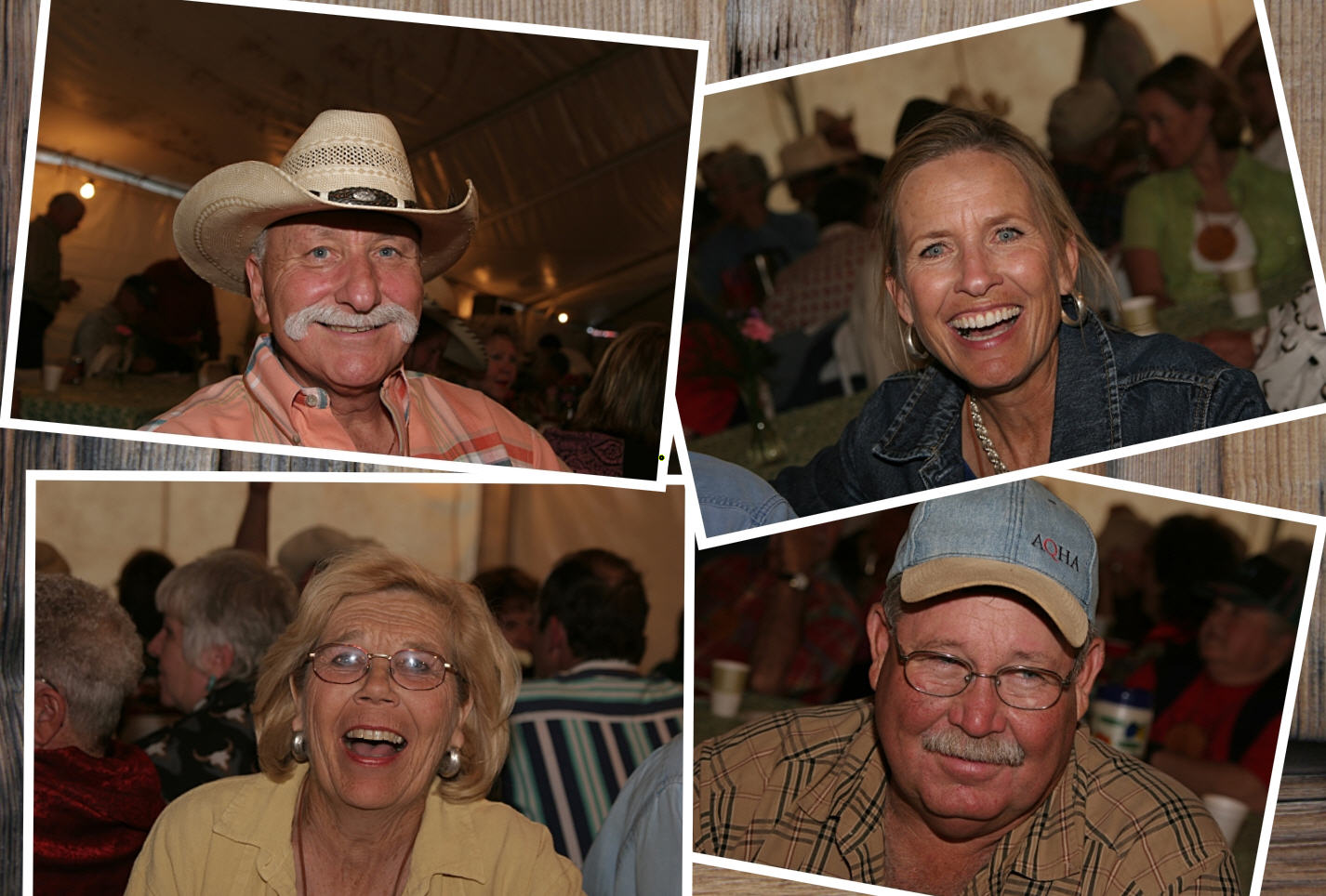
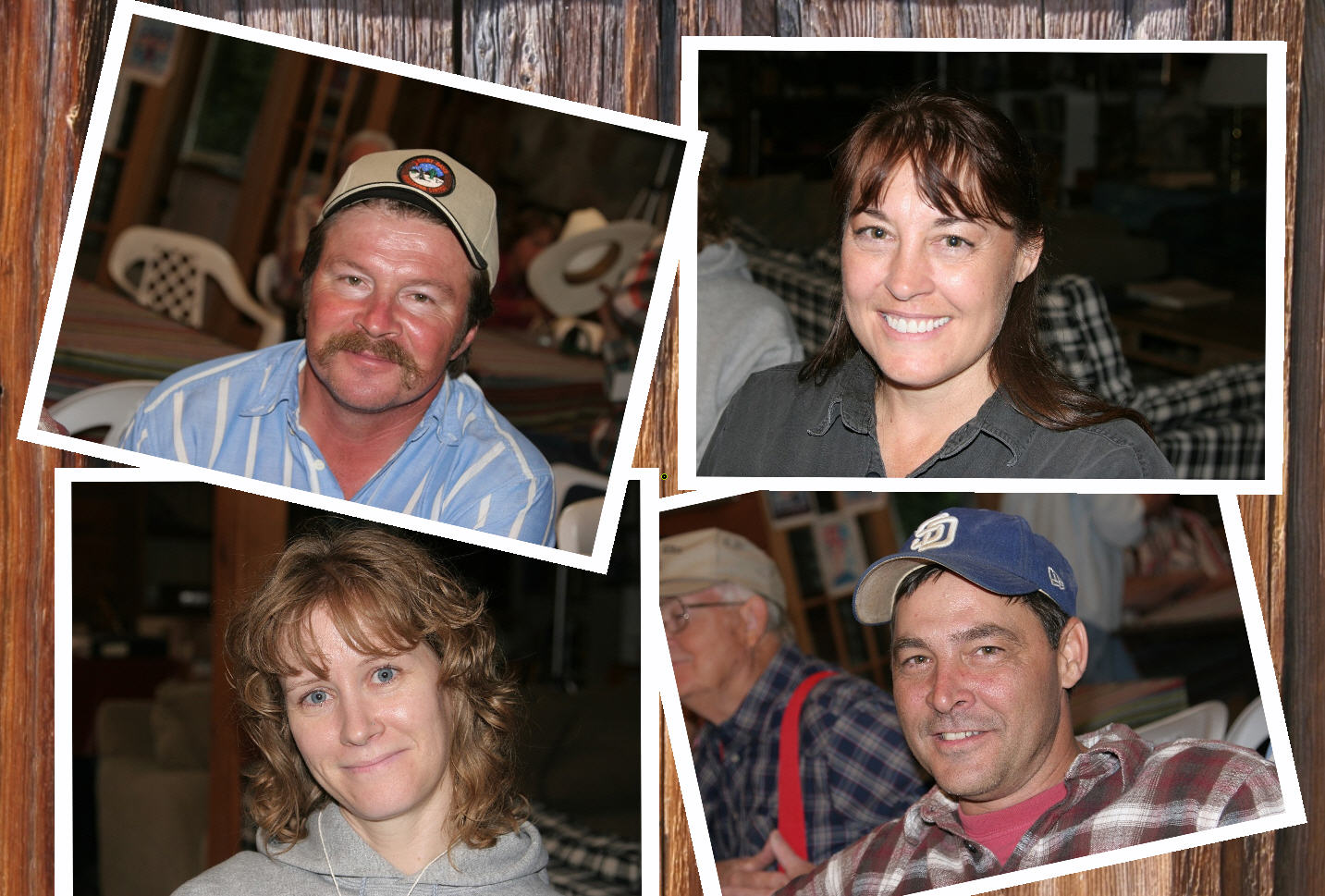
This may not be something introduced by this beta, but it is the first time I have tried the technique and it seems like a bug to me. I have some animation which includes 4 snapshot photos on a background. Each of the photos animates in individually. There is no problem with any of the animation itself but the problem is with the picture objects displayed on an angle. The first time I did this, I actually created resized photos with a 4 or 5 pixel white border on them. They seem to display ok and if there are any jagged/stairstep edges on those which are displayed slightly rotated at an angle, it is hardly visible. Here's a sample: On a new project I tried the same technique, but this time I thought I would save a bit of time on processing the pictures with white edges. I didn't feel like fooling with png masks either. So I simply added four white rectangle objects to the main picture and then added each of my 4 photos to the 4 rectangles as children. I made the photos slightly smaller than the rectangles so that it would mimic the white edges. The animation is fine and I have the effect I want. Unfortunately, the rectangles behind the photos which are set off at an angle are quite jagged (and of course more noticeable full-screen on my large monitor). It seems like the picture objects when added have some sort of anti-aliased edges but the rectangle objects do not. Again, this may not be something new, but it is the first time I have noticed it.


-

Regarding Text Object ... am I missing something?
mhwarner replied to mhwarner's topic in General Discussion
Hi Lin, Thanks for the explanation. I just thought it would be nice to have a method to group multiple text objects to treat them as one (without breaking any of the other functionality that you describe). Someday maybe we'll get beveled text in PtoE. Until then, now that Igor has fixed the problem with the rasterized text, it will probably just be easier to go that route or maybe I'll just continue creating the PNG title files in Photoshop. -
Regarding Text Object ... am I missing something?
mhwarner replied to mhwarner's topic in General Discussion
Igor, thanks for fixing the bug on rasterizing the text. That will certainly help some. Lin, thanks for your response. I had initially created my text as children of a frame object (all three at the same level) which I did use successfully to manipulate the size and motion. I tried it with a transparent rectangle as you suggested and it appears to work the same. Is there a difference in using the rectangle versus the frame for the parent object? The main issue I have still exists, however. Say that I want to zoom the text (a title) onto the slide from nothing to full coverage of the slide. That works fine using the parent rectangle (or frame) object. But then I would like it to sit there for a second or so and then slowly just fade away. At that point, I cannot change the opacity of the parent because it is already 0. So I have to change the opacity of each of the separate text objects. But I cannot manipulate them as one. If I select all three text objects and click the "Create New Keyframe Here" button, nothing happens. I assume the program can't do that. So a suggestion would be that when I select all three text objects at once, the button should be grayed out. But anyway, at that point, I have to select the objects one at a time to create a separate keypoint for each one in the exact same spot. Then I have to go to each of those 3 stacked keypoints and change the opacity for each text object to set it to 0 (or whatever). I'm guessing that want I want to do isn't possible currently. Obviously a better answer would be that we could somehow add "bevels" to our text, much as we can add shadows. Igor will have to comment on whether that is even remotely possible. Maybe even the ability to add a second shadow (maybe on top instead of underneath), say in a lighter color, to a single text object to simulate a bit of 3D. If so, I can add it to the "wish list" for next versions topic. -
In order to avoid having to create some fancy beveled titles in Photoshop, I have been trying to create something similar in PtoE v. 5. I came up with something reasonably decent by stacking 3 different text objects with slightly different shades and offsetting one and lowering the opacity on another and playing with the shadows. Fine so far. But there doesn't seem to be any easy way to manage these multiple text objects. For instance, I want to be able to zoom them in from very small to large enough to cover the slide, while at the same time going from an opacity of 0 to 100. It does not seem possible to group these three text objects to manipulate them as one. I tried first adding an empty frame with 0 opacity and then zooming it, which seemed to work somewhat, but it still doesn't give me the control I would like. Even worse, if I try copying the frame and text objects to another slide to manipulate differently (or change the actual letters in the text), it gets really screwed up. Is there any trick for dealing with multiple text objects on a slide, or is this something for a wish list in a future version. I also tried rasterizing some text to a PNG file to stylize in Photoshop, but unlike an earlier version of 5 (one of the betas, I'm sure), instead of getting colored text on a transparent background, I simply get white text on a transparent background which is a PITA to colorize first. For now, I just create the text in Photoshop, stylize it and save as a PNG. But I really prefer the flexibility of working with the text directly in PtoE. Any suggestions would be appreciated.
-
Using Copyrighted Music in PTE presentations
mhwarner replied to kstittel's topic in General Discussion
Here are a few places I have used or at least looked at. Some are a bit pricey, but others are fairly reasonable. All of them allow you to play samples before committing to a purchase: First, one of our own members here has a nice selection of royalty free music on his site which can be used for the purposes you describe: http://www.beckhamdigital.co.uk/royaltyfreemusic_new.htm Also: http://musicbakery.com/ http://www.freshmusic.com/ http://www.music2hues.com/ http://www.instantdownloadmusic.com/demos.asp -
Great news, Igor! I'll be waiting impatiently for the ability to include multiple MPEG2 files in DVD projects as well as the increased speed of burning. Thanks to you and your development team for taking such good care of us!
-
There is also another possible work around mentioned here: http://www.picturestoexe.com/forums/index....20&start=20
-
I have an ATI card and this does seem to be a good workaround. You might have to get the slides properly resized for your particular screen resolution initially to fill the screen, but using window mode seems to eliminate the annoying switch to an all black screen initially then (in my case, at least) much darker slides for the show than I see in photoshop or otherwise, and then an annoying switch to an all black screen when the show quits or is cancelled. Most of the shows I am doing are being burnt to DVD, though, and this ATI problem doesn't seem to affect the Video Builder. Thanks for the suggestion!
-
Integration of "Customize synchronization" to main window
mhwarner replied to Igor's topic in General Discussion
Igor, that sounds like a wonderful idea to me! I sometimes avoid using the timeline for the very reasons you describe. It is annoying and sometimes time-consuming to switch back and forth. I believe this change will make using the more sophisticated controls available in PtoE much easier for newer and less experienced users. This (and the upcoming great news about the ability to include MPEG2 files in Video Builder) are both things I am looking forward to! Thanks again for a wonderful product. -
Is there a way to automate the O&A settings
mhwarner replied to mightec's topic in General Discussion
If nobody is able to suggest a possible solution, you could try editing the .PTE file directly. It's not necessarily intuitive but if you can add your new effect to, say, the first slide, then save your project. Make a backup copy of the .pte file for the project and then edit the file with Wordpad or Notepad. See what additions have been made to the first slide that differ from the other slides and then copy/paste this into each slide in the appropriate place for each slide. Try it first with a small show with 8 or 10 slides and see how it works. I have used this method to modify some of Dom's templates as well and it has been particularly useful to change the names of his default picture files to the directory structure that I use. Maybe not the best solution, but perhaps a bit speedier than editing each slide with the O&A editor. -
Bob, I have just done several shows exactly as you describe. The trick is to go into the "Project Options" and click on the "Screen" tab. Then go down to the "Additional Options (scroll down to view)" and set it to 90% of the slide to show main images. This works fine for me with 1024 x 768 sized slides. Also be sure to click the "Set for existing slides" button just below the percentage box (not the one above) to apply that parameter to all existing slides. If you are doing any animations, you will want to click the "Tools" button at the bottom of the O&A window and be sure that "Show Safe TV Zone" is checked. While this checkmark doesn't actually do anything to resize your slides or the final output, it does put a purple border around the O&A window which shows you what will actually be cut off. That way, if you add text or other objects, you can be sure to keep them inside the purple border. You can also experiment with the 90% amount, but a couple of us fiddled with it a while back and that number seemed to be about optimum. Let us know if that works for you.
-
I have converted a few to WMV (Windows Media Video) files for Mac people. I can't remember the details now but I used PTE to create an .AVI file and then I used one of the video tools in Roxio to save it as WMV. There are other conversion tools available if you search Google search using "AVI to WMV". http://www.google.com/search?as_q=&hl=...amp;safe=images I believe you could also convert it to a .MOV (Quicktime?) file which can be read on a Mac as well. Lin or somebody else may have a better answer but this will get you started.
-
I have just returned from a trip to Yellowstone (and a number of other places in Montana and Wyoming). Unfortunately, I have not had a chance to put together a slide show. However, I would strongly suggest that you visit this NPS web page: http://www.nps.gov/yell/photosmultimedia/index.htm where there are many links to videos, photos, "virtual" tours, etc. They even have podcasts somewhere which you can download. You should find all the information you need to help you make your decision. And my advice is definitely-- GO! It was a marvelous trip with many wildlife sightings (elk, deer, grizzly bears, black bears, buffalo) and breathtaking scenery. It was actually my 4th visit to Yellowstone and I saw many things that I had somehow missed on my other three visits.
-
Converting PTE to AVI and then to Flash????
mhwarner replied to fitzner's topic in General Discussion
Check out this thread: http://www.picturestoexe.com/forums/index....&hl=youtube Apparently at least one person is using this to display P2E shows that way. -
Silvia: Not sure exactly what you are asking, but this may help. First, to set the "Safe TV Zone" border, as Dom has pointed out above, open the Objects & Animations window and click on the "Tools" button down in the right corner. Select "Show Safe TV Zone. This will add the purple border which show what part of your slide will not display. Note that this border only SHOWS what is not displayed, it does not actually make any changes to the slides or force them to fit in that zone. In order to display all of your slide without cropping the images first, you can go into the "Project Options" dialog on the main screen, click the "Screen" tab and change the "% of the slide to show main images". For a standard (not wide-screen) TV, 90% seems to work well. If you do this and apply to all of your slides, then go into the Objects and Animations window, you should see that all of your slide will fit in the safe TV zone. Depending on the size of your slide (or dimensions of your image), you might see a black border at the top and bottom, with the image covering the screen from side to side in the safe TV zone. I hope this is what you are asking and that you can understand my reply.
-
In the US: Shutterbug Magazine - http://www.shutterbug.com Outdoor Photographer - http://www.outdoorphotographer.com Popular Photography - http://www.popphoto.com PC Photo - http://www.pcphotomag.com/ Igor, since I assume you are interested in these magazines in order to promote the release of version 5, I would like to suggest the names of a few columnists to contact individually. They are: George Shaub - http://www.georgeschaub.photofolio.com/ (editor of Shutterbug magazine) Joe Farace - http://www.joefarace.com/ (email: [email protected]) Rick Sammon - http://www.ricksammon.com/ (email:[email protected]) I met all three of them at a photography workshop a couple of years ago and have followed their columns over the years. Joe is especially knowledgeable about Photoshop plugins and other utility software and writes columns for Shutterbug magazine. (I know Joe is a fan of Panos and has given him several plugs.) Rick Sammon writes columns for several of the magazines including Outdoor Photographer and PC Photo. I'm sure if you send all or any of them copies of the software when it is released, along with a brief description of it's function and some useage tips, they would be likely to plug you in their magazine columns. I would also suggest sending copies of PTE v 5 to Phil Askey at dpReview http://www.dpreview.com/ (which was recently purchased by Amazon). The dpReview site and associated forums get zillions of hits a day from photographers. I know that several of our regular forum participants here have given PTE "plugs" over there from time to time as well. You might also contact Steve at Steves Digicams, http://www.steves-digicams.com/ That site reviews camera equipment and software as well and has a popular on-line forum. If I can do something to help with a write-up, let me know.
-
It's hard to tell without knowing the exact sequence of steps she takes in opening the Adjustor and then where it hangs for her. My first guess would be that it has something to do with her security settings in Excel in "Tools\Options\Macro Security". Or perhaps it has something to do with her anti-virus software. Also, I wonder whether she has Service Pack 2 installed (or if that even makes a difference). We would need more information to trouble-shoot.
-
Ah-ha! I understand now. When I went to the folder where my pte's are stored, it recognized about 8 of them. So I guess that means it worked fine for me in Excel 2003 SP2.
-
Al, thanks for sharing this. It worked fine for me with Excel 2003 SP2. I'm not sure what Ken is talking about loading more than one project, but once I open a project, the "Open" button disappears. I changed some slide durations and some transition times, clicked the necessary buttons and saved the revised project out. It worked fine and it showed my changes when I opened in PTE.
-
I have created a tutorial on the subject of DVD Menu modifications in the tutorials section at this link: http://www.picturestoexe.com/forums/index.php?showtopic=6847 Feel free to add comments, suggestions, or point out any inaccuracies.
-
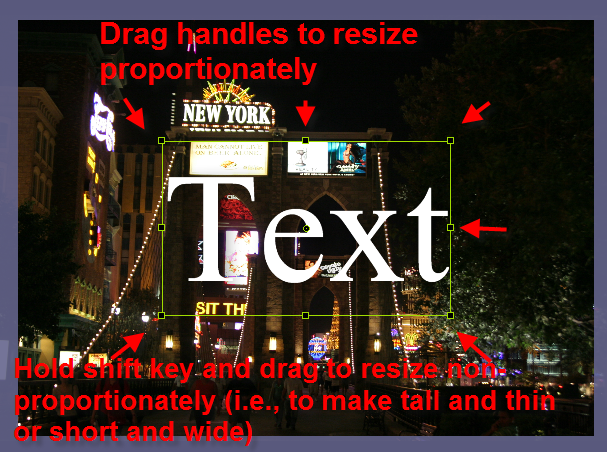
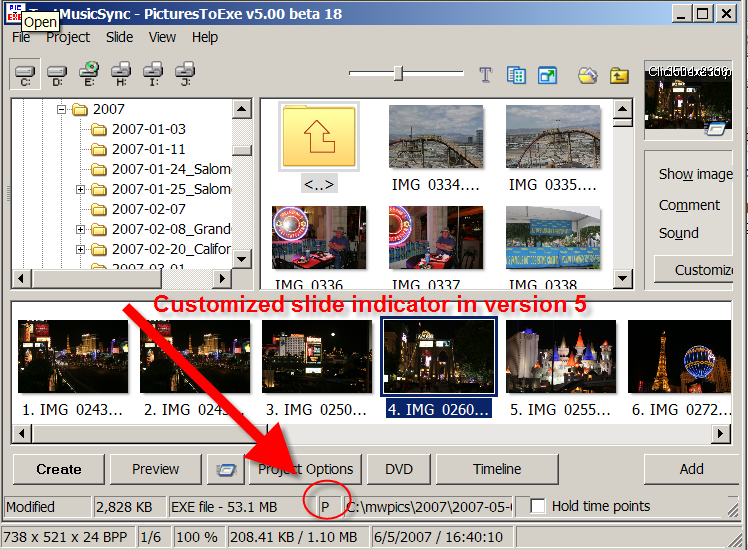
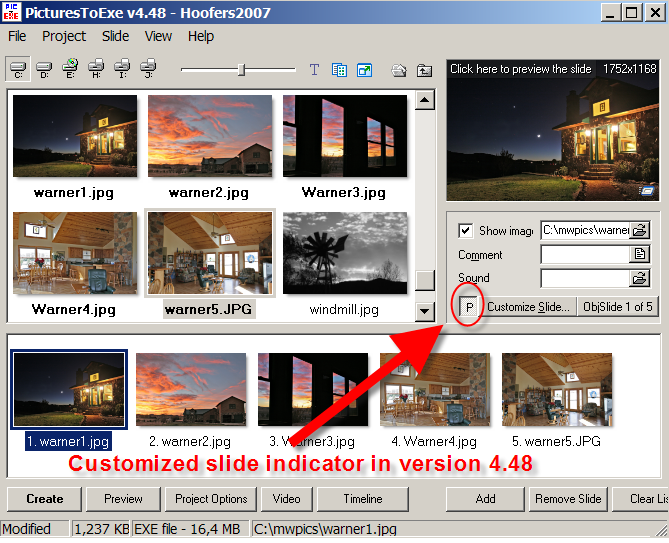
This is not really a tutorial so I didn't post it in that section, but I just thought I would point out a couple of things that I figured out which have had me stumped for a bit. (If the moderators feel it belongs elsewhere, feel free to move it.) 1. The customized slide indicator. In version 4.x and before it was a depressed button immediately to the left of the "Customize Slide" button. I know that it was not available in early betas of version 5 but I had recently seen references to it being fixed. For the life of me I did not see it and was about to post that it was still missing. After studying my screen intently, I found it in Beta 18 (and it was probably there in an earlier beta but I somehow missed out on it's location). Anyway, you can find the indicator (still the letter "P") down in the status bar now between the project size of the EXE file and the name of the current slide. 2. Adding and resizing text in the Objects and Animations window. This is probably obvious to some of you but it took me a bit of playing around (and some frustration) to discover. When you add text in the O&A window, you can resize by dragging the corner handles or the side handles of the text box. BUT ... it is always proportional. I wanted to make some text a bit taller and thinner to add a few more words for a title. I finally discovered that by holding down the shift key and dragging (the top, bottom, or side handles especially), you can make your text taller and thinner or shorter and fatter. Simple really, but not immediately obvious and since it is not possible to specify a font size for your text, the only way to get the size you actually need.
-
Once I finally figured out where version 5 was storing the templates, I immediately re-set the location within P2E to a structure similar to the one in 4.48. Personally, I try not to purposely put anything under "Documents and Settings". I like to create my own structures where I want them to be. Somewhere down the road, it would be nice to have something in the actual installation routine allowing the user to specify a choice of where to store templates.
-
Regarding the music synchronization, I created a test show with 15 slides and three separate pieces of .mp3 music. I went into the Timeline and clicked on Timed Points\Arrange All Points and P2E perfectly spaced out the slides and ended the show when the music stopped. I tried this with several different pieces of music and it always seems to work. I did not bother to burn this one to DVD, but I can tell you that the other day I created a show with about 400 slides and 8 pieces of music. It had a number of different animations (including one of Dom's very useful templates -- Photopiles) as well as pans and zooms and scrolling titles. With one click of a button I burned it to DVD (and created an ISO file to use for creating 16 additional copies of the DVD). All went without a hitch and I think this was using either B12 or B13. This new version of the program has certainly made my job easier (and more fun) in creating DVD slideshows for my customers. I do hope users will take the time to learn version 5 (just an hour or so of playing is all that's required to put together some amazing stuff). My thanks again to Igor and the team for a fantastic product.
-
I use 90% and it seems to all fit in quite nicely. I could be completely wrong, but as far as I can tell after a good bit of experimentation, using the 'safe TV zone' option in both PTE and in Video Builder does absolutely nothing to actually resize your slides or force them to fit in properly in a 4:3 space. All that it seems to do is draw a semi-transparent border in the O&A screen or the menu screen for Video Builder which SHOWS you where the safe zone is. It's up to you to do the resizing to make your slides fit. Perhaps Igor could comment if the safe TV zone actually does do something that I'm not aware of. I had some help from Tom on this and there is a thread about it here: http://www.picturestoexe.com/forums/index....5&hl=screen Igor has since changed the text on the "Screen" tab of the project options dialog to make it easier to see the box for changing the slide percentages.
-
Comments - suggestion for future version [DONE]
mhwarner replied to mhwarner's topic in Suggestions for Next Versions
I have used ThumbsPlus for my image management needs for many years. While perhaps not as sophisticated as iView Media Pro (now owned by MicroSoft) or iMatch or even idImager, it has a lot of functionality which perfectly suits my needs. I do have the free version of idImager and I also have purchased ACDSee Pro. I have an old license for iMatch as well, but haven't used it recently. I guess the new Photoshop Lightroom is good at this as well, and if you have Photoshop, of course you can also use Bridge. The CS3 version is faster than older versions, The things I like about ThumbsPlus is that it is relatively intuitive (which means I can have my husband, who is almost computer illiterate, use it to print proofs for me on photoshoots). I can select a group of photos and add IPTC (or JPEG EXIT if need be) captions and keywords, I can create virtual galleries, do batch functions like renaming, basic editing if I am in a hurry, create quick, simple slideshows for display at the events for which I shoot (I always use PTE for the final product), resizing (for PTE shows), etc. If you haven't tried it, you can look at it and download a trial version here: http://www.cerious.com I have thousands of images and have never run into any speed issues. The thumbnails are stored in a Microsoft Access database and once created, the program opens them very quickly. If you want to fool with the database itself, you also have that option although I have never had the time or the inclination to do so. It is easy to back up the database(s) as well. While it doesn't do everything I would like, it does the things that I need it to do well and doesn't cost a fortune (around $49US for the standard version, $89 for the pro). Each program seems to have some outstanding feature so you have to try them and make your selection on the way you work and what is most important to you. Sometimes, using more than one makes sense. For instance ACDSee Pro has a neat shadow-highlight tool that is much quicker than processing a bunch of photos in Photoshop, as well as the ability to create flash slideshows, and the ability to resize the thumbnails on the fly (much like the lightbox in PTE), but it only seems to have one window, so if you are editing a picture, you can't easily get back to your thumbnails. I use it for those things sometimes, but I don't bother with doing cataloging in that program. With ThumbsPlus, you can have multiple windows open and keep the thumbs catalog open while you edit or examine individual shots. I have also set up a print format to quickly print out proofs 9-to-a-page on my photoshoots. TP is the quickest way for me to accomplish the most things that I need to do in the least amount of time. And I am always surprised that in all the reviews of digital asset management, it never seems to be mentioned. Too bad, because I think a lot of folks are missing out on a great product. Again, these things are very much up to individual preferences and the way you work, but if you haven't tried it, take a look.