mhwarner
-
Posts
709 -
Joined
-
Last visited
-
Days Won
18
Everything posted by mhwarner
-
Thanks for pointing this out. Photoshop has a similar feature. This is really helpful in deciding which font looks best. Another tip that I discovered, which may or may not be documented somewhere, is that if you click on the text object itself, while you can drag any of the handles to resize it proportionally, if you hold down the SHIFT key and drag on one of the sides, you can resize in that direction only (i.e., make taller text or fatter text without resizing the other direction).
-
Indeed, look at the way the basic hardware requirements keep increasing with each new version of MS' operating systems. Somehow, I doubt that the computer makers are unhappy with the situation. They are definitely all "in bed" together. I'll stick with XP2 until I have no choice next April when they quit issuing security patches for it. Maybe by then, the rest of the kinks will be worked out. Unlike those here who are retired, or "hobbyists", I am still earning my living from computer programming and can't afford any problems whatsoever.
-
Actually, I downloaded the software program you mentioned and am enjoying playing with it. It definitely can be addictive. As for your slideshow, I would really love to see it. I'm sure it is well-done as always. Unfortunately, I tried a couple of times and I just can't afford the bandwidth right now to pull down a 150 MB file (I am on a satellite connection). Any chance you could put together a "light" version of the show?
-
I think something must be slightly different because Tom's Random Slideshow Generator no longer works. If I create a simple slideshow and save it in 5.5, Tom's utility doesn't appear to recognize the utility and does not create the random effects. Yet if I open that same slideshow in 5.1 and re-save it, Tom's utility does recognize it and will save it out with the random effects. I haven't taken the time to report it yet and haven't seen Tom on the forum for a while. I just assumed there was some difference between versions of PTE.
-
Lovely pictures, Mark, and the music is most appropriate. You were able to get some good highlighting effects. Just out of curiousity, what is the font you use for the titles? It is a good fit for the subject matter. Thanks for sharing.
-
Igor said he was still thinking about it back in April, but I don't think he's ever updated us. I too am very interested in this fix. I'm guessing it will not be available. http://www.picturestoexe.com/forums/index....ost&p=52107
-
Thanks Dom! Your explanation does clear things up. I didn't realize that the new "Show real slides in Slide List" parameter was there. It is in fact checked "on" by default. And I believe you are correct that what is actually being displayed in the slidelist is the slide at the BEGINNING of the transition. If I uncheck the box, I do indeed see exactly what I did in version 5.1 -- the entire picture/image that I had designated as "Show as main image". So in the slides which contain only "fly in" images, only the background is displaying at the start of the transition and that is what I am seeing. For example, with the "Show real slides in Slide List" checked on, your "Avalanche" template shows nothing but 4 gray slides in the slide list. With the parameter unchecked, I see pictures 1, 6, 11 and 16 only. I do agree with you that the slide as it exists somewhere in the middle of the transition would be preferable to the way it looks at the beginning of the transition. Maybe we can add it to the wish list. Thanks for responding. And thanks for your graphic image, which by the looks of it is a template for the "World Tour" show. I hope it will be available soon!! Peter, thanks for taking the time to test as well. However, in my testing it appears the slide that is displaying is as it exists at the BEGINNING of the transition rather than the end. I wonder what the could be different in our setups? So in the end, I guess it is not a bug, but a new "feature" after all.
-
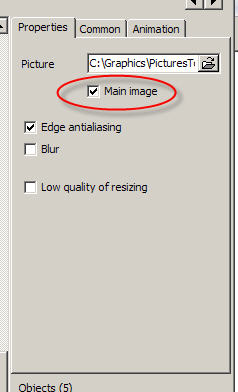
I still think it is a bug. And if you had taken the time to look carefully at the images I posted (including the red circle annotations I added), you would see that it is definitely NOT how it worked in 5.1! I specifically went back and tested in 5.1 before posting, and the behavior is quite different. Why bother to have the check box for "Main Image" then? What is that for? I personally don't agree with showing only the background image -- which in my case is what is there when the transition STARTS -- not when it finishes. When it finishes, the background and all 4 of the "fly-in" objects are visible. That would be an even better solution, as far as I am concerned, but I am happy to live with at least allowing me to select one of the objects/images to set as the main image. Thanks for jumping in here, but I'll wait to hear Igor's explanation on whether it is a bug or whether the functionality has changed and if so, what the "Main Image" checkbox now is used for. And I would personally think that someone like Dom, who sells lots of interesting templates, would be annoyed to know that the horizontal slidelist for all of his templates now shows nothing but a bunch of black slides. So now you have to click on the list to find out what a particular slide contains to know whether it is something you want to modify in the O&A editor. A large step backward as far as I am concerned.
-
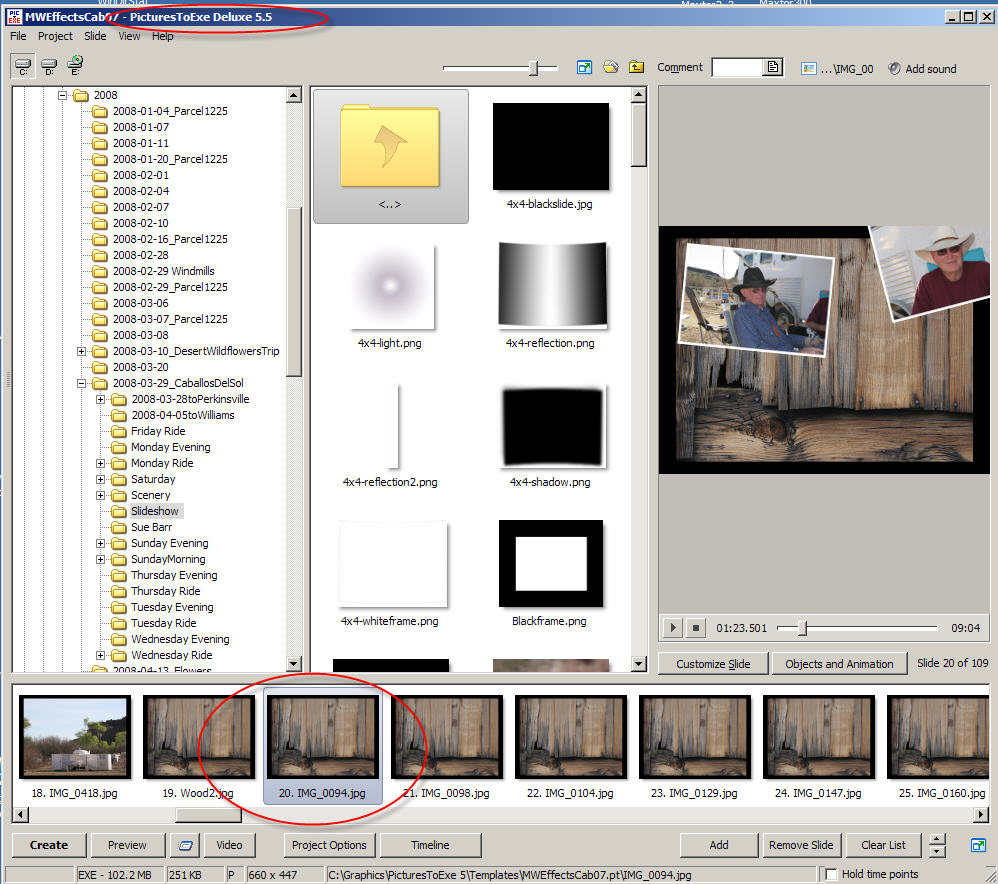
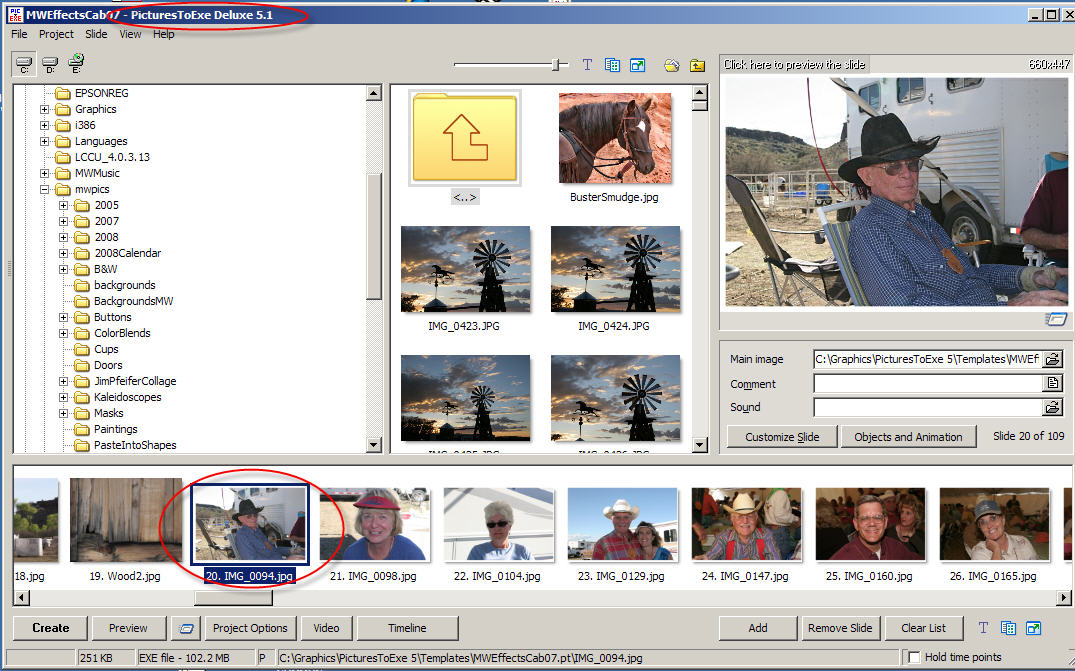
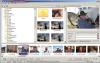
Sorry not to have posted sooner, but I haven't been able to test much with 5.5. However, I noticed this other day but wrote it off to possibly being related to someone else's template I was using. However, I noticed it again with one of my own shows and I have gone back to 5.1 to verify that it did not exist there. It was definitely present in 5.5 beta 5 (the earliest I tested and which I just reinstalled to be sure it still had a problem) and is present in beta 11 and RC candidates 1 and 2. Anyway, here's the issue. I set my screen to display the slides as a horizontal list. I have a slide (multiple slides actually) that have animations. There is a backround image with 4 secondary images which "fly" onto the background. I have selected one of these secondary images and checked the "Main Image" checkbox. In version 5.1 of PTE, that secondary image/object correctly shows in the slidelist. However in 5.5, including the latest RC2 only the underlying slide/background shows in the slidelist. The animation window does correctly show the whole animation. Here are some screen shots to illustrate what I mean. I do hope that this is not a new "feature" as it makes it very difficult to tell what I have on a slide just by glancing at the slide list. If it's a new "feature" for some reason necessitated by the new animation screen (I hope not), then the check box for "Main Image" needs to be removed from the O&A window.

-
I have a Canon 20D with a 10D as backup. Will probably purchase a 40D within the next month. I also have a Canon A95 which I always carry in my purse so I am never without a camera. When I first started doing serious photography many years ago, I had a Konica 35 MM rangefinder, then a Konica SLR. I went through a couple of non-SLR Olympus cameras and my first digital was an Oly 2000 back in 1999 (which amazingly enough cost more than my current 20D and a couple of decent lenses!). I had and still have an Oly 2100 UZ which I use some for IR photography. I also had a Minolta Dimage Zi (I think that's what it was). I had no investment in lenses to steer me toward either Canon or Nikon, but the forums I frequented seemed more heavily weighted toward Canon and the 10D had just come out so that's what I picked. With the dSLR, I love the viewvinder over the EVF of my earlier Minolta and Olympus cameras and of course the interchangeability of the lenses. The A95 "spare" that I care is one of the last of the small cameras which use the standard AA batteries and a compact flash card and so I can use all the smaller 500mb and 1G cards and batteries that I acquired as I upgraded through the series of cameras. I also have a waterproof housing for the A95, so it has come in handy on some raft trips where I wouldn't feel comfortable taking the more expensive cameras. When I buy the 40D, I am going to send the 10D off to have it converted to an IR only camera, since the Oly 2100UZ is getting on its "last legs". I do a lot of horseback riding event photography professionally No matter your choice of camera, Dom, the thing is to just go out and use it. With the creativity and talent you have display in your imaginative templates for PTE, I have no doubt that we'll begin seeing some great new slideshows displaying your artistic talents in photography. I can't wait.
-
Hi Swede, Thanks for a very enjoyable show. You have some extremely well done photos in that show. I'd be curious as to your photography setup. I think the music was quite appropriate and the sound effects added a nice touch. I have a large monitor with a higher resolution and don't usually change resolutions for show, so like Dave, I had a few instances where pictures zoomed extended beyond the frame. While I know we can always change the resolution of the monitor to watch the show, I personally prefer not to do that. One thing I have done in my shows to avoid that is to use some black rectangles in the animation between the picture and the frame that essentially cover up any portion of the zoomed picture so that it isn't actually visible to us stubborn folk who don't want to change resolutions. Also, I had a question about some of the photos with the girls/women who had the gold necklaces on. Are their necks actually being stretched by those things, or is it an optical illusion? Anyway thanks for sharing this with us.
-
Hi Lin, What you describe above is exactly what I want to do (sometimes). Drag and drop files from a different program open in another window. I might have some number of files categorized by a keyword in ThumbsPlus, for instance and shown in a "gallery" within that program. Those files could theoretically reside in 10 different file folders. Rather than making copies of each file and putting them together in a single new folder, it would be cool to drag them into a PTE slideshow and after creating the show, THEN save them out as a template all into the same folder. I understand (and have experienced selecting from multiple folders within PTE) the problem of duplicate file names. It would be a neat feature, but certainly not a showstopper. After attempting to do what the OP was describing, I was merely pointing out that dragging and dropping does not seem to work from a different program (or a different instance of Windows Explorer itself).
-
Henri, In the case of Pictures to Exe, a partition is not necessary. You can have multiple versions installed on the same machine and they do not conflict with each other. I have 4.48, 5.1 and the latest 5.4 beta installed and can easily switch between them. In fact, Igor has written the installs such that a new version with a different number (at least in the 5x series) will automatically install in a different subdirectory. So there is no reason you cannot work with both versions as the need arises.
-
Hi John, I understand what you are wanting to do and why it might actually make sense. I use ThumbsPlus and sometimes would like to create a slideshow from a gallery (of images in different folders tagged with a common keyword). However, aside from the reasons why Lin has suggested that it might not be the best idea, I don't see any way that you can actually drag and drop photos on either the slide table/list in 5.1 or on the slide table/list or timeline in 5.5. It does not allow me to do it from either windows explorer or from ThumbsPlus (both of which can drag and drop into Photoshop or other graphics applications). So I think dragging and dropping is actually a moot point unless there is another trick which I do not understand.
-
Hi Brian, I expect Lin or somebody more technical than I will jump in here, but I believe the quick answer is that if you use version 5, even without Pan and Zoom and without hardware acceleration enabled, you will still not have some of the functionality available in version 4.4x. If you are dependent upon things such as "transitions from/to the desktop", or running your show at the size you have designed it (not full-screen and not in windowed mode), you will not have those features in v. 5 no matter what. On the other hand, if you want to quickly and easily burn your shows to DVD, easily add titles to your slides and animate them, or use other features of the O&A editor than just P&Z, you should consider v. 5. It's definitely a trade-off, but I suppose that if v. 4.x perfectly meets your needs, you should stay with it. Perhaps if you list the things that you particuarly depend on in v. 4.x that are not available in newer versions, someone might be able to suggest a workaround that will enable you to upgrade.
-
Dom, You are amazing and so very imaginative! A very cool effect! Thanks for sharing.
-
Igor, I didn't see it included on your list of what's new so I just want to be sure you have not yet added the fix for the ATI graphics cards because my screen still darkens when running a preview or a newly created slideshow. Will that fix be included somewhere in 5.5, or is it scheduled for 5.6? Otherwise, thanks for this update. I love the new welcome screen!
-
Patrick, I thoroughly enjoyed the show. The photography was lovely. As for the dark shadows issue, I did not really notice it as a problem. I only spent a few days in Amsterdam once many years ago so I can't remember the quality of light in that city, but I have spent a good deal of time photographing in New York City and found much the same issue with the light and shadows there. While I agree that it would be possible to bring out more detail in the shadows, I'm not sure that it wouldn't take away from the overall impression of the city. The human eye, of course, compensates for the difference and sees a broader dynamic range than the camera, but most of the detail was visible in the shadows of your photos and it did not detract anything as far as I am concerned. My only negative comment would be that I did not think the quality of the simulated line-drawing/watercolor painting of the windmill at the end was up to the quality of the rest of the show. If you are using Photoshop, you might want to experiment with this free action http://www.atncentral.com/download.htm#Watercolor_Tint (or one of the other sketch actions available here) to see what alternatives you might be able to create. Thank you for sharing and this show stays in my keeper list to watch again.
-
Hi Mike, Take a look at the cube action offered on Panos' site. It's only $12.99 US and has about 18 different effects. Could be a real timesaver and the result is very elegant. http://www.panosfx.com/index.php?option=co...9&Itemid=45 I think Dom had a free action to create a 3D book which I suspect could be adapted to making a cube. It is probably posted on his website. And he had a "Rotation" demo and template as well. I would assume they are still out there on his website somewhere. If you still really want to do it yourself, I had an old tutorial stored away which somebody had posted on dpReview a few years ago. I could find the original illustration photos online, so I sent you a pdf to the "Contact Us" email listed on your website. Let me know if you don't receive it.
-
Hi Dave, I enjoyed your show and in particular some of the photographs with late afternoon light and/or gathering storm clouds. I thought the music, background and titles were appropriate. I especially liked the "undulating road" (or whatever you called it). Not sure what to suggest about the signs. I wasn't particularly interested in reading all of the long ones, but that's just me. My only suggestion would have been to work some of the pictures with the very washed out skies in Photoshop (or whatever) to attempt to pull in a bit more detail. Thanks for sharing.
-
Nicely done! The colors and the transition techniques used compliment the photographs. I am also amazed at the amount of work that went into the actual sculptures. Who would have thought that such an elegant show could be created from an ancient cemetery! Thank you for sharing this. I wonder if you would be kind enough to tell us which transition and the settings you used to display the initial slide with the gradually appearing lines. Thanks!
-
Hi, Take a look at this thread: http://www.picturestoexe.com/forums/index.php?showtopic=8111 It sounds like it might be possible to add a video clip using a utility written by one of our members, Granot/Boxig (who, unfortunately, seems to have totally disappeared from the forum ). I haven't tried it yet myself but since Dom says it works, I will take his word for it! Here's a link to download the utility in case you want to try it: http://www.thailandphotoalbum.com/ShowVideoPTE.zip PS - does anybody know what's happened to Granot/Boxig?
-
Igor, it sounds reasonable to me. But maybe make it only 5 posts. At that point someone should have established him/herself as a serious user. And thanks for looking into this!
-
Thanks for the info. I have blocked. Hope it works.
-
Hi Tim, In case you are not aware of it, you can download a fully functional trial version of Photoshop Elements (I think it works for 30 days) and try it out. I agree with Barry that it is likely to just about everything you will need to edit your photos and make slideshows. Also, if you ever decide that you do need to move up to the full version of Photoshop, you can get a very decident upgrade price on it because you previously purchased PS Elements. I just recommend Elements to a friend the other day who is not at all a graphics person and she was delighted with the ease with which she was able to modify photos and create graphics for some websites using the package. Try it -- you have nothing to lose. Perhaps you can find a package that is cheaper, and with some maneuvering might do what you want, but unless you have way more time than money (and it sounds like you will need to spend much of that time on the scanning process), you will be doing yourself a favor in purchasing the package. The other thing to keep in mind is that PS Elements (and of course, Photoshop itself) are so universally used that there are many, many tutorials out on the net explaining how to do just about anything you are likely to want. (And don't forget Barry's excellent tutorials as well.) Whatever you decide, best of luck and we wil be waiting to see your first slideshow!