goddi
-
Posts
3,593 -
Joined
-
Last visited
-
Days Won
26
Everything posted by goddi
-
'Insert Template...' for individual slides
goddi replied to goddi's topic in Suggestions for Next Versions
Yes, but then you have to deal with resetting the Duration and applying a Style will remove any previous settings made for the slide. Gary -
Igor, I understand that we can use 'Project Options', 'Defaults', 'Insert template'. Make a selection and then 'Apply to all slides'. This can be applied to all existing slides and new slides. However, it would be helpful to be able to 'insert a template' from this menu to individually selected slides (not all existing slides) that have already been placed in the Slides. I don't think this can be done presently. (As Lin has pointed out, you can 'apply to all slides' and then individually remove the ones you don't want in O&A). Gary
-
Greetings Judy, Perhaps I am misunderstanding the question, but I think there is an easier way of putting filenames in each slide. I'd go to 'Project Options', 'Defaults', 'Insert template'. Make your selection. Then 'Apply to all slides'. Afterwards, it is easy to remove them for the final output. Gary
-
How do I move slides from one sequence to another?
goddi replied to jmG-06100's topic in Suggestions for Next Versions
I tried Jill's method in Beta 35 and it works perfectly in the fullscreen Slidelist view (clicking on the triangle). You can highlight several slides in sequence or highlight random images. I drag the highlighted group and I can move them to a new spot. They are 'moved', not 'copied'. Gary -
How do I move slides from one sequence to another?
goddi replied to jmG-06100's topic in Suggestions for Next Versions
Jill, Thanks. Did not know that!!! Super idea. Gary -
Yea, a topic was just moved from the 'Styles & Templates' forum to 'PTE 10 Beta'. The 'Styles & Templates' remain bolded even though there are no unread sub-topics. Gary
-
Greetings Igor, I use Firefox. After all the forum sub-folder postings have been opened and read, some of the primary forum subject folders remain bolded as if there are sub-folders postings that have not yet been read, even though they have all been read. Gary
-
Slideshow - Edinburgh to Handa island and back
goddi replied to jmG-06100's topic in Slideshows & AV Shows
Greetings, Yea, I was amazed at seeing these campervans zipping down the Applecross Pass. Now that lorry...what was he thinking??? You had a bigger car. I can see the increase in cost. Knowing I was driving these crazy roads, I got full insurance too, but nothing happened!!!! Just a thought, but why not get a Facebook account and just post them there with a link in the Forum? Seems to work well. Got to watch for music copyright issues, though. Gary -
Greetings, Lately, I have seen bolded Forum topics that indicate there are unread sub-topics, but when inspected, there are no unread sub-topics. For example, today, the 'General Discussion' and the 'Suggestions for Next Versions' are bolded but no unread sub-topics are indicated. Is this a Forum software bug? This has been happening many time. Gary
-
Slideshow - Edinburgh to Handa island and back
goddi replied to jmG-06100's topic in Slideshows & AV Shows
Greetings, At first I could not figure out how to view the show. I didn't have my wife here to translate the French menu. I finally found the download icon but I might have also hit the other '...injurieux...' by mistake, my wife now says. Sorry. But I was able to download it. You went to places that we did not have time for. Nice to see the other places and tips for next time. I noticed your Avis bill was 1096 BP for 10 days. My car rental (Astra) was only $542 for 9 days. Wow. Big difference. From the map, it looks like you did not make it into the Applecross Pass? Did the broken down lorry let you see any of the Pass? Gary -
Greetings George, There are many videos of this drive. Most are in rainy, overcast and icy conditions. Hard to see anything. We were very fortunate to have such a beautiful weather and very little traffic. Can't imagine what it is like in high season! And, if anyone is thinking of doing it, do the route counterclockwise--best way. Glad to bring back good memories. And nice to know that non-FB people can view links to FB pages. Thanks... Gary
-
Greetings, There are drives and there are drives. This is one of the most beautiful and fun drive you can have. (It is a long video but it needs to be long.) This is a link to my Facebook page so I don't know if a non-FB person can view the show. (Also, used Ver.10 Beta) Gary
-
Thanks, jmG and Roger. The hard part was having to leave out so many other videos and images of the trip. My favorite is just looking at the videos of the driving through Scotland. That was so much fun, despite the reduced width of most roads. But that would be a several hour video! I still wonder how I didn't lose my right-side mirror. Gary
-
Dave, thanks.. Gary
-
Mary, Yes, that would be useful. But my main camera does not have GPS. And my GoPro is a pain to get it to work. And I don't have a cell phone. Many times I forget where the heck I took the picture so it would be nice if I could do it. Gary
-
Greetings, Thanks for your comments. For the maps, I used a program called Route Generator 1.8.1 (should be free): https://sourceforge.net/projects/routegen/ First, I find a map on Google Maps and do a screengrab. I then crop it in Photoshop for the correct aspect ratio (think I cropped it at 3072pxx1728px). Same as 16x9. And then used that image in Route Generator. The hard part is just clicking the little dots to establish your route. Select the car/bike/plane, etc., for the route and the speed you want them to move. They you can bring in its AVI file into PTE and add text, if needed. When I see other PTE shows, I always wonder where the heck they are. Hopefully, my maps have helped. Gary
-
Greetings George, Thanks for the comments. No, it was not a 'dash cam'. What I had for video taping in the car was my GoPro Hero7. I did have it on a suction cup attached to the front windshield. It worked fairly well for the most part. Sometimes, I handheld it while driving...wife did not approve. It has some issues but it was worth using. The best part is the built-in stabilization-worked great. The bad part was sometimes the GoPro would freeze up and I'd have to dismount the suction cup and take the camera out of the case and turn it on/off and then reassemble the stuff to the car again. GoPro has a bunch of other issues such as giving the wrong date for the files. Really stupid but otherwise, pretty decent video. For the steam train, it comes by the viaduct at a specific time...about 10:45 am I think. So we drove from Fort William out to the viaduct. Go early...very little parking area and to find a good spot for taking photos. It was a bit rainy and muddy but we just climbed up the hill a bit and hoped it would be a good spot. I had to ask several people in front of us to please move so I'd get a good shot. The crazy part was I used my Nikon D7100 DSLR to video the train. Handheld. I forget my monopod in the car. I don't know why I didn't use my GoPro, which would have solved a lot of problems, such as quality and stabilization issues. But I think I wanted to use the telephoto lens to be sure to get a tighter shot of the train. I did run the Nikon video clip through PowerDirector software to fix some stabilization. It did reduce the quality but did help on the stabilization. (I'm going to try to replace my Facebook posting to correct the typos you found for me. Sometimes, no matter how many times I proof the text...I can still miss stuff!) If you go to my FB site, there are a few other PTE shows of our trip to Scotland. Thanks.... Gary
-
Lin, thanks. I did it all in the V10 Betas, starting from Beta1. Made me learn the new V10 very well! And one of the new Styles, 'Cut Out Text'. Thanks, Manuel! Gary
-
Greetings Maureen, Thanks for watching it. I highly recommend Scotland!! What a magnificent place. We truly were fortunate to have an unusual high pressure front keeping the more normal cloudy/rainy weather at bay when we were in the Highlands. Yep...the landscape and the people and the 'plates' were great!!!! Gary
-
Greetings, Here is a link to my Edinburgh to Glasgow Road-Trip show. Since it is a large (and long) video, I had to put it on my Facebook page. Not sure what else to do with it. And not sure if a non-FB person can get to the link. Anyway, here is my recent project. Gary I had to re-post the PTE show again. Found one more typo!!!! (Hard to pronounce 'Edinburgh' correctly and even harder to spell it correctly, apparently).
-
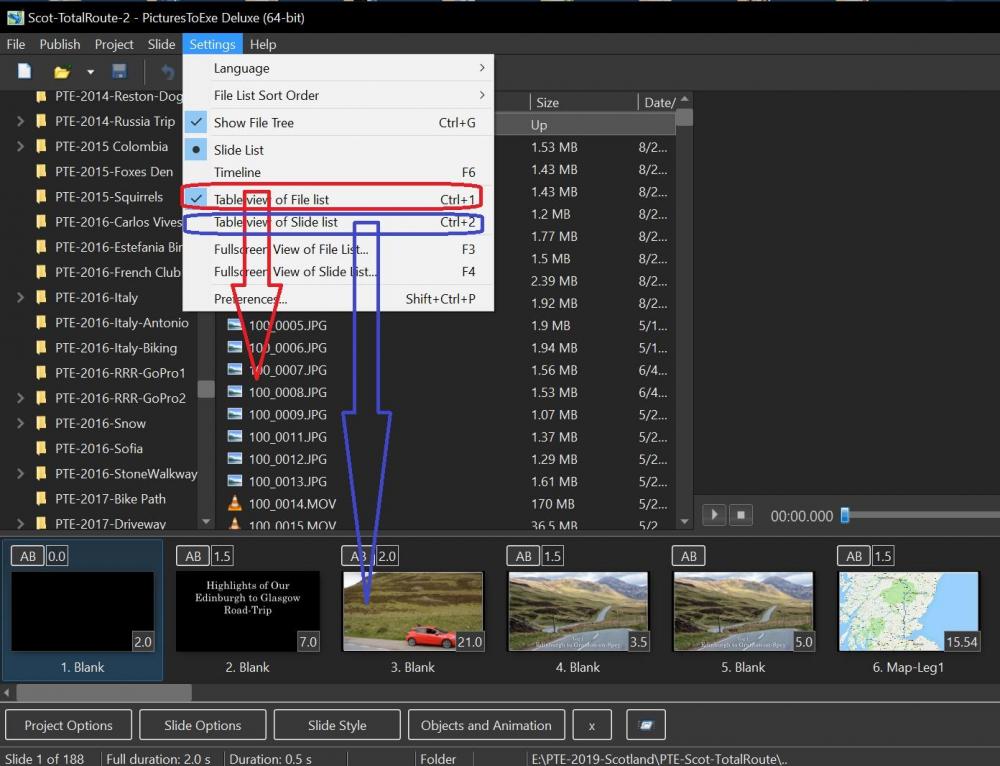
Just check or un-check the 'Table view...' in Settings. If checked you get file names; if un-checked you get images. Gary
-
Greetings, I know that I can move an entire audio tracks up or down. But I want to move audio clips up/down into an existing audio track. I don't want to manually drag them with my mouse. If there are several crossfaded audio clips, for example, it is difficult to keep them exactly has you had them if you drag them by hand. Or even just a single audio clip is hard to move up/down manually and keep it exactly in the same position. Is there a way to highlight a single audio clip or a group of audio clips (like Ctrl-?) and move them using the keypad (Ctrl-PgUp/PgDn?) into an existing audio track? Gary
-
Igor... Ok, I just didn't know if that was a set limit for everyone or if I had just use up some portion of a higher limit, since I had be able to upload larger files before. Thanks... Gary
-
Igor, Thanks. Reading and trying to understand all the specifications of graphics cards is next to impossible. Good to know what not to get. Gary
-
Greetings Tom, Thanks... Yes, just after I had posted my question, I found Igor's post. I am still wondering if it the Intel Graphics 630 is sufficient for PTE or is it better to get the Nvidia card? For the Intel Graphic 630, I see that " Due to its lack of dedicated graphics memory or eDRAM cache, the UHD 630 has to access the main memory (2x 64-bit DDR3L-1600 / DDR4-2133) ". Not sure if that would work well with HA? Seems safer to go with the Nvidia with its own memory? Gary