goddi
-
Posts
3,596 -
Joined
-
Last visited
-
Days Won
27
Everything posted by goddi
-
How to zoom-in and keep '86% of slide to show main image' fram
goddi replied to goddi's topic in General Discussion
Dave, I am using '86%' just as a technique to have a black border all the way around the images and to show a border on each image. The problem with making a "matte' is that not all the images are exactly the same size and some are horizontal, some are portrait. So a single specific "matte" size would not work. If I put a blank black image to each side of the image, it would cover the border I have added to all the images, and a pain to have to do it to each image. I am not sure how to explain it but it would be nice if the '86%' (or whatever the reduction in the main image size you choose) could be made to act as if it was the 'main image size' so the animation would operate within that '86%' frame size. Any other ideas? Gary -
Greetings, Normally, I have made shows with 100% of the slide showing. However, I am working on one that I have all the images at '86% of slide to show main image' (in Default tab). When I would zoom-in with 100% of slide showing, the frame of the 1920x1080 window would be boundary of the zoom, no problem. However, when set to '86%', for example, the zoom-in enlarges the image. I want the image to stay at the '86%' size and keep the same boundary of the '86%' frame. Is there a way to do this to make it a global effect for all images? I know I can do this by creating 4 rectangles (one for each side), but I'd have to do this for each image. And if a border is applied it would get covered by the rectangles. I am looking for a global effect to do this. And this would be useful for panning, etc., too. Thanks... Gary
-
Forum-not opening to new postings; keeps opening to first posting
goddi replied to goddi's topic in Forum & Website
Peter, Thanks...I had forgotten that trick. I was clicking on the topic, not the dot or star icon. Thanks very much. Gary -
Greetings, In the past, when I would do a 'View New Content', the Forum would open to the new unread posting, skipping all of the already read postings. Lately, it has been opening to the very first posting that has already been read. So if there are, say, 3 pages of postings to a topic, it keeps opening to the first posting and I have to then scroll each time to find the new unread postings on the 3rd page. Is there something that I can do to get it back to opening to the new unread posting, not to the initial posting? Thanks.. Gary
-
Cloning Your Hard Drive... Software Suggestion
goddi replied to Lin Evans's topic in Equipment & Software
Bert....Not to argue with you but that is just like closing your eyes and walking across the street, hoping you won't get hit by a car. Not testing a restore process is putting all your eggs in one basket. Why not give it a try? You will sleep better knowing it might work when you need it. At least, give the recovery boot disc a try. Just see if it will boot up as expected. You can't go wrong doing at least that. :) Gary -
Cloning Your Hard Drive... Software Suggestion
goddi replied to Lin Evans's topic in Equipment & Software
Bert, I really don't know the answer to this question, but what happens when your disk gets the 'blue screen of death'? It won't boot. To do a restore using the Windows System Image backup, won't you have to have a working version of Windows7? If you can't boot up the disk to Windows, how will you go about doing a restore? Can you create a boot restore disk so you can start a restore process? I really don't know but that would be what I would worry about. If you haven't tried to do a restore at all, I think you might try to do a restore of just a file or two to see if it works, at least while your disk is working. And how to do it when your disk does not boot. Just some thoughts I have. Gary -
Cloning Your Hard Drive... Software Suggestion
goddi replied to Lin Evans's topic in Equipment & Software
Lin, I don't think I agree when you say "if the hard drive itself is trashed (not just files corrupted or missing boot sector, etc.) you have to purchase a new hard disk, install an OS on it, recover all your files from the imaging software and then register each to make them work meaning you must enter each unlock code for each software which requires it." Yes, you have to purchase a new hard drive, but you just have to restore the backed-up image to the new hard drive. You don't have to install a new OS or unlock codes or re-register programs or anything like that. The newly imaged disk drive will work just like the old one. That is how I got my new hard drive, that replaced my crashed drive, to work. I only had to do the restore of the image. Piece of cake. That is why I favor the way Aronis works. Having mirroring working is probably the best to have in addition to imaging, but for most people, doing frequent backup imaging is the minimum to be safe. Also, don't you have to have both drives operational when you do a clone? If the original drive is trashed, the only resort is an image backup, if you have one. From my understanding, 'cloning' will copy a partition from one drive to another to make that drive an operational hard drive (not the same as 'imaging' which is use only to restore files or partions). Gary -
Igor, I just tried the same test. I made sure that I had 3 projects with the correct File Tree associated with each. I re-installed 8.04. Each of the 3 projects showed the correct File Tree for each project. It seems to happen only when updating from an earlier version. And, none of my projects have been moved to any new location. Gary
-
Igor, Yes, it does. I don't see any other problem except for the correct File List not being retained. Gary
-
Cloning Your Hard Drive... Software Suggestion
goddi replied to Lin Evans's topic in Equipment & Software
Greetings, Not to beat a dead horse, but I just want to give my two cents on the Acronis backup program. Lin stated that his experience with Acronis was a major pain. Not sure if that was an older version or not. For me, it is very easy to do an image backup with it. I have 3 physical hard drives in my PC that are all backed-up with just a couple clicks. It takes several hours, but what is the alternative? However, Lin did a clone of a failing hard disk before it failed. I think the problem with many of the 'backup' software programs is that you have to have an operating system that is running on the drive you want to restore with the restore program installed. This really makes no sense to me. This brings me back to Acronis. The great thing about Acronis is that you can make a restore disk. I have had to use it several times. When your PC won't boot and all you see is the blue screen, all you have to do is insert the disk and your PC will boot up. You will be in your OS and then you can do a restore of the entire backup (programs and files) or just a single file. So doing an 'image' backup, for me, has saved my bacon many times. I recently had a drive crash and just put in a new drive and restored the 'image' to the new drive, using Acronis. I have just too many programs and data files to even think of having to re-install or lose when a drive crashes (and they will). Gary -
Igor, I followed your steps above. PTE will retain the File List/Tree whenever I change the 'file/folder' location in the File List. The problem is that after I have upgraded to a new version, ie 8.03 to 8.04, the File List/Tree does not retain the previously correct files/folders in the File List/Tree that previously matched the show. After upgrading, the File List will keep the files/folders that is there from another project and does not change, even if you open other projects. This happens with Open Recent Project or Open. So I have to 'reset' the associated file/folder location each time. Once I do that, the proper file/folder locations does stay correct...until I update PTE again. So each time I open an old project after an upgrade, the File List for each project is incorrect until I reset it. Let me know if there is any other test you want me to do. As Dave mentioned, I, too, keep my pte, images and music files in the same folder for each project. Not sure if this has any bearing on the problem, though. Gary
-
Peter, I have a similar mix of files. I have 41 .dat files, ranging from 0.dat to 125.dat. One is empty. Many have multiple projects listed that are not related to each other. Dave, I have Windows 8.1 on both my desktop and laptop, both with PTE ver. 8.0.4. Strange. Gary
-
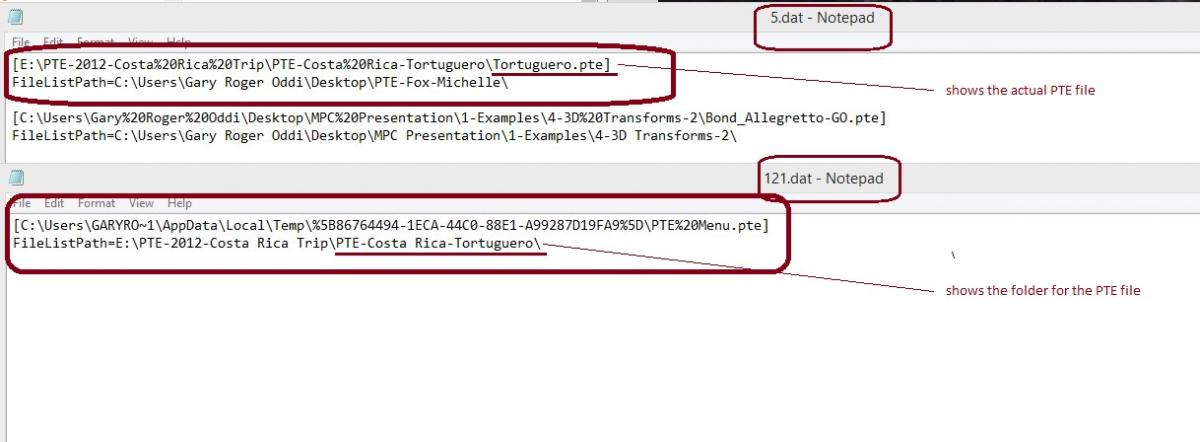
Thanks,Dave. So now it is just two of us. I went back to the 'special location' and found 2 .dat files that has a reference to the Tortuguero pte show. But, one shows the path to the actual Tourtugero.pte file and the other shows the path to only the folder that contains the Tortuguero .pte file (\PTE-Costa Rica-Tortugero\). The .dat file that has the path to the Tortuguero.pte file, also has incorrect FileListPath to the 'PTE-Fox-Michelle' folder that contains the images that are not associated with the Tortuguero show. I don't know how to interpret these different .dat files, but perhaps this might help Igor or someone figure out what is going on. Thanks... Gary
-
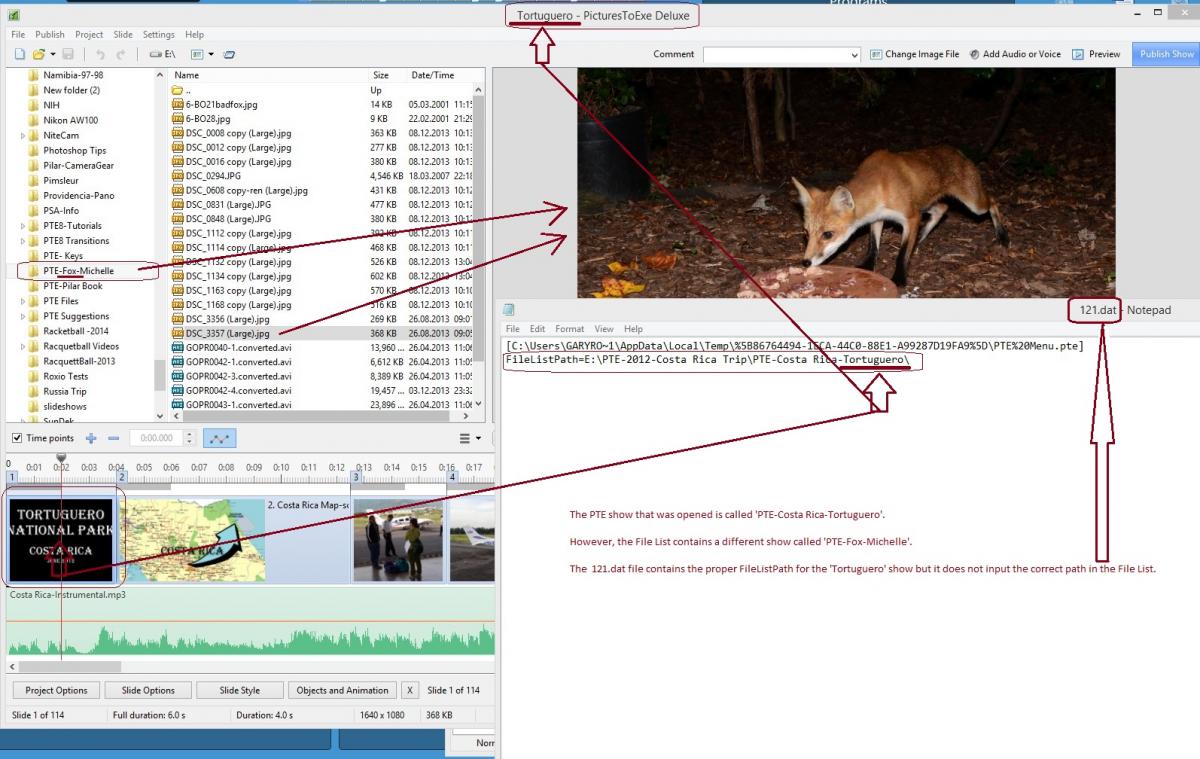
Igor, Thanks for indicating the 'special location' where the FileListPath information is stored for the PTE projects. First, I did not uninstall the previous version 8.0.3. I installed 8.0.4 over that version. Second, I did not move any project files to another location. So, I took a look at the 'special location' you mentioned. I found an example of a show that would fill the File List with the incorrect images, i.e., images from a different show. I then found .dat file in the 'special location' that relates to this show. The correct FileListPath for this show is shown in the '121.dat' file but the correct images do not show up in the File List when I open the show. In the attached screenshot, the correct filename for the show is 'PTE-Costa Rica-Tortuguero' but the File List pulls up the images for another show called 'PTE-Fox-Michelle'. Can you see what might be going on here? This problem has been happening each time I do an update. Thanks... Gary ADDED LATER: I just when through the same procedure on my laptop and it also displays the same problem.
-
Greetings, I have brought this up before. The last time, I think, was back in December 2013. http://www.picturestoexe.com/forums/index.php?/topic/17187-folder-in-file-list-and-project/?hl=%2Bfile+%2Blist But I will bring it up once more. I just upgraded my PTE version from 8.03 to 8.04. After doing this, and then opening an already saved PTE show, the File List does not keep the previously associated location of the images used in the show. It seems to retain whatever the previous File List was for whatever show was recently opened. So I have to do a hunt and peck to re-establish the images used in the show to be in the File List. This holds true for each and every previous show I have made. This is aggravating to have to do this for every show. Once the proper location is found and the show is saved, the File List is properly retained. Why does a simple upgrade of a version lose the proper association of the File List for the shows? Gary
-
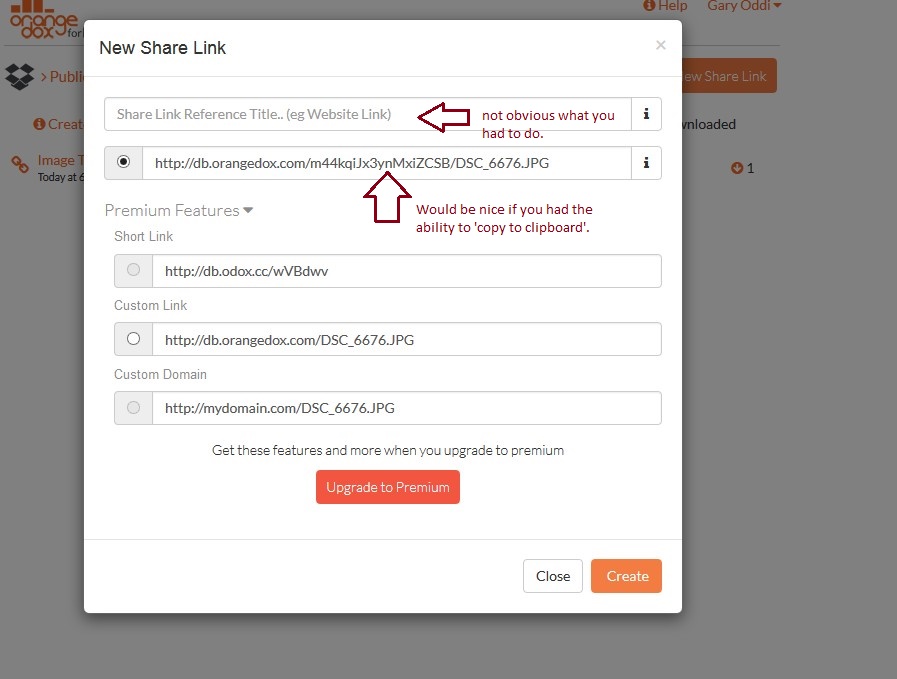
Eric, Chad, from OrangeDox, apparently listened to some of my suggestions and is making some changes to make it more intuitive. You might want to check it out. Gary
-
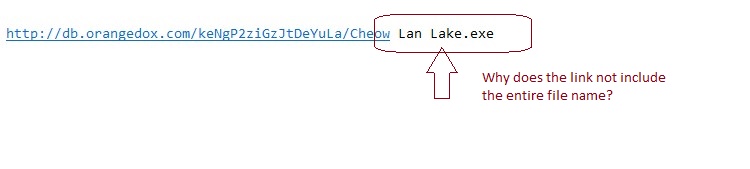
Greetings Chad, Re: Slow download--I am talking about when I downloaded the file from the OrangeDox link that I sent to myself. I sent a large file to myself and downloaded it and it seemed to take a very long time. Re: Confusion. The box where it wants the 'Share Link Reference Title (eg Website Link)'. That is not intuitive as to what you want or that it is needed. Ultimately, I stuck in the file title and got it to work. The 'Website Link' portion really threw me. Still don't know what it would mean. Also, it would be nice if we had the ability to copy the link to the clipboard, instead of having to highlight it and then do a Ctrl-C. And, I notice that the last part of a long filename does not get into the link. It seems to still work, but it adds confusion. See attachments. Gary

-
Eric, I just tried it again and I got it to work. The problem was that I never filled in the 'Share Link Reference Title'. I sent the link to myself and downloaded the linked file. The statistics show that it was downloaded. Got it... But the strange thing I've noticed is that, if the link is long, the last part does not get into the active link portion. But it still seems to work, but very slow downloads. Thanks... Gary
-
Eric, I have been trying to get this Orangedox to work but I can not. I have followed their instructions but I do not get any statistics to show. I have copied/pasted their link and sent it to myself. At first I was able to download the file from Orangedox but no statistics are shown. Now, I get a 404 error...can not find the file. Is it still working for you? What's the secret to make it work??? Gary
-
Tom, My wife just got a Samsung Galaxy Note 10.1 2014. It's Android and can not create PTE shows. But I am amazed at the quality of the video when it plays the MP4 files made with PTE. So now a question. Why would we need 'Publish/Video for Mobile Devices...Tablet'? If an MP4 that is created using 'Publish/HD Video' produces an MP4 that plays on an Android tablet, why/when would we use the 'Publish/Video for Mobile Devices...Tablet'? And I play them off a memory stick and the show with the added video clips play smoothly. Not sure of the difference. Thanks... Gary
-
Lin, When you say 'A video show made with PTE...', are you referring to an .exe or .avi or mp4 or just any output from PTE? Just not sure if you are being specific in the type of output or in general when you say 'video'. Is the 'exe' considered a 'video'? Thanks... Gary
-
Dave, Yes, you can do that. But with PrtSc, you have to take additional steps to have another program opened (like Paint, etc.) and paste it into it and save it. Claudio is not concerned with getting a full screen res, I think. With the ScreenCapturePrint, you just set the area you want with your mouse to capture and you can immediately print it or save it or send it to the clipboard. If you have a lot of images or areas on the screen you want to capture, this is really a good tool to have handy. It is great, also, in capturing areas of the screen when you have a question about something on the screen, like in PTE's menus. Gary
-
Lin, What I suggested to Claudio was to use this free program called ScreenCapturePrint: http://www.infonautics.ch/screencaptureprint/ I like it because you can very easily define the exact parameters of the screen area you want to print. I think if you use the Windows printscreen, you would get more than just the MiniPlayer or the O&A screen area that Claudio wants. Great program. Gary
-
Peter, I have been checking out the 'star' again. Now, the 'star' is NOT greyed-out and it does show '...first unread post'. I wonder if they updated the software. So it is now working as you have described. Very strange but the problem seems to have been rectified, for me. Gary
-
Yes.