goddi
-
Posts
3,593 -
Joined
-
Last visited
-
Days Won
26
Everything posted by goddi
-
================== Dave, Sorry, but I don't understand your posting. My point is that the duration times are not retained when a slide is moved in the Timeline. Gary
-
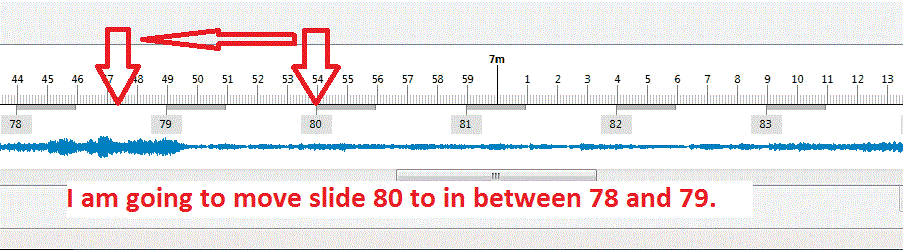
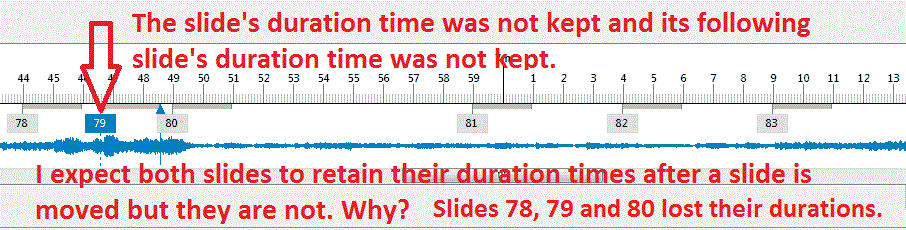
======================= Dave, From what you are saying, if I understand it correctly, moving a slide in the Timeline "has an effect on the Duration of the previous slide." I just don't see only that happening. See the attached images. When I move a slide in Timeline, it just gets dropped in between 2 slides. In my example, 3 slides lost their durations that were set before the move was made. None of the slides should not lose their durations, right? I think what is needed it to be able to press the Control key, for example, and be able to move a slide and all slides will retain their durations, during the move of a slide. Gary


-
======================================== Greetings, Thanks for the links. I never picked up that the Keep Full Slide Duration was only for use in Slide List. I did not get this because it makes no logical sense to me at all. But the fact that, when in the Slide List, the duration is kept when a slide is moved whether the Keep Full Slide Duration is checked or not. So I don't see what this choice is supposed to do, other than adding in the next slide's transition to the previous slide's duration calculation. If it is only supposed to work in the Slide List, then Igor should have it disappear when we switch to the Timeline. This whole issue seems to be a bag of worms. Some have added that the Keep Full Slide Duration is useful when adding video. I have added video to several shows. I add in the video and then set the duration time of the slide to the length of the video. I then add the fade-in transition to the video slide. The following slide has its own fade-in transition. Why complicate it more than this? The so-called 'outgoing transition' actually belongs to the following slide, not the slide with the video. When I move the slide with the video, all I want to move is the slide with the video and its own fade-in transition. And this should be allowed to be done in the Slide List and the Timeline. It makes no sense not to be able to do this in both views. The Keep Full Slide Duration does nothing, as far as I can see, except recalculate the duration time by just adding in the next slide's transition time...why, I don't see, except add confusion. I must be missing something, but I don't see what. Lets keep it simple. Gary
-
====================== Dave, Well, I am not sure what is going on anymore. I just tried to create an example and now, and, I don't know why, but the duration DOES move with the image. BUT, it keeps its duration whether the 'Keep full slide duration' is checked or not checked. And, it keeps the image's duration only in the Slide view (Slide List as Thumbnails), but NOT in the Timeline. So I am as confused as ever. If it keeps the slide's duration with or without the 'Keep full slide duration' being checked, then it should be renamed as 'Show full slide duration' because it only seems to toggle between the two methods of calculating the duration. And why does it not work in the Timeline view??? I just don't get it.... Gary
-
==================== Greetings, I get what you have described above. However, when I activate the 'Keep full slide duration', and in the Timeline, then move a slide from its current position to a new position down the line, the slide that is moved does not keep its duration. It looks like the position of where that slide was, actually keeps the duration. The duration does not stick with the moved slide. Is this what I have not been understanding??? Gary
-
Greetings, I have been following the discussion about this topic but, I must admit, I don't think I have understood all of its nuances. However, now that Igor has defined its use and new location, I now must ask this question: Does it really 'keep' the full slide duration (such as locking in the full slide duration) or does it only 'show' the full slide duration? If not, the name should be changed to 'Show full slide duration'. Maybe this is why I have not been able to fully comprehend this function...? I don't see this function actually keeping or holding the full slide duration when changes in slide positions are made. Also, since checking the "Keep full slide duration" box is capable of only showing the change in the slides' durations when you are in the 'Slide List as Thumbnails' view, shouldn't it only appear when you are in the 'Slide List as Thumbnails' view? Thanks... Gary
-
=================== Tom, I have another idea that 'might' work. Try doing a screen capture while playing the exe. There is a program called Debut Video Capture Software by NCH. Here is the link: http://www.nchsoftwa...ture/index.html I apparently have a 'free' version; not sure how I got it. But, until Oct. 15, it is for sale for $39.95, but you also can download the trial for 14 days use. I tried it on an exe file. With the free version, I could only save the screen capture as an AVI. The paid version gives you more flexibility. When I viewed the screen captured video, it did lose some quality when made full screen. However, it looked OK when I reduced the viewing size. The program is a bit strange to start the process. It took me a while to figure it out. You have to start the 'recording' process; then start the exe file. The final video will show your keyboard and mouse strokes in the initial beginning of the video file because it records that stuff too. You just have to edit that out. But....it might be a possible solution to your question. There are also some setting that might increase the final quality of the screen capture, but I am not sure what to do in that respect. Gary
-
================================ Maureen, After viewing your excellent slide show, I happened to take a look at a 'Wildlife Safari' TV show (public broadcast) that I recorded a couple weeks ago. I didn't now what was on it. First it showed Nepal; then Namibia; then, guess what? Lofoten...but in snow. Quite a contrast! I wouldn't have known where it was without having seen your show, because all they said was 'Lofoten'. I wouldn't have know it was in Norway. Small world. Gary
-
Greetings, I never got any bites on my question below about using the Converter. I want to revive the question to see if anyone might respond to it. Gary -------------------------------------
-
======================= I have Dropbox but I haven't figured out how to use it.... I'll have to work on that. I am sure it is useful, but I like to use MediaFire because I can tell when and how many times it has been downloaded. And sometimes I don't know who might want to download it. For example, I just did a PTE show for a friend's wedding and they sent the MediaFire link to all their guest to download it. So far, it has been downloaded over 60 times and I would not have had all of their email addresses. And easier to post only one link. So it does come in handy. Gary
-
Greetings, I recently created a large PTE show of our family that contained video. The size came to over 236Mbs. I wanted to get it to my niece but it was too large to email. And it was too large to put as one file on MediaFire; its limit is 200Mbs. Another member of this Forum suggested that I split the file in two. He recommended the HJSplit program. I used it. It is simple and easy. When you send the split files, you have to also send the HJSplit program so the recipient will be able to join the files, but HJSplit is small and easy to use. Since we are getting into adding video, file are going to get pretty large so I hope this can be useful to others. http://hjsplit.en.softonic.com/ Gary
-
Brian, Thanks for the information. Yes, I remember now that the 2 rootkits I found were call 'Bifrose'. I just checked my Malwarebytes program and its last update was 9/25, a day short of their update to catch the virus. Though others have disagreed, I could not dismiss the fact that I had found two viruses and that they were probably causing the problem with PTE. It is good to have this cleared up. Sincerely, Gary
-
============================== Greetings, Thanks Barry and nobeefstu. I do understand what a false positive is. I am just wondering about my particular circumstance. I am not trying to argue the point. When it happens, you don't know whether it is or it is not a real virus. From what you say, if I did nothing and just waited a couple days, and Avast updated its virus listing, it would have cleared up by itself? Gary
-
================ Lin, The portion of what you quoted of my post didn't show us so I am not sure exactly what you are referring to. However, whether it was a virus or a false positive, the results, to me, were the same. It disabled a function in the PTE program and it caused the removal of a bunch of files. Avast has not yet replied to my submission to them. A false positive really isn't too much difference than a virus, especially when it took me 2 full days of poking around trying everything I could find to get it back to normal. It seems you are ignoring that the removal of the rootkit (that Avast did not find) solved the problem. I have been using Avast and PTE together for a long time. Something went wrong. Gary
-
======================== Lin, Not to beat a dead horse, but 'solution' means just that, something was resolved. It does not point either way. Your knowledge and logic, I am sure, is better than mine, but I don't get anything else but that they understood and solved the problem. Their solution could be to update or correct their malware list, like they do for all the other viruses. I am just curious how and what they did. Just curious. Well, the question is, why didn't Avast find the two rootkits and solve it itself? I understand that not every anti-malware will catch everything. But since Avast did not detect the two rootkits, yes, I think Avast has a problem. If Avast had found the two rootkits, then I would not have had to use another program to solve the problem and I would not have had the 59 executables quarantined. The problem was fixed immedately after the rootkits were detected and removed. Having a backup, it was very easy to just restore these exe's. I don't understand why it seems you are objecting to me trying to understand what Avast's 'solution' was. It is just not that obvious to me. Gary
-
============================ Greetings Lin, Yes, I did read what Igor said. But he did not say what Avast said. He said only that they had found a 'solution'. Whether it was a virus or a false positive was not definitive. I don't see where you interpreted Igor's statement that it was a false positive. I never intimated that PTE had anything to do with causing a virus. I do know that my PTE program and its exe's were affected. But from what happened to me, I am not sure it was a false positive. I used another program, Emsisoft, and it moved 59 PTE exe's to quarantine. Maybe they were wrong; maybe not. After I removed the 2 rootkits that AVG found, my problem went away. I could use PTE's Publish and PTE stopped freezing up. Also, the several files that Avast sent to its Virus Chest were similar to "TempPteViewer95954.exe" (with different numbers). I sent one of the files to Avast and I hope they will let me know more details. Ok, maybe it was a false positive. But things happened and at this point, I don't really know. Gary
-
==================== Barry, What did you do to get rid of the virus? Igor, Thanks for the info. I also submitted a report to Avast. Did Avast give you any details as to what they are doing concerning this virus? I have had a similar problem before of a virus attaching exe files created by PTE. No other exe's were attacked. Is there a particular vulnerability in the PTE exe's or is this just a random occurance? As I mentioned above, 59 PTE exe's were quarantined. Thanks...Gary
-
============================== Ok...after two full days of tinkering with this problem, I think I finally found the fix. I turned off Avast and installed AVG-Free. I ran the AVG-Free scan and it found 2 'rootkits'. It was able to remove them. I then tried to Publish several exe's, and they worked with no problem. I turned off AVG-Free and turned Avast back on. I tried to Publish several exe's and they all worked with no problem. No virus notices came up. So it seems that AVG-Free can find and remove the virus but Avast could not. Fingers crossed, this problem might be solved. Gary
-
==================== Barry, I think I found the solution. I came across a program called ComboFix. I ran it and it fixed the problem. I don't know what it did or what it changed, but I can now Publish exe's with no problem. See if it works for you. It will give you the results log as a txt file, but it is a lot of data that I can't see what corrected the problem. Gary http://www.geekstogo...mbofix-by-subs/ (But there is a warning: ComboFix is a tool that should only be run under the supervision of someone who has been trained in its use.) Added later: Barry, I was able to Publish exe's right after I ran ComboFix with no problems or virus warnings. HOWEVER, after I did a re-boot, the dang virus came back. It is back to Avast showing the same virus and locking up when I run the Publish. Stumped... Gary ============================== Added even later: I figured out why I did not have a problem with running Publish after I ran ComboFix. I had not turned Avast back on. It had to be off when running ComboFix. So there was nothing to indicate that a virus was present. So when I rebooted, Avast was turned on again and Avast started to indicate that I have a virus, still. Gary
-
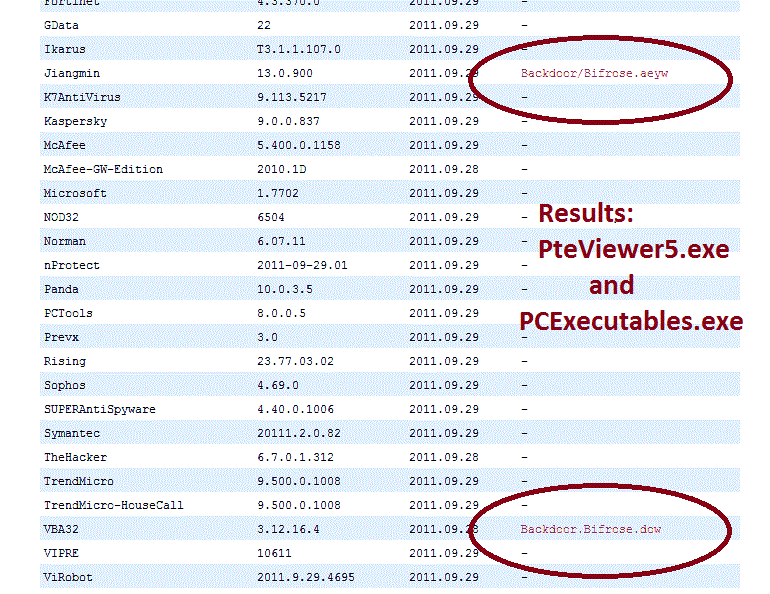
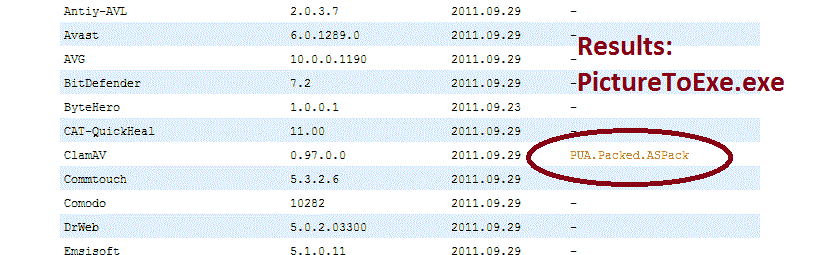
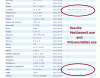
======================== Thanks for the link. Each time I try to Publish a show to an exe, the Avast Malware notification indicates the 'Object' (of the virus?) is ...'TempPteViewed.....exe'. So I ran each of the exe files in the PTE program folder (PteViewer5.exe; PCExecutables.ese; and PicturesToExe.exe) through the VirusTotal site you mentioned. The Win32:Malware-gen did not show up but some other results showed. I have attached gifs of the section of the reports. But, perhaps these are false positives (?). This morining, I re-ran the Emsisoft anti-malware program and the results were "no suspect files were detected during the scan." I then ran the Avast boot-time scan, as they instructed. The results were that there was no "malware detected." However, I then tried to create an 'exe' file in the Pictures To Exe program but it, again, said "The threat was detected and blocked...". So it is there but I can't find a way to find and eliminate it. Does anyone have any ideas to find/eliminated the virus? Gary

-
==================== I just got a reply from Avast. You might already have this info but here is what I got. I am in the process of following their steps: Hello, Thank you for contacting AVAST Software company with your concerns. Make sure you have uploaded last virus definition and tle latest version of avast. 1. open avast 2. click on "Maintenance" 3. select "Update" 4. scan your PC again - run boot time scan If you are using Windows NT, ME, 2000, XP, Vista or Windows 7, disable the system restore feature - http://support.microsoft.com/kb/264887 The system restore feature can be re-enabled after the virus removal process is completed. To acivate Boot-time scan, start avast!, and click on "Scan Computer" on the left side of the screen. From the menu select "boot-time scan" and then click on "Schedule". Then restart your computer and the scan will start automatically. Move any viruses found to the virus chest. Miroslav Jenšík AVAST Software a.s. Gary
-
========================= Ken, If you are asking if I submitted a report to the Avast Tech site on this issue, yes I did. If this is not what you are referring to, please be more specific. Thanks. Gary
-
============================ The bottom line for me is that Avast said it blocked the virus in one file. Avast deep scans says everything is OK. I run another program,Emisisoft Anti-Malware, and it comes up with 59 PTE exe files that have been contaminated. Does not give me too much confidence. Gary Added later: Igor, I don't think it is a false positive. Another anti-virus program picked up the virus. PTE freezes when I try to Publish an exe. This has happened one before to me some years ago. I don't remember how I fixed it but I believe it is a real virus, not a false positive.
-
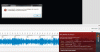
=========================== I am in the same boat. Today, I discovered I got the same Win32:Malware-gen virus. I have been trying to get rid of the virus but no luck yet. Avast said it blocked and quarantined the bad file and then its scans says there no viruses. But it did not eliminate the virus. I ran another virus elimination program from Emsisoft and it said the virus is 'Gen.Trojan.Heur'. It quarantined 59 of my PTE exe files, so far. I thought Avast was good enough to prevent malware but it does not seem to work that well. Attached is the first notification that I got from Avast. If you come across a fix, I'd like to know. When I try to Publish an exe, PTE will freeze. Gary P.S. I have the Sandbox active but it did not help.
-
============================== Peter, I gave it a try but saw no difference. All slides lost their set times. If Igor can make it work in Timeline as it does in Slides, I think it would be a good thing. Maybe others have a use for the current method. I'd like to know if anyone sees the current way it works in Timeline as opposed to in Slides to be useful. Currently, if you are working in the Timeline and want to move and retain all the slide times, you have to switch into Slides, make the move, then switch back to Timeline. Gary