goddi
-
Posts
3,593 -
Joined
-
Last visited
-
Days Won
26
Everything posted by goddi
-
Greetings, I think this might be a bug. I put in 12 images, with the nav bar. I previewed the show, but I put the nav bar on pause and manually forwarded each image to review what they looked like. However, when I was on the 11th image and tried to go forward to the 12th image (the last one), it will not advance to this last image. Gary
-
Barry, 1920x1080 Gary
-
Greetings, I have mentioned this before but it seems to have fallen into a black hole. Let me raise it again because I believe it would improve the usability of PTE: There is no way to lock in the Customize Lengths of slides, and let the Timeline/Timed Points/Arrange All Points re-adjust all of the slides so that all of the slides are arranged to the length of the music, while keeping the Customized Lengths for those particular slides. A work-around was suggested which requires one to move the slides in 'Full Screen View of Slide List' but this is not an intuitive choice. It makes sense to be able to keep the Customized Lengths for the slides that have it and use the Arrange All Points to spread them all to the length of the selected music. If this is done in the Timeline, the Customized Lengths are lost. Thanks... Gary
-
====================== Greetings, I am what I would call a middle-of-the-road user. I don't do rotating cubes or highly technical things. Not that I don't want to but it is a bit beyond my brain. But what keeps me from trying some of the possibilities is that I don't know WHY I would want to choose a particular menu item or what it is really going to do. Even reading the Guides many times does not help. I agree with Peter that one of the most important improvements is to have mouse-over context pop-ups to tell me WHY I would want to use the menu choice and what it will do for me. This gets my vote. Thanks... Gary
-
====================== Igor, Thanks for the quick reply. Sorry but I did not see the Style drop-down menu, which reveals the video nav bar. I now understand this new feature. I would suggest that the video bar needs an 'Exit' button choice. Thanks... Gary
-
========================== Greetings, I am just getting into trying out the new video capabilities. I have 7.4. 1-I don't see this new navigation bar. I opened an old show, saved it in 7.4 and played it. I usually use the nav bar so I expected the old nav bar to change to this new nav bar. But it showed me the old nav bar that I previously had. Also, the Project Options seems to still have the nav bar Off as a default. I have to check it to have it appear. So I am confused as to what Barry and Igor are talking about this 'new' nav bar. Can you explain why I don't see it? 2-Will there be a way to adjust the volume of the video (not in the nav bar, but in O&E). I see you can mute the video, but will there be a way to just adjust the volume level without having only mute as the option? Thanks... Gary
-
================= When I tried in it 7 beta 2, I did not have any problem. Usiing Ctrl W, the image opened up in PS5, I saved the image back, and no problem. The image was not deleted. Gary
-
How to insert video into a previously made show?
goddi replied to goddi's topic in General Discussion
============= Igor, Thanks for the reply. I thought everyone knew how to do this except me. Glad to hear the 'new feature' will make this possible. Gary -
Greetings, I see that many are mastering the new video capabilities with Ver. 7. I seem to be a bit behind everyone with the use of video inserts. I can see how to insert a video clip into a slide. But once the slide goes to the next slide, the video ends. What I want to do is to take an existing slideshow and insert a video in a small window in one of the beginning slides and continue playing through the exisiting slideshow. But when I insert the video in, say, the first slide, the video does not carry through the show, but it ends when the show goes to the second slide. Can someone clue me in on what the technique is? I have tried various things but I can't come up with the proper method. Thanks... Gary
-
============= Peter, Dave and Igor has got it. My point was that when your are in View/Main View, and untick View/Slide List as Thumbnails, the little horizontal line icon shows up but it does not work. Igor says he will fix it in Beta 3. Thanks Igor, Pete and Dave. Gary
-
============================ Peter, Yes, that is the icon. I'd like it to actually work. Gary
-
================ Peter, Thanks. That is good to know. But...why not be able to adjust the size of the windows? When you move the mouse to the proper location to make the adjustment, the icon shows up but does nothing. I'd say, make it adjustable as it does in the other view. Gary
-
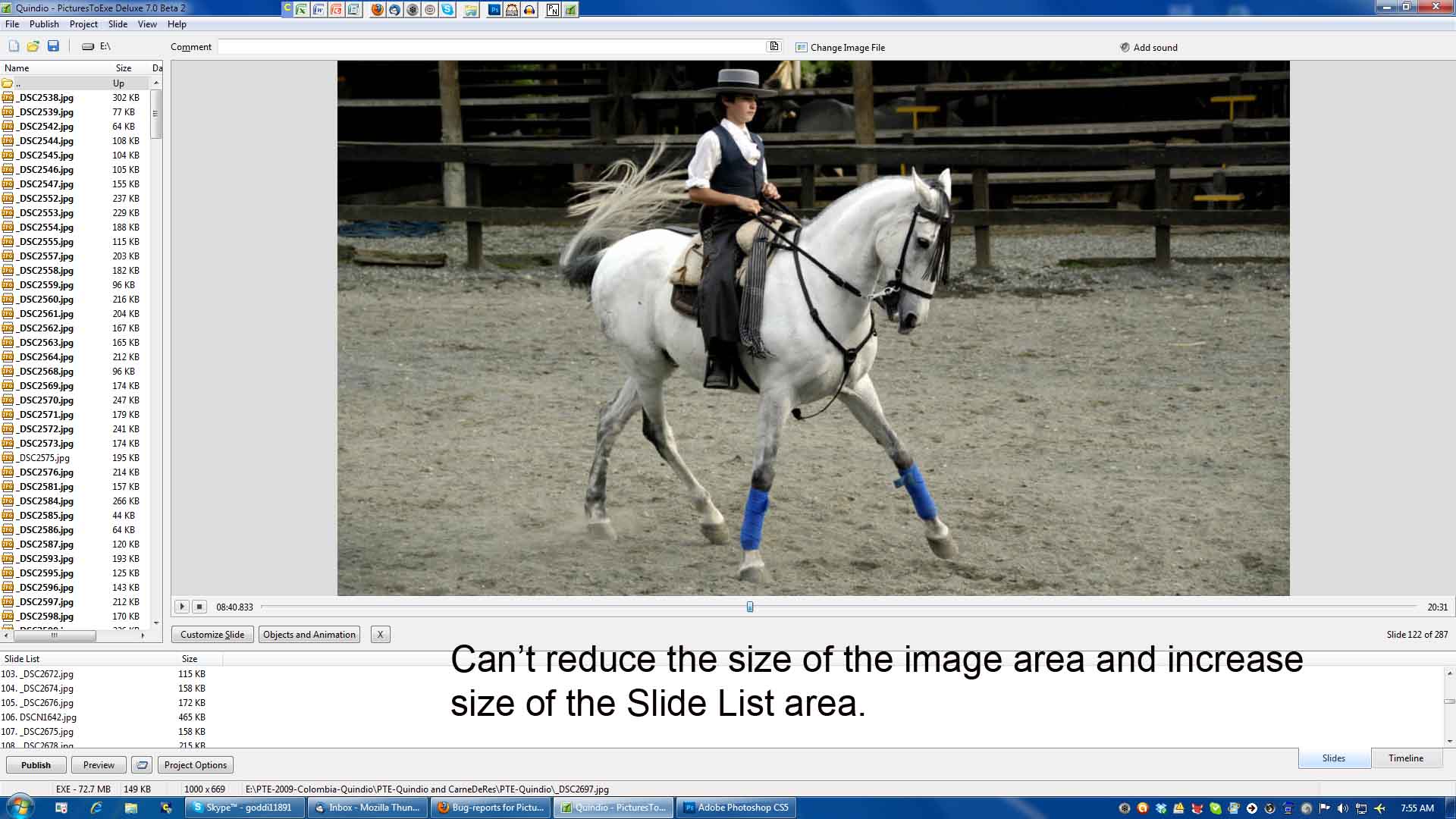
======================= Yes, Igor. That is true. However, in prior versions, the Slide List area defaulted to a much larger area. Now in Ver 7, it is too small and can not be adjusted to be larger when View/Slide List as Thumbnails is unchecked. The icon to adjust the window appears but it does not allow any adjustment. And wouldn't it be nice to be able to have more than one row of images in the Slide List area when View/Slide List as Thumbnails is checked? Thanks, Gary
-
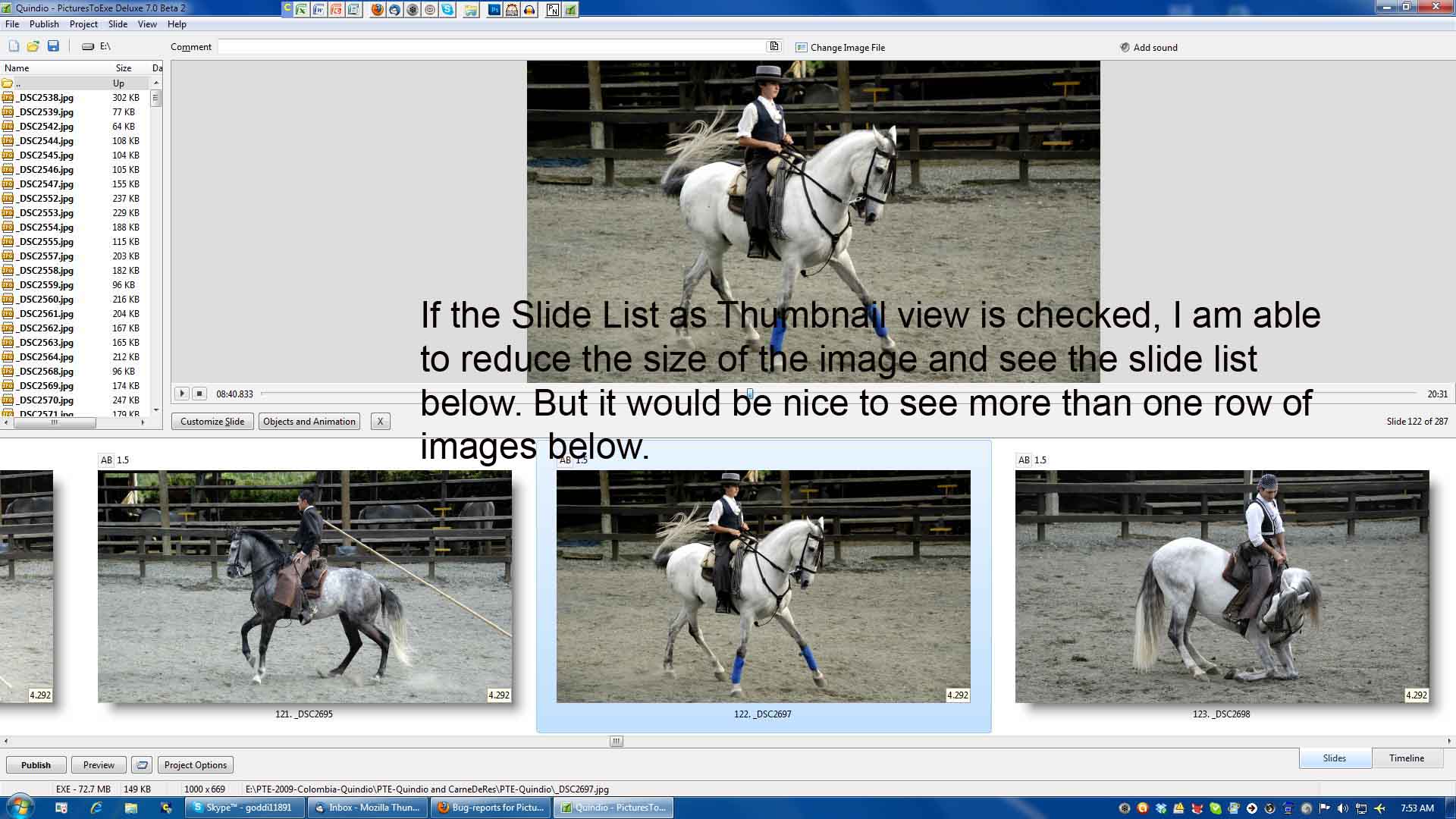
======================================== Igor, I hope the attached screen shots explain it more clearly. One attached image has the View/Slide List as Thumbnails selected. I am able to reduce the viewing area of the selected image and increase the area below to show a larger Slide List. In this View, I would like to be able to have more than one row of images in the Slide List. In the second attached image has the View/Slide List as Thumbnails unselected. I am not able to reduce the viewing area of the selected image as I can when Slide List as Thumbnail is selected. Let me know if you need more information. Thanks... Gary


-
Greetings, I just installed Ver 7 beta 2. The first thing I noticed (when the Slide List As Thumbnails is unchecked) was that the Slide List view area is much smaller and the slide viewing area above it is much larger. I would like to increase the size of the Slide List view when the Slide List As Thumbnails is unchecked. It seems that you an do this only if you have checked the Slide List As Thumbnails view. The double-line icon is there to make the change in size of the window but it does not work. Also, when in the Slide List As Thumbnail view and you increase its viewing area of the slides, they all increase in size in one row. Is there anyway to make it so you can get more than one row of images when in that View when you increase the area of viewing Slide List As Thumbnails? Thanks... Gary
-
Jean-Claude, I just went through your 4 tutorials and I found them very helpful. I have played with the audio functions but not to the extent you showed in your videos. I learned some new tricks! Thanks for putting them up and they are very understandable and appreciated. Thank you, Gary
-
Hi Gary, I'll try to find out how that works. I haven't gotten around to using the Nav Bar much yet, but soon I'll ring it out and get back to you. Best regards, Lin ========================= Lin, I don't want to install Ver7 yet because I am in the mist of a computer problem. But, I do have a question. What about the Navigation Bar? If you have video in the show with still images, will the Next button skip to the next image, regardless of what the video is doing? Or will it Fast Forward through the video and not skip to the next image? Or....? Thanks, Gary
-
============================ Dave, I really appreciate that you putting together the above data. It helps to understand what is going on. The bottom line seems to be the money. I think the best we can do is the SX80. I recently have seen two slide/AV presentations with two different projectors that would not be acceptable for any digital competition, in my opinion. This Canon SX80 should be a big improvement. But, unless we rob a bank.... Thanks... Gary
-
=============== Kieron, Thanks very much for the confirmation. At least we will be in the same boat! I will pass on your comments to our club's president. Sincerely, Gary
-
=========================== Thanks for the link, Eric. But I notice that they don't even mention the LcOS projectors. That seems to be the newer technology. Things change so fast it is difficult to get info on the cutting edge. But it has some good basic info. Limitless funds? Nope! Gary
-
=================== Dave, I did see the WUX10 but the price is beyond our club's budget. The SX80 is on sale for $2,290 and the WUX10 is going for $5,563. It is unfortunate that we don't have the bucks for the better projector. But I still don't understand, if the brochure says "the projector operate brilliantly in both 4:3 aspect ratio and 16:9 aspect ratio", what am I missiing here? It seems to be telling me that it will show the 16:9 format as the WUX10 will. Perhaps the SX80 will show the 16:9 as a smaller footprint on the screen than the WUX10??? Most of the use will be for individual digital photographs but I am trying to get the club into displaying PTE type slideshows. Thanks, Gary
-
======================= Peter and Igor, Thanks for confirming this glitch. Since I discovered the "View New Content" some time ago, it has really helped in being able to read all new postings much more efficiently. It will be great when the fix is in to perfect it. Sincerely, Gary
-
Greetings, I found the brochure on this Canon Realis SX80 Mark II and it stated the following: "Canon REALiS projectors operate brilliantly in both 4:3 aspect ratio and 16:9 aspect ratio. So, no matter which screen you own, you won't need to purchase another." http://i.b5z.net/i/u...e_10-2009_2.pdf Is this sufficient to not worry about the 4:3 vs the 16:9 issue? I read that the LCOS projectors (as this Canon is) is highly recommended. Gary
-
-
==================== Dave, I am still trying to digest all of this. In the meantime, which Epson did you get? I see that the 16x9 Canon is more than twice the price of the Canon Realis SX80 Mark II. Gary