davegee
-
Posts
9,323 -
Joined
-
Days Won
59
Everything posted by davegee
-
My take: SLICES.zip Note: Constructed at 1920x1080 on a 1920x1200. Not guaranteed at anything less than 1920x1080. DG
-
Feasible, but if that were the case should not the "create" button be greyed out? DG
-
Any noticed that it is not possible to create a Custom Transition from Customize Slide within O&A? It works OK from the Main Screen but not O&A. Tried it on both W7 Desktop and Vista Laptop - same result. DG
-

Any way to fit SELECTED slides only to soundrack v 7.5
davegee replied to philm5d's topic in General Discussion
You could also select all except the first slide - go to Customize Slide - select a suitable slide duration to bring them all into the limit of the Audio Duration and follow the previous instructions again. DG -
Not seeing it in the latest V. But the view that you get depends on the amount of scrolling you apply to the timeline (Ctrl + Scroll). When I perform the operation you describe, the Red Cursor line is always in view regardless of the amount of Scroll Set. DG
-
Any way to fit SELECTED slides only to soundrack v 7.5
davegee replied to philm5d's topic in General Discussion
Click on it and drag - in the timeline. DG -
Any way to fit SELECTED slides only to soundrack v 7.5
davegee replied to philm5d's topic in General Discussion
OK, I'm working in 7.5.1 (latest release). After adjusting your first slide timing go to your last slide (in the timeline) and adjust it so that its end coincides with the end of the music. Click on the last slide (in the timeline) then SHIFT + Click on the Second slide - this highlights all slides except the first slide. You can now select "Arrange Selected Slides". In version 7.5.1 it is in the dropdown menu to the left of the PLAY button. In V7.0.7 it is in TIMED POINTS. DG -
Any way to fit SELECTED slides only to soundrack v 7.5
davegee replied to philm5d's topic in General Discussion
After manually adjusting first slide, arrange the last slide to end with the music. Click on last slide, shift click on second slide and use "Arrange Selected Slides". DG -
See this thread: DG
-
Igor, I suspect that most people use masks to control the opacity of large groups of objects because we do not have the option to choose whether a "child" inherits the opacity of its "parent"?? DG
-
There are two kinds of Custom Transitions. The first is the kind that is tailored toward specific images in your project and should be saved to your project folder. Artem says that he has fixed a small bug which will make this kind more easily editable. The other kind can be used again and again and should be kept in an effect folder. In this case the length of the effect is immaterial and the"timeline" of the Custom Transition should be treated as a percentage and not a fixed time. These are then expandable to suit any two images in any project. Masks can be included and any of the animation effects available in O and A. IMHO etc DG
-
It is also possible to include a Mask in the Custom Transition and by using this you can isolate a portion of the incoming image during the centre portion of the transition. DG
-
Customise transition? Still not as good as third party editing but will produce what you describe above without having to add key frames every time? Worth looking at. DG
-
Editing parameters of a key frame in O&A
davegee replied to uuderzo's topic in Suggestions for Next Versions
Umberto, I'm not sure how that would work? At a point half way between two keyframes, which keyframe would you be adjusting? The one to the left or the one to the right? Always the one to the right? DG -
Editing parameters of a key frame in O&A
davegee replied to uuderzo's topic in Suggestions for Next Versions
Place the cursor in the timeline where you want to make the change. Right click - "Add Keyframe Here" - the parameters will reflect the position of the cursor and the settings of the keyframes on either side. Edit to suit. DG -
iiyama? http://www.dabs.com/category/computing,desktops-and-monitors,monitors/11109 Just tap in your requirements and you can eliminate the alternatives. Not suggesting that you buy there but I have had good dealings with them. My IIYAMA 24" is great - but I would consider changing to 1920x1080 to have everything in the same AR - for the time being!! DG
-
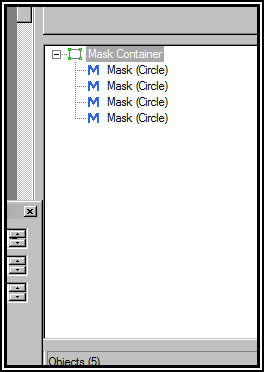
"add a new mask to a mask container" ...... "two masks into a single mask container" DG
-
Use MASK instead of Frame - enclose all Text Objects inside Mask. Add the Mask to a frame (or frames) and use them to do the Panning. DG
-
Highlight the Mask Container in Object Panel and click on ADD MASK in PROPERTIES TAB. DG
-
Tom, 7.5.1 will deal with this problem as well as mask performance issues. DG
-
Tom, Watch out for a PM. DG
-
Because it doesn't work - I have removed it. DG
-
The downloaded Template when opened up, includes, but does not use: Lake.wmv Bear.wmv Butterfly.wmv Use frames to create the ellipse. Change the vertical axis of the FRAME without changing the horizontal axis. DG
-
Igor, Your mail box is full. Welcome back!:rolleyes:/> DG
-
The transition has not changed - its name has? It is now "dissolve". If you DISSOLVE from a normal image to a black slide it is "Fade Out".;)/> DG