davegee
-
Posts
9,314 -
Joined
-
Days Won
58
Everything posted by davegee
-
Lin, Didn't your recent tests tend to prove that, whilst it is possible to make HD Video in PTE, the PZR effects take their toll on the available computing power to produce stuttering etc? In order to make a 1920x1080 HD Video you need to be able to use 1920x1080 images and if you cannot then use PZR effects as required then what is the point? I've no doubt that in future when we all have machines which are 10 - 20 times as powerful then it will be possible, but Sony etc will by that time have invented SUPER ULTRA HD requiring even more computing power! DaveG
-
500ms is almost no dissolve! If your slide time is that close to your transition time it's likely that you are going to run into trouble. Look at the timeline at the point where the problem occurs - it's possible that, for some reason, the transition time is longer than the slide time? DaveG
-
Jeff, It would help to know which Pioneer unit you have? I just looked at the Pioneer range and the top of line unit features 1080 SCALING which is not the same thing. I think this means that your PAL recordings are scaled up to 1080 size. There was no mention at all of BluRay - just the "normal" DVD playing. It this stage in the game I believe the only viable way is to play your 1920x1080 EXE files from a suitably (HDMI) equipped laptop to your TV. I have been doing this for the last 9 months or so and the quality exceeds all other methods. DaveG
-

Possible new feature for PTE?
davegee replied to Ed Overstreet's topic in Suggestions for Next Versions
The way I look at this and other suggestions is that I would hate to see the developers wasting precious time on what I see as "frivolous" requests at the expense of more meaningful improvements to the basic PTE program. It might be a time for re-grouping, consolidating and making what we already have more intuitive rather than adding bells and whistles which will appeal to only a minority. A "POLL" might be warranted, but remember guys - a poll, like an election, is only meaningful if EVERYONE takes part. DaveG -
Barbara, I have just looked at Igor's Demo and the only use of masks is on the text elements of slides one and three. The rest is down to transition effects. DaveG
-
Hi all, There is a link to Lin's MASKTUTORIAL in this thread: http://www.picturestoexe.com/forums/index....hl=masktutorial Happy Boxing Day, DaveG
-
Barbara, Choose a slide and go into O&A - The right hand side will show the mask structure. Drag the little blue arrow from side to side to see the effect. DaveG
-
Ian, You might consider putting the sequence here up at your site for download as an EXE? Please? DaveG
-
With due respect to everyone copyright is not the issue. A MIDI file incorporated into a PTE EXE would very likely sound different on every different machine it is played on. The sensible way IMHO is to convert from MIDI to MP3 before making the EXE file. DaveG
-
PF, The PROJECT folder need only contain the JPEG images for the PTE PROJECT. My RAW images are in my D300 Folder and that is where they stay. I might have sub-folders there to differentiate between different shoots, but when processing the RAW files I send the processed file from NX2 to CS3 and, depending on whether I am going to print or convert to JPEG for a PTE project, I will save to the appropriate folder. I prefer to use CS3 for final cropping and resizing. In the case of the PTE Projects folder it will be something like z:\PTE Projects in progress\Austria 2008 or similar. This folder will contain ONLY JPEG and MP3 files and perhaps some PNG files etc but certainly NO RAW files. If I want different versions of a RAW file it is simple, within NX2, to save to the same NEF file as many versions as I require (even a B&W version) - all in the same NEF file. In CS3 etc this can done with a PSD file saved to the same folder as the TIFF files. When saving PSD files it is advisable to save a small JPEG with the same name for quick easy identification. I like to work with NX2, CS3 and PTE open at the same time and will always go back to the original NEF file if a different version or CS3 if a tweak is required. I will never re-edit a JPEG file. The RAW files are in one place, the PSDs and TIFF files for printing are in another place and the JPEG files for PTE are in the PTE Project folder. When the PTE Project is finished and requires no further work I save a TEMPLATE in my Z:\PTE Templates folder and (if confident that I will not need it again) I will delete the PTE Project from the PTE Projects in Progress folder. DaveG
-
Alternatively PF, If you follow what is becoming standard procedure for PTE and having ONE FOLDER PER PROJECT and no sub-folders this problem would never occur. You cannot save two files in the same folder with the same name. Another variation on the same theme is - keep the folder near to the root of your drive until finished and then save as a template to wherever you want. Merry Xmas, DaveG
-
Well done Ian! Up to your usual standard - the master shows us all how to do it once again! Merry Xmas. DaveG
-
Hi Igor, Full path: Z:\PTE Templates\Oberissalm1920.pt\MPEG TEST\Project1.pte P.S. I transferred the images to Z:\Temp\MPEG TEST\Project1.pte and tried agan and DID NOT get the error message. DaveG
-
Sorry Igor - yes Beta 16. DaveG
-
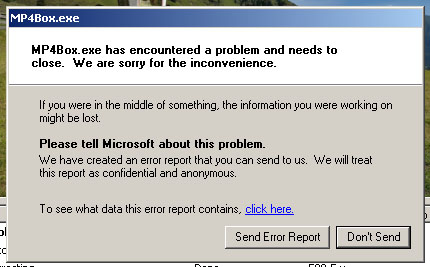
Hi Igor, When creating "HD Video for PC or Mac" I am getting the attached error message at the end of the creation of the video EVERY time. The video is created and plays but the message appears every time.(Windows XP SP2). DaveG
-
Igor, Would it be possible to place a preset number of equidistant "markers" along the timeline for each slide? In this way, if a slide is synchronised precisely to a bar of music or a number of bars of music, the placement of each beat of the music could be seen precisely without the need for calculation or reference to the waveform which can be extremely difficult. I would suggest that the number of marker presets should be multiples of both 2 and 3 to cater for all time signatures - 2/4, 3/4, 4/4 etc. This would be a tremendous help when synchronising keyframes to a piece of music where the waveform does not display a marked peak "on the beat". Thanks, DaveG
-
Lin, I recently did a series of MPEGs for a MAC user which had no PZR effects and just fade in/out transitions. The MAC user was delighted. I will try to go a little further with PZR but I suspect that you are correct. Did you try with lower resolution MPEGs? DaveG
-
Thanks Ken, The same to you also, and to all PTE'ers. DaveG
-
Bob, In addition to what Peter has said, if you have more than two keyframes AND change the type of PZR from LINEAR to anything else, you will need to go into the SETTING UP / SPEED OPTIONS and change each of the keyframe transition points from SEPARATE HERE to GLUE HERE. DaveG
-
..... and if Igor did this the first thing that would happen is that someone would want to know why the file that they right clicked on did not open up as they expected it to!!! Lin, I appluad your methodology with JPEGs BUT not everyone does that. Nor are some people aware of the implications of O, E and R-S'ing. The general consensus amongst people who ask about the "best" slide show software at places like Nikonians is that PTE is too complicated and (I hate to say this!!!!!) unintuitive. I can provide links to these statements if required. What I want from PTE is that it should do what it was always intended to do - create the best quality slide shows. Bells and whistles don't interest me in the slightest. I know how to open CS3 or Audition if required without having PTE do it for me. DaveG
-
Hi Lin, You said:"Is it really any different in substance than clicking on an Icon and viewing a JPG in Photoshop or Irfanview, etc.? When we open a jpg in any image editor we have the option of viewing it, editing it and re-saving or closing and opening a different file." I really wouldn't know because I make it a habit to always go back to the RAW file in NX2 OR keep CS3/4 open when working on files for PTE so that if I need to, I can make an edit and then save to my PTE project folder. I don't need to send the JPEG to CS3 - it is usually open in the form of a layered PSD. I gave up on shooting JPEG a long time ago. Saving VERSIONS of the same file within NEFs or PSD files is simple and allows for return to any part of the creative process without the need for having numerous TIFF files of the same original. Same goes for sound files - I keep AUDITION open when working on a file for PTE. I make it a habit to save as WAV version as well as MP3 so that I can go back to an uncompressed file if I want to do any editing. During this discussion we have refered to JPEGs and MP3s as though they are always the same in terms of quality. JPEGs, as we all know, can be quality 1 to quality 12. Would you apply the same rules to a quality 1 JPEG as to a quality 12 JPEG? Where would you draw the line? With MP3 files would you apply the same rules to a 20 Kbps file as to a 320 Kpbs file? Again, where would you draw the line? I am of the opinion that it is far safer to make a generalization that JPEG and MP3 files should not be repeatedly opened, edited and re-saved. That way, good working practice is promoted. DaveG
-
OK Lin, Now that we agree on something let's go back and consider Peter's statement: ".....we could right click on an item in the Project Options...Music tab and be taken into our nominated sound editor with that sound file opened ready for edit". That implies that it would be possible to open, edit and re-save an MP3 file, apply further compression and further degradation of the sound and be able to do that as many times as necessary to get it right. I know that Peter indicated (correctly in my view) that he uses WAV files until he has got it right and then converts to MP3. But if that facility were incorporated into PTE it would be implying to someone less knowledgeable that it is "correct" to do the same thing with MP3 files. In my honest opinion opening, editing and re-saving any JPEG or MP3 file is (what I call) "bad practice". I don't think that PTE should subscribe to something which could be interpreted as "bad practice". That's all I meant by my previous comments. It is nothing new - I have said this many times in this forum. DaveG
-
Lin, I'll try to re-word: The point I was trying to convey (the point I have always tried to convey) is that the losses involved when saving to a compressed format (JPEG, MP3) are non-recoverable. "Decompressing" does not recover the losses nor does it "fix" JPEG artifacts. DaveG
-
Hi Peter, I wasn't pointing a finger at anyone in particular. Your first sentence seems to agree with the principle that you should remain in the "lossless" state until the very end - we are in agreement. WRT JPEGs and "Compression/Decompression" - converting to JPEG is a one way street - there is no "Decompression". DaveG
-
Hi all, Sorry to have to disagree, once again, about this. The ability to take an already compressed file into another programme for edited is encouraging bad practice. This subject has been covered before. You should always go back to the last saved TIFF, PSD or WAV file and start from there. With regard to JPEGs there is a whole chapter on it in Martin Evenings CS3 book where he discourages that practice. I know that many people do it and they do not see any differences in the files - but the difference is there, however minute and I don't think that PTE, or any other programme, should be encouraging bad practice. DaveG