

macian
-
Posts
265 -
Joined
-
Last visited
-
Days Won
7




macian's Achievements

Senior Member (4/6)
-
Congratulations on this anniversary – I look forward to the new version.
-
Thanks, Jill. I thought you would know! Ian
-
Until recently, double-clicking on a slide brought up O&A dialogue. Now it opens Slide options. How can I revert to the former situation? I assume it is ridiculously simple!
-
Thank you, Igor. I wish you and your team a Happy New Year. I’m looking forward to seeing what v12 has to offer.
-
I wonder if you could post the three images so that we could see the problem and possibly offer a solution?
-
Manual Slideshow In Project Options > Audio > Loop the soundtrack. In Project Options > Control > Keyboard > enable “Wait for a key press (Space or Right key) to show the next slide."
-

Live presentation mode with preview of next slide?
macian replied to pixelfuxx's topic in Suggestions for Next Versions
Apple Keynote, too. -
I hope you have an excellent experience with PTE AV Studio on your new Apple Mac. It’s a joy to use! Ian
-
Try leaving KF3 at C=720
-
The limit may be 4Gb.
-
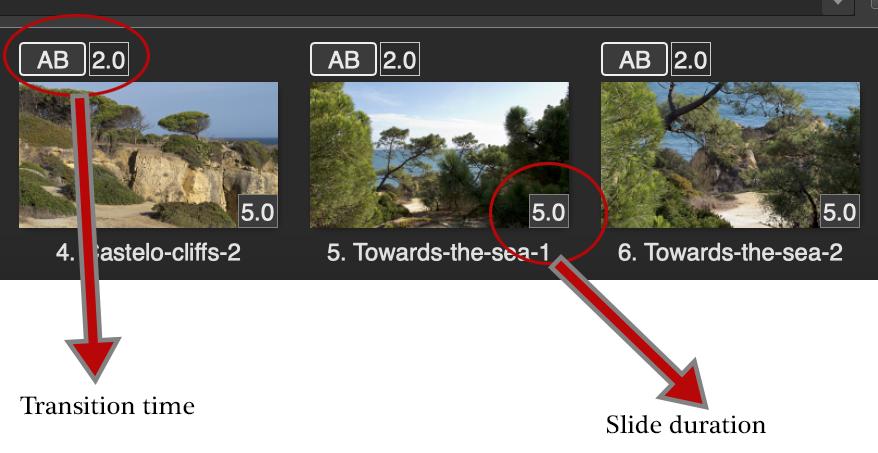
Try altering the slide duration rather than the transition time.
-
I am pleased that you have solved the problem. Je suis heureux que vous ayez résolu le problème.
-
Please translate to English on this Forum.
-
A fine presentation, Barry.
