All Activity
- Today
-
The alternative I chose for simple beginning and ending trimming of the slide in question was to right-click the mp4 clip in the file list and choose Convert/Trim Video Clip and then do the trimmimg similar to this Beckham tutorial. This ends up creating a revised video clip that can be added as a slide and is done entirely within PTEAV. Actually it was this tutorial that led me to believe that the O&A method I was fiddling with would accomplish the same thing.
-
This is so easy to do in PTE. I should have added that most of the time I just do video straight in the timeline. Add your video as a Slide. Drag the play head to where you want it start. Right click and select trim beginning of video. Then drag the play head to where you want it to end and drop your next slide or video at that point. If this is your last slide then just add a Blank. Very quick and easy. To join lots of clips together just do the same. Simply add to the Timeline in the order you want. No need to physically join them first. I only use the trim in O&A when I want to adjust the speed. No need for any external programs. Jill
-
Hi everybody. I saw a video with a heron from Digital and decided to offer this kind of design for such files. It is not necessary to use the entire project. You can apply one or more slides. All text blocks are editable. The slide duration can be extended for easier reading of the text. The slide movements are edited by the overall frame. Due to the lack of layer overlay modes in the program, the file with the crumpled paper effect is superimposed with a change in the opacity of the layer, adjust it yourself if necessary. Information about the project and the download link in the description of the video on YouTube. https://youtu.be/DUej61T06rU
-
- 1
-

-
My usual need is when I am making one of my travelogues which normally have a mix of jpg's and video clips. With the videos I may have anywhere from 2 to 4 clips on my Galaxy related to some experience (e.g., taking a gondola up a mountain) where each clip might be 20 or 30 seconds and I end up taking pieces of each to create one single clip that I end up using in PTEAV. When doing so I have been using Movavi to accomplish the editing and piecing together to create the single clip. But there are times like this where I have a single clip and I may need to cut a bit from the beginning and a bit from the end. I thought it would be easier to do entirely within PTEAV but perhaps it is easier just doing in Movavi.
- Yesterday
-
I have never had a problem with this. But then I normally set my Slide Duration first to match the Music/Voice & then Trim the video to fit that Duration. I will adjust the speed of the video to match the Duration. Obviously I wouldn't do this if I needed Lip Sync, but I very rarely have a video with speech on it. I guess it depends how you work, but I am very happy with the way it works now. Jill
-
If the only "object" in the slide is the video clip and you trim from the beginning and end of the clip on O&A doesn't it seem like the duration should also adjust to match the duration of the revised clip? I guess I can just change the duration myself but it seems like this should be automatic.
-
It has always been so and has been discussed ad nauseam. You are trimming the object (the video clip) and not the slide duration. I have always seen a case for trimming the slide duration when trimming a video clip IF the video clip is the Main Object but.......
-
That is exactly my point. Why bother with any "clip" adjustments if they don't actually translate to the slide? Again it seems like there is something missing here.
-
jmc, Agree, very strong app. A lot of potential. Hope this is just the beginning. Thanks for the comments. Best Alex
-
Very nice work, and a really beautiful song too... Well done! You must spend hours on PTE, but it's definitely worth it. What mastery of this wonderful software... once again, congratulations.
-
 Gerald joined the community
 -
When you trim a video, the clip duration changes, but the slide duration remains unchanged.
-
The commentary in this sequence was written by me, but read by Grok AI in the accent I determined. So, for those who find commentary a bit challenging, here is a way to avoid all the microphone issues, mis-spoken words and spoiled recordings and no dealing with noise in the audio
-
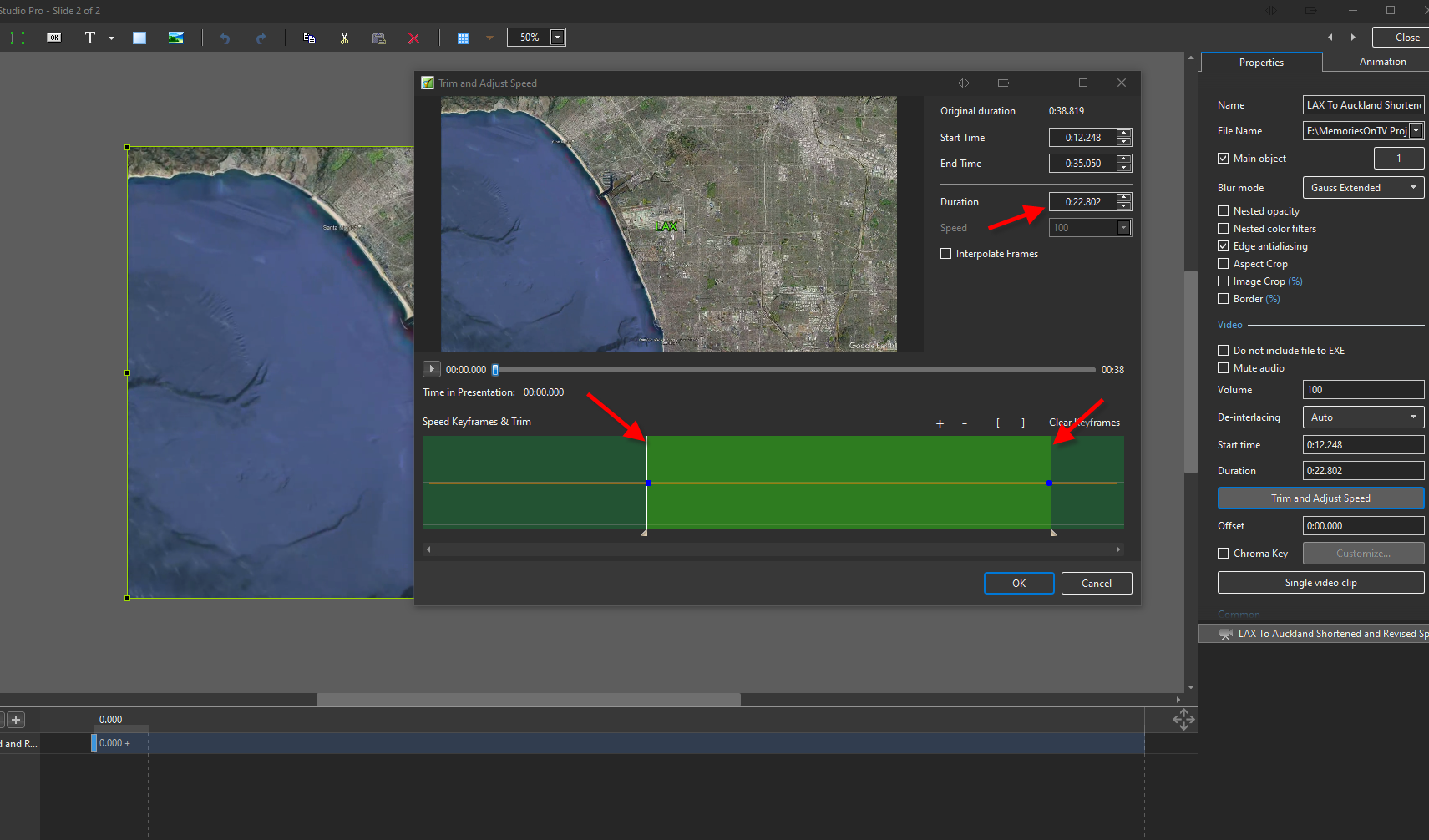
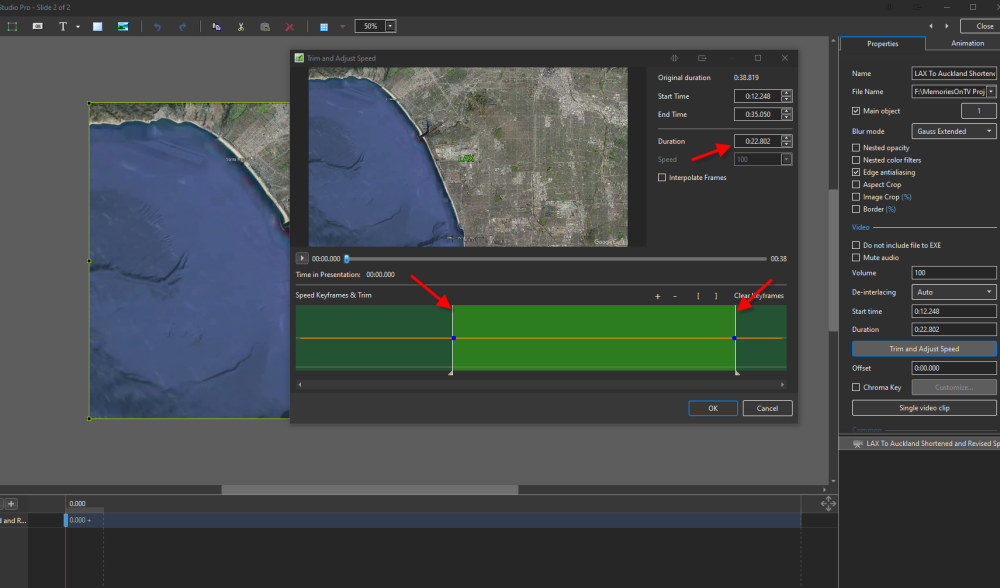
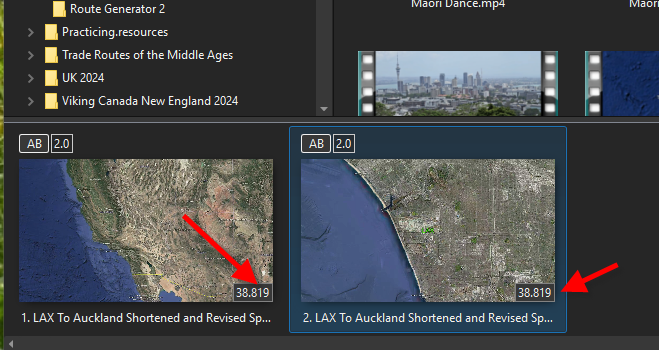
I am still stumped with the Trim and Adjust property feature with a video. I have a video clip that is about 38 seconds long. I add it as a slide and then add it as another slide right next to the first just to play around. On the second slide I go to the Properties and choose Trim and Adjust Speed and move the start and end points and it shows doing so changed the duration to about 23 seconds. HOWEVER when I go back to the main screen the duration shows the same on both slides and then when playing the second slide which I thought I reduced to 23 seconds it still shows the 38 second duration and it plays for 38 seconds although the last 14 seconds or so is just really a freeze frame. What am I misunderstanding or doing wrong since it seems that the Trim is not really having the desired effect?
-
Hi Mike I am interested in your stand against Adobe and just trying to understand it from your perspective. Here is why I support Adobe from my POV. Affinity is free now that it has been bought by Canva, an Australian privately owned business. It was inexpensive before Canva purchased it and updates were done with some frequency. My use of Affinity was for 360 editing after Adobe discontinued that in pursuit of the AI editing. I know Canva is a desktop publishing platform and it is still privately owned at this stage. My memories of Google buying Nik Efex, making it free but never updating, and it eventually lapsed until bought by DXO. Canva is expected to list in 2027 as one of the biggest IPO's. My concern is how Canva will put money into R & D for Affinity in the future after listing? Has Canva purchased Affinity to boost the IPO price? Shareholders continually want increased profits and the first thing to go is R&D that does not generate income (even though it is a part of Canva desktop). I just renewed my yearly Adobe Photography Plan subscription in Australia for under $200 a saving of over $80 on the monthly plan. I believe it is more expensive in the US? I also seem to be getting rewarded for being an early adopter of the subscription model that started in 2013. It was $108 AUD then so an $87 increase in over 13 years is hardly price gouging with all the new features. I recall that PS Ver 1 on 5 floppy disks was $1600 AUD with no free updates and there were more pirated copies than officially versions sold by Adobe. Cheers Mark
-
Thanks, I have some infrared images that I can use this style on. Mark
- 1 reply
-
- 1
-
- Last week
-
Thanks John, and I completely understand that, as that would be my preference. For me, this was practice in getting the text tightly around the image and other images (I have over 50 similar from this chance meeting), but the text alignment was a problem, covering part of the image. I will try just a few words of text on different images when I get a chance. Cheers Mark
-
Hi everybody. 10 transitions in the style of an Old Film Frame for your creativity. The download link is in the description of the video on YouTube. https://youtu.be/Gskzy8bzjYw
- 1 reply
-
- 4
-
-
Apologies for not replying sooner after the prompt replies. Yes, I could create a cut out using PS etc. but I was hoping to be able to do this easily from within PTE . But you are right, in the absence of PTE, then its PS (actually for me it'll be Affinity but that's a point of detail).
-
Nice work on the text personally I'd prefer changing images every 3-5 seconds
-
Pleased how this short AV turned out after some experimenting with the text. The Great Egret is the largest of the Australian egrets. Identification The Great Egret's overall plumage is white, and, for most of the year, when not breeding, the bill and facial skin are yellow. The feet are dark olive-grey or sooty black, as are the legs. During the breeding season, the bill turns mostly black and the facial skin becomes green. Also at this time, long hair-like feathers (nuptial plumes) hang across the lower back, and the legs become pinkish-yellow at the top. Young Great Egrets are similar to the adults, but have a blackish tip to the bill. Habitat Great Egrets prefer shallow water, particularly when flowing, but may be seen on any watered area, including damp grasslands. Great Egrets can be seen alone or in small flocks, often with other egret species, and roost at night in groups. Distribution Great Egrets occur throughout most of the world. They are common throughout Australia, with the exception of the most arid areas.
-
Ok, we'll check again.
-
Lock slide to section of audio track -- is it possible?
digartal replied to mhwarner's topic in General Discussion
Would it be easier to save the project as a different name rather than move slides? I use this a bit to create different versions of the same slide set to different music and transitions? -
Nice, well-composed, and tells a great story. Thanks for sharing.
-

Lock slide to section of audio track -- is it possible?
mhwarner replied to mhwarner's topic in General Discussion
Thanks for the response, Jill. I just wanted to be sure I wasn't missing something. Not the best option but your idea of creating separate projects might work. I will experiment.