All Activity
- Past hour
-
I really like the idea of multiple slide/object tracks. We've already written some of the code. One of the most important ideological questions is slide duration and transition duration. You can already see (V11) the difference in the timing concept for slides and audio clips - they are calculated differently. I'd like to discuss this topic after the release of V12.
-
That's a good idea. Let me think about it.
-
Bruno, thanks for checking!
-
Multiple image Tracks were asked for a long time ago & have been worked towards for equally as long. It is not that the programming itself is complicated, but that it changes the whole way in which PTE will work It is far more than just adding in extra code, the whole structure will need to change. I am not involved with the development of PTE, but I can fully appreciate what is involved it trying to do this. It is a major rewrite of the basic code. To enable existing Projects to still work will be even more complicated. PTE is extremely powerful as it is, you can do so much in O&A. But some things require a bit more effort from the user. Adding in extra image tracks may make some things easier to do, especially for beginners. But we still need to retain the power & flexibility of O&A. Jill
- Today
-
 Fredja joined the community
 -
Hi, I’ve already asked about this in another post, and they directed me here. I see now that it’s not good news; I was hoping that, given how much gameplay potential those timelines offer, they would be included in this update. I understand that programming can be complicated, and as more features are added over time, it can become even more complicated, Since it seems like more people are asking for it, I thought this would have been considered a long time ago to make this leap in this version
-
Georges, I really appreciate your comment! Thanks and good luck . Best Alex
- Yesterday
-
Bonjour, C'est très original, recherché, très créatif. J'admire la maîtrise que vous avez de PTE. BRAVO. Et merci pour le partage. Georges Hello, This is very original, sophisticated, and creative. I admire your mastery of PTE. Well done. And thank you for sharing. Georges
-
See
- Last week
-
See Here - Scroll to the bottom of the post to the latest Jill
-
Can someone please advise what has changed in the recent update, I have not found anything so far. Thank You
-
Thanks, Bruno. I already tried organizing them into categories based on the number of images, and it’s a mess—it didn’t work out well for me. And now that there’s a search function and a filter, I don’t find it very practical. I’m just saying this is my experience; maybe that system works well for others. When using other programs—it doesn’t have to be this type—I miss that feature here. And now that there’s a filter, I think it would be better if the list were displayed the way I described. Again, this is just my opinion; it doesn’t have to be practical for everyone else. I’m just basing this on my experience with other programs.
-

Quick Search in Styles and Transitions in V12
Tonton Bruno replied to Igor's topic in PTE AV Studio 12 Beta
As for two images you may find a hundred of styles, it is better in my opinion to sort them by categories, because you know which ones are your favorite categories, and you rich faster the best suited style. In the reverse case, few styles in only two or three categories, the fact they are sorted by categories has actually no impact on the browsing time. This is why I consider that the present organisation is the most efficient one. -
Yes, Bruno, but what I mean is setting up a filter for two images, so that you don't have to go through each category one by one to see the images in each one, but rather display a list of all the images across all categories. I'm not sure if, for this, there should be a default “All” category that, when selected, displays all the styles using that filter.
-
Quick Search in Styles and Transitions in V12
CorVdK replied to Igor's topic in PTE AV Studio 12 Beta
Works as intended. Useful feature, thanks. Greetings, Cor -
Quick Search in Styles and Transitions in V12
Tonton Bruno replied to Igor's topic in PTE AV Studio 12 Beta
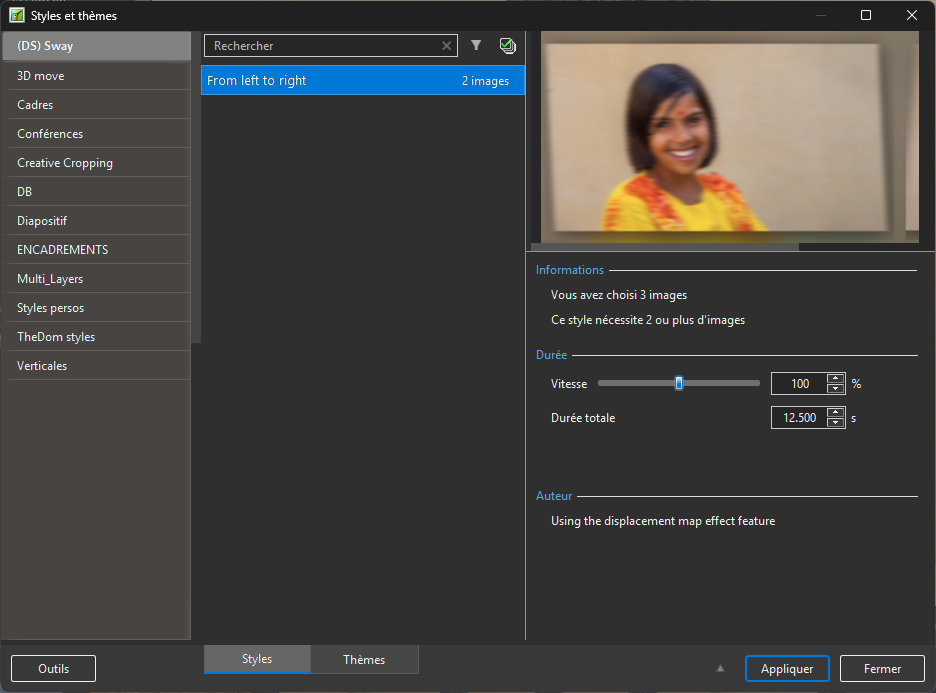
Yes, it works fine ! @SoCu: Displaying a list of the number of images works within all categories. The available categories are listed on the right and you have to choose them one at a time. if I add a filter for 3 images, I see that styles are found into 6 categories, and they are displayed by category. If I add a filter for 2 images, I see that styles are found into 11 categories.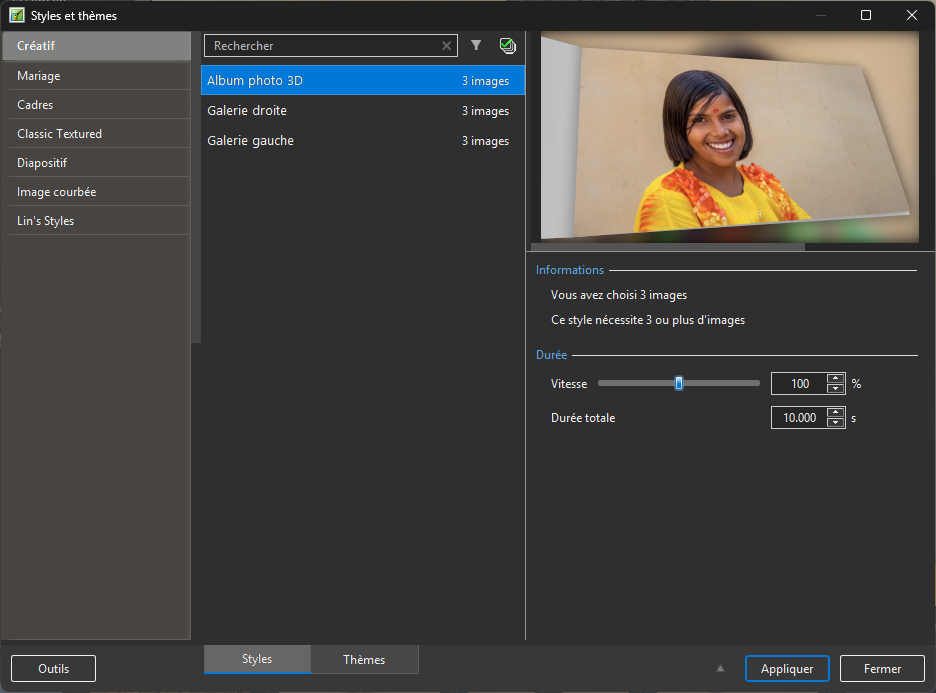
-
Hi Igor, it seems that displaying a list of the number of images only works within a single category. Is it possible to make it display a list of the number of images across all categories?
-
Thanks, Bruno! Can you also check this new function: Quick Search is now accent-insensitive: typing "a" will match both "a" and "à"
-

Master & Linked Videos Can Not be Copied - In PTE11 also [SOLVED]
Igor replied to jkb's topic in PTE AV Studio 12 Beta
Hi Jill, thanks for checking! -
Patrick, Thanks for sharing your impression. Yes, using this App is a great way to express yourself in terms of creativity. If you need it. Glad you like this one. Best. Alex
-
Master & Linked Videos Can Not be Copied - In PTE11 also [SOLVED]
jkb replied to jkb's topic in PTE AV Studio 12 Beta
Hi Igor, this all seems ok now. Thanks for fixing it so quickly Jill -

Free Music / SFX Resource - Over 2000 Tracks
Eric Matyas replied to Eric Matyas's topic in General Discussion
Happy Friday the 13th. I'm not a superstitious person, but I know a lot of people are, so to honor this day I'm releasing this week's new music track on it: "NIGHT STALKER 3"_Looping (LoFi) You can listen to it here: https://soundimage.org/wp-content/uploads/2026/03/Night-Stalker-3_LoFi.ogg And download it here: https://soundimage.org/horror-2/ As always, it's 100% free to use in your projects with attribution. Attribution information is here: https://soundimage.org/attribution-info/ OTHER HELPFUL LINKS My Game Music Mega Pack (over 1400 tracks and growing) https://soundimage.org/ogg-game-music-mega-pack/ My Genre Music Packs: https://soundimage.org/ogg-music-packs-2/ Custom Work: https://soundimage.org/custom-work/ Support: https://soundimage.org/donate/ Enjoy, please share my site, and, most importantly, please stay safe. 🙂 -
Quick Search in Styles and Transitions in V12
Tonton Bruno replied to Igor's topic in PTE AV Studio 12 Beta
Yes indeed! very handy and useful! We can combine search by author and number of images. Thanks a lot! -
Master & Linked Videos Can Not be Copied - In PTE11 also [SOLVED]
Igor replied to jkb's topic in PTE AV Studio 12 Beta
Hi Alex, I'm glad, thanks for the confirmation! -
Glad that you like this new function! I just updated a text description in the 1st above above and added a new screenshot.
-
Quick Search in Styles and Transitions in V12
AlexRoma replied to Igor's topic in PTE AV Studio 12 Beta
Amazing! Thanks to Igor and all the staff.


