Leaderboard



Popular Content
Showing content with the highest reputation since 09/03/2026 in Posts
-
Hi, here are some transitions I've created with the help of a friend who gave me a hand with a few minor issues. Since these are my first ones, I'd like to share them with you. https://www.mediafire.com/file/0kqiuqzxbo61z9f/Papel_Unido_v.2.rar/file10 points
-
Hi, here are some transitions for you; I hope you can use them if you like them. https://www.mediafire.com/file/gw0ot8t04q2z5o3/4K_numeric_transitions.rar/file7 points
-
Hi, This feature (timeline scaling) is already on our TODO list, and I agree that it would be very useful. Let me say a few thoughts. We have many ideas for improving the product (PTE), so we constantly have to choose what to build now and what to implement later. Some ideas or features might look simple but are actually very difficult to implement, because they are deeply integrated into complex old code. Sometimes we wait to rewrite a whole large section of code so we can add several new features at the same time. We have a small team. For example, one person writes the code for slide styles, another work on the Objects and animation editor, and a third works on effects and custom transitions. There is also important ongoing work - refactoring (restructuring) old code - that is not immediately visible to users but is very impotant to ensure the legacy code doesn't break down under the weight of new features and effects. Then there is the matter of cross-platform support (PC and Mac). Sometimes we spend a long time working on a new feature or effect and hit a "dead end" - it doesn't work as intended, so we have to delay it, and time is lost. Yes, we might also make mistakes when prioritizing which features to include in a new version. We're trying to make the program better with every release, but we aren't perfect, and we ask you excuse us, if we don't always meet your expectations! In any case, I always welcome all constructive criticism and reminders about the features you’d like to see. Thank you!6 points
-
Hi, We've added experimental support for images in PSD format. It works only for PSD files saved with the "Maximize Compatibility" option (enabled by default in Photoshop), which includes the merged layer. Try the new v12.0.5 Beta: https://www.pteavstudio.com/forums/topic/56408-pte-1205-beta/ Please check this Beta with your PSD files and let me know if they are all supported in PTE AV Studio now. Would it be disappointing if some PSD files failed to display (PSD images saved without the "Maximize Compatibility" option)? Should we keep this experimental feature in the final code of V12? We still recommend to use JPEG format as the best choice - it offers an optimal file size, very good quality, and fast loading, especially for high-resolution images.4 points
-
In my experience I agree with Nelson and JKB. I have owned PTE for many years (probably V1 in the 90's) and always found the developers very reasonable, responsive, supportive and I am not aware of any other applications that have this contact with the developer support from. One of the other major competitors is no longer being developed or availalble so I appreciate the support and development assistance of PTE. Sometimes in life we don't always get what we want. Furthermore, while not a developer, I do know some software has some legacy platform problems and what is requested may not actually be viable/possible using the existing code/platform. I certainly appreciate the time and effort by the developers in implementing the recent changes for V12 and the updates since. Also compatibility with new hardware is a problem. I do notice updates and changes to suit Apple OS changes regularly even though I am not an Apple user. There is an old saying, you attract more flies to honey than you do to vinegar. Seeking support for changes in an empathetic manner I have found is more productive. Thank you to Igor and the team for your assistance and support, I certainly appreciate it.3 points
-
Lots of features have been added over the years at users requests. If it was easy to add the Zooming in for O&A then it would have been done. So it may not be easy to add. WnSoft are a very small company with limited resources & PTE is continually being developed. Other changes are constantly being worked on & will appear when ready, Jill3 points
-
Hi, PTE AV Studio 12.0.5 Beta is available: Added support for images in PSD format. Only for PSD files saved with the "Maximize Compatibility" option (enabled by default), which includes the merged layer. Added support for videos in the MXF file container. Fixed an issue where TIFF images used as decorations were not displayed correctly in slide styles. Fixed an issue on macOS where Arabic letters in text objects overlapped each other. Download for PC: https://files.wnsoft.com/test/pteavstudio-setup.exe Download for Mac: https://files.wnsoft.com/test/PTE-AV-Studio.dmg Player for Mac: https://files.wnsoft.com/test/PTE-AV-Player.dmg The About window shows v12.0.5 Build 2 (Build 1 on Mac)2 points
-
Hello everyone, I leave you the link to these transitions in case someone wants to try them. Edited: I have created some new transitions that are slightly lighter in file size by using blend masks and eliminating the alpha video. I will leave the link to the previous ones so they can be used in version 11, while these new ones are for version 12 only. PTE AV Studio v.11 y v.12 https://www.mediafire.com/file/l4jq6xlu6ze3stv/Light_Leaks_Transitions_2.rar/file PTE AV Studio v.12 https://www.mediafire.com/file/tv281dluq0b7yb5/Light_Leaks_Transitions_2_%28PTE_12%29.rar/file2 points
-
Hi, If you like the new PTE AV Studio 12, please share the news about V12 on your page or with your photo club. Thank you! Here is a short example text. Feel free to edit it as you like:2 points
-
Hi, Try the new version 12.0.5 Build 1: https://files.wnsoft.com/test/pteavstudio-setup.exe Now it works correctly with TIFF images in slide styles.2 points
-
Yes, it' a common issue for all TIFF files included in a slide style or CT resources. TIFF decoder incorrectly handles the "{" character in the file path. We have already fixed this bug, and the solution is very simple and reliable - just one line of code. I'll publish the new version on Monday.2 points
-
Imagine you own PTE V11 and you're going to check if a new version or update is available. If your version is up to date you will see "You are using the latest version of PTE AV Studio Pro 11 ..." when clicking on Help / Check for free update menu. And when clicking on Help / Check for new version you can see "You are using the latest version of PTE AV Studio Pro 11" There is nothing to indicate that a new version of PTE is available. It would be relevant to display a message stating that version 12 of PTE is available. (For example, Audacity displays this type of message for version 4). For users who frequently visit the WNSOFT forum, it's obvious that a new version of PTE is available; however, for others, there is no information regarding the availability of V12.2 points
-
This story is based on a local platypuses in a creek not far from my home. Pip is a curious cartoon like AI created young platypus who lives in a beautiful Australian creek in the northern rivers of NSW.2 points
-
Reworked D drive and now using it. Thanks all for the help!2 points
-
A little late, but... I have a small gift for you in connection with the release of version 12 of the program. A set of transitions for your creativity. I hope you find them useful. Thank you. ZigZag Fold Transitions PTE AV 12 includes three transition options: A standard package of four transitions, A 9x16 version for vertical videos, A version with sound effects. Download link below the video on YouTube2 points
-
I have checked out the PSD support & yes it does show PSD files in the FileList & they can be added to the SlideList. But they do take a long time to display the thumbnail in Filelist as they are so large. As I now do all of my editing in PTE I no longer use Photoshop or other programs that create PSD Files. All of my PSD files are very old, but they do work. However I cannot see any advantage in using them, they are very large files & it only shows the visible image rather than individual layers. Creating a jpg from the PSD is very easy & produces a much smaller file size which is much quicker to load & use within PTE. I will stick with jpgs & doing my editing within PTE. Jill1 point
-
Aleina, thanks for your response! Glad that PSD support works correctly. --- P.S. This Beta is a stable version, so we can publish it as a final version.1 point
-
I am very grateful for the PSD support—it is really important to me, as I often have to mock up items like newspapers in the program. It solves so many problems at once! I’ve tested this feature, and it works!1 point
-
Hello, I’m sharing these 15 styles with you; I hope you like them. They are for creating slides with text, images, or both, with the option to change the background. https://www.mediafire.com/file/h5pvsstzbo9mxv4/4K_Floral_Styles.rar/file1 point
-
Malcolm, The discount expired a long time ago, it was only if you bought it pre final release. PTE already produces optimised file sizes, so running a MP4 created in PTE through Optimiser won't really reduce the file size. At least I don't think it would. But if your MP4 has been created by another program, then it may reduce the size. But I think PTE would also. This is my understanding, if Igor can say otherwise then I stand corrected. Jill1 point
-
I sometimes have problem focusing my digital camera (Nikon P950) on birds when they are nesting in trees. My camera does not have a manual focus ring. In Affinity I select the bird and create a mask, then use a Live Filter Light layer with texture option which creates a bump map of the image. I have found this method helps to recover detail that unsharp mask does not. I think Photoshop also has a light filter. https://www.affinity.studio/ https://www.affinity.studio/help/filters-lighting-effects/ Thanks, Tom Example (I probably recovered too much detail in this example)1 point
-
AI like ChatGPT can recover much more detail. After AI identifies the subject (or you describe it), then it can add more detail to the feathers because it knows what a Night Heron looks like. You can use a budget low resolution camera and get good results by enhancing with AI. AI masking, sky replacement, resizing, and noise reduction is common in most photo editors today. I almost always use AI to help identify new birds I have never seen before.1 point
-
Let me see if I can explain this clearly: if I provide the style and you want to change "Halloween Party" to "Halloween Night"—well, if I create the style in PNG format, you won't be able to edit the file. However, if I create it in TIFF format, anyone who wants to can edit it to their liking—using an editing program like Photoshop or GIMP, for example.1 point
-
"We all want the program to be as strong as possible so we all benefit. But it's worth remembering that turning ideas into reality requires complex decision-making, staffing, and budget. Personally, I find the software very feature-rich for its current price point. It raises an important question: if we want a faster influx of new features, how much more would we collectively be willing to pay to fund that extra development?"1 point
-
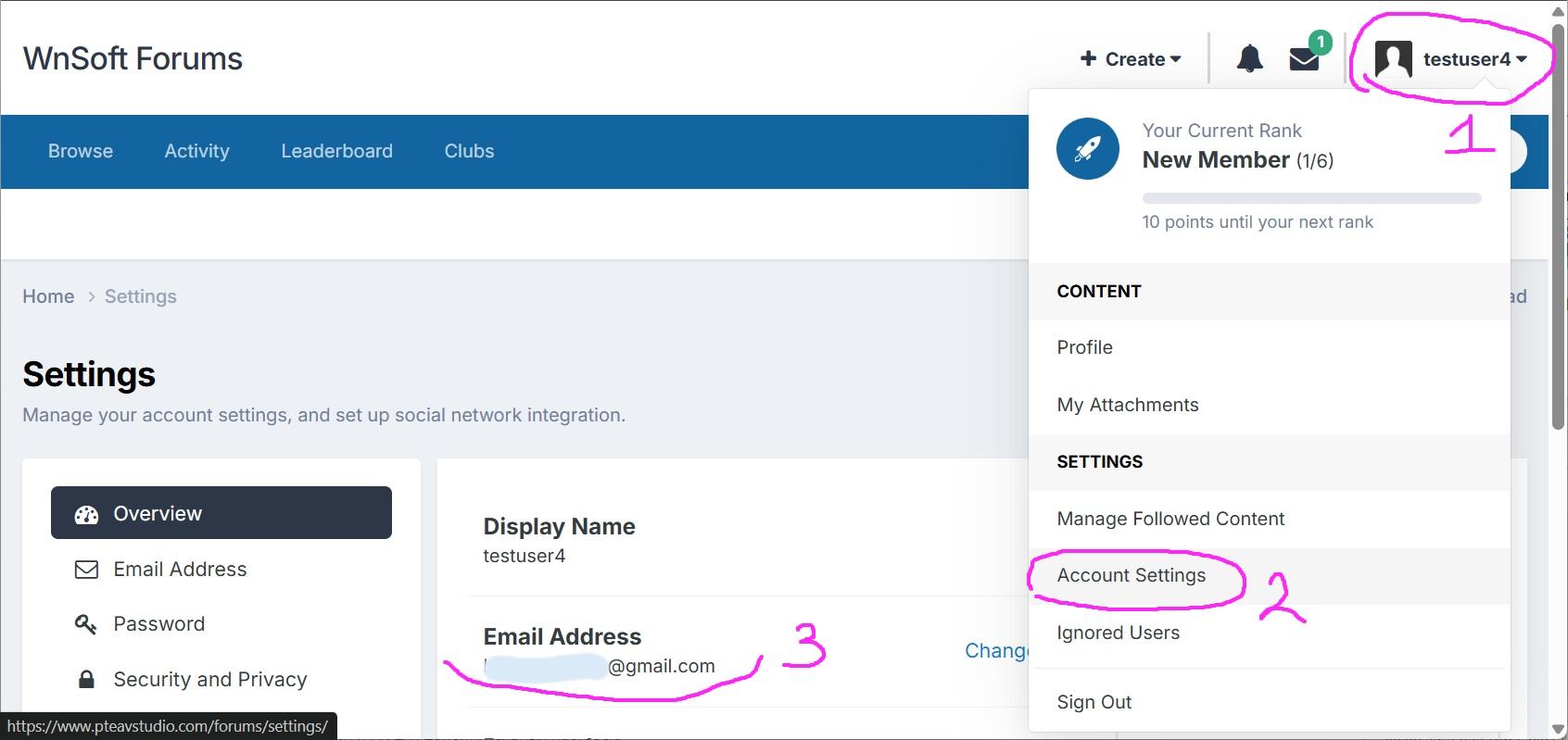
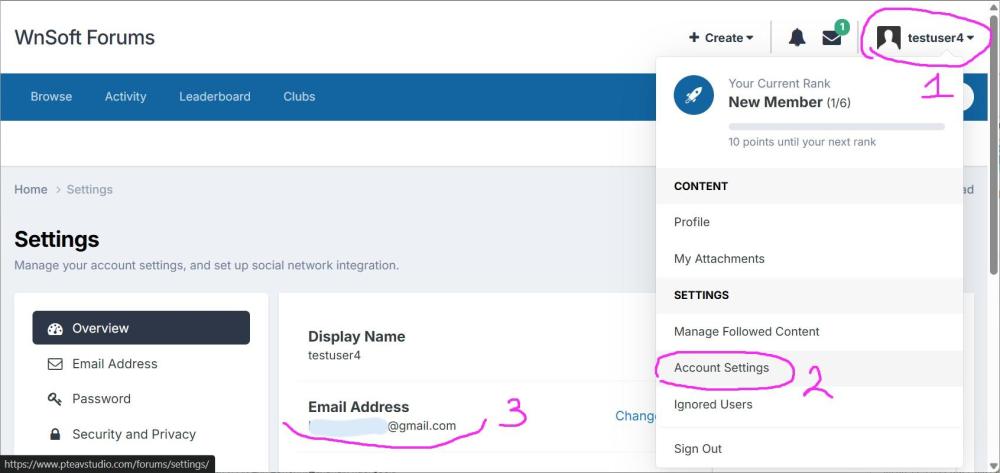
Hi, We plan to update the forum software to version 5.0 in 1-2 months, because the current version 4.7 will stop getting support after December 31. In the new forum version, you will log in with your email address + password. Right now you use a username. Please check that you remember the email address used in your forum profile. Click the profile icon in the top-right corner Select "Account Settings" Your profile page will show, and you will see your email address there Later, when we update the forum (we will tell you in advance), you will need to enter this email address and your password. If you need help, please contact me through the contact form: https://www.wnsoft.com/support/
 1 point
 -
Thanks. I just used the free ChatGPT. I am in 2 minds about the development of AI and where it is going. The green washing of the impact on the environment as well as the unkown use and potential are a concern. Luckily for me, I live within waking distance of a creek that has been 1 and 4 each time I visit. On saying that they are more active at present as it is the mating season. Have manged to capture briefly 2 males fighting and a courtship on camera/video. Cheers Mark1 point
-
Updated version of PTE AV Studio 12.0.4 is available for PC and Mac Download: https://www.wnsoft.com/pte-av-studio/download/ Or use the Auto Update function: Main menu > Help > Check for Free Updates Fixed an issue where a video clip with adjusted speed or a trimmed start could be skipped in the final render during video export. Fixed an issue where restoring a backup project loaded files from their original location instead of the project's backup folder, if the original file was available. About window shows: 12.0.4 Build 1.1 point
-
Hi, I see the problem with this style (confetti) in V12. We’ll check the code today.1 point
-
Hi SoCu I confirm this style works well with PTE 11 and unfortunately the confetti appears white with PTE 121 point
-
SoCu, This Style works OK with Version 11. Original Post is here: https://www.pteavstudio.com/forums/topic/20848-confetti/#comment-138292 Possibly Igor can throw some light on this?? DG1 point
-
I asked AI about your problem 🙂 1. Toggle Hardware Acceleration (Most Common Fix) PTE relies heavily on the computer’s graphics card to encode MP4 videos. A recent graphics driver update can sometimes cause errors. [1] Have him go to the Publish menu -> HD or 4K Video. Look for the Hardware Acceleration checkbox at the bottom of the window. If it is checked, uncheck it and try publishing again (or vice versa). [1] 2. Check the Destination Folder (Permissions Issue) Sometimes Windows or macOS blocks PTE from writing a new video file to certain directories due to recent security updates. Ensure he is not trying to publish directly to an external hard drive, a USB flash drive, or a cloud-synced folder (like OneDrive, Google Drive, or Dropbox). Have him change the destination path to a simple, local folder directly on his main drive, like a folder on his desktop or local C:\ drive. 3. Scan for a "Corrupt" Asset or Missing File Because the failure happens on this exact project file across multiple versions, there is likely a single corrupt or unsupported image, audio track, or video clip embedded in the timeline. [1] Look for missing files: If a file was moved or renamed, PTE might show a "File Not Found" warning on the timeline. Isolate video clips: If he has embedded shorter .mp4 or .mov video clips inside his slideshow, one of those clips might have a codec that is choking the encoder. Have him temporarily remove any video clips from the timeline and see if the show publishes as an MP4 with just the stills. [1, 2] 4. Create a Clean Test Zip To verify if it's a system issue or a file path issue, he should use the built-in backup utility: Go to the main menu -> File -> Create Backup in Zip. Save that zip file to his desktop, unzip it into a brand new folder, and open the new .pte file from there. Try publishing from this clean, consolidated folder. [1] 5. Check for Third-Party Interference Sometimes antivirus software flags the temporary encoding processes PTE uses to build an MP4 as suspicious, blocking the file creation. He can try temporarily pausing his antivirus program for 5 minutes just to see if the video publishes successfully.1 point
-
Try loading the Sample Project from HELP. Publish at the same settings - will that publish OK? If so, start looking at the content of your project. How many slides, Images, Videos etc. DG1 point
-
Is drive D a Physical drive on your computer? Is it connected via USB - if yes then try disconnecting & reconnecting Does it have enough free space? Can you create an exe on the same drive? Try a different Drive & see if it will create I cannot see anything wrong with your settings. Jill1 point
-
Okay, so the transitions have been added in reverse order. When you add this second transition, the first image displayed is the previous slide so the effect isn't the same as before. I've put the link in the first post; I removed the previous one since those transitions are included in this version, and I've also changed the video to show what they look like.1 point
-
Hi SoCu, I understand what you try to do - make a bigger copy of the text object under the normal text, to look like an outline effect. The problem is - when you make the font size bigger, the letters don't grow the same on all sides. Bigger letters shift a bit and cover the small text more on one side, less on other side. This is why outline look normally in some places and not OK in other places. Jill's idea is the right way for this - use Ring Shadow to simulate outline effect. P.S. Your pictures are on Imgur web service, and Jill can not see them, because of regional limitations of Imgur. Better to upload pictures as attachment to your post here on forum, not link to outside service.1 point
-
Hi everybody, The Project you see was created entirely in PTE 12. All the pictures are 9x16 Aspect Ratio. Just replace the Placeholders in " .EDIT" folders with pictures or videos of your choice. There's a Transitions ,so you can use any number of the Slides. The Link to the Project is included .1 point
-
Beautifully put together—it immediately draws you in and makes you want to try it out yourself. It’s truly impressive. Thanks for sharing.1 point
-
Thank you Alex for sharing. I've recently repurchased PTE since I stopped using Proshow and have been replicating some of my favorite transition and styles. Its incredibly helpful to take a peek at some of the amazing and original transitions and styles you have created.1 point
-
PTE describes positions and sizes of objects using percents. Pixel values are not involved. So, if you work in O&A using percent (%) for the inputs of Pan and Zoom, the precise values of "Virtual size of slide" don't play any role, provided that the entries describe the correct aspect ratio. So, for any 16to9-project it does not make a difference, if the virtual size is 3840x2160, or 1920x1080, or just 16x9. The situation is different if you work with Pan and Zoom in the uncomfortable way using pixels (px). In this case you should chose for virtual size the resolution of the device on which in the end the show will be presented. Nevertheless, as said above, in PTE's project files pixel values for Pan and Zoom will not occur. Everything will be transformed to percents. And working in O&A with percents allows you to position the objects with high precision.1 point
-
Hello everyone. I present to you 8 transitions in the “Light Film Frame” style for your creative work. The download link is in the release description on YouTube.1 point
-
Hi, You can send Barry a personal message with this question: https://www.pteavstudio.com/forums/profile/671-barry-beckham Or perhaps Barry will see your question and answer it himself. Please read the 11 mini tutorials for all the new major features in PTE AV Studio 12: Every publication tells about a new feature, includes screenshots or a video demonstration, and sample projects: https://www.pteavstudio.com/forums/tags/new feature/ 2. The online help has updated articles for new features: https://docs.pteavstudio.com/en-us/12.0/v12_wn/main 3. Also read the What's New page on our website: https://www.wnsoft.com/en/pte-av-studio/whats-new-12/ It tells about new features and includes screenshots and video demonstrations.1 point
-
Hello everyone. The project is a demonstration of the new features of the 12th version of the program, now with layer overlays. The Light Leaks overlay now works relatively correctly, relatively because the mask effect has to be applied to the entire composition, not just to a layer, and the overlay of the image on the folding paper works correctly. BD.1 point
-
This is the same video with 2 different edits to show how you can reframe a 360 degree video after capture.. It needs to be edited in special software provided by the drone company.1 point
-
If you use the Timeline view rather than going into O&A to trim the video, then just play the video up to the point you want it to start. Then right click & Trim Beginning of video. For the end point I just drop the next slide in at the point I want it to end. If you don't get it exactly right then you can always fine tune it in O&A afterwards. I find this method quick & easy Jill1 point
-
Hi Pascal, What a super cool effect !!!! Bravo !!!! Best regards, Lin1 point