Igor
-
Posts
13,676 -
Joined
-
Last visited
-
Days Won
288
Everything posted by Igor
-
Peter, Can I ask you help me investigate this issue, please? 1) Uninstall Beta 15. 2) Install it again and import settings as you did before (from Beta 13). 3) Beta 15 will be started. Please don't close it. 4) In Windows Explorer try to find apr.ini file on a drive where Windows is installed. You should discover several copies of this file in different folders (NOT in Program Files). On my Windows XP they are here - C:\Documents and Settings\All Users\Application Data\PicturesToExe\Versions\6.5 Beta 15\ 5) Please send me two apr.ini files from "6.5 Beta 13" and "6.5 Beta 15" folders.
-
PicturesToExe Deluxe 6.5 Beta 15 is available It's Release Candidate. Download link: http://www.wnsoft.com/apr/picturestoexe-beta.zip (7 MB) Changes in this beta: + Visual improvements in the main window of VideoBuilder. * Fixed issue (Beta 1-14) with the drive button in the main window of PicturesToExe on the toolbar. * Improved import of settings from previous versions when you install a new version. * Fixed old bug (all versions) when Copy/Paste for slides didn't work in the fullscreen view of Slide list (Lightbox) called from the timeline mode. John, Please make a screenshot to illustrate that issue.
-
Ken, The main part of video cards can't perform Bicubic resizing. Photoshop uses modified improved Bicubic algorithm (maybe Lanczos) and additionally adds unsharp mask. That's good for static picture. But when we use animation (Pan/Zoom) this sharp picture (after Bicubic + unsharp) will cause strong moire effect. The problem with sharpness of video mainly related with DVD output. Because by default we create interlaced video to record 60 frames per second. If you turn on "Progressive" mode it will vastly increase sharpness but reduce smoothness of animation.
-
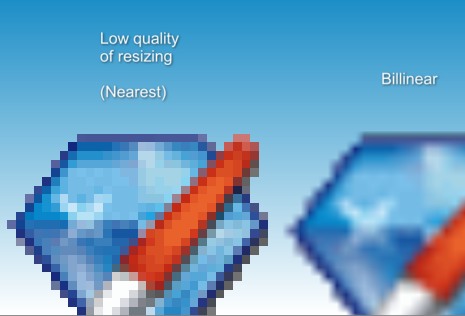
Thanks to all! Cor, "Preserve hard edges (no interpolation)" too long for the interface. "Preserve hard edges" - this may cause confusion - side edges of a picture or edges inside a picture. Peter, I feel that we should avoid use of "sharpness". The pseudo sharpness is an illusion and side effect of low quality of this resampling algorithm. There are three known resampling algorithms for pictures: 1) Nearest Neighbor (current "Low quality of resizing" in PTE). This method provides the lowest quality of resized picture. 2) Bilinear (used by default for pictures in PTE). Acceptable quality. 3) Bicubic (used in Photoshop by default). Gives high quality. I think we should hint to an user that the first option (Nearest Neighbor) gives low quality and he should avoid this option for normal use and apply this one only for specific tasks. There is a danger that inappropriate name will turn user wrongly think that this option gives something better than without this option. For this reason I personally prefer add words "low": "Low quality of resampling" "Low quality of picture"
-
Yes, it's definitely a specific option for special effects.
-
Ray, Thanks, I've sent you PM.
-
We have and old translation file for Swidish language in PicturesToExe. It was not updated since version 5.1. So I've turned off support of it. You can find _Swedish.ini file in the main folder of PicturesToExe and rename to English.ini.
-
Jean-Cyprien, PicturesToExe can display given picture exactly pixel in pixel on a display: The simple example - 1024x768 images on fullscreen of LCD 1024x768. Or fixed size of slide. Please see my sample show: http://www.wnsoft.com/test/Nearest2.zip At the beginning of this demo there is no difference between Bilinear and Nearest. Because video card recognize this case and draw picture pixel in pixel without resampling. I used fixed slide size 512x512 and two pictures of 512x512 each. One placed onto Mask to show difference. This option "Low quality of resizing" is closely linked with resizing/resampling and I don't know what is the best name for this.
-
Gerard, "Resampling without loss" seems good. But wouldn't it force an user think that he'd better to turn on this option, it something that improves quality? Other variants "Low quality of picture" "Nearest (edged resizing)"
-
Please see the attached sample show: http://www.wnsoft.com/test/Nearest_vs_Bilinear.zip (500 KB) Jean-Cyprien, When a picture shown on the screen at its original size (pixel in pixel) no need to use Bilinear, Nearest or Bicubic resampling/resizing. So these algorithms are necessary only when we resize picture (larger or smaller). For this reason I think it isn't exact to call it sharpness. In future we can add real sharpen filter and it will cause a mess with two options.
-
So the best name is "Nearest Neighbor Resizing"?
-
There is an option called "Low quality of resizing" option (Object & animation editor, Image properties). Could you please advice more exact and "speaking" name for this option. See the screenshot. Photoshop calls this option: "Resample Image: Nearest Neighbor (preserve hard edges)" We should find enought short name to fit it in the window of PicturesToExe.

-
Dave, Sorry, we will fix it in Beta 15. Gary, You're right. I'll fix it in Beta 15. Thanks! Barry, It's an old issue. Thank you, I'll try rework it in the nearest beta. Peter, Sorry, I can't reproduce this issue. On my PC a new beta imports successfull all settings, including default template for new projects. Daniel, I'll answer in the next reply.
-
PicturesToExe Deluxe 6.5 Beta 14 is available It's Release Candidate. Download link: http://www.wnsoft.com/apr/picturestoexe-beta.zip (7 MB) Changes in this beta: + The floating window with proporties of an audio clip displays original duration now. * Various improvements in audio editing. * Fixed issue with reading of Comment field from EXIF date in some JPEG images.
-
Official English User Guide for PicturesToExe Deluxe 6.5 in PDF format: http://www.wnsoft.com/apr/help/6.5/PicturesToExe_User_Guide_v65.pdf or http://www.wnsoft.com/apr/help/6.5/PicturesToExe_User_Guide_v65.zip
-
Probably it's a bug. Please send me a project file with one slide.
-
Jeff, Please upload a sample project to show this problem. Also it's highly recommended to use latest available beta release (Beta 13) before submit a bug report. Probably an issue already resolved.
-
John, Thanks, we'll display original audio clip duration (e.g. 4:17.356). Daniel, 2) Thank you, I've recieved you JPEG file with EXIF data. We'll try fix this issue. 3) I think the problem in slide size. The height of the slide 853 pixels and you have 9 pieces (sub-images). So one piece has height 284,33333... which leads to this problem. Try slide height as 852 pixels (852 / 3 = 284.0). Same problem with slide width (1280 / 3 = 426,6666666...)
-

Rotation of Images in a folder in Beta 6.5 V12
Igor replied to Big Kev's topic in General Discussion
Sorry, but I can't reproduce this issue. Could you send me all this project with images, please? -
I think it was a fault in the protection system in the main program of PicturesToExe. We plan rework this system in the nearest version(s).
-
Eric, 1) Did you see such error messages before? 2) Would it help, if you restart PicturesToExe?
-
Please send me just only .pte project file, I'll try recover it.
-
I've opened WnSoft page in Twitter. Please subscribe to my page. http://www.twitter.com/wnsoft
-
PicturesToExe Deluxe 6.5 Beta 13 is available Download link: http://www.wnsoft.com/apr/picturestoexe-beta.zip (7 MB) Changes in this beta: * Fixed bug (Beta 1-12) in a floating window with properties of an audio clip. Changing of the Start time didn't affect to the Duration parameter below. * Fixed visual bug (Beta 12) with Mask object which has 32-bit image mask with alpha channel. * Fixed bug (Beta 1-12) with a floating waveform window. Duration value could be on 10-30 ms less than real duration of an audio file.
-
Dear Jessica, We apologize for this delay! Probably the automated email with the key was blocked by email server. I just sent your upgrade key for Deluxe version. P.S. If you still didn't receive it, please let me know.