thedom
-
Posts
2,323 -
Joined
-
Last visited
-
Days Won
6
Everything posted by thedom
-
Actually, what would be useful would be to have the ability to set the default font, size, color, shadow... for all your text in the Project Options. If I remember correctly, a member already posted this suggestion.
-
I guess it's because this is not a manipulation that the users of PTE have to do very often. You can ask Igor to make this new developpment in the "Ideas and suggestions for next versions" section : http://www.picturestoexe.com/forums/index.php?showforum=9 But I am not sure it will be in the top priority of the Wnsoft team.
-
Gary, you can do it very easily. You have to open your pte file (with notepad by example). If you want to change your fonts from Arial to Verdana by example : Replace all "FontName=Arial" with "FontName=Verdana". Save your file. That's it. PS : make back up first !
-
Yes, it is possible to ask him to Igor. You can send him a PM. Oui, il est possible de poser la question directement à Igor. Vous pouvez lui envoyer un message privé via le forum.
-
Ama, I think XnView (freeware) can convert tiff to jpef in batch mode : http://www.xnview.com/en/download.html
-
Actually, DaveG is right. I never noticed the option "Display slide in random order".
-
Hello Ama, There are no random functions for the order and display time of the pictures in PicturesToExe. You can include your 6000 images in your slideshow with drag and drop. It will take a few seconds. You can modify the order of your images with drag and drop too. The display time is by default the same for each picture. You can then select several of those pictures and specify the display time for all those images. You can do it very quickly. There is a random function for the slide transitions between each picture. I think PTE can display images in tiff format but I am not sure.
-
This animation will be perfect for all your family pictures by example. It is very dynamic and energetic. There is a discrete animated background. You have the ability to choose very easily your own color for each slide. The template is by default for 21 pictures, available in 4:3 AND 16:9 screen format, for 4:3 AND 3:2 pictures format. It is very easy to duplicate a slide to add more than 21 pictures to your slideshow. Download the template here on TheDom Shop. IMPORTANT : This template is FREE but after 10th of October, people who want it and did not already download it will have to purchase it. To see what this animation looks like, please download the demo (exe file) for a much better quality compared to the video. [ 21 pictures - 2 minutes and 30 seconds - 14.27Mb ] -
-
Yes, it is possible but unfortunately for you this module to generate the pte with the exe is only for the developpement team (to debug) and is not available to public.
-
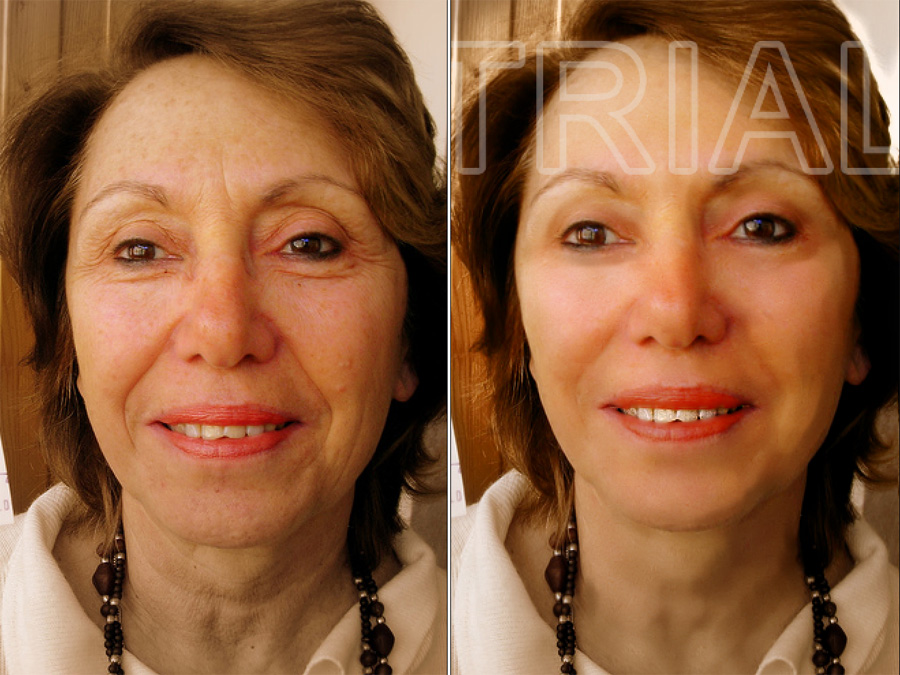
Extremely easy to use and very intuitive ! Here is an extreme test I made just for fun with a photo I found on the internet. Sorry Madam.
-
This software should be called "We are all top models!" : http://www.portraitprofessional.com/gallery/?p=1 Move your mouse over the image to see the original Some examples in the gallery are really... Hmmm, go have a look at yourself !
-
Tanks Mike, it seems interesting. The sample on the main page is IMHO overdone but gives an idea about the possibilities. I am downloading the trial version right now. Thanks again. Before : After :
-
Dave, You can tell people at your club to download Lin's PTE for smarties tutorials or more recently, to watch MikeL117's PTE Video tutorials. I think a lot of people missed those last tutorials.
-
The template is now available. I added the link in my orginal post.
-
In my opinion, animation shouldn't mean image on screen much longer. You're right, it's the best way to make something artificial and boring. Actually, I used the wrong word. I said "profesional" but I meant talented photographers, whatever they do it for a living or not. I agree 100%.
-
I finished the second animation (full screen version). I added the demo of this second version in my original post (YouTube video embedded and link to the exe on TheDom Sharing Place). The templates for both versions are now available on TheDom Shop.
-
Barry, I agree but here are some question authors can ask themselves too : 1. Are my images of enough interest to be presented still with fade transitions ? 2. Do I have to add some animation to make my show entertaining in order to keep my audience ? 3. Can I try to make something different and original to surprise my audience ? In my opinion : Answer to No1 : Yes it works for pictures with a high level artistic, aesthetic, stunning pictures... Unfortunately a very few of us are profesional photographers and have the talent/the subjects to make this kind of pictures. Answer to No2 : No for your friends and family who will most of the time enjoy to see what you made, visited, etc... But for others ? Answer to No3 : Of course not an obligation. But if you succeed, it's so satisfying for you and your audience.
-
 In my opinion, ability to include video clips is one of the first priorities for PTE.
 -
John, Here is the direct link to Boxig's utility called "ShowVideoPTE" : http://www.picturestoexe.com/forums/index.php?showtopic=9870 A readme is included in the archive and the HideTaskBar utility (from Granot too).
-
You can watch the video but I recommend to download the exe file for a much better output quality. - The embossed labels are directly done within PTE. You can do it very easily by yourself : The label itself is a PTE rectangle with gradient color and the font is "Plastique" you can download here on dafont.com In the template, you have the ability : - to choose your own text and color for the embossed labels . - to insert as many pictures as you wish in full screen between each "chapter". The template is available HERE for 4:3 and 16:9 screen format and for 4:3 pictures and 3:2 pictures. The hands are those of my girlfriend.
-
[FORUM] Updating of the forum to new version 3.0.2
thedom replied to Igor's topic in Forum & Website
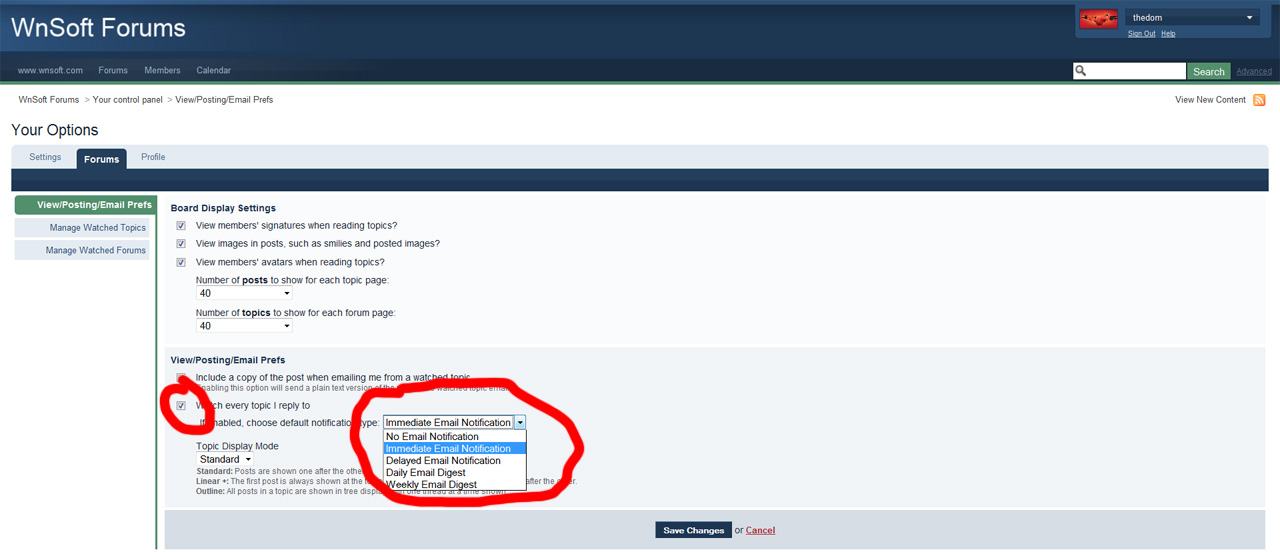
Yes, it does. It's a general option which applies to each topic you participate. But in the same time you can choose for each topic individually to "watch the topic" / "stop watching the topic" (button on the top right). Do I answer to your question ? -
Ok, done. The track of moved topic remains but the topic is readable by all again. => http://www.picturestoexe.com/forums/index.php?showtopic=10469
-
Mightec "vertical blind" demo is a good example of images sliced : And if I am allowed to tell about my work, the fan demo : (FREE template HERE).
-
[FORUM] Updating of the forum to new version 3.0.2
thedom replied to Igor's topic in Forum & Website
Eric, are you talking about "Email notification" for topics you reply to ? If so, this is an option you can activate in your profile :
-
Dave, I think this is the answer to your question :