thedom
-
Posts
2,323 -
Joined
-
Last visited
-
Days Won
6
Everything posted by thedom
-
JPD's method clearly shows how powerfull this parent/children feature is ! Congratulations guys. Tom, I tried to make your sequence a little bit more "realistic", I hope you don't mind. I added : - "3D" helicopter, - shadow of the helicopter on the lake, - "3D" missile. (I added "perspective correction" for both "3D" effect). By the way, I don't know if you did it on purpose, but your A9 (background) image doesn't have to be a png. For exactly the same result, a jpg is fine (285 kb instead of 1132 kb). And I removed the soundtrack to make the project lighter to post it. heli_revu_Feb3_2007_10_53_29.zip
-
Now that I watched your project, I perfectly see what is your "problem". Unfortunately, I do not have an immediate solution because it's quite complex. If anybody else want to have a look, here is Tom's project : http://thefreedom.free.fr/heli.zip Anyway, I like the idea. Don't know what it is for, but it's fun.
-
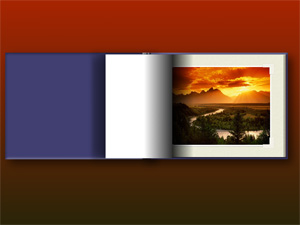
I'm making progress... Some of the features I use are only avalaible in the O/A (not in preview mode nor in exe), that's why I can only show you a flash animation of a single slide. The final template will include : - book opening - pages flipping - book closing It will be very easy to modify the cover and the page themselves (because shadows are done in PTE). You will have the ability very easily to : - use portrait and landscape pictures. - change the frame picture - add as many pages as you want To be honest, I'm quite proud of what I already have done... Photoalbumv3.zip
-
Tom, Could you please post your project. I'm quite sure it will give us ideas to try to improve it if we see what it looks like right now...
-
It really looks great, congratulations ! Will this option work as the navigation bar feature, meaning we can design our own buttons and share them ? I noticed you added a new tab : "common". Really wondering what it is for. A lot of surprises in this beta 9 I guess... Anyway, I can't wait for beta 9 ! Do you have an idea of many days/weeks we still have to wait ?
-
Buenos días Silvia, Si en el futuro desea que te envíe de otros ficheros (demos, tutoriels...) que no pueda cargar a distancia, no duda en enviarme un mensaje privado.
-
HI Silvia, I just send you JPD's template to your email address.
-
Stéphane, To be honest, I really loved your two previous slideshows ("OGM" and especially "J'adore t'écrire"). They are probably the best shows I have ever seen! I like this one too but I found that the spotlight effect all along the show is a little bit too much and in a way, "tiring". In my opinion, the spotlight could be bigger maybe ? And maybe you could alternate this effect with full screen composition ? The pictures are very interesting too but the whole show keeps a little bit (too?) mysterious for me (because of the spotlight maybe and partial vision?). I Think I undestand the way you presents this story with "zoomed" pictures (shooted close), part of bodies but for my taste it's maybe a little bit too suffocating. But don't get me wrong, I think your show is excellent. I just give you my personnal perception of it. Anyway, you demonstrated your extreme technical skills with PTE.
-
Tom, I think I misunderstood you, sorry. Actually, right now, I think the simplest way to sync both wings so they flutter in sync is the following : one you are done with one wing (A), switch from this object to the other wing (B ). Select each keypoint on A, immediately click on B and add a keypoint (+ button) on B's timeline. But I guess you already know this. Maybe the paper method is not so bad...
-
Tom, be my guest! I share my projects to give everybody the ability to make changes and to improve them. About the synchronisations of objects, two requests were posted a couple of weeks ago : - the ability to set the time parameter when you clone a keypoint (500 ms interval right now) - see http://www.picturestoexe.com/forums/index....ost&p=36051 - the ability to clone several keypoints at the same time - see http://www.picturestoexe.com/forums/index....ost&p=36068 Maybe in a future version of PTE...
-
Hi Cal, I would like to help you but you have to be more specific about the subject you would like to have explanations. I really encourage you to study the PTE project. Focus on a wing by example and see what are the changes between each keypoint.
-
Just to let you know that I am improving my template (see picture attached) but I really have to wait for beta 9 because of the new features which will be released...
-
Hi CallMan, I think this feature is not yet re-implemented in v5. For a complete list of what's still missing (compared with v4.48), see here : http://thefreedom.free.fr/share/viewtopic.php?p=54#54
-
Hi Tom, Here is the PTE project : http://thefreedom.free.fr/share/dload.php?...amp;file_id=173 Yes, it is possible to make the wings flutter faster. You just have to decrease the time between the keypoints for the wings. Of course, you will have to add keypoints but you just have to clone them. I think it's quite easy but do not hesitate to ask for help if you need.
-
Hi John, This alternative solution (graduations above the timeline) was suggested : see http://www.picturestoexe.com/forums/index....ost&p=29832 and http://www.picturestoexe.com/forums/index....ost&p=29920. I'm really not sure but I think Igor added this request in his "To Do" list (for a future version) but I couldn't find his reply...
-
Hi Tom(uk), I just read the post you left on my site about this demo (http://thefreedom.free.fr/share/dload.php?action=file&file_id=165) Thank you for your interest. I will post the full PTE project of this demo tonight and will let you know.
-
Hi Nettleton, Thank you very much for the promotion about my website.
-
The image you put first in the slide list in the main window is defined as the "main image" and it's the one which appears for the slide in the slide list. But if you want an other image you add on this slide to be the one seen in the slide list (or if you remove this first image), go in the objects and animation window, in the "objects(3)" window select the image you want to be seen in the slide list and in the "properties" tab, check "main image". Close the "objects and animation" window, the object you just choosed as "main image" is now the one which appears for this slide in the slide list. Hoping you can understand what I mean... I think Ragnar gave you the correct explanation. I don't know if you are a photoshop user but the obejcts visibility works in PTE exactly like it does in photoshop with the layers. One option there is in photoshop that doesn't exist in PTE though is the ability to hide/show a layer ("layer visibility"). May be it would be an interesting option to implement in a future version of PTE... An option you can use now is to set the opacity of an object to 0 to reveal the object underneath.
-
Mightec, It's a standard PTE transition effect. See here for complete explanations : http://www.picturestoexe.com/forums/index....ost&p=36499 The template will be avalaible as soon as beta #9 is released. But I don't know when beta #9 will be avalaible. It uses the standard PTE transition effects for the flipping pages that everybody can use (see the explanations above) but add some simple additional effects, shadows and masks for a quick use without need to make any work in an external photo editor. It can be used for landscape and portrait pictures whatever their resolution. If it can interest some of you.
-
Hi mightec, I don't know if it's what you're looking for but I have a work in progress which might interest you : http://www.thedom.fr/share/dload.php?actio...amp;file_id=175 The effect is much less impressive than JPD's template but the future template will give you the ability to use portrait and landscape pictures.
-
Yes, it would be so useful ! That's what i called a "transformation" feature in PTE (the ability to move independtly the 4 corners of an object) in JPD's other post about his photoalbum (see here). Igor, is it absolutely not feasible in a future version ?
-
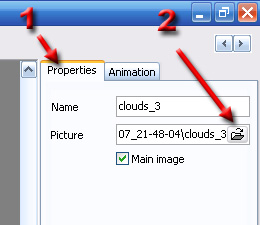
Hi John-W Welcome to the forum. If I understand correctly what you mean, PTE v5 (beta) has this function in a way. In the slidelist, select the slide you want to replace, click on the "objects and animation" button, and in the "properties" tab (1), browse to the new image (2). (see image attached) Once this new image selected, it will replace the previous one without affecting anything for your slide (duration, transition, ...). Is it what you are waiting ?
-
A little question Jean-Pierre : Why did you make the background picture ("Fond") the parent of the whole photo album ?? IMHO, it should be an independant object with no children. This way, the user could use the image he wants for his background, change its ratio if he needs and whatever the resolution of this image, it wouldn't affect the size of the photo album. Just a suggestion. What do you think ?
-
Great! And I noticed you improved it: No more visual defects (you fixed the thin white line in the middle of the book). Even if your template is very strict (number of pictures, size of the images,...) which might prevent some to use it (not "user friendly" enough ?), I really think it's amazing. Congratulations Jean-Pierre!
-
I was a Proshow Producer user and I switched to PTE mainly because of : - its very superior image quality - remarkable engine : pan/zoom/rotate/transition effects much smoother - very stable (I NEVER had a crash and I had so many with Producer! ) - the parent/children objects which is so powerfull (probably the best feature!) - excellent conception and simplicity, very intuitive - the potential of future evolutions on a VERY SOLID basis (imho, proshow products are a little bit messy, especially since v3).