goddi
-
Posts
3,596 -
Joined
-
Last visited
-
Days Won
27
Everything posted by goddi
-
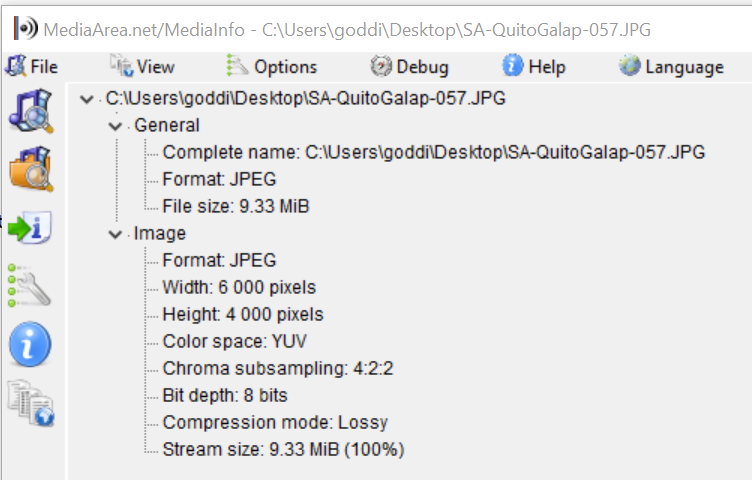
Greetings, I am using Win 10 and PS CS5. This is the original image, but too large to attach. But the one above exhibits the same problem. Gary
-
Greetings... Ok...I'm at my wits end... can't figure out what is going on. Let me ask again... I have a folder with about 800 images. If I try to use 'Edit File' of an image listed in PTE ('Set Graphical Editor' is set for Photoshop), Photoshop will open but then immediately close. If I try to open the image in Photoshop by right-click on the image on my Desktop and select 'Open with', Photoshop will open but then immediately close. However, if I first have Photoshop opened and then try to open the same file with right-click on the image on my Desktop and select 'Open with', the image will open in Photoshop. I have compared the Properties of images that work and images that don't work, and I don't see any differences. I have Googled to find an answer but can not. These images do open in all my other photo programs. What can be going on with my PS CS5 that might be causing this problem? I put the same image on my wife's PC...same problem. Thanks... Gary
-
Greetings, Thanks, Dave. Yes, much better. I reduced the image's size a bit more, just to see if I could do it, and adjusted the white border to match. And I did a slight Rotate. This does accomplish what I'd like to do...but I still think that having Rotate in Framing would be sooooo much easier to do and adjust, and would not overwrite previous animations or text. Hopefully, Igor can eventually figure it out. But thanks for the Style. I'll keep it handy. Gary
.thumb.jpg.2ea764502d17abb60a8bb5f25f9ffb60.jpg)
-
Greetings Jill and Dave, Sure, if there were just a few images (or video clips) needing to fix the horizon level, I'd just fix them in PS. But, I have a tendency to not hold the DSLR perfectly level. I've come back from trips and have had many not quite level. I like to put my images into PTE with a Zoom of about 95% with a thin border. This gives me a small black frame and a thin border around the image. So...if I have to level an image in this situation, the ability to apply a rotation in Framing would be the 'easy' way. Why have to open each one in PS, make an adjustment, save, when I should be able to just do the rotation in seconds in PTE (and is always adjustable)? Quick and easy. And it does not remove any text or other settings you might have already implemented, as it would using a Mask in a Style. And...you can easily adjust the border's px any time you want. And...it would add to the possibilities to animate within Framing. Gary
.thumb.jpg.d302f9a912fe969aaa004b3e1025c168.jpg)
-
Greetings Dave, Yes...thanks... Gary
-
Greetings Dave, Thanks for the style. But I really just don't like to use Masks. First of all, this style renames each slide to be '000_0150-1' in the Slides. Not sure how to fix that. I was able to edit the Style to remove the bottom 3 entries for Blur, etc. And I removed the Keyframe that rotated the image. But then I need to have one for vertical images. I can adjust this Style to match what I like to apply to my images and rotate the image within the border. But the problem with Styles are that they removes any adjustments you have already made, such as text, etc., so you have to apply it at the very beginning and stick with it. For me, one of my main reasons for wanting to have Rotate in Framing is to do slight corrections with the horizon. When you have an overall Zoom of, say, 95% with a border and the horizon is not exact, it would be helpful to be able to Rotate within the Framing to make a quick adjustment. Framing gives a great way to crop images, just lacks the Rotate function. But thanks for the Style. I'll play with it some more but hope that Igor can come up with Rotate in Framing which would simplify the process. Gary
-
Greetings Igor, Framing has the ability to Zoom and Pan, but not Rotate. I'd like to be able to Rotate within Framing. Back in 2019, I know you said "Sorry, Gary, it's not possible in PTE 10. I'm doubt that it even possible without applying a mask. It would be a complicated code. And it will not work as probably you want. Rotation means that user may see empty space between a border and picture." Users came up with using a mask as a solution. However, Rotate would be extremely useful if it can be done within Framing, without having to deal with Masks. I'd like to request it again. It would be such a useful addition. As far as empty space between a border and picture, zooming in would eliminate that possibility and have the Zoom, Pan and Rotate features within Framing for added possible animation. Gary
-
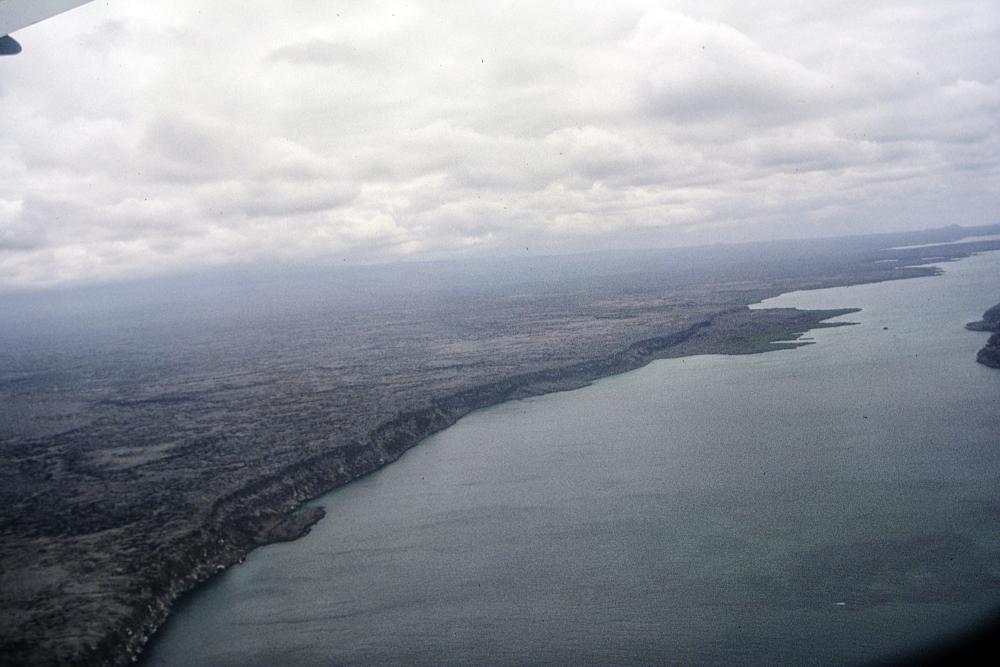
Greetings, I can open my Photoshop CS5 and open a file, no problem. However, if I try to 'Edit File' of an image in the Slide View ('Set Graphical Editor' is set for Photoshop), Photoshop will open but then immediately close. I seem to remember having this problem a long time ago and it was fixed. But I can not remember what the fix was. I've searched the Forum but can't find it. Google has many 'fixes' but this seems to be more involved with PTE since it works normally outside of PTE. Any ideas? Gary ADDED LATER: I just tried to 'Edit File' in other projects but I did not have this problem. Photoshop opened correctly. It is only happening in this recent project. But, I just tried to do an 'Open with' Photoshop of the images in this new project while in File Manager, and the same problem happened. So is it in the file itself? I've attached one of the images from this project that exhibits the problem. And...I put this image in another project. All of the other images would open in PS, but this image would not....can it be an attribute in all these images that is causing the problem???
-
Thanks Dave and all, I'll pass this on to my friend and I'm sure he'll know what to do now. Gary
-
Greetings, Yes, I had found that discussion. But for someone that has never used Chroma Key, it has not helped. I do notice the 'Chroma Key' only appears in the menu for videos, not for stills. So I still don't know the steps needed. I'd like the 'Steps for a Dummy' on how to do this. I've played around with the eyedropper, but I just don't know what I am supposed to do. Gary
-
Greetings, I'm trying to help a friend who is new to PTE on how to use a 'greenscreen'. I know nothing about it and I searched the Help files for 'chroma key' but nothing shows up. Are there detailed instructions on how to use the 'chroma key' in PTE? I've searched everywhere and could not find anything. Thanks...Gary
-
Greetings Jill, Picking my shows at random can work very well. If you are using 'Portion of Screen', you just have to have your folder with your list of shows next to it. Once a show stops playing, just click on the next or any show in the file list. You can also, if needed, just open a different folder with shows. The 'Movie & TV' player gives you the ability to stop/start any show at any time, and play any show at random, so you don't have to have them listed in the exact order you have them listed in the folder. Gary
.thumb.jpg.4bb1c1c61f60ac12223d1c8cd37fb0a8.jpg)
-
Greeting Jill, It might sound complicated but it really is not. If you do it a couple times, it's a piece of cake. The 'green frame' is only on your screen...not the viewers. So I don't understand what you are referring to when you say it is 'distracting'.. The problem with VLC is that you can not quickly start showing the next video you might want to show. There is no 'Next' or 'Previous' icon to use. I am going to give a presentation and I want to present several mp4 shows, one right after the other. Can't do it with VLC without closing it and reopening it to select the next show. Clunky. The 'Movie & TV' player gives you the controls you need to quickly run shows anywhere listed in a folder. If you want to run exe shows, etc. with a menu, maybe you have to use VLC. My purpose is to play mp4s (pick and choose) and demo the PTE program or any program easily. I stopped using exe's along time ago. When you use the Basic tab, you get the same 'green frame' that I was talking about. The problem with Basic is you lose the ability to use part of your Desktop. You have to run the show at full screen at your end. I want to be able to play the mp4 in a Share Screen with 'Portion of Screen' which gives me some space to view my list of shows in the File Manage to choose the shows at random and be able to call up a program to demo. If you desktop is fully covered, you can't do that. Using 'Portion of Screen' gives you that space on your Desktop. I see your method works for you but for my purposes, I find mine to be more flexible. Gary
-
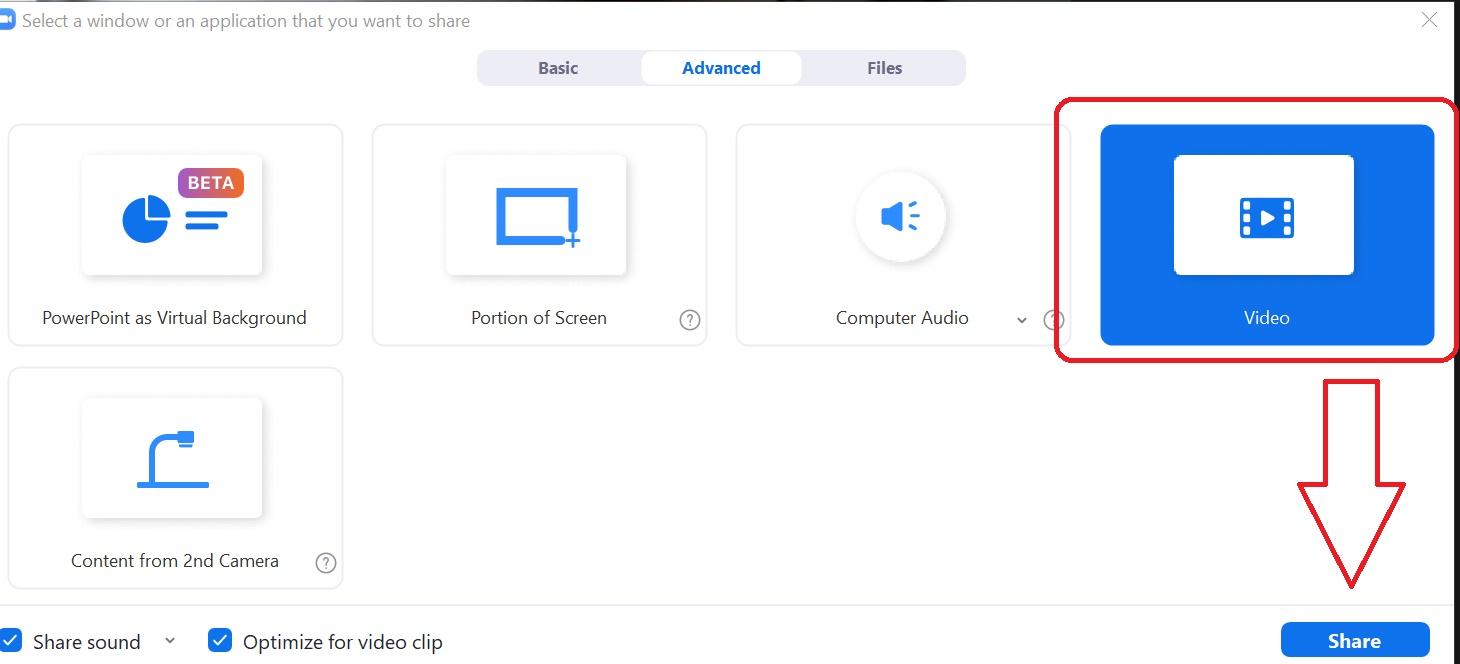
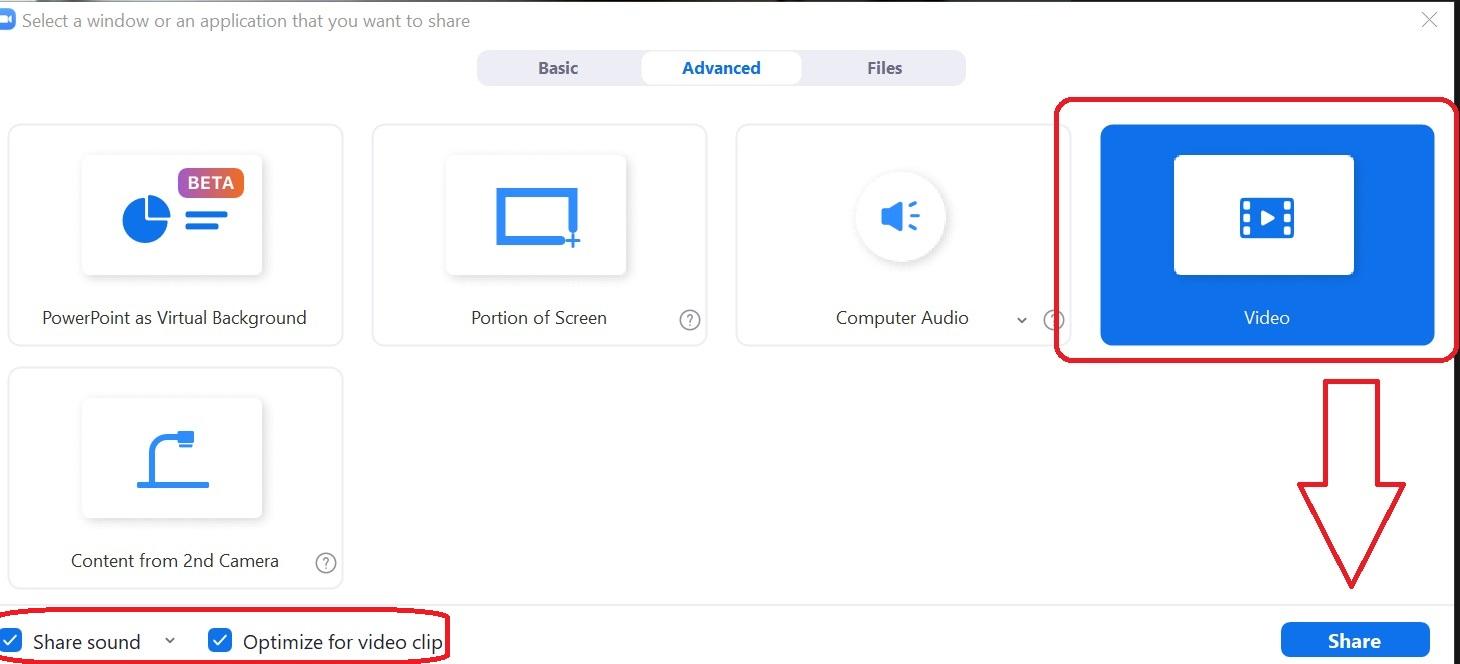
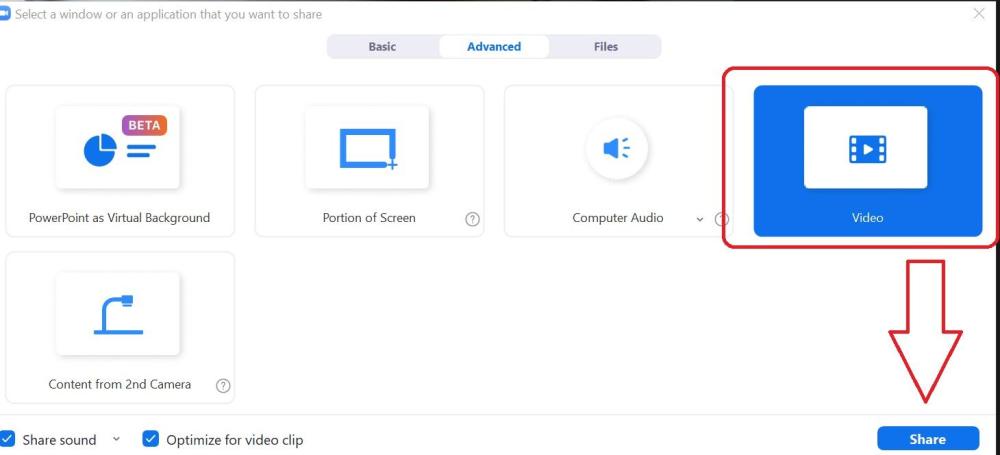
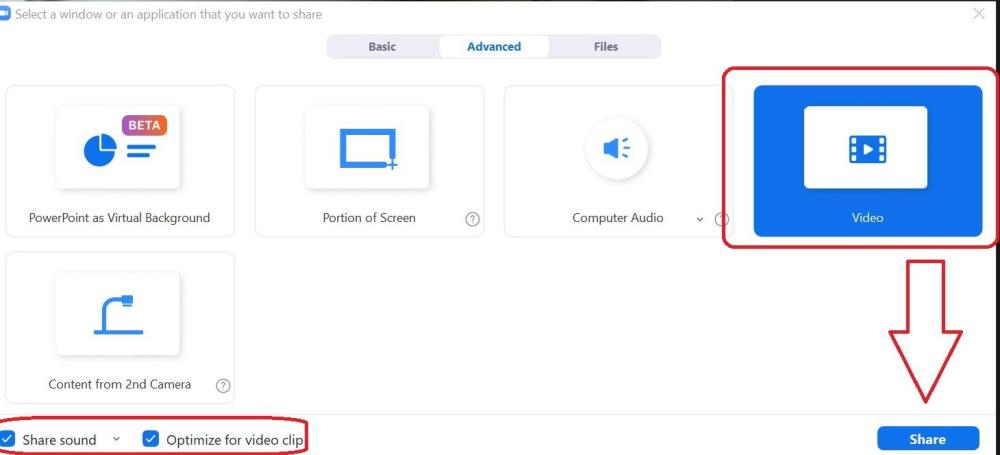
Greetings, I thought I had a handle on how to Share Screen on Zoom and show mp4's and even the PTE program, but I forgot how I did it. So, after more tinkering around, I've come up with my method that seems to now work. After I have start Zoom and invite the guests (at least my wife on her PC), I click on 'Share Screen'. In the 'Advance' tab, I check the boxes for 'Share Sound' and 'Opt. for Video Clip'. Then I choose 'Portion of Screen', not 'Video'. The green frame shows up. I then open one of my PTE mp4s from a folder and just pause it for the moment. I then make sure the mp4 fits inside the green frame. Adjust the green frame and the mp4 so that the mp4 fits nicely inside the green frame. Then I can play the mp4. If you are playing the shows from a folder with a list of mp4s in the folder and playing them with the Windows 'Move & TV' player, you have the 'Next' and 'Previous' buttons to quickly advance or go back within that folder to other shows in that folder. (Some players don't have that feature). And, if you want to demo the PTE program (or any program), just open it and it will show up within the green frame...or make minor adjustments to make it fit. From my experiments, the PTE shows play smoothly and the sound is good. The volume of the music has to be controlled at the viewers end, not yours. One thing though, if you want to make comments when the mp4 is playing, you have to pause it because the other person will have a hard time hearing what you are saying. You don't have control over the volume at their end. If you choose 'Video' instead of 'Portion of Screen', you have to stop the 'Share Screen' and start another video. Not as smooth if you are wanting to play more than one mp4. Let me know if this works for you or you have better suggestions. Thanks... Gary
-
Greetings Jeb, Next week, I am going to give a presentation about PTE via Zoom to my computer club. I did a bit of practice to see what worked or did not work. I found that if you Share with a reduced sized screen, the results were a bit choppy. Then we tried to just start with a full sized screen that you want to share, and the other guy said it was very smooth...much better. Try that and see if it smooths out the results. Seems kinda backwards that a smaller screen would be choppy and a full sized screen would not be. But give that a test and see what you find. Also be sure to check the Share Sound, Optimize for Video Clip...then Share. I find, too, to have the MP4 already opened so that it will show up as a choice to Share when you clip on it. Gary
-
ProjectFilePath not being used as a default
goddi replied to goddi's topic in Suggestions for Next Versions
Greetings Denisb, I am not sure I understand your posting. I just opened another project. In its .pte, the CreationTool shows version 10.54. When I open it, using FileManager, the File Name list shows a list of files from the Screen folder, having nothing to do with my project. This project was made in 9/2021. Are you saying it should or should not show this problem? I do see that if I re-save this project with the correct File List showing, the .pte corrects itself showing the correct ProjectFile Path. But I know it had already been saved with the correct File Name list. But it seems it did not retain that info. (Also, I see the .pte file format has changed a bit). Gary -
Greetings Igor, I just tried the latest project on another PC. It did not show any mp3 errors in the Timeline. Let's just drop this issue since it seems to be something only happening with me and corrects itself, somehow. Thanks... Gary
-
Greetings Igor, All projects are on my local drive, Windows10. I will give it a try but usually once it corrects itself, the problem does not reappear in that project. Maybe we should just let this one go and I'll just deal with the few that have had this happened. If it did not show with your trying to reproduce it, I probably won't on another of my PCs. But, I'll let you know. Thanks... Gary
-
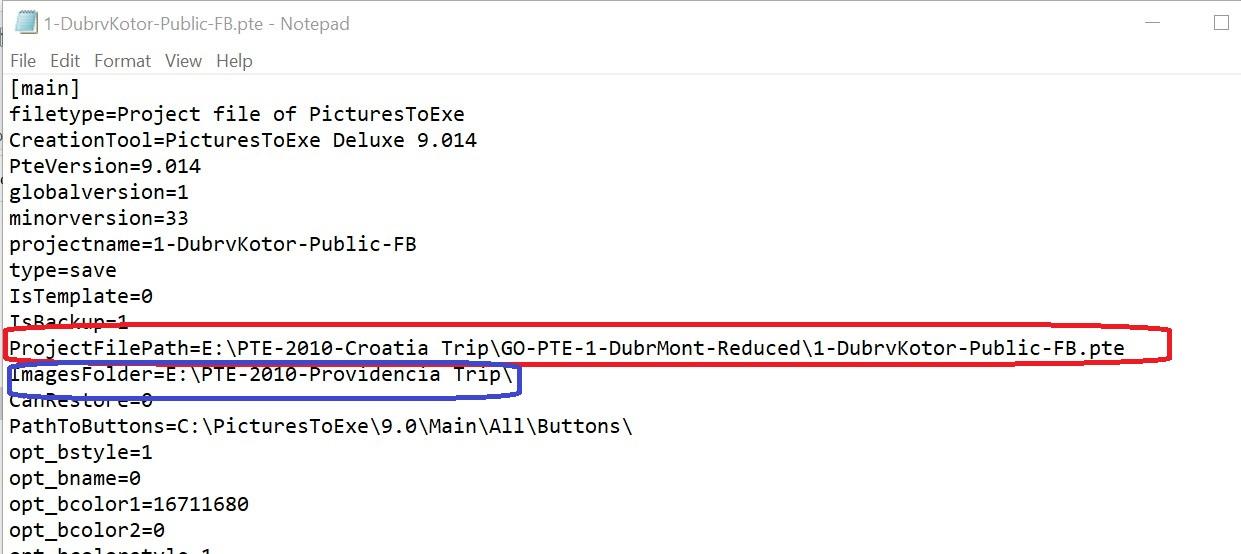
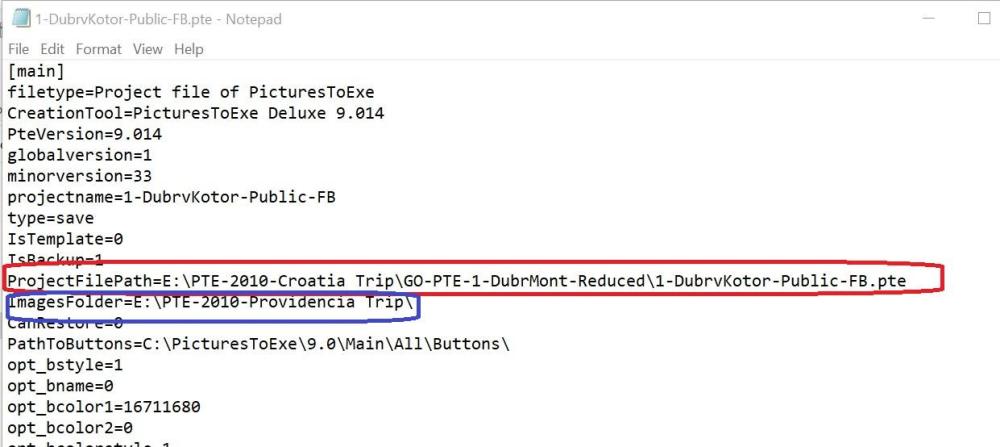
Greetings, I have made this suggestion several times in the past, starting in 2013. I am hoping that this can be included in the upcoming Ver.11. I would like the 'ProjectFilePath...' that is already embedded in the .pte file to be used as the default for the File Name list to be displayed when you open a .pte show. So many times, when you open a .pte show from the FileManager, the File Name list displays a completely different folder or files that have nothing to do with the project. Then you have to remember where and what folder it came from to show the files that were used in that project and have to browse to find it. The 'ProjectFilePath...' is already in the .pte file for each project. It would be useful if that is the default set for showing the File Name list or other 'file openings' such as a search for audio files. The 'golden rule' is to have all files pertaining to a show to be in the same folder. Sure, not all do that but that is a good starting point. For instance, when I open the 'DubrvKotor-Public-FB.pte' (shown below), the File Name list shows the files in the 'PTE-2010-Providencia Trip' that has nothing to do with the project I am trying to open. This happens numerous times. I don't know why the 'ImageFolder...' somehow has some other project's folder listed that has nothing to do with the project I am trying to open. I then have browse to the correct location of the files for the project, re-save it and then it has the proper files shown in the File Name list. I don't know how the incorrect location of the files for the project gets into the .pte file but it would be very useful to make the 'ProjectFilePath...' and/or the 'ImageFolder...' information to be the default when it is saved and not changed until you re-save it. Thanks... Gary
-
Greetings Igor, Right after I wrote the above posting, I found one show that was made with 10.07. When I opened it, I got the errors with the mp3. I closed it and reopened it and the errors disappeared. Here is the link to that show in a zip. https://we.tl/t-nAXKyl0YjQ Gary
-
Greetings Igor, I just went through many of my older shows but I could not recreate the problem. I could not find any older .pte versions. The shows that had this problem were older shows so perhaps they were unmodified old .pte projects saved in the old version. So let's just leave it at that. Seems eventually I can clear up the errors in the mp3s. I don't have any earlier versions of PTE to work with. Thanks for looking into it. Gary
-
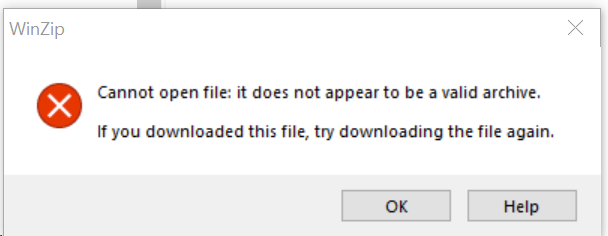
Greetings Igor, As you suggested, I copied an mp3 file, renamed it, started a new project with several images and with this renamed mp3. Yes, it did show the waveform correctly. But, sometimes it does not and I close and re-open it and it then shows correctly. I have zipped up a show that had shown this problem. Now, when open it, it shows the waveform correctly. So I can't recreate it every time. But it has happened to several shows. Here is the link (WeTransfer). https://we.tl/t-YqWr8TY9Nd I tried to zip a larger show, about 4 Gb, that had many more mp3s with 'error' but when I tested the zip, it said: Is there a size limit with WinZip? Gary Oddi PS. I can 'Create Backup in Zip' of the larger show but neither WinZip or ZipWare will open it (4Gb+).
-
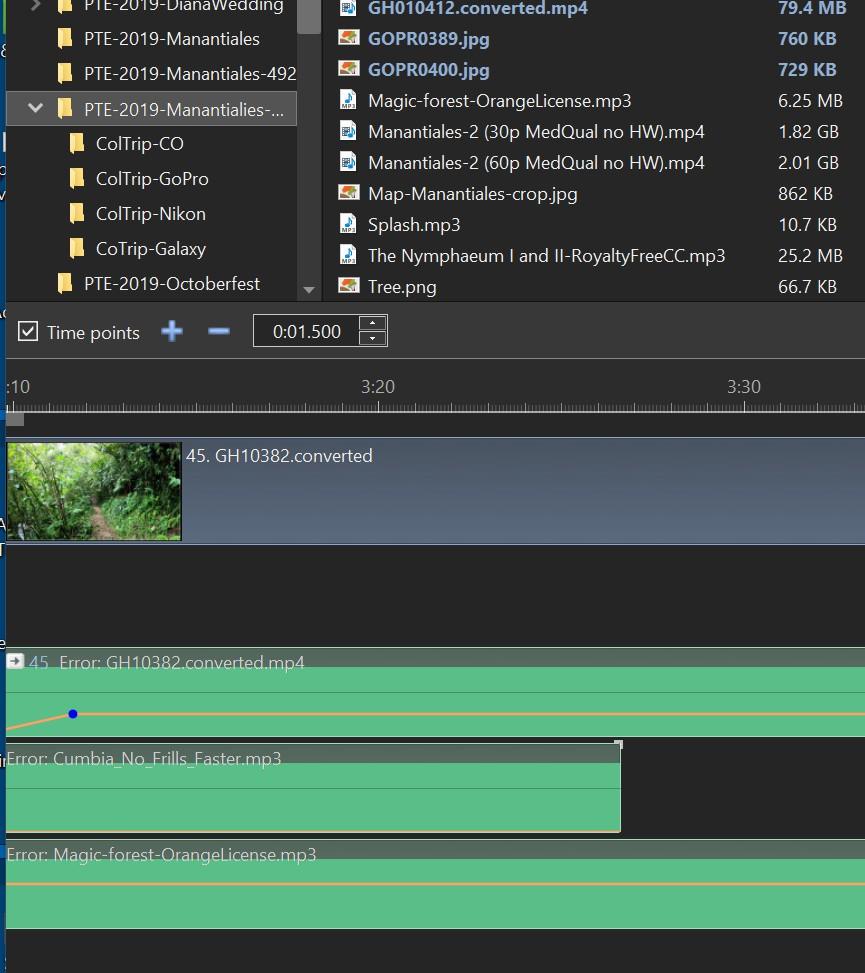
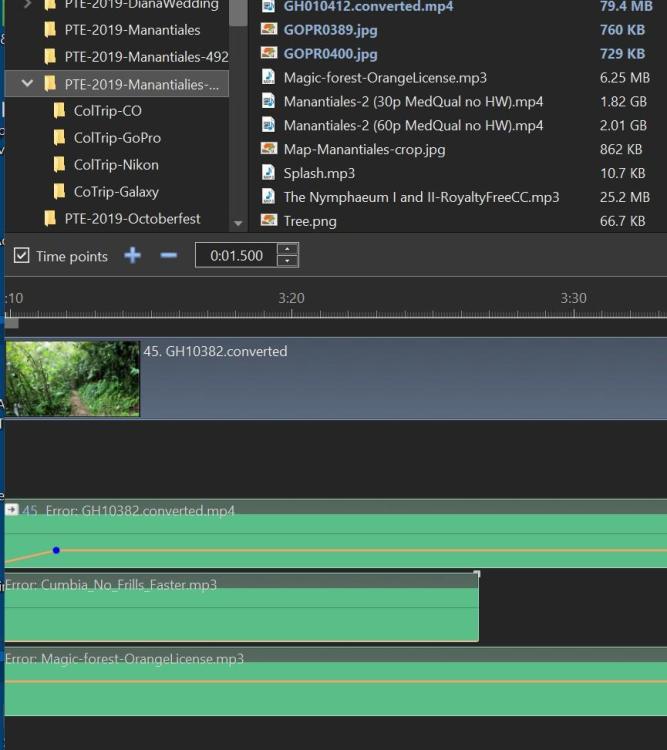
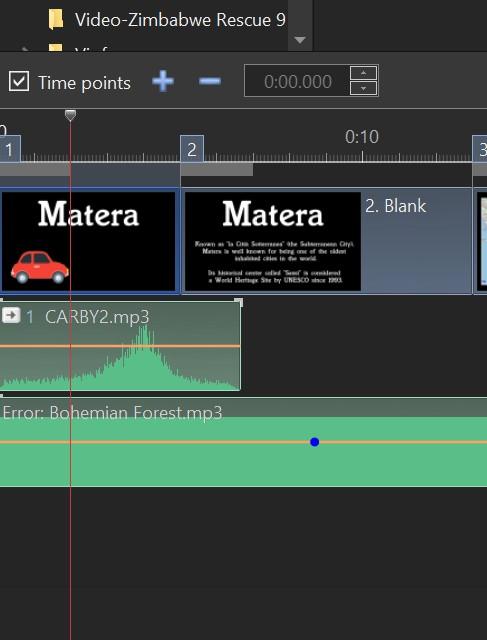
Greetings Igor, I deleted all the files in the WnSoft-WaveCache folder. I opened the .pte show again. But, it still showed 'error' in the mp3s. No other PTE show was opened. But then I closed it, and later reopened it. It took a while showing 'wait..' with the mp3s and then all the mp3s showed up correctly with no 'errors'. Is there a better way to avoid the 'error' in the mp3s? This has happened in several shows. Here is what the mp3s looked like even after I cleared the WnSoft-WaveCache folder. (But look below and it happened again in another show.) But...I just opened another old show and got a similar 'error' in the mp3. Then I closed it and reopened it and the 'errors' were not there. It there something else going on? Gary
-
Create Backup in Zip-files not recognized [SOLVED]
goddi replied to goddi's topic in Troubleshooting
Greeting Denis, Oh yes...I see the light. Thanks. Gary -
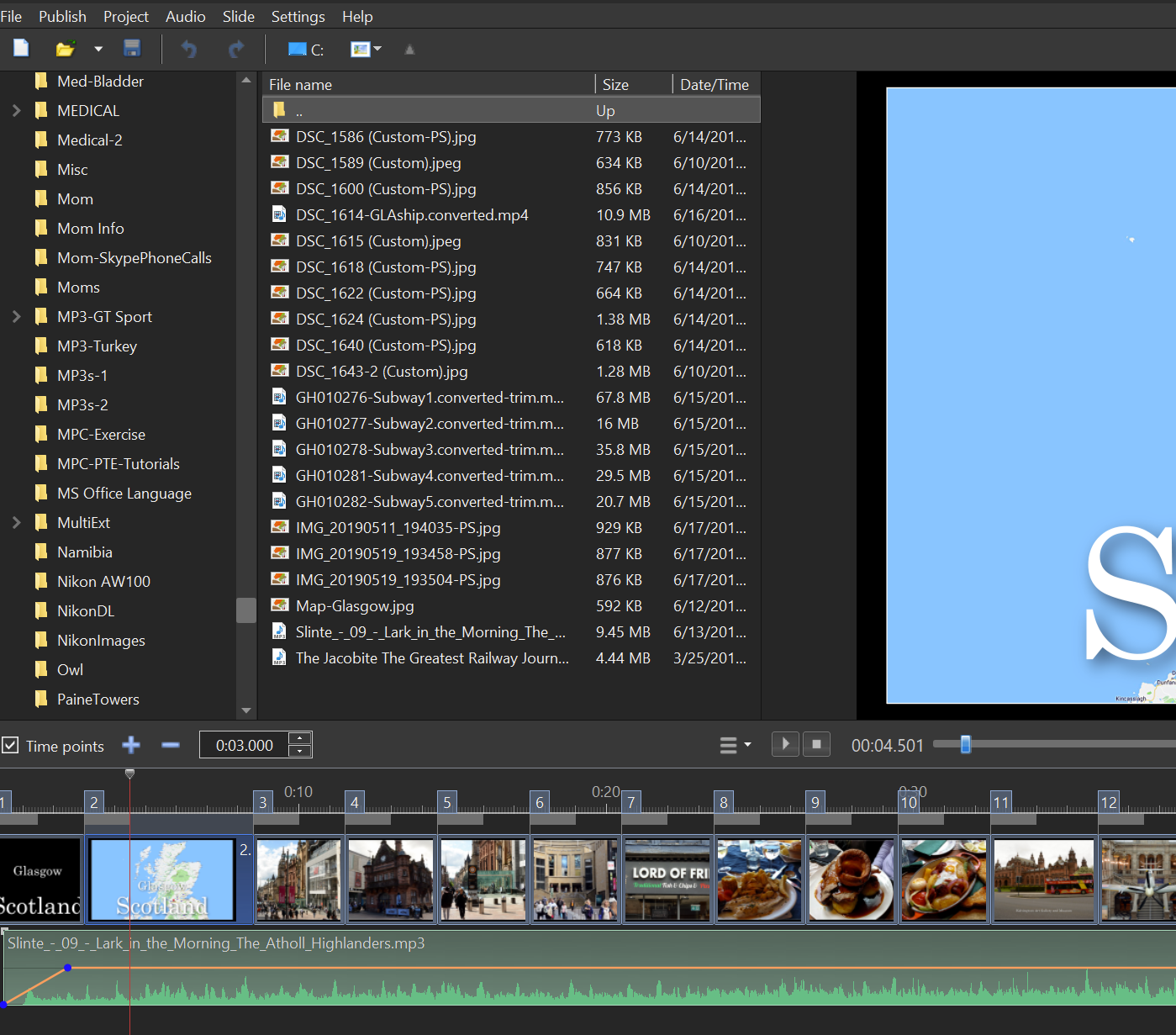
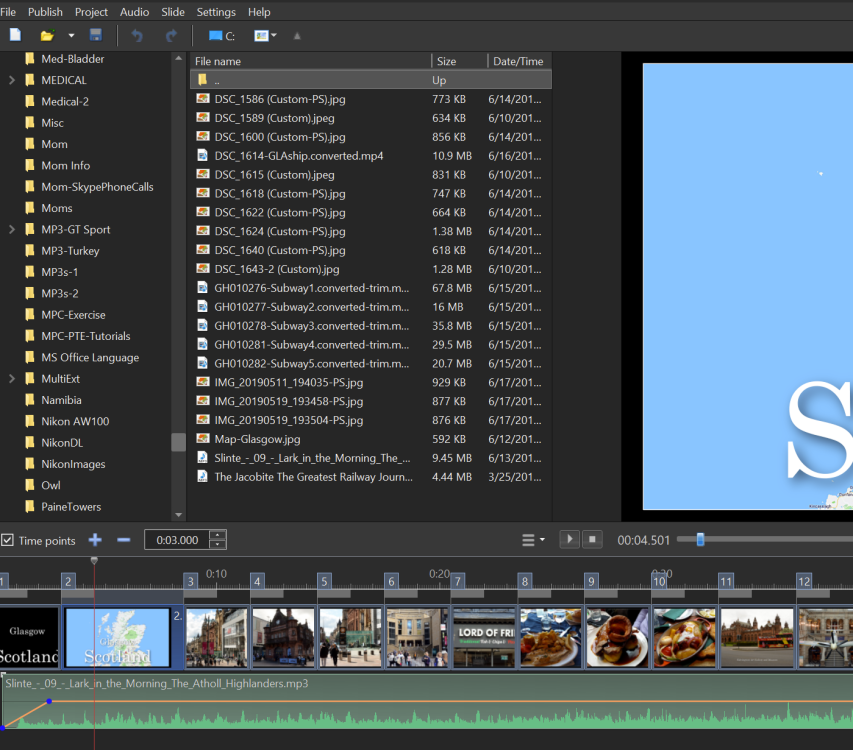
Greetings, I removed a bunch of files from a long show to make a shorter show. I made a 'Create Backup in Zip' of the remaining files and save the .pte. I unzipped the file and ran the .pte of this shorter show in a new folder. All the files were there and worked as expected. However, none of the files used in the show were in 'blue' to indicate they were being used in the show. I opened and closed the show several times but it did not change. Bug? Gary
.jpg.27d787250b8abc63c7f15223102b5a06.jpg)
.jpg.47f5083bb7fe425cc67ce29d84d1cbb5.jpg)
.jpg.6f775bd9916d520d3c1a08b1df7a1681.jpg)