goddi
-
Posts
3,596 -
Joined
-
Last visited
-
Days Won
27
Everything posted by goddi
-
Convert Video Clip process - renaming and resizing
goddi replied to goddi's topic in Suggestions for Next Versions
Denis, Thanks. I had not tried your method. But this shows that all Igor has to do is change the dropdown lists to include all the resolutions so it works easier. I don't want to have to remember all the different resolutions. Gary -
Greetings, I have two suggestions for the Convert Video Clip process. 1. Allow the renaming of the Destination File’s name to be made in the Destination File’s window. Currently, you have to click on the browse icon and change the name in the resulting window. If the Destination File’s window becomes highlighted when it is clicked on, it should allow you to make the file name change in its window. 2. Allow the Resize dropdown list to display all of the possible choices. Currently, not all of the possible resized choices are displayed for each resize. For example: -1920x1080 displays only 1280x720, 1024x576 and 960x540. -1280x720 displays only 1024x576 and 640x360. -1024x576 displays only 512x288. -960x540 displays only 480x270. If you want to resize a 1920x1080 to 480x270, for example, you cannot do it directly. Gary
-
Custom transition - Invalid floating point operation [SOLVED]
goddi replied to tom95521's topic in Troubleshooting
Greetings Tom, That is basically what I did. I did an image backed of my Win7 drive, just in case. Updated to Win8.0; then 8.1. I got all the programs to function. Good luck with your process. Gary -
Custom transition - Invalid floating point operation [SOLVED]
goddi replied to tom95521's topic in Troubleshooting
Greetings Tom, I really don't want to start a 'war' here about Windows 7 vs 8. But I am just curious why you would not want the most recent version of Window (8). And now that Igor has fixed the custom transition problem. I think I heard that if you have Windows 8, the yet-to-be-released Windows 10 will be free. Just curious. I did like Windows 7, but I have been able to make my Windows 8 look and act almost exactly like Windows 7. Yea, they moved things around, but once I found them, no problems. Really, just curious. I had Windows 7 Pro and I updated it to Windows 8.1. It went smoothly. Gary -
PTE and Mercalli SAL3 - image stabilization issue
goddi replied to goddi's topic in General Discussion
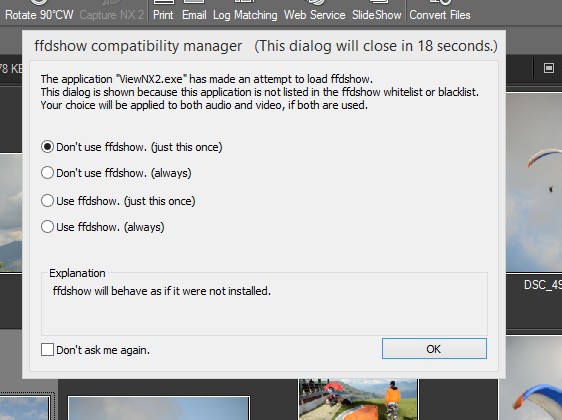
davegee, on 05 Mar 2015 - 03:29 AM, said: Dave, Did you take a look at my question in posting #20 about the attached screenshot concerning VNX2 and ffdshow? Gary -
Greetings, I have made some of these suggestions in the past but they have not been incorporated into new versions. So I am trying again. 1- Provide ‘Overwrite’ warning when you Convert a video clip. Yes, you can edit the file name in the Destination File window, but it would be nice to have a warning if you are going to overwrite an existing file. 2- Provide the choice to be able to Trim a video clip without have to Convert it. 3- Make MOV video clip play smoothly in the Convert preview window. They play very jerky so it is very difficult to trim accurately before Converting them. Yes, I can trim the MOV clips in VNX2 first, but it would be nice to be able to do it within PTE. 4- When you want to add the audio portion from a video clip, make it clearer how you can do this. Currently, you have to know that you can click on the ‘Audio files….’ selection to have the ‘Video files…’ appear. It is not obvious that you can do this. 5- Show the extension of the files in the Slides and Timeline views. Sometimes you might have the same name for different image or video files but the formats are different. 6- For images that have been put into the project but are not the main images, show some indication in the File List that the file is being used in the project, i.e. italicized, for example . 7- In the File List, add a ‘Length’ column to show the length of the video files. 8- Currently, if you have a video clip followed by an image file, you can move the image file to the left (when in Timeline view) to shorten (i.e., trim) the end of the video clip (an easy way of trimming the end of the video clip). It would be helpful to be able to do this to the beginning of the video clip by being able to move the video clip to the left to ‘trim’ the beginning of the video clip. This would allow some fine tuning of the beginning and ending of a video clip. Yes, you can make such adjustments in O&A but it would be nice to be able to just move the video clip in the Timeline to have a similar effect. Gary
-
PTE and Mercalli SAL3 - image stabilization issue
goddi replied to goddi's topic in General Discussion
I don't think that is a good way to go. If we converted and trimmed a video clip and then wanted to go back and use PTE to trim it a bit more, you'd have to send it through the convert process again. Will that have an effect on the final quality? I don't know but I don't think a re-convert needs to be done. Why not just be able to trim the clip? Gary -
PTE and Mercalli SAL3 - image stabilization issue
goddi replied to goddi's topic in General Discussion
Yea...I should have added 'after the conversion process'. I had mentioned this before in other postings. My converted MOVs seem to play OK. Pre-converted MOVs don't even play well in the Conversion's preview window. Too jerky to even trim. Gary -
PTE and Mercalli SAL3 - image stabilization issue
goddi replied to goddi's topic in General Discussion
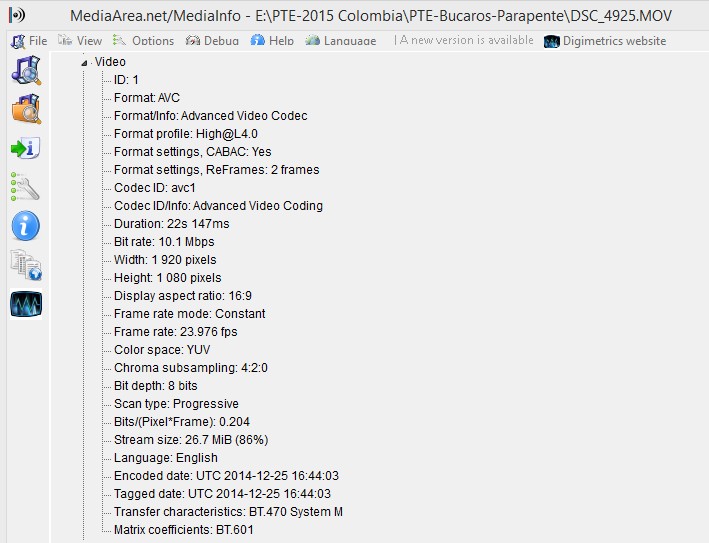
Eric, I have had no problems putting HD (1920x1080, 24 fps) from my Nikon D7000 into PTE. Attached is what an MOV clip's specs looks like. Gary
-
PTE and Mercalli SAL3 - image stabilization issue
goddi replied to goddi's topic in General Discussion
Dave, Yes, I now realize that I can select the 24fps in VNX2 for my MOVs. I will be sure to select that frame rate. Thanks...Gary -
PTE and Mercalli SAL3 - image stabilization issue
goddi replied to goddi's topic in General Discussion
Peter, I think Dave does is 'not having problems' is that he (I believe) is first running them through the Convert process. I agree with this. If I just run my MOVs through the Convert process, they play smoothly in the Convert window, when trying to do a trim. My concern has been trying to trim them while in the Convert window. The non-converted MOVs, for me, show as jumpy and jerky when played in the Convert window. If I convert the MOV and then bring it back into the Convert window, it plays smoothly in the Convert window for trimming. Maybe it is because my PC is 32 bit, not 64. Not sure if this would make a difference. But when I play my MOVs in WMP or other media players, they play smoothly. Gary -
PTE and Mercalli SAL3 - image stabilization issue
goddi replied to goddi's topic in General Discussion
-
PTE and Mercalli SAL3 - image stabilization issue
goddi replied to goddi's topic in General Discussion
Dave.... Yes, my videos mostly come from my Nikon D7000 DSLR (MOVs) and my camera is set for sRGB. I did a quick test of trimming an MOV from my D7000 with VNX2. Worked well. But I did notice that when I saved the trimmed clip, the bit rate changed from 11.2 to 16.5 (not sure why it changed). The frame rate changed from 23.976 to 29.970...but that was the default. I didn't notice that I could have kept it the same. So it works pretty nicely. Thanks for the tip. But I don't think there is a way to do a 'precise' trim with an MOV in PTE's Convert process. It plays way to jerky. But I do see the advantage of trimming the MOV clip in VNX2 and then running it through the Convert process in PTE. Questions when saving an MOV for PTE that was trimmed in VNX2: 1- If I can change the frame rate, does it matter which one I choose if it is going into a PTE show? 2- The file types to choose from are: MOV (H.264/AAC), MOV (H.264/Linear PCM), MOV (MotionJPEG/Linear PCM). Which is preferable for PTE? (I just updated my VNX2.) Also, what does the attach message mean that I get in VNX2???? Thanks... Gary
-
PTE and Mercalli SAL3 - image stabilization issue
goddi replied to goddi's topic in General Discussion
"You can trim in-camera or in VNX2 and output in the same format/quality. I recommend VNX2 for this - it does a good job." Greetings Dave... I saw it but I was not sure what VNX2 was. I also just saw your post on VNXi. Now I see that I have VNX2 installed on my PC but have not had the time to work with it, especially with video. Later today I will poke around with it to see what it does. Thanks for the reminder. But it would be nice if PTE could make it so you could just trim a video clip without having to put the clip through the Convert process. But, then, it does not work well with the original MOV format so trimming that format is not very accurate. Very shaky and jerky. I wonder why. Gary -
PTE and Mercalli SAL3 - image stabilization issue
goddi replied to goddi's topic in General Discussion
Greetings Dave, So if I read this right, "N.B. Video clips which require Trimming should be Converted/Optimized by right clicking on the clip and choosing “Convert Video Clip” before adding to the Slide List in order to preserve the setting of Full Slide Duration equal to Video Clip Duration", you can NOT trim a video clip without having it also automatically go through the Convert process? Gary -
PTE and Mercalli SAL3 - image stabilization issue
goddi replied to goddi's topic in General Discussion
Oppsss...Above...#7. Gary -
PTE and Mercalli SAL3 - image stabilization issue
goddi replied to goddi's topic in General Discussion
Eric, I don't think you can trim without converting the video clip. At least in the latest version. See my posting below. Gary -
PTE and Mercalli SAL3 - image stabilization issue
goddi replied to goddi's topic in General Discussion
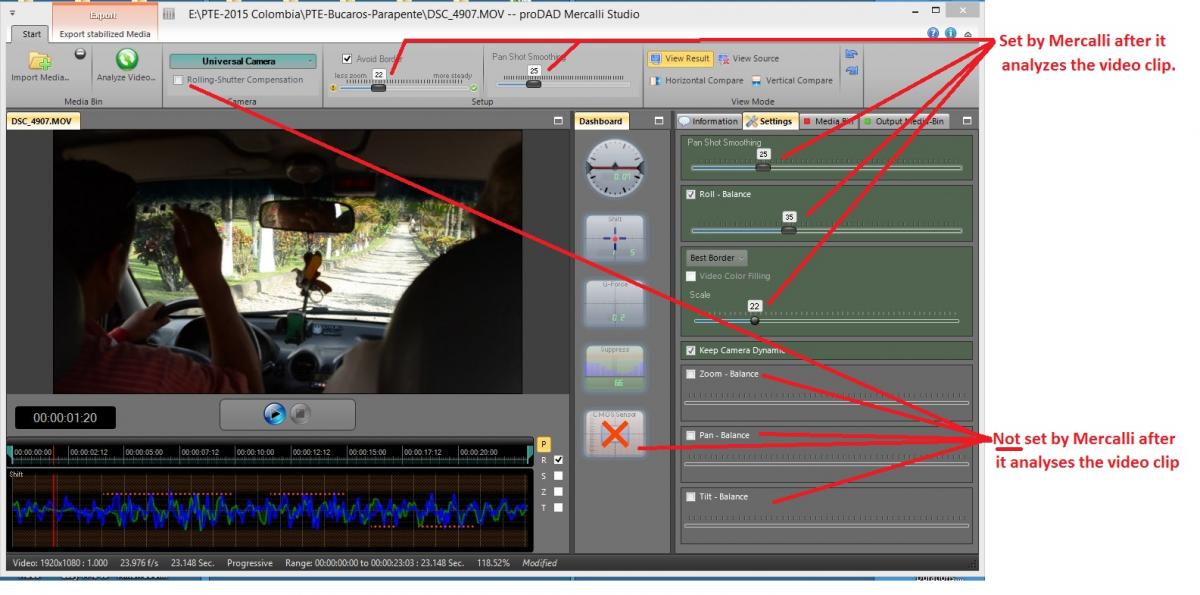
Peter, I tried the trial version of Mercalli-Easy. When I tried to save the results, it stopped half way through...maybe because it is a trail version. Its saving output is AVI. The Mercalli SAL3 lets me save as MP4. Not sure what the difference is after you Convert it in PTE. I also notice that the Mercalli-Easy automatically enabled the Rolling-Shutter Compensation setting, while the Mercalli SAL3 does not. And the Easy version does not show any CMOS setting. No, I am not completely happy with the stabilization results I am getting with Mercalli SAL3. I get some strange jerkyness where the original video does not have. And some added blurring in some spots. The Mercalli SAL3 has a bunch of sliders and choices that I am not sure how to use to make the results better. I have attached a screenshot of what I get after a video is analyzed. I would assume the additional sliders, etc., that my version has can be used to get better results but I have not found out 'why' or 'when' I should tweak them. Gary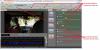
-
PTE and Mercalli SAL3 - image stabilization issue
goddi replied to goddi's topic in General Discussion
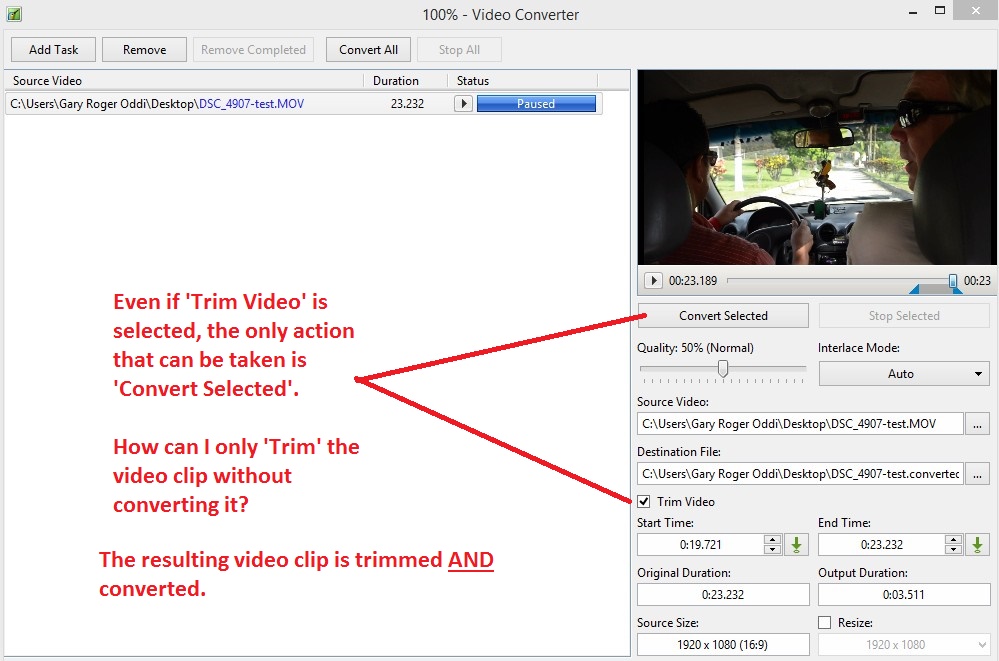
Lin, Peter, Dave and Eric, Ok...let's say I want to trim a long video clip before I stabilize it or convert it. And say I want to do the trimming in PTE. From what I can see, you can not trim the video without it going through the convert process. See attached. If I want to use only a small portion of a long video clip, I don't want to have to run the long clip through Mercalli each time I want to tweak the inputs in Mercalli. So I'd like to be able to trim the video clip first using PTE. However, the fly in the ointment is that my video out-of-the-camera is MOV format. The preview in the Convert window does not play MOV format video smoothly...it is very jerky so it is difficult if not impossible to do a good trimming. So that is one reason I did the PTE Convert first; then Mercalli; then PTE Trim (with another required Convert). I have a problem because the MOVs don't play smoothly in the Convert window and you can not do a Trim without doing the Convert. Gary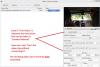
-
PTE and Mercalli SAL3 - image stabilization issue
goddi replied to goddi's topic in General Discussion
Lin, The reason I would first run the video clip through the PTE 'convert' process is that it allows me to do some trimming of the clip before I run it through Mercalli. If I just wanted a short portion of a long clip, it would take a long time for Mercalli to first encode the entire clip. Doing the trimming first in PTE, before Mercalli, let me encode a shorter clip in Mercalli. But I will try your method of just running the entire clip through Mercalli first, then run it through PTE's convert process and trim it then. But, I am really at a loss on how to set the parameters in Mercalli SAL3 after it Mercalli has analysed it. I'm am not sure what to check and what to set the Settings for the best results. I have looked for YouTube tutorials but they don't say 'why' or 'when' you would want to adjust any of the settings after the video clip is analyzed. It is hard to tell what they are going to do. Have you found any good tutorials on how to use Mercalli? When I import a video, it automatically inputs some defaults, and then after the clip is analyzed, the defaults are readjusted automatically. But it is not clear what other adjustments should be done after Mercalli does its analysis of the clip. If anyone has any input, I'd appreciate it. Thanks... Gary -
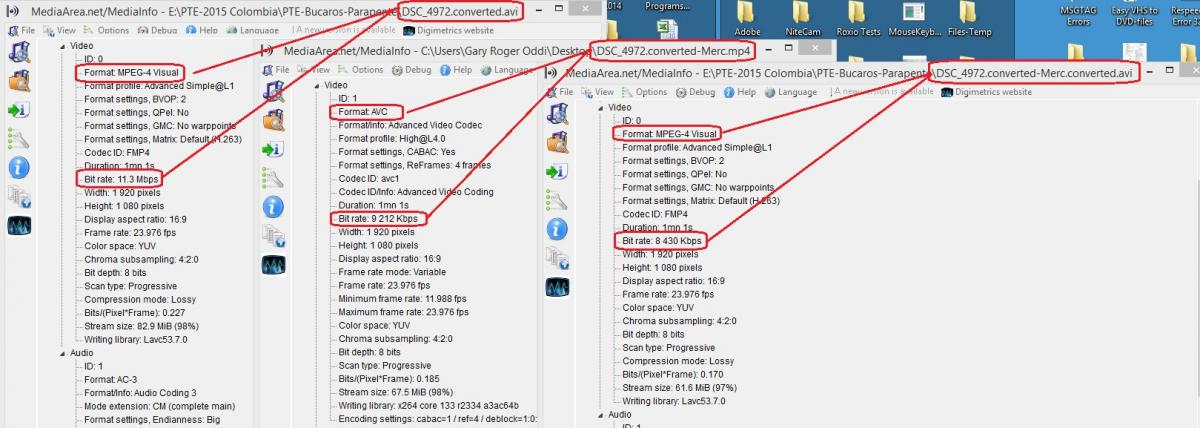
Greetings, I am trying to stabilize some videos using ‘Mercalli SAL3’ that I have included in a PTE show. I have had some success but still trying to figure out how to use Mercalli to get the best results. But I have come across a bit of a strange result that I’d like some opinions on. I have put in a video clip into the PTE show. I have let PTE convert the clip, with some trimming done. Then, I run this converted clip through the Mercalli program to help stabilize the image. When I then play this video clip in PTE, it does not run smoothly anymore. (But it does run smoothly in Windows Media Player and in VLC). So then I re-convert the previously converted clip and then it run smoothly again in PTE. Here are more details: I start with an original video clip that is in ‘mov’ format. I let PTE 'convert' the clip and I did some trimming in the process. When I convert it in PTE, the format changes to a file with the ‘avi’ extension, DSC_4972.converted.avi, (the Format shows it to be ‘MPEG-4 Visual’). Then I run this file through Mercalli and it comes out with an ‘mp4’ extension, DSC_4972.converted.Merc.mp4, (the Format shows it to be ‘AVC’). But the problem is it then does not run smoothly. I then re-convert it in PTE and the extension goes back to ‘avi’ extension, DSC_4972.converted-Merc.converted.avi, (the Format goes back to ‘MPEG-4 Visual’). And it then runs smoothly in PTE. Please see the attached screenshot. I thought a big change in the bit rate would be causing the problem, not the format, but the bit rates appear to be very close to each other in each file. I would like to know if this result is ‘expected’ or are my steps causing the problem. Thanks… Gary

-
Greetings, This is a slideshow of my wife and I and a couple friends paragliding (parapente) in Colombia in December. I enjoy creating stories by combining videos with still images. PTE allows this to be easily done. I like the fact that you can extract the audio from the video and place it in the audio track to have complete control over it. Most of the videos and stills were taken with a Nikon D7000 DSLR, 18-200mm lens. A couple of videos clips were taken with a Nikon AW100 pocket camera. The slideshow is posted in MP4 format because the EXE format came out about 3 times larger. So I just got it under the maximum allowable size for the Slideshow club. I hope you enjoy it. Any comments welcomed. Gary
-
(SOLVED) Erratic behaviour when setting option in Project Options (SOL
goddi replied to JEB's topic in General Discussion
Jeb... You are not the only one. I have done that many times. It took me a while to figure out what was going on. Double-click is a natural thing to do. I still forget at times and make the same mistake. I am glad to see I have not been the only one.... Gary -
Igor, Thanks. I was having difficulty trying to find a topic and I thought, perhaps, logging in would help. But good to know it is not necessary. Gary
-
Dave...Ok...Thanks... Gary