

goddi
-
Posts
3,596 -
Joined
-
Last visited
-
Days Won
27
Everything posted by goddi
-
Slideshowclub- 'Find their other files' not working
goddi replied to goddi's topic in Forum & Website
Yes, I tried it and it works now. Thanks much. Gary -
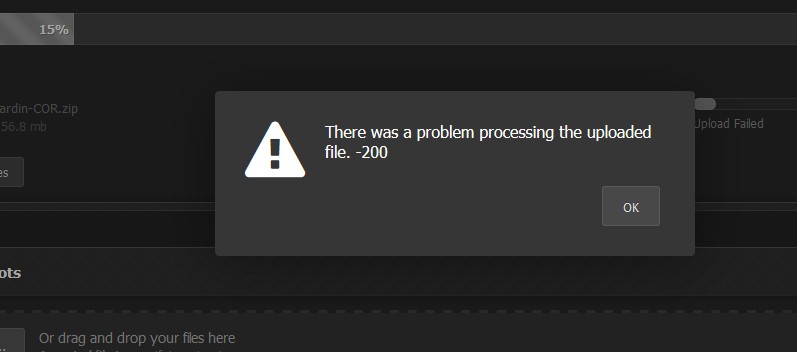
Igor, I tried to upload the file using Firefox, Chrome, IE and Edge. All showed the same problem. Got the '-200' error message. I then tried another zipped file that had been uploaded in the past, and, it too would not upload. Gary
-
Here is a video screenshot of what is happening...starts, stops, starts, stops, starts....Gary SlideShowClub_error.mp4
-
Igor... Just one file, as I normally have done. The progress bar shows the percent increase but it will stop somewhere around 10% to 15% and then start over and over until I get the error message. Gary
-
Igor, The zipped file is 160.5mb. Gary
-
I can not get Slideshowclub to upload my show. It keeps stopping at about 15%. Not sure what is going on... But the Parapente show should be available for download. Gary
-
In addition to the link to my Parapente show that Dave posted above, I am trying to upload one from a trip to Jardin, Colombia, but I am having trouble getting the Upload to work, at the moment. I will keep trying, but check the SlideShowClub to see if I can get it uploaded. Gary
-
Greetings, I am trying to upload a show (tried several times) but it can't get past 10% to 15%, and then starts over and over again. Here is one error message I got: Any ideas??? Gary
-
Slideshowclub- 'Find their other files' not working
goddi replied to goddi's topic in Forum & Website
I had sent an email about this problem to IPS Focus people. No reply...yet. Gary -
Slideshowclub- 'Find their other files' not working
goddi replied to goddi's topic in Forum & Website
Ken, I can get to the individual shows. But if someone else can use this feature with Win10, I would hope this can be fixed. Seems I am not the only one. Is this a problem that Igor can fix or is it the IPSFocus program? Gary -
Slideshowclub- 'Find their other files' not working
goddi replied to goddi's topic in Forum & Website
Greetings All, I have tried Firefox, IE, Chrome and Edge, but I get the error message each time. I have Win10.
-
Greetings, When I am in the Slideshowclub site, the "Find their other files" does not work. Has this ever worked? I don't remember seeing it before, but it does not seem to be functional. Gary
-
Dave... Funny, that is what I had done but I had not renamed it so I did not notice it was Created as 'My Style'. I renamed it and, bingo, it works. It did not seem that there was still a connection between the edited style that I just applied in O&A and then going back to Slide Styles and doing a Create. All of this is finally bringing me into the 'Styles' world. Thanks for the help. Gary
-
Dave, You lost me when you said ' Create it again from the Tools Menu in exactly the same Category'. I assume you mean to use 'Tools' in the Slide Styles menu but I don't see how. Gary
-
Greetings Dave, Speaking of Style Organization, is it possible to change the default location of Styles, Templates and Transitions to a different folder without causing problems? I would prefer to have these subfolders located where I have the PTE program installed. It looks like I can change the default location in Preferences for both V8 and V9, but I'd like to know for sure before I tamper with the current settings. Also, Dave, is there a way to 'edit' a Style? For example, your 'Window with border in mask' has a blue background. I prefer a black border (default) but I have to change it by going into Slide Options each time I use it. I don't see any way of saving that 'edited' Style. Is there a way to save it? Thanks... Gary
-
Dave, I don't know how you did it but this style is BRILLIANT!!! I re-did my map and I was able to get the white border, and put my text and my red car with animation of the map. I figured out how to remove your blue background and change your zoom from 80 to my 95 percent. AND...I can rotate the image within the border!!! Magical...Fantastic... Keep up the good work. Gary
-
Greetings, Just put up a new slideshow (3:30) of a stop we made in Castelbuono, Sicily on our road trip from Naples to Palermo. The stop in the town was for only for a short time but it was certainly worth it. Just in case you are in the area, you should drop by the town.The slideshow was made in V9, Beta15. Gary http://www.slideshowclub.com/files/file/439-castelbuono-sicily/ P.S. I ordered one of their Panattone and it should be here by the end of next week!!!!!! P.P.S. Got it and it was mmmmmgood!!!
-
Slide Duration-How to save for specific individual images?
goddi replied to goddi's topic in General Discussion
Lin, Yes, I am getting that drift... Maybe I'll make a suggestion. Thanks all, Gary -
Slide Duration-How to save for specific individual images?
goddi replied to goddi's topic in General Discussion
It might be OK if you have a small number of slides and they are all contiguous to change their duration. What if you have a hundred slides and the slides with specific durations are scattered through the show. It would be a pain. Why not allow the ability to 'lock' in that special duration for individual those slides using the 'Slide Options/Main' menu? Just add it as an option. Gary -
Slide Duration-How to save for specific individual images?
goddi replied to goddi's topic in General Discussion
Lin, I thought I had replied to this but it disappeared, apparently. Let me try again. The problem is that only the duration of 'New slides added will carry the time set in Project Options for Slides'. Here is the problem: For example, if I have the intro text slide set to 3, and I have a Route Generator map that has to be set to 9.04, and I have all the other slides already set to 5, when I want to change all the slides that are set from 5 to, say, 4 and 'Apply to All', the 3 and the 9.04 durations get changed too. Is there a way to 'lock' in the duration times for certain slides so I can change all the other slides to a different duration as I create the show? Still not possible??? Otherwise, I have to change the duration of the other slides, slide by slide. Gary -
Greetings, How can I save the 'Slide Duration' for specific slides so they don't change when I modify the 'Project Options/Main/Default Slide Duration'? If I have set the slide duration for specific individual images, their duration will change when I change the 'Default Slide Duration'. I'd like to keep those specific individual slide durations so they do not change when I change the 'Default Slide Duration'. Possible? Gary
-
Thanks, Igor. Best wishes and Merry Christmas and Happy New Year, too!!!! Gary
-
To keep up a tradition - My Christmas video
goddi replied to Delicate's topic in Slideshows & AV Shows
Always a pleasure to view your work!!! Inspiring. Merry Christmas. Gary -
Viewing a slideshow / project on another laptop
goddi replied to Warren57's topic in General Discussion
Greetings, Just in case, Publish it also an 'HD Video'. It will be created as an MP4 file. I say this because sometimes the exe format does not play on my laptop as smoothly as an MP4. The MP4 should play well with the Windows Media Player, or really any media player. Copy both to your laptop and see what you get. Gary -
Fonts-how to copy fonts from old to new PC?-SOLVED
goddi replied to goddi's topic in General Discussion
Sometimes you don't see the forest for the trees... But you got me out of the woods! Gary