

goddi
-
Posts
3,596 -
Joined
-
Last visited
-
Days Won
27
Everything posted by goddi
-
Igor, I know you prefer each suggestion to be in a separate topic. But I think it would be more efficient to just make a list at this point. A know you are thinking of 9.01 improvements and I would like to make the following suggestions. These suggestions are not made for new ideas or neat tricks. I think they would improve what you already have in PTE to make it easier to use and more intuitive. They are not in any particular order, but all, I think, are important. Gary To-Do List Suggestions for V9.01 1-Add filename’s extensions to ‘Slides’ and ‘Timetable’. 2-Widen O&A’s ‘Properties/Name’ and ‘Picture’ boxes to see more of the entries. 3-Add horizontal sliders in the Folder and File List windows. 4-Add a ‘Length’ column in File List (to see length of videos). 5-Make the ‘Convert’ window always show on screen and not just as icon in Tray. 6-Allow the ‘Border’ setting to be made Global, with ability to turn off and adjust individual borders. 7-Allow the O&A’s default ‘Border’ setting (currently 1.5) to be modified. 8-Add in the ‘Project Options/Audio’ an additional option to ‘Add (or Copy?) Audio from Video’. 9-Allow the ability to ‘Trim’ a video file without having to ‘Convert’ or re-Convert (adding a second ‘convert’ to the filename). 10- When an ‘Open Recent Project’ or ‘File Open’ is performed, insure that the associated files (at least the location of the last save) of the project are displayed in the File List. 11-Indicate in the File List the non-main files that are used in a project with some notation (i.e., color or italicize, etc.) 12-Allow non-main files to show the ‘Insert template’ information. 13-Add ‘Rotate’ to the Frame function. 14-Create the ability to copy all of the O&A’s settings that were made to one slide to another slide (copy/paste). 15- Currently, if you have a video clip followed by an image file, you can move the image file to the left when in Timeline view) to shorten (i.e., trim) the end of the video clip (an easy way of trimming the end of the video clip). It would be helpful to be able to do this to the beginning of the video clip by being able to move the video clip to the left to ‘trim’ the beginning of the video clip. This would allow some fine tuning of the beginning of a video clip as you can with the ending of a video clip. ...Any comments from users?
-
Igor, It looks like you have the pricing backwards on the Forum site? Gary

-
Greetings, I am still trying to figure out all of the variable that one must deal with when using video in PTE (bit rate, frame rate, codec, etc.). Igor recommends “to work with converted video files, because original MP4 video in H.264 is ‘heavy’ for PTE.” Lin has said “…The conversion by PTE to AVI is done to make it much, much easier on the resources of a system when creating an executable file. Because MP4's are fairly highly compressed, to play them as executable they must first be uncompressed in the system then played. This frequently makes for jerky playback because it's a strain on system resources. …You have the option of creating an AVI rather than an MP4. …I use Microsoft MPEG 4 Video Codec - PTE doesn't ask to convert it.” My videos start out as MOVs and then I have been converting them (using an outside program) to a smaller MP4 format with a bit rate of about 4 Mbps. My primary concern is getting the size of the video clip as small as possible that will play well, as an EXE or MP4. The problem, as I see it, with the PTE Convert process, is that it creates a much larger AVI file by bumping up the Bit Rate significantly, for example: 1-PTE Converts an MP4- the size goes from 47Mbs (bit rate 3.9 Mbps) to 135 Mbs (bit rate 11.4 Mbps) 2-PTE Converts an MP4- the size goes from 27 Mbs (bit rate 4.0 Mbps) to 60 Mbs (bit rate 12.6 Mbps) 3-PTE Converts an MP4- the size goes from 117 Mbs (bit rate 4.0 Mbps) to 365 Mbs (bit rate 12.6 Mbps) When Igor says ‘heavy’, is it referring to just the ‘compression’, meaning the ‘codec’ or is it the ‘bit rate’, which increases the size of the video, or is it both? So how do I select a higher compression (smaller file) and reduce the bit rate (smaller file) and still play well? I can use a video converter (Videomiser 2) that will let me choose various HD outputs: HD-AVI (MPG4); HD-MP4 (H.264); HD-MP4 (MPEG4); and HD-MPG (MPEG-2). Each of the above settings will let me select a bit rate down to 2 Mbps, except the MPG2, only 4 Mbps. Another video converter program (Aiseesoft), gives me the following HD choices: HD MPEG-4 (MPG4); HD H.264/MPEG-4 AVC (H.264); HD AVI (H.264) Not sure what to select here, but the last one's output is AVI but the lowest bit rate to choose is only 8 Mbps. The problem with the PTE Convert is that you cannot modify the bit rate you want. That is why I prefer to use an outside program to convert (and trim). It has become very necessary to keep the final file size down because the largest file you can upload to the Slideshowclub was 280 Mbs, and now it is down to about 128 Mbs. So, after all of this, should I use an outside program to convert my ‘MOVs’ directly to whichever output is an ‘AVI’ and choose the lowest bit rate that looks acceptable? Gary
-
Yes, MP4s are good to start. My camera takes MOVs. But when you add your videos, you should normally let PTE 'convert' them. They will then be AVIs, for better performance in PTE. You can do some trimming in the Convert screen of PTE. It is best to right-click on the video file in the file list before you drag it down so the Convert window opens and you will be able to use the Trim function just before you convert. It took me a while to notice the little green down-pointing arrows which will bring in the trim points to when you want the video to start and where you want it to stop, for the trimming. They will be converted to 'AVI'. You can also use the free Windows Movie Maker to do trimming (and other things, like stabilization). I just bought the Aiseesoft Video Converter Ultimate for an alternative trimming program. Lots to learn about video but it really adds to the show. Gary
-
Easy...just drag it down like an image. But drag it down to the Slides, not the Timeline view. At least, that is what I do. Less chance of unexpected results. Gary
-
Shirley, I have been using PTE for a long time but I have never been aware of the ability to 'hide/show' the envelope line. Why someone would need that, escapes me. I guess that is why I didn't mention that as a possibility!! Good you figured it out. Gary
-
Greetings Shirley, The horizontal 'red' line is just the audio progress line of the voice over that plays in the YouTube video. That is not part of the PTE program. What seems to be missing is the 'orange' volume line. Perhaps you accidentally you moved it down...but you still should be able to see it. I am not sure, from your screen print, if you are really missing the entire orange volume line. Take a closer look for an horizontal 'orange' volume line. There is no horizontal 'red' line in the program. Gary Later...I just noticed that the audio file is an WMA format. Try to convert it to MP3 and see if that makes a difference.
-
Suggestion: Extract audio from video file
goddi replied to goddi's topic in Suggestions for Next Versions
Lin, Yes,'extract' might not be the best work. Perhaps it should be called 'Copy audio of video to track'? That would signify that you would have to mute the embedded video audio, and allow the manipulation of the volume of the copied audio track. My primary purpose was to bring this function out into the open. Just a thought, maybe this function would automatically mute the video track (but have choice to be unmuted). So a third choice could be 'Copy/mute audio of video to track'. Gary -
Suggestion: Extract audio from video file
goddi replied to goddi's topic in Suggestions for Next Versions
Lin, If you have no audio files, such as MP3s, added in tracks, and you have a video clip in the Slides, when you click on the "three bars to elicit the menu", there is no soundtrack to export. I think you have to first 'export' the audio from video track, as I explained above. After the audio from the video is now in a track, the 'three bars' will allow you to export the entire soundtrack as a WAV or MP3, as a stand-alone audio file. This is how I see it. Gary -
Suggestion: Extract audio from video file
goddi replied to goddi's topic in Suggestions for Next Versions
Dave, Perhaps you can find it if you know what you are looking for. I have tried the Online Help with 'extract video audio' and nothing pertaining to this came up. I tried 'extract', got nothing relating to video. After I searched on 'Audio', I found (in a very long page of results): "Adding the Audio of a Video Clip to an Audio Track The Audio of a Video Clip can be added to an Audio Track and the Envelope can then be applied to it. Add the Video Clip and then, in Objects and Animation/Properties Tab, Mute the Audio of the Video Clip. To add the Audio of the Video Clip to a Track go to Project Options / Audio Tab and Add a Track and then Add Audio File. In the bottom right corner of the browser change the “Audio Files” drop-down type to “Video Files” and navigate to your Video Clips Folder. Select your Video Clip and click on OPEN. Click OK in Project Options to see the Audio of the Video Clip in its Track. Adjust the start of the Audio to coincide with the start of the Video Clip. The envelope of the Audio of the Video Clip can then be adjusted as required in its Audio Track." The problem, perhaps, is that he word 'extract' is not used. Before you 'add the audio of a video clip' to a track, you have to 'extract' it, in my mind. So that is what I would be looking for. And maybe, I wouldn't want to 'add' it to a track. I might just wanted to remove (extract) the audio from the video clip to be used elsewhere. So, yes, 'adding...' is documented in the Online Help, but, for me, hard to find if I am looking to 'extract' it. Maybe a few words, like 'extract' or 'remove' need to be added to the Online Help. Thanks... Gary -
Suggestion: Extract audio from video file
goddi replied to goddi's topic in Suggestions for Next Versions
Greetings Lin, My purpose of making this suggestion is that this feature is basically a 'hidden' feature. I found out about this some time ago, and then forgot where in the menus I could find it. I would use this to have the ability to adjust the volume of the video's audio, especially if I wanted to also have music playing in the background or for voiceovers. I only suggest that feature be more obvious. After the video's audio is extracted, the users can do whatever they want with it but it really gives more flexibility to be able to adjust all the video's audio while the video is playing. Yes, muting of videos can still be handled though the O&A menu, to avoid simultaneous playing of the video's audio. Gary -
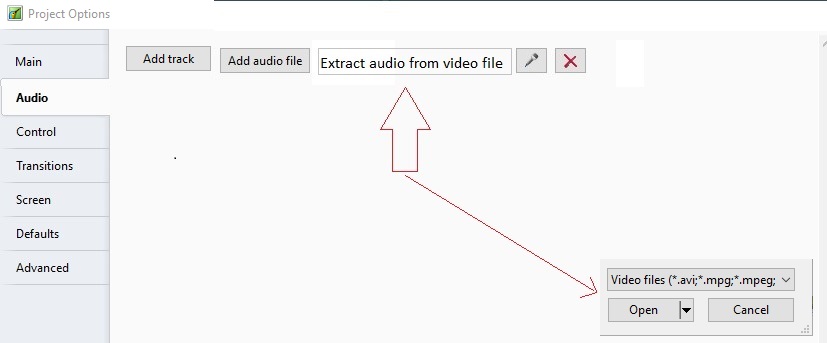
Greetings, I don't think many people realize that you can extract the audio from a video file unless someone points it out. Here is a suggestion to modify the Project Options/Audio tab so that it is clear that it can be done. The suggestion is to add in a separate icon for extracting the audio, and the video formats will be displayed in the Open window. See below. Gary
-
Igor, That is good, but we still can not upload larger files to Slideshowclub. Still get the '-200' error. I have sent many emails to the IPSFOCUS people explaining the problem, but no reply, no fix. Gary
-
Dave, I don't think the fact that we can not upload shows (larger than about 124mb) to the Slideshowclub and can not search the archives is trivial. I think we should get what should be working to be working. But Igor will decide. Gary
-
Yea, I know. It was obvious. Why not stick to the question? Gary
-
Sure, that is easy if you know what you are looking for and you know the exact name of the show. My question is, is there any other way to Search for shows? What if I wanted to find all shows created my you or me? Or, one about 'Africa'. There is one called 'The Beauty of African Wildlife Continued'. Wouldn't find it under 'A'. So, apparently there is no way to find a show unless you go page by page, or you know the exact name of the show. The bottom line is, can this site be given a Search function by word (any word in the title) and by author? I think this would make the site much more useful. Gary
-
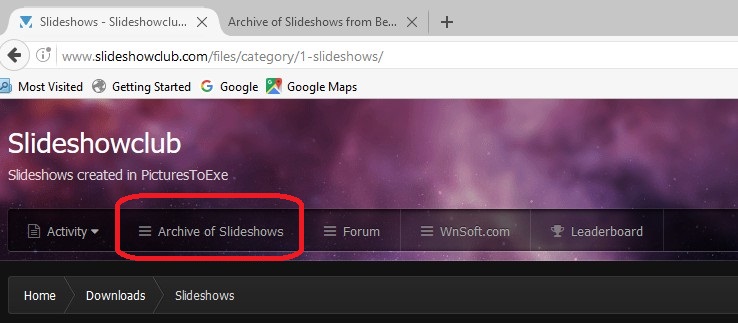
True, shows are no longer uploaded to the Beechbrook site but you can still access the site and download shows that had been uploaded in the past to this site from the 'Archive of Slideshows' link. So my question is, is there a way to Seach the Beechbrook site. Going page by page seems the only way to find a show, but I am hoping there is a way or can a Search function be added. Nobeefstu says it was 'effortless'. Just wondering how. Gary
-
So how do you do a Search in the Beechbrook site? I don't see any Search function. Gary
-
Yea, now I see. Then, I would suggest that no new styles or updates be posted until it gets fixed. Really messed up my Styles list. Not sure what I had or how to replace them. Gary
-
Dave...More problems in importing styles... I just imported the above style. Now I have 5 styles named 'Universal Window Style' and 5 named 'Universal Window Style 2'. Must be a bug?????? Gary
-
Dave.... Question... When I imported this update, it imported with the same name as the previous one. So I saw two styles with the same name. I then renamed one of them, but then both somehow were changed with the new name I gave. So now I have two 'Window with Border in Mask-2'. And I don't know which is the old and which is the updated one. Is this a bug or how are update to be handled??? And, one of them will not allow any dropdown (left or right mouse click) menu as the others do. Gary
-
Greetings, Well, I just solved the problem. All I did was to re-select the Route Generator's ffmpeg.exe file in Preferences and it started to work again. Not sure what started the problem because I don't think I tinkered with any of the original settings. So all is well. Gary
-
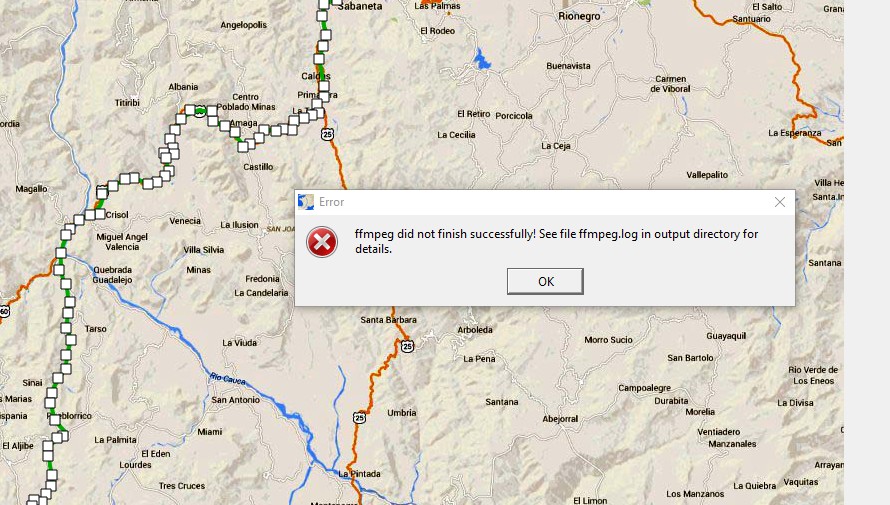
Greetings, I have recently been using Route Generator and have been successful. But, all of a sudden, it is not generating the map. I have tried a couple of different codecs, Cinepak and Windows Media 7, but they now don't work. I have sent emails to the Route Generator people but no replies. Can you tell me what might be going wrong? I have looked in the ffmpeg.log file but nothing that I can see. The last line shows this: "Error while opening encoder for output stream #0:0 - maybe incorrect parameters such as bit_rate, rate, width or height [AVIOContext @ 05b41240] Statistics: 0 seeks, 0 writeouts". Any ideas??? Gary
-
Greetings, I assume you are talking about the Slideshowclub.I posted about this problem, see link below. Thought Igor knows about this problem, it has not been fixed, yet. Same think happened back about June 2016. Not sure what is going on. Gary
-
That is strange. I think we had a similar problem some time ago where the file size was a problem. It was fixed and now it seem to be back. Hope it gets fixed soon. Thanks... Gary
