goddi
-
Posts
3,593 -
Joined
-
Last visited
-
Days Won
26
Everything posted by goddi
-
Lin, Thanks for the info. But don't think this is a good solution to what I am trying to do. These steps might be useful if you have only a few audio clips but I've got 17 audio clips in this show. When you highlight a group of the audio clips in the Audio Tab, the 'Link to Slide' feature disappears. To have to link and unlink these clips one by one is not too intuitive or easy. Why not have a feature where you can just highlight the audio clips you want to move as a group within the Timeline's audio track? The better way, as I see it, is to be able to do this as I stated in my posting above. I'd like to be able to highlight a consecutive group of audio clips in the Timeline with a 'Ctr+key+End' (for example), without the screen position moving, and then be able to move that group left or right. Is this not possible? Gary
-
Greetings, Some time ago, I asked a similar question but I mistakenly used the word 'track', instead of 'clip'. So the responses did not really address my question. So let me try again. Is there a way to highlight a group of audio clips in their track and then move the highlighted group as one group? For example, say I have 8 audio clips in a track. All have been positioned in a good way. But, then I want to move clips 3-8 as a group to the right or left. I'd like to be able to highlight clips 3-8 with a 'Ctr+key+End' (for example), without the screen position moving, and then be able to move that group left or right. Now, I have to move clip #3, then clip #4, then clip#5, etc., with the potential of disrupting an already perfected arrangement of the audio clips. Is there a way now to do this? I have searched the Forum but can't find anything along this line. Thanks... Gary
-
(Solved) PTE's MP4s won't play on my Samsung Galaxy Tablet
goddi replied to goddi's topic in Troubleshooting
Greetings, Well, I just tried a thumbdrive that is formatted as 'exFAT' in my Western Digital Media device and also plugged directly into my Samsung flat screen TV. Neither recognized the exFAT formatted thumbdrive. So, each has its own advantages and, of course, disadvantages. Gary -
(Solved) PTE's MP4s won't play on my Samsung Galaxy Tablet
goddi replied to goddi's topic in Troubleshooting
Greetings, I did a little testing. I have found an answer to a problem that I had when trying to play PTE MP4 files using a thumbdrive on the Samsung Galaxy Note 10.1 Android tablet. This might also apply to other Android devices but I really don't know for sure. Originally, the tablet would not recognize the thumbdrive because it was formatted as NTSF. So I tried Fat32 format. It works but this format limits your file size to 4Gbs. I discovered that you can format the thumbdrive as 'exFat'. I had not heard of this format before but I tried it. With the thumbdrive re-formatted as exFat, it will recognize and play MP4 files greater than 4Gbs. So with this discussion of 4K and HD files that will create larger MP4 files, this might be the way to go for playing them on certain Android devices. My testing also showed this Android tablet will not play MOV or MPG files. I think this normal for Androids. But I believe it should also play AVI files. So I tested this (with a thumbdrive formatted as exFat) and it will play AVIs less than 4GB but it only plays the audio portion if the file is greater than 4Gbs. Not sure why. I contacted Samsung tech people and they could not answer this question. But my primary concern is being able to play PTE MP4 files that are larger than 4Gbs on an Android device. Perhaps, the answer is formatting the thumbdrive as 'exFat'. Gary -
(Solved) PTE's MP4s won't play on my Samsung Galaxy Tablet
goddi replied to goddi's topic in Troubleshooting
Dave, I don't have a Mobilite but I just discovered something new. I have been Googling around and I 'think' that if a thumbdrive is formatted as 'exFAT', some Android tablets will read that format and the exFAT format can surpass the FAT32's limitation of 4Gbs. I will test this out after my wife gets home with her Samsung Note Android tablet. Gary -
(Solved) PTE's MP4s won't play on my Samsung Galaxy Tablet
goddi replied to goddi's topic in Troubleshooting
Greetings, I think I have found out what has been going on. The thumbdrive originally was formatted as FAT32. I wanted to add a few very large video files that were larger than the 4Gb size limitation for a device that is formatted as FAT32. So I re-formatted it as NTSF. This allowed the larger file sizes. I have discovered that the Samsung Galaxy Note 10.1 tablet (Android) will not read a device that is formatted as NTSF. I guess this applies to all Android devices. So once I re-formatted the thumbdrive back to FAT32, it recognizes the thumbdrive and reads the MP4 PTE shows and the videos. I called the Samsung help line and they confirmed this. I have read that you can 'root' your Android device to allow it to read NTSF devices but this may void warranties and it might be a bit complicated too. So I will just stick with FAT32 for the thumbdrive files to be played on the Samsung Android tablet. Gary -
Greetings Barry and Colin, Well, it is kind of good (in a bad way) to know that there are more people in my boat than just me. It has been frustrating trying to shine a light on something beyond the regular competitions. It is a bit sad to see that other photographers in our clubs don't see the possible creativity and exciting presentations they can make with a program like PTE. Our club starts up again in a month or so, and maybe I can give it one more shot... Thanks...Gary
-
Barry, I have been trying to get our local club into making AVs. I finally was able to get on their schedule to make a presentation of PTE earlier this year. I even purchased a laptop to be sure that the presentation went as planned. I emailed each person a full page of links, including PTE's, and many sites for free programs and demos that will assist in the creation of slideshows. I just can not get these members to give it a go. I don't know what it takes. I guess I have to find that second enthusiast!!! I feel our club is just stuck in the mud and doing the same thing year after year. We do have another club in the area that will hold a Photo Essay, but they do it only once a year. Most seem to use the PSG. Hard to even lead a horse to water... Gary
-
(Solved) PTE's MP4s won't play on my Samsung Galaxy Tablet
goddi replied to goddi's topic in Troubleshooting
Phil, That is good to know. I have played them from a thumbdrive so I just don't know what has changed on our Note. I will try to stop by BestBuy and see if someone there can figure out what is going on. I will try to copy one to the Note and see what happens. Thanks... Gary -
Greetings, When we first got our Samsung Galaxy Note 10.1 2014 Tablet back in March, I remember I was able to play my MP4s of a thumbdrive that I had originally created for my Windows desktop PCs. It has been a while since I tried doing this, but now they will not be recognized by the Tablet. I even tried to run them through the iDealshare program suggested in this Forum to 'convert' MP4s so they play on an Android. That did not work. I even tried to Publish an MP4 within PTE to be exported for a Tablet. That did not work. My wife stopped by BestBuy where they said something about having to 'reformat' the thumbdrive. But that was not clear enough for her to understand. Has Samsung changed something, perhaps through updates or something, that is preventing the playing of PTE's MP4s???? Or what am I doing wrong??? Gary
-
'Bungee-Retrieval' uploaded to Slideshowclub
goddi replied to goddi's topic in Slideshows & AV Shows
Lin, I see that there the 'higher' jump places in the world to bungee jump. But I am wondering if the actual jumping lengths (length of the bungee cords) are the same (for safety). For me, where I might land if the rope breaks is pretty important too..like crocodiles?. I just found this site. Pretty scary. In my video, it looks like the bungee cord is pretty frayed. Not sure if it is just the poor video or it really was in bad shape. I've done the Zambezi white water rafting, twice. But bungee jumping??? No way! Take a look at the video here: http://www.telegraph.co.uk/news/worldnews/africaandindianocean/zimbabwe/9009939/Bungee-jumps-at-Victoria-Falls-suspended-after-tourist-plunged-into-Zambezi-River.html Bungee jumps at Victoria Falls suspended after tourist plunged into Zambezi River A Zimbabwean tourism company has suspended bungee jumps at Victoria Falls while they investigate an accident in which a tourist plunged into the Zambezi River, a spokesman has confirmed. I just looked for some more current YouTube videos and I am amazed at what they are doing now at Victoria Falls. Now they have added zip lines and bridge swings. The equipment looks a lot safer now than when we were there in 1997. But things can still happen.... -
Yes, it is a 'free download' but it is really just a trial version. It costs $29.95. I played around with it a bit but it only will output about 1 minute of video in the trial version. I have been using Freemake Video Converter (free) and I have never had a problem with its outputs not working with my Samsung. It does have a couple interesting effects. I was hoping the 'Split by Chapters' would let me 'slice' a long video into chapters but it seems it will split a video only if chapter markers have already been embedded in the video. Interesting.... Gary
-
'Bungee-Retrieval' uploaded to Slideshowclub
goddi replied to goddi's topic in Slideshows & AV Shows
Tom, Yes, that would have been very cool...but a miracle since the GoPro had not been invented yet. When I took the video, my Hi8 was pretty much the best quality video. Even before that, I had the RCA system where you basically carried around a VCR in a backpack with a cable going to the camera. I lugged that system around in China and the Galapagos. Boy...has technology changed!!! Just look at what we can do now with PTE!!!!!! Gary -
'Bungee-Retrieval' uploaded to Slideshowclub
goddi replied to goddi's topic in Slideshows & AV Shows
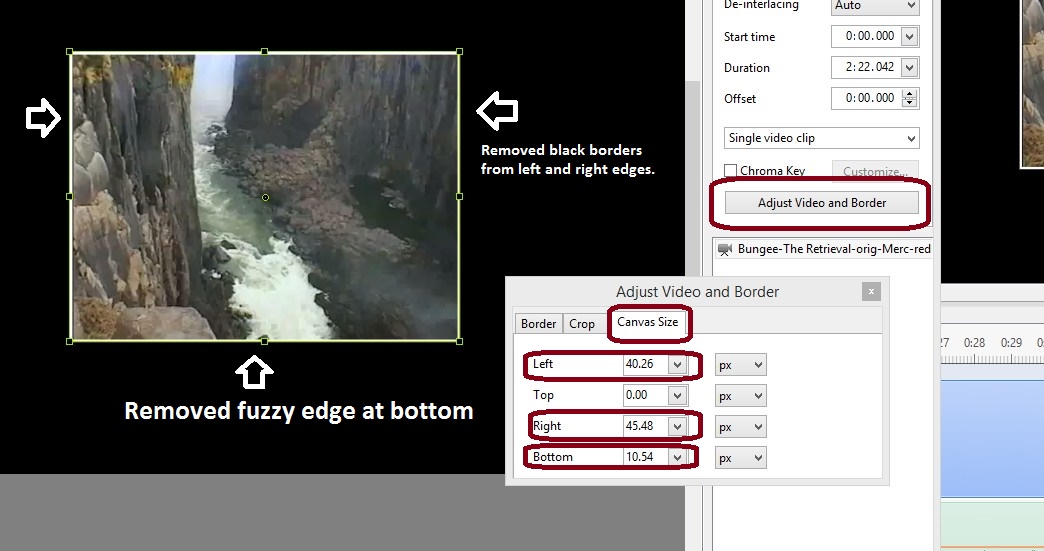
Eric, Yes, the 'Adjust Video and Borders' is in the O&A menu. Using its 'Canvas Size', I could bring in the bottom border to hide the bit of fuzzy line the conversion to digital process creates; and I could bring in the left and right borders to hide the black strips also created with the digitizing of the Hi8 tapes. Very useful. See attached. Gary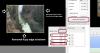
-
Tom, Check out the 'Bungee-Retrieval' show I just posted on the Slideshowclub. It shows the retrieval method. Gary
-
Greetings, After I posted my previous Bungee-SloMo show, Tom asked how the bungee jumper was retrieved after the jump. I discovered I had a clip of a bungee jump from another angle and it shows how they are retrieved. This is a short video clip of a retrieval. The video is from a Hi8 tape that I digitized so the quality is not very good, but I hope it entertains. It is a good thing that they don't just drop them off at the bottom with the crocodiles! While creating this show, I learned a bit more for presenting videos by using the Video and Border menu. It was very helpful in trimming off the fuzzy edges that you get when you digitize Hi8 tape (at least it happened to me). Gary
-
Tom, Yes, the expression on her face made the video, in my mind. The pull them back up. I just discovered in another video that I have a sequence of them doing just that. I had forgotten that I had it and I wish I had included it. It's pretty neat to see them lower someone else and they let the jumper get right-side up and they both get pulled up. We did the white water rafting there (Victoria Falls, Zimbabwe) but I did not have the nerve to jump off that bridge! I am finding a lot of Hi8 video that I have digitized and PTE makes it fun to make a show with it. Putting music and text gives it a better way of watching the stuff. Not so boring... Thanks... Gary
-
This is a PTE show with only video. The goal of this production was to create a show with a slow-motion video clip that is inserted into the main video. I also wanted to see if I could do it with a fade-in and a fade-out of the slo-mo video. The slo-mo portion of the show was created in the trial version of ProDad ReSpeedr. I cropped out the logos that the trial version puts in. The video quality is not too good because it originally was a Hi8 video that I digitized. Just hope you enjoy it. Comments, of course, welcomed. Gary
-
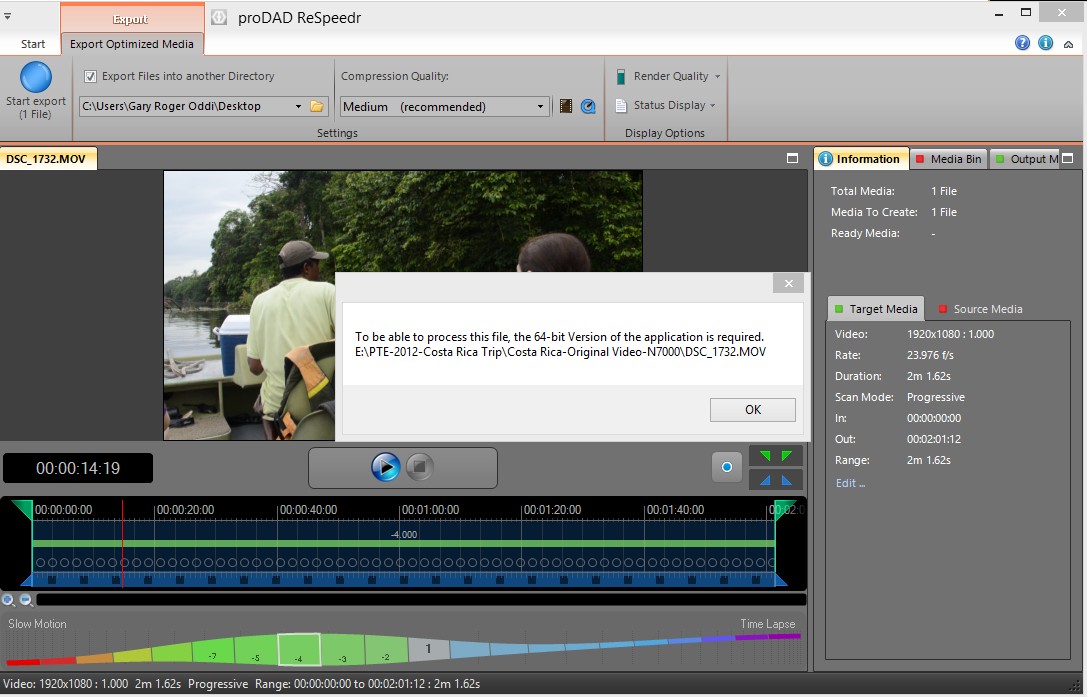
Tom, I was just about to purchase Respeedr. The download site shows it to be a 64 bit program. There was a warning that HD and 4K video needs the 64 bit version. My desktop is a 32 bit system. But ProDad gave me a site to download the 32 bit program. So I downloaded their 32 bit trial version. I tried to run a video clip from my Nikon D7000 and my GoPro, but the 32 bit program would not take them. I got a warning that the 64 bit version was needed. See attached. I was able to process a video clip that I had digitized from an old Hi8 camera. It really worked well. So in order to used the 64 bit version, I would have to do an upgrade by installing the 64 bit OS, which would require me to re-install all of my programs. Not something I want to do at this point. I might put the 64 bit version on my 64 bit laptop in the future. But just a warning to others who might still have a 32 bit OS. Gary

-
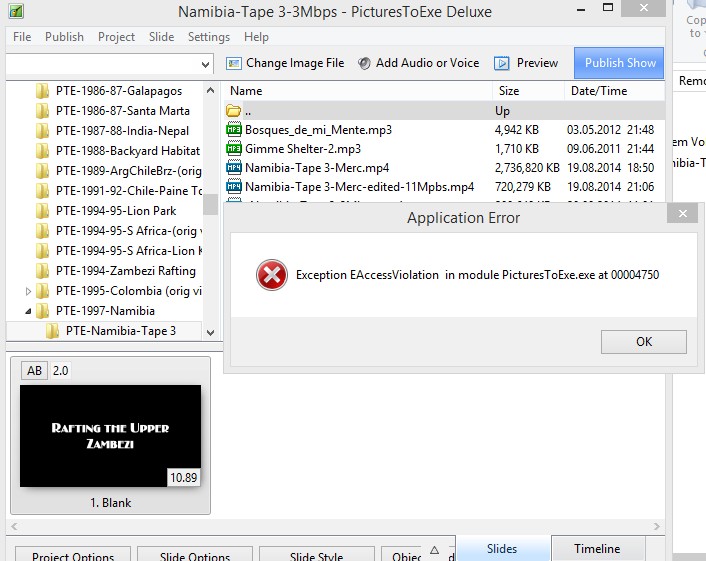
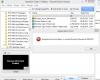
Greetings, I had a strange problem when I tried to 'Change Video File'. I wanted to rename the video file used in several of my PTE shows. As expected, when I renamed the video file, I got the blue error message that it could not be found. No problem. I then used 'Change Video File' to swap out the old named video file with the new named video file. I had to do this to 3 different shows where I had renamed the video file. Each time, PTE locked up and I had to close it down and reopen. When it 'locked up', I could not do anything within the program. It just stopped responding. The first time, I got the attached error message. But after that, when it locked up, I just closed PTE and reopened it and the correctly named video file was there and it operated normally. I have not had this problem before when changing video files. I am using Ver. 8.0.5. Any ideas? Gary
-
Greetings, I recently purchase the Mercalli V3 SAL (standalone) for stabilizing my videos that I include in PTE shows. Still trying to learn the best way to use it. But it seems to have positive results. I just visited their site and took a look at another product they have called 'ReSpeedr'. I took a look at a demo/tutorial of it and it seems to be pretty neat. I think most of the discussion here has been for timelapsing still images. But for those who are also wanting to speed-up and slow-down video, this might do the trick. One nice thing is that you can place the effect (slow-down or speed-up) in the middle of the entire clip, so the clip shows the normal speed, then the effect, then back to normal. Take a look at this demo: Then, I am thinking. What if we put single images (perhaps intended for timelapse) into a PTE show, and outputted it as an MP4 or AVI, and then used this ReSpeedr to do the processing for speed-up or slow-down of the video? Takes care of not having to so a lot of math!!!??? Just another interesting way of dealing with images or video for PTE??? Gary
-
Very Cool! Here is a link that shows how to do Hyperlaspe the 'hard way'. I hope the Microsoft app will be easier! But interesting.... I've never heard of it before. But there seems to be a difference in the Hyperlapse mentioned in your link and the links I have posted. The 'Windows app' seems to be for already-taken video that takes out every 10th frame, and stabilizes it. This is different from the Hyperlaspe that these Youtube videos shown below where it is created in the camera, not later. Gary
-
Greetings Jose, Yes, I used the PTE's MP4 just for measurement purposes. It is too bad that my main PC is 32 bit. All of this adds to the amount of time needed to produce a good slideshow, but the stabilization of videos with even the slightest movement is really necessary. Makes a big difference. Mercalli seems to work pretty well so far. Thanks... Gary
-
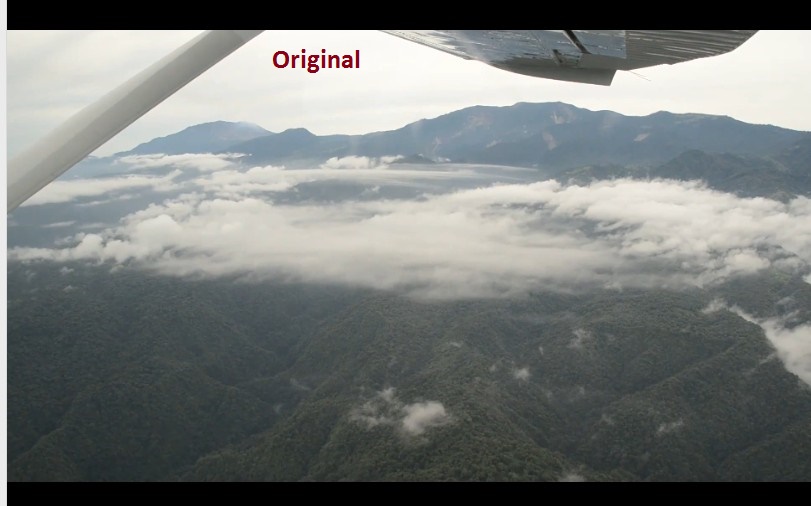
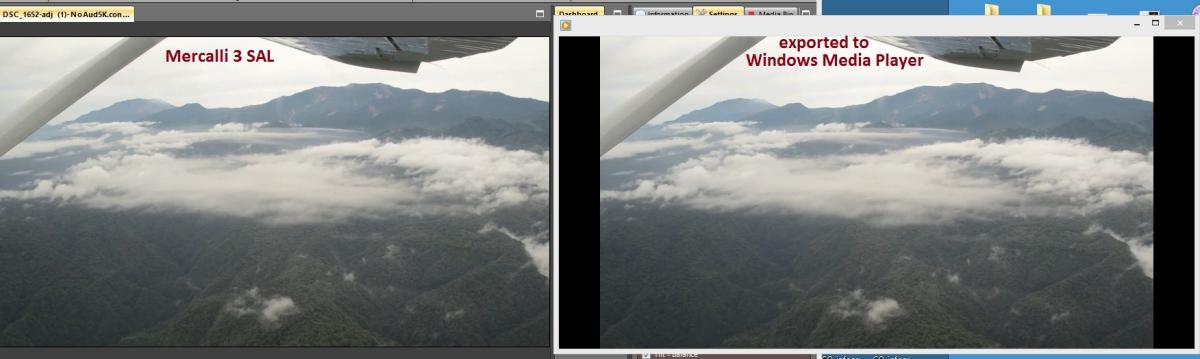
I did a test with my new Mercalli 3 SAL. I opened a PTE MP4 file in Mercalli. Mostly still images with some video clips. Yes, that does not make sense but I wanted to see how long it would take for it to analyze and to export a long 'MP4 video file' in a 34 bit OS (Win 8.1). The PTE's MP4 files is 8 minutes. Mercalli took 8 minutes to analyze the file and 8 minutes to export it. So it seems my fear that a 32 bit OS would take an excessive about of time to process a video file in Mercalli does not seem to be a concern. But, it is interesting that the original PTE MP4 is 234 MB, with a bit rate of 3.8 Mbps. The Mercalli exported MP4 file comes to 706 MBs (at medium quality) with a bit rate of 12 Mbps. The Mercalli exported MP4 (at low quality) export is 263 MBs and a bit rate is 4.5 Mbps. I don't see a difference between the 'low' and 'medium' quality MP4 export. I also took a screenshot of a frame of the video. I have attached a screen shot of the original (shown Windows Media Player) and then a screen shot comparing the same frame as it shows in Mercalli and also after it was exported (shown in Windows Media Player). I think the exported screenshot does show a little softening of the image...but just slightly. If anyone can do a similar test using a 64 bit OS, I'd be interested to hear if the analysis and export will take half the time, or not. So far I am pleased with the results from Mercalli 3 SAL, especially with video that does not have excessive shake. Gary


-
Tom, The Mercalli person said it only difference between the 64 and 32 bit OS versions is a matter of rendering time. Also, the 64 would be able to handle the high res video like 4K. My video clips are usually short and I'm not into anything real fancy yet, like 4K. So I hope my 32 bit desktop will do the trick. I am a bit puzzled so far with how to select the settings but I will search around for Youtube videos that will show how to use the program. I saw one but I have to go back and find it to watch it a few times to get it to sink in. Let us know how you get along with the 4K stuff. Should be lots of fun! Gary