goddi
-
Posts
3,596 -
Joined
-
Last visited
-
Days Won
27
Everything posted by goddi
-
Suggestions for improvements: 1-Autosave Notice. I was playing around with a slideshow, experimenting with various different menu items. I didn't want to actually save anything. I was just testing different menu items to see what would happen. After a long session I closed the slideshow (without saving). I noticed that some of the last changes, in fact, had been saved to the slideshow. It was fortunate that I did not make too many drastic changes and I was able to get the slideshow back to its original state. I had forgotten that the Autosave had been selected in the Settings/Preferences menu. My suggestion is that, when the Autosave has been selected, a notification warning will pop up in the main screen, perhaps to the left of the Comment window. It can be very dangerous to forget the Autosave has been selected if you make changes that you don't really want to save. A notification in the main screen might help to avoid a potential problem. 2- Relative Keyframes. I have noticed that keyframes do not adjust in a relative fashion when the slide's duration is changed. When a slide's duration is changed, the keyframes remain in their absolute positions. I suggest that there be a way, when you increase or decrease the duration of a slide or group of slides, that the keyframes will adjust in a relative way to the total change. This would be helpful, for example, when you need to increase/decrease the duration of a group of the slides to match up with the audio's length. Currently, if you increase/decrease the duration of a group of slides, you have to go back into each slide that has multiple keyframes and readjust them. If we could have the choice to have the keyframes readjust relative to the increase/decrease in a change in the slides' duration, it would help to maintain the keyframes' relative positions. 3- Latch audio files in Timeline. It would be helpful to have the ability to temporarily latch adjacent audio files together. This would allow the shifting of a group of audio files together, without disrupting any crossfading you have already carefully set. Using the Ctrl key to select the audio files would be intuitive. 4- Latch keyframes together. It would be helpful to have the ability to temporarily latch adjacent keyframes together. This would allow the shifting of a group of keyframes without losing their relative positions. Using the Ctrl key to select the keyframes would be intuitive. 5- Allow the expansion of the O&A's keyframe timeline. It would be very helpful to be able to expand the O&A's keyframe timeline when you are working with multiple keyframes that are very close together, similar to how the Timeline can be expanded. Gary
-
====================== Igor, That would be great. Here is another example of this problem. I just happened to take a look at a PTE tutorial that someone had made for sound editing. When I openned the PTE project, the File List showed my files from one of my previous projects. It would be very helpful if PTE would automatically show the the files in the File List window that pertain to to PTE project as it is openned in PTE, so we don't have to Browse to set the proper location of the source files. Thanks, Gary
-
===================== Dave, Ok...So I have to 'fix' each of the older shows that don't 'remember' their associated folders that apply to them. And it should not happen again. Future version will remember the associated folders. Got it. Thanks... Gary
-
========================== Peter, Ok...but I am not sure if I am understanding fully. If I read these posts correctly, my problem occurs because I have tried to open an old show in a new version. The old version did not have the code to remember the associated folders. So, if I go through the Browse process for each of my older shows in our latest version and set the folder locations for its File List and Audio and do a Save As, the problem will not occur again with those shows? I just have to bring them up-to-date? Thanks, Gary
-
Dave, Ok...I will get into it later. Thanks... Gary
-
=================== Dave.... Hmmmmm.... I am using 7.5.2. It would be nice, if after setting the folder for the project in the File List location, PTE would use that location as the intial default for its initial Save As and adding Audio and other functions. Gary
-
=============================== Dave, "If you open an older project and save it as a 7.5 version it will always open the correct folder from that point onwards?" Perhaps that will be the case. Time will tell as I use the 7.5 version. But as we get new versions, won't the 'problem' persist? Now, let me add a couple other similar 'aggrivations'. Let's say I now have the correct folder displayed in the File List window. When I do a Save As, I have to Browse to that same folder location. Wouldn't it be nice if PTE would pick up that same folder that is in the File List window as the initial default location? Then, let's assume that I have now done a Save As to save the new project into the proper folder (that contains all of my images). Then when I want to add an audio file to the project, I go into Project Options and choose Audio, the location that appears is not the folder that I just did a Save AS to. I have to then do a Browse again to find the correct folder. I would like it to default to the Saved As folder because I am using the logic to put all of my images and audio files in the same folder. Wouldn't it be nice if PTE would select the Save As folder as the initial default folder for the initial look for Audio files? Gary
-
Greetings, When I open a previously created PTE show (.pte), usually the files associated with the show will appear in the File List window. However, every so often, the files in the File List window will display the files from a different show and I have to hunt to the location (folder) for the correct files for the show I want to work on. What is creating this difference? I am not saying there is a problem but it is just an inconvenience that I'd like to avoid if I understood why this is happening. I know that if I browse to the correct folder and then show it in the File List window and save the project, the next time I open the project, the correct folder appears in the File List window. But why did it the correct folder not appear in the first place? Thanks… Gary
-
================================ Thanks Davy. We didn't have a 'white Christmas' , but we did get a Day-After-Christmas-White Christmas! Gary
-
================= Thanks, Lin. We actually got a little snow today! Almost a white Christmas... Gary
-
====================== Thanks, Ralph. They are fun to make. Have a good year. Gary
-
======================== Thanks, Barry. I'll send you a PM. Gary
-
This is a Christmas card from me to everyone. The video portion is a JibJab video that I put into PTE with text and a couple tree images. Happy New Year!!!! http://www.beechbrook.com/pte/ Gary
-
======================== Dave, I was looking for something like these: Part 1- http://www.youtube.c...h?v=doMHTiGVc1A Part 2- http://www.youtube.c...h?v=7A6dJkZsYoI I don't want to get into 3D or cubes or eagles flying by windows. /> I can show samples of these after a video of the basics. I don't think I could put one together with such precision, so I was hoping to find something like the Part 1 and 2 above, but for 7.5. I just want to get our photo club interested in creating 'photo essays' and get beyond the competitions, etc., that we normally do. Gary
-
Greetings, I have been 'volunteered' to give a presentation on how PTE works to my photo club next year. I have been searching for a YouTube-like video that will go through the basics of what PTE can do. I have seen a Part 1 and Part 2 YouTube video for Version 6.5 that is pretty nice. But I am wondering if there is, or will be, one for 7.5. I know there are many tutorials on individual how-to's but I'd like one that is an overall demo to give the audience a good overview of PTE 7.5. Is there one out there yet???? Thanks... Gary
-
=================== Dave, No...my wife has it at office so I haven't had a chance to get my hands on it. It's like a dog with a bone...I have to wait for the right monment....:D/>. But I will give it a try as soon as I can. Thanks... Gary
-
===================== Dave, I have Windows so the Mac's programs won't help me. /> In a PM to me from Igor, he correctly pointed out that video directly from GoPro needs to be run through the PTE Converter to play, due to a problem with a 'videos that have a variable frame rate.' But that works for 'normal' video from GoPro. But if a video clip was shot at 120 fps in GoPro, it freezes and is jerky when inserted into a PTE show. And if it is run through the PTE Converter, it then plays at 'normal' speed, not in slow-motion. So I don't know yet what to do with GoPro video shot at 120 fps and get it into PTE so that it actually plays in slow-mo. />/> Gary
-
============================= Dave, I will see if I can send Igor a clip. But I am really confused with these GoPro files. The original 120 fps file is 47.4 mb and is 29 seconds long. I trimmed the file down to a 50 fps,10 second clip, but the file reduced to only 45.8 mbs. Your 13 second clip was only 12 mbs. If these short clips come out so large, I don't think I would ever be able to use them in PTE. I think I will send Igor a PM to see if he can figure it out. It would be nice to be able to add some GoPro slow-mo to some PTE shows. It is clear that I am doing something wrong and I don't have a handle on these type of files. I'll keep trying to figure it out, though. Thanks for your help. Gary LATER: I sent Igor a PM with a link to a file on MediaFire.
-
-
============================ Dave, I think the problem I am having with the 120 fps clips that I create with my GoPro is that when I process it with the GoPro's CineForm, and reduce the fps to slow-mo, the codec is 'CFHD'. PTE is not accepting that format. I wonder if that is the problem and if Igor can, somehow, make it so that PTE accepts video with the CFHD codec. I've tried all kind of ways to get PTE to accept a video clip from GoPro shot at 120 fps but no luck. I'd be interested to see what my MediaInfo program says about your slow-mo clip. Let me know how I can download it. My wife's Nikon AW100, I've read, can shoot up to 240 fps, but I have not been able to get my hands on it, yet, to test it out. My Nikon D7000 will not shoot 120 fps. Thanks, Gary
-
=================== Kor1, I don't have Premiere. I am just trying to find alternative ways to get 120 fps video clips into PTE. Maybe Dave will come up with something. Gary
-
========================== Dave, There must be something with what the CineForm produces. I have found that the Pot Player media player and the Windows Media Player will play the 120 fps clip in slow-mo, but the VLC media player will not play it. It says it will 'not support CFHD video format' (a Sony Vegas format). Interesting. I will see if my wife's little Nikon will shoot in 120 fps. What is the Nikon model you have? Gary
-
=================== Dave, I just did another experiment. I converted the 120 fps video clip using the GoPro CineForm program to 29 fps. It plays in slow-mo in my media players. However, when I put it into a PTE show, I get the blue"Video not found" error. Also the file size jumps from 48 mbs to 515 mbs! I also tried to run 120 fps video clip that was converted to 29 fps through the PTE Convert but it won't even show up or be accepted by the PTE Convert process. Gary
-
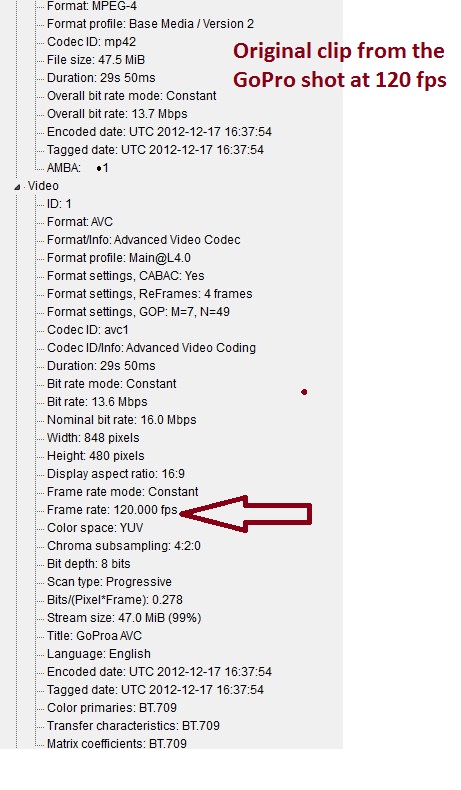
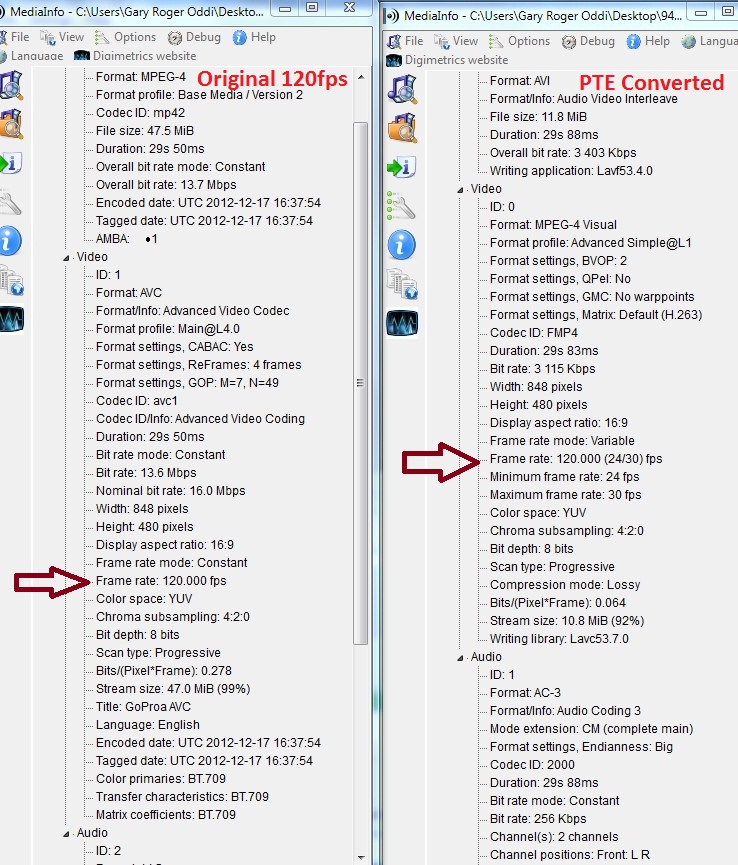
====================== Dave, Hmmmm.... I just pulled out my GoPro Hero2 and shot about 30 seconds in 120fps. I dropped it into a PTE show but it does not play too well. It jumps from a frame to a frame and freezes for a few seconds at each jump. No slow motion, for sure. I ran it through the PTE Convert and it goes back to playing at the normal speed. What am I missing? I attached info about the two video files. Do you see why it is not playing in slow-mo? Gary
-
============================== Greetings, I have been wondering, too, how to do slow motion. I thought you have to shoot the video at 120 fps and then use a program to 'slow' it down. I have the GoPro CineForm Studio (which is free) that, I think, can do this. But I have not shot anything yet at 120 fps to try it out. If you have video at 120 fps, see if you can do the slow motion with the GoPro CineForm program. Gary