goddi
-
Posts
3,596 -
Joined
-
Last visited
-
Days Won
27
Everything posted by goddi
-
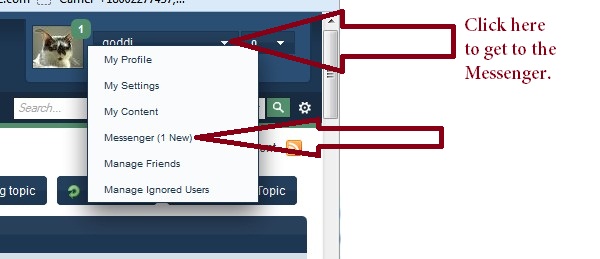
========================== Eric, Yes, I do get an email when a PM is sent to me. The problem was that my Messenger mailbox was full and I did not know how to get into my Messenger directly from my account to be able to delete messages in my Messenger. I could see my Messenger icon if I clicked on the link to read the PM that I got in my email. However, I did not know that the little white triangle in the upper right hand location of the Forum page would do that. Learn something every day! Gary
-
================================ Spock, The PM I was referring to had to do with the fact that I could not figure out where to go to get to the Messenger link in this Forum. See the attached for what I learned. In the upper right hand corner of the page, there are a couple little white triangles. One of them opens a window that give a link to the Messenger. I did not know this and that was what was pointed out to me. See the attached. Sometimes PMs are used so as not to post conversations that might not relate to the actual subject of the original post. In this case the original subject was Custom Transitions, not my problem of finding the Messenger link. But I am happy to share what it was all about. No problem here. Gary

-
==================================== Dave, Thanks for the Template. By looking at it, I figured out what I was having problems with. It was my assumption that I could use the customized transition as a global transition that could be inserted using Project Options and it would be applied to all the images (as you would normally choose Dissolve, etc.). I see that the Custom Transition has to be applied to each image individually and even the transition time has to be applied to each image usings that image's 'Customize Slide' settings. I got it to work. But, to keep it simple, I did not use your Frame. I just put the Zoom to 80% and just kept the black borders. Now the pages turn and the images stay on for the set amount of time. Thanks for the help. Gary P.S. I still can not figure out how to get to my 'Messenger' menu in the PTE Forum. The only way for me to get into it to delete any messages is to click on one of your PMs and it takes me there. Can you tell me how I can get to it directly??? Gary (I got your PM on how to do this...Thanks...) P.P.S. I just put in your BertBook custome transition and it work just fine. Super!!!! Thanks...
-
======================== Dave, I am just starting to try out these transitions. But I think I am missing something to make them work correctly. I copied your 'bookish' transition into a PTE show. I loaded it into the show and it is the only transition selected. When I play the show, a black frame will show up as the page is turned, but, right after the page is turned the black frame immediately disappears. Then the black frame shows up just before turning the page, but it dissappears immediately, again, on that page, and this sequence happens on all the pages for the show Is there something that I need to do to have it work as your example does so well??? Thanks... Gary ADDED LATER: I was tinkering with the transition and discovered if I make the Slide Duration equal to the Transition, then the black frame does not 'dissappear'. However, I can not get the image to stay on the screen after the page has been turned. If I set the Slide Duration to 10 seconds and the Transition to 10 seconds, I get a nice slow turn of the page. But immediately after the page has been turned, it jumps to turn the next page without any time spent on viewing the image in between the turning of the pages. Can you tell me what I am not doing correctly??? Your example turns the page, but also allows for a few seconds to view the image. Thanks.... Gary
-
'Video Player' Nav Bar needs 'Esc' icon
goddi replied to goddi's topic in Suggestions for Next Versions
======================== Greetings Tom, I don't know how I missed that 'P.S.' from Igor. Thanks for pointing it out. Gary -
'Video Player' Nav Bar needs 'Esc' icon
goddi replied to goddi's topic in Suggestions for Next Versions
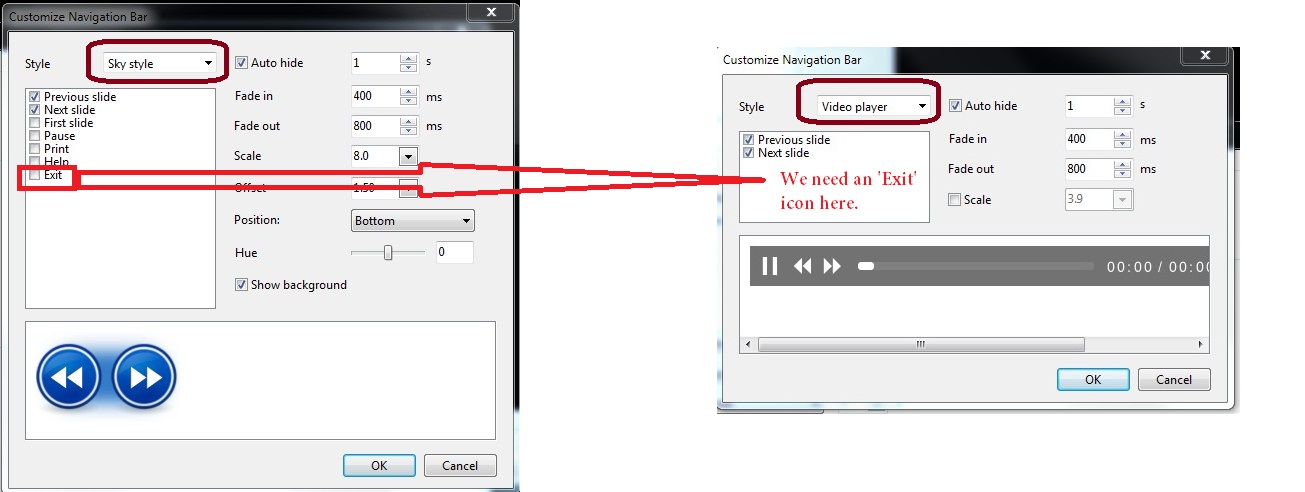
=========================================== Brian, When you refer to the 'Video-Format', I am talking about the the Nav Bar choice that is called the 'Video Player' format, which is used when playing the EXE. There is no 'Exit' icon in the Video Player format as there is in the Sky format or the Air format of the Nav Bar formats. I have attached a screen shot to clarify what I am talking about. Thanks... Gary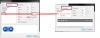
-
'Video Player' Nav Bar needs 'Esc' icon
goddi replied to goddi's topic in Suggestions for Next Versions
============================= Xaver, I have my shows set to 'Close show after last slide', but the point is to be able to close the show at any point. Why not have an ESC icon anyway, as the other styles have??? And I don't think the show closed at the end of the last slide when viewed on the Windows Surface Pro. I'd have to go back to the store to check but we had a heck of a time trying to close the slideshow using the Touch methods. Only the ESC on the keyboard that they finally attached worked. Gary -
'Video Player' Nav Bar needs 'Esc' icon
goddi replied to goddi's topic in Suggestions for Next Versions
============================== Greetings Xaver, Yes, but it does not exit the show. You need to hit the ESC to clear the screen when using the Video Player style, even if the cursor is at the end position. Gary -
Greetings, I have suggested in the past that the Video Player Nav Bar needs an 'Esc' icon. If you give a PTE show in the 'exe' format to someone not familar with PTE, the person might not know to use the 'Esc' key to stop or interrupt the playing of the show. But today, I went to a computer store to test some PTE shows on the Windows Surface Pro. After a show played for a show while, I wanted to stop the show and try another one. After 4 salesmen tried to close the show using the touch features, we figured the only way was to attach the keyboard to get to the Esc key. So it looks like it would be a good thing to add an Esc icon to the Video Player Nav Bar to make it easier to close a PTE show on a touch machine, too. Gary
-
======================= Greetings Dave, You've got to be careful, you guys are starting to make me to become too good with PTE!!! /> I went back and created a better contructed PNG frame than I had done before. I see better how well it works and how well this frame can be adjusted for images that are of different sizes. And I can make a set of 'frames' of different pixel 'stroke' sizes for future use. Super! Added Later: Thanks to Dave, I now see that if I change the size of the transparent PNG frame to fit a smaller sized image in the O&A window, the frame will become thinner. I did not notice that before. But it is easy to create a proper sized transparent PNG frame for images of different sizes. Yes, I also tried the Copyright method. That will work if all the images are the same size. I usually use a mix of landscape and portrait images, so this would not work in that circumstance. I don't see a way to customize a specfic slide to not use the Copyright on that image. But, thanks, again, for clarifying this process. Gary
-
=================================== Barry, I don't disagree with you at all. As a long time user, once in a while I come up with an idea that seems to be simple and wonder why it is not already in the menus. Many times, I have seen the white borders around images in a show and it looks great. But it is not in the menus and it needs to be done in a round-about way. I do sympathize with what Igor is going through. I don't know how he can be listening to so many inputs and updating and creating such a very cool and useful product, and keep his sanity. I just threw out the idea and, when he has the inspiration to take a look at it, maybe he might include it. But if I didn't ask the original question about the borders, I would not have discovered your helpful hints. Though it seems like a simple, yet useful, thing to add, I defer to Igor's priority list. No problems here. :D/> Gary
-
================================= Dave and Barry, Yes, it worked. I had to figure out how to make the PNG, since it has been a while since I have made one. I like that it can be adjusted once added. You can make a 'thicker' frame and adjust what shows within the O&A frame. But if you have an image with a smaller aspect ratio, a new PNG frame has to be made to fit it. But I see what you are getting at. But wouldn't it be nice if PTE had them already available in the menu next to the 'Add Image' button? Thanks... Gary
-
Greetings, Just got the word about a Webinar: http://www.datacolor...w&_hsmi=6785068 Gary
-
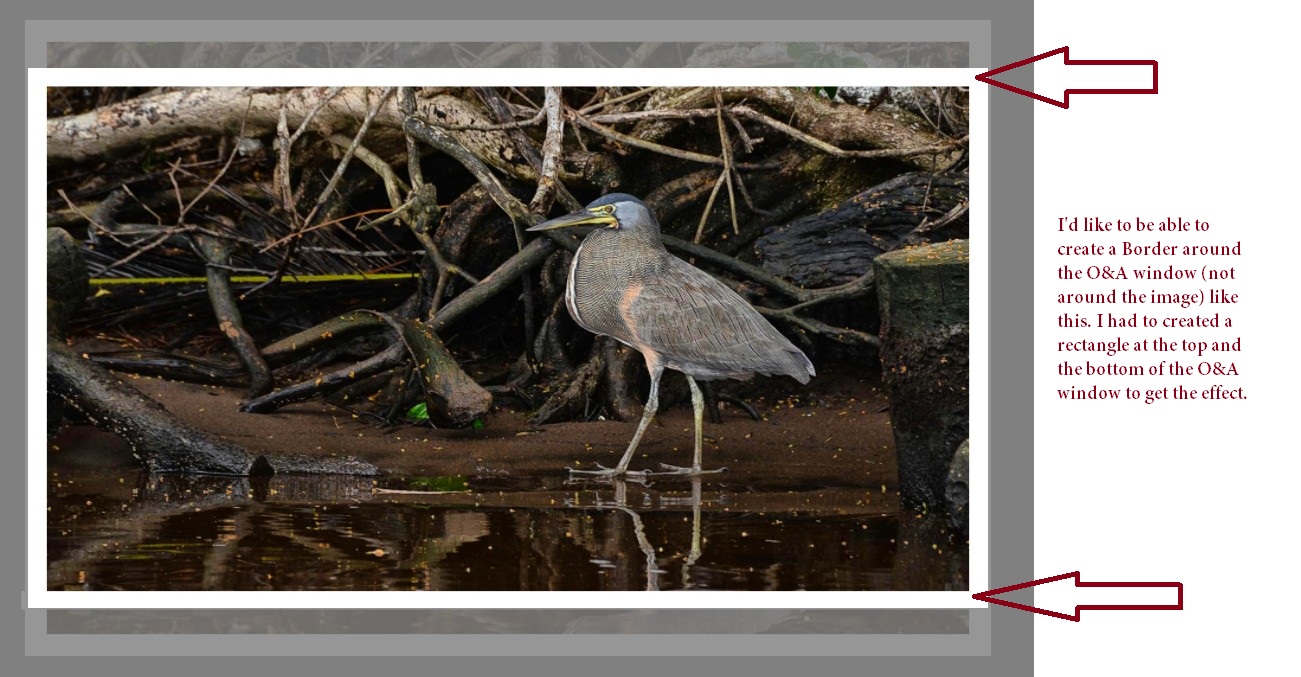
====================== Dave, I see, said the blind man! I don't know why I never heard of putting in the same values in CANVAS to make it work. Thanks. /> Now...is there any way to make the 'Border' appear as a border of the O&A window, not as it is attached as a 'stroke' to the actual image? I do my cropping in the O&A window so that the top and bottom portions of the image extend beyond the top and the bottom of the O&A window. I'd like the Enable Border/Canvas result to be applied to the O&A window, not the image. I don't think this this can be done but maybe you have a trick up your sleve? Do you think this is a good option that Igor can put in the menu? I think this might have been discussed before but I don't remember the outcome. Gary
-
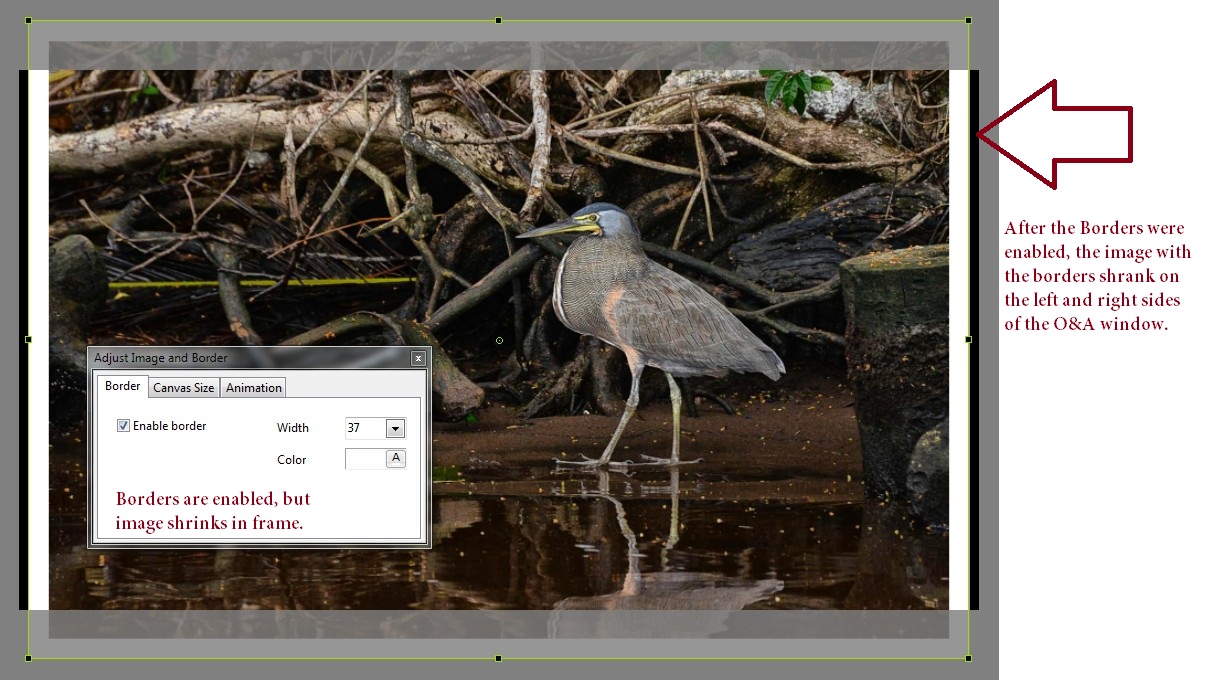
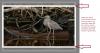
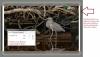
Greetings, When I click on Enable Border, the image with the border shrinks within the O&A window. I had not noticed this happening in previous versions. I am using 7.5.4. As I increase the Border's width, the image's shrinkage increases. I have attached two screen shots. Gary
-
================= Roger, Yes, thanks. I had a feeling what you said was the way it worked. I just could not find it said in the way you said it. I will just have to tinker with it some more. But I normally only make one version of an image and use it in PTE,or if I do, I just rename it. So the 'plural' process does not enter into my workflow...yet. But thanks for the encouragement and I'll see what I can get out of LR. Thanks.... Gary
-
==================== Ken, You've got to be kidding. The original posting has to do with Lightroom Tutorials, which, in my mind, has to do with using LR to prep images for PTE. Now, there have been links on LR tutorials, so what is the difference if someone gets a bit more direct within this posting to ask about using LR? This Forum is getting a bit too tight fisted. Let's relax and let it flow, so long as it is in the same vein and the OP has not complained. I've already been chastized for only mentioning Viveza, which is a plug-in that I thought is supposed to work within LR. Really puts a wet blanket on possible postings in the future. Just my thoughts... Gary
-
====================== Greetings, I am sure you are right that once you learn your way around, it would be a useful program. But, I just can not get around something basic that maybe you can clue me in on, or staighten me out. I have Photoshop CS5 and Lightroom. I want to use LR 4.3 in a similar manner that I use PS. What I mean by this is that I can open an image in PS by just doing a File/Open. In LR, I have to deal with 'Catalogs'. I don't understand this concept. I already have my images in folders where I want them and can easily find them. I don't want 'Catalogs'. I have to do a 'File/Import' in LR to be able to view them as a Catalog in LR. Is LR creating a duplicate image? Or is it just a shortcut to the same image? I just can't figure it out. But I certainly don't want to have to open an entire Catalog just to get to one image or a group of images. I just want to see the image(s) in a Detail View with file name, file size, date modified, etc., and be able to select them. Am I not seeing the forest for the trees? I just can't see how to work with LR in the way I normally work with other programs. Is there a way to do this??? Also, I can't figure out how (or if I can) get the Nik Viveza plugin to work in LR. (Though it looks like LR's Clarity is similar to Viveza's Structure tool, which is the main tool in Viveza that I like to use). If I can do the same functions in Photoshop as I can in LR, I'd just prefer to keep using PS, mainly because of this inability of mine to understand the use of the LR's Catalog function and not being able to view the images in Details (as opposed to only as images). And, I can create 'Actions' in PS....I don't know if you can do this in LR (?). Yes, I have viewed a bunch of tutorial videos, but they have not shed any light on my quesitons. :blink:/> Gary
-
========================================== Peter, Welcome to the "silent majority". Thanks for your past service in a thankless job. I've been there, so I understand. Since the second Pinned posting was signed by you and you were a Moderator, it seemed as if you had some ability to make the correction. And if you did not have the ability to delete the second Pinned posting, I would figure you would know who it should be directed to. But I guess that is water under the bridge now. But it still is confusing to have both Pinned postings, one saying to use this section for software questions and the other to NOT post software questions. /> Gary
-
Peter, In a recent posting by you, you stated that this Forum is not about Photography. I wish you would recant that or explain what you mean. It is like having an automobile forum and not allowed to talk about tires. It made me look at your two 'Pinned' postings on the purpose of this section, "Equipment and Software." After going back and forth between the two Pinned postings by you in this section, I think the first Pinned posting revised the second Pinned posting, where you state, "Please DO NOT post here about Software." If I read this right, this second Pinned posting should be deleted? And, hopefully, we can post questions about using and how to use different software programs to prepare images/video for PTE? Perhaps, a new section can be introduced on "Preparing images/video for PTE"? Gary
-
========================= Peter, Well, that is interesting. Since there was not a direct question asked in the initial posting, I did not think this was a 'hijack'. It had to do with, in my mind, software of interest that we can use. Yes, the posting had to do with tutorials for Lightroom, but I thought Dave's and my input fell into this 'topic' as alternative possibilities. Move them if you see fit, but I didn't think our postings took the topic into a different direction. And I think these Nik plugings can be used in Lightroom as external program (not plugins as in PS). And, after reading some Forums, some of the Nik plugins do work within Lightroom. Gary
-
=========================== I am in the same boat. I just have not found a use for LR. I tend to stick with Photoshop CS5 (for Levels and UnsharpMask) and a few other programs to rename/resize images. I like the Viveza plug-in, too, but only for its 'Structure' tool. But I went through a bunch of the tutorials that have been posted here and it made me learn a few things, so I might be getting into LR a bit more. I finally figured out how to "save" an image in LR....I mean 'Export' an image and Rename it. It is not a very intuitive program but it looks like I have to work a bit with it with much patience. So thanks to all the postings for the kick in the pants that I needed. Gary
-
Make smaller presentation (SOLVED)
goddi replied to Derek Henderson's topic in Slideshows & AV Shows
================================ Derek, If I understand your question, I think I recently went through a similar bit of confusion. I wanted to make a replica of the same show, but with higher resolution images. Somehow, the first attempt did not work. But I found a few steps that works for me. You can read my postings here: http://www.picturest...-old-shows-pte/ I was doing the opposite from your situation, so just reverse using the High Res and the Low Res images. But here are the steps I used: -Make a New Folder -Create a 'Backup In Zip' file (File/Create Backup In Zip) and save it to the New Folder. -Extract the zipped files into the New Folder and do a 'Save As' to the New Folder (the File List should show the Low Res images-High Res in your case). The PTE show will run as it did in the previous location. -Copy/Paste the High Res image (Low Res in your case) so they overwrite the Low Res images (High Res in your case) in the New Folder. Dave made the suggestion to Create a Template (Files/Templates/Create Template From This Show). This will work, too, but I prefer my steps. I look at the Template process for creating basic defaults that I would want to use for new projects. Gary -
==================================== Eric, I have Video Pad, too. However, I just tried to do what I think you are talking about but I don't quite see how. I have a regular DVD movie that I tried to extract to an AVI. When I do an 'Add Media' and point to the DVD, I can choose the files in either of the two folders, Audio_TS or Video_TS. When I choose the files in the Video_TS folder, VideoPad produces a VOB file and an MP4 file for each of the original VTS files, individually. I don't see how it can convert the entire movie to a single AVI file. Can you shed some light on the process you are using? Thanks, Gary
-
====================== Geoff, I now see the fly in the oitment. The Boilsoft program will record at a maximum frame rate of 15 fps, while the BBFlashBack Express program will let you choose a frame rate of 24 or higher. I just did a test of doing a screen capture of a YouTube movie trailer and there was a remarkable difference between the two programs. The BBFlashBack Express really showed a much better result. Gary