goddi
-
Posts
3,596 -
Joined
-
Last visited
-
Days Won
27
Everything posted by goddi
-
======================= Igor, It could be. But, I have the same set-up (Win7) and antivirus (MSE) as during all previous installations of PTE versions. This error message has only occured with the install of 7.5.2. I will keep you posted if I find anything. Later: Just as a test, I just re-installed 7.5.2 over the 7.5.2 that gave the error message and I did NOT get any error message. Good. I then completely uninstall 7.5.2 and re-installed it. NO error message. So it must have been something on my PC that caused the hic-up. Good. Sorry for the scare. Gary
-
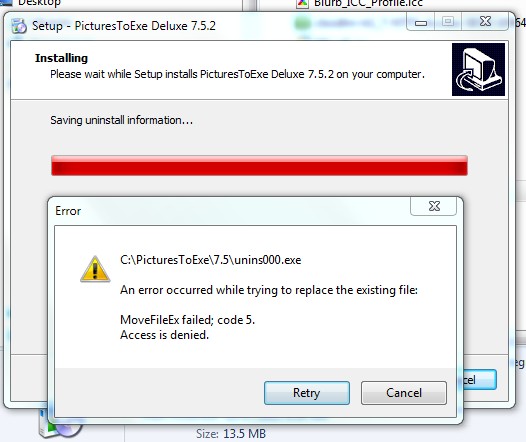
================================== Igor, Yes, I opened the old PTE project in 7.5.2 and the wave form showed up as expected. Thanks. However, today when I installed the 7.5.2, I got the attached error message. I hit 'retry' and it went away and it seems to be working OK. I had already updated my PTE a few days ago with the 7.5.2 when it became available and got a similar message but I thought it was just something that happened with my PC. However, today I re-installed it just to be sure I got the lastest version and got the same message. Gary
-
================== I am pretty sure that I saw the same email from this person, too. I can read emails on my server before I download them and it was definitely spam. So I just dumped it at my server. Tom must have dealt with it pretty quickly. Gary
-
=============================== Igor, Yes, I see I clicked on the wrong file. Sorry. I sent you a PM with the link to the correct PTE project. Let me know if you need anything else. Gary
-
========================= Greetings Igor, I just sent you a PM with a link to MediaFire with the .pte project files. Thanks for looking into it... Gary
-
==================================== That was a good idea. But before I dumped the current files and inserted the re-saved audio files from Audacity, I tried something else. I dumped the current audio files and then just re-inserted the same MP3 files. The current audio files showed up in the wave form (7.5.1). So, it would not prove anything if the re-saved audio files showed up. It must be something in the old version of PTE that does not carry over to the new version too well (?). I guess it is not a big problem and I'll not worry about it since it can be overcome easily. Thanks... Gary
-
================== I can't give any real techincal explanation as to why it would play well on desktop, but not on the laptop. The Nvidia cards may be not be exactly the same. Originally, I did not like to convert my video files using the PTE Convert because the file would usually become larger, and I was concerned with the shows getting too large. Some time ago, I noticed one particular video segment that was jerky. After I ran it through the PTE Convert, it ran smoothly. The PTE Convert does something that makes it more efficient for video cards to handle, from what I got from a discussion in the Forum. So, now I tend to use the PTE Convert. Also, after I do my video editing in the FreeMake Video Converter program, I choose the MPEG4 codec, instead of the H.264 codec, when I use it to convert my edited original-out-of-the-camera video to AVI. Then I run this AVI through the PTE Convert process, which makes it a more efficient AVI file. Gary
-
Greetings, I noticed a bit of a strange thing that happens when I open an old pte file in the 7.5.1 version. The wave form does not display the mp3s. I have 2 MP3 music files associated with this old pte show. I just happened to open this old show in 7.5.1. When I play the show, the music plays but their wave forms do not show up in the Timeline. So, I clicked on Project Options/Audio/OK (without doing anything else). Then the 2 MP3s were displayed in the Timeline. Is this a normal thing or is this a 'bug'. I would expect the MP3s to automatically show up in the Timeline when I open any pte file in 7.5.1. Not sure if it makes a difference, but here is the data from the old pte's version info: CreationTool=PicturesToExe Deluxe 7.06 PteVersion=7.06 globalversion=1 minorversion=17 Thanks... Gary
-
=========================== Just a shot in the dark...did you convert your videos using the PTE Convert function? I had a video that was jerky until I ran it through the PTE Convert. Gary
-
Show's Length Indicator-turns blue/underlined? [SOLVED]
goddi replied to goddi's topic in General Discussion
===================== Strange you don't see the blue color. Here is a screenshot with the blue color and the underline. It looks like a hyperlink but does nothing that I can see. Gary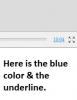
-
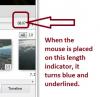
Greetings, In 7.5.1, when the mouse is placed over the show's length indicator, it turns blue and gets underlined. It looks like it is an active link but it does nothing. Is there some reason or purpose for this? See attached. Thanks... Gary
-
========================= Peter, It is really funny that you said you expected the slide to actually 'move' to the 'End' or to the 'Top'. I say that because the first time it tried it in 6.5, that is actually what I thought I saw happen. And I thought, nice but when would I use that feature. Then, after you saying it did not work for you, I put it to the test in 7.5.1 and realized that only the cursor moved to the Top or to the End. Now for the real funny part. I went back to 6.5 and tried it. In 6.5, it does actually move the slide to the End or to theTop!!!!! But then, in 7.5.1, you don't need the 'ctrl' key. Just using 'Home' or 'End' will move the cursor (but not the slide). Go figure..../> Gary
-
==================== Peter, Try it again. It works in my 7.5.1, in Full Screen, Slides and Timeline modes, and in the File/Slide Lists views. Gary
-
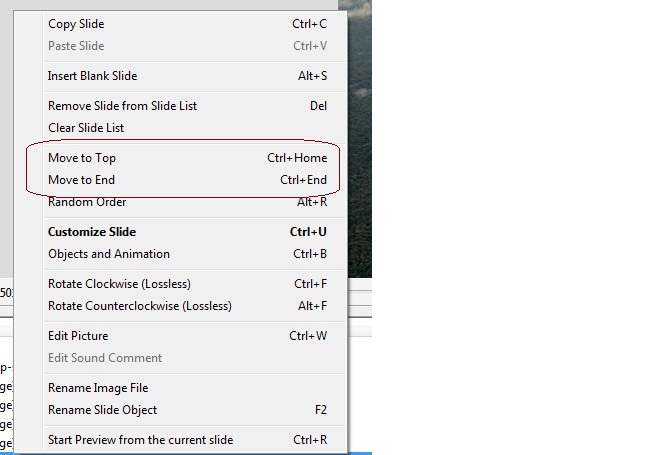
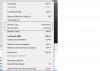
======================= Peter, I was not sure what the 'to Top' or 'to End' meant so I looked in Ver. 6.5. See attached. I think this is what the question was about. I didn't even remember it was in the menu. Gary
-
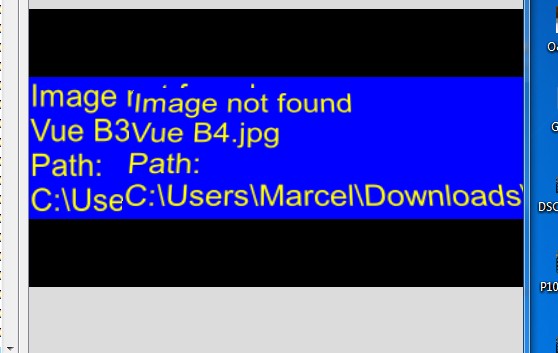
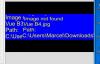
====================== Geoff, I loaded the Marcel transition and selected it as the transition for a slide but I get error messages. See attached. Not sure what to do. Thanks... Gary
-
================================== John, Fasinating to see other parts of the world and how they live. I don't see any 'interference patterns' that Mick talked about. Maybe it is his monitor, not sure. What I noticed was that it looked like the images were reduced too much so that sharpness was lost. Many images had a 'painterly' effect or almost like they were done on canvas. Not sure how to exactly explain it. Perhaps, the 'mini-pans' made the movement seem a bit 'jumpy', if I can use that technical term... But I liked the music and the 'trip'. Gary
-
Riding the Zambezi River-New Show on Beechbrook
goddi replied to goddi's topic in Slideshows & AV Shows
======================= Mick, Glad you liked it. The original version was on a VHS tape. Back then, there was no HD. The conversion process converted it to 720x480 so there is not much hope to get a better quality for full screen. It gets pixelated. I have not tried to put it on a DVD...maybe I will just to see what happens. I did the best I knew how to at least get it into PTE. /> I enjoy traveling and sharing the experience with others to encourage them to also go see what is out there. Thanks... Gary ADDED LATER: I made a DVD of the show but there was no improvement over the MP4. -
Riding the Zambezi River-New Show on Beechbrook
goddi replied to goddi's topic in Slideshows & AV Shows
=========================== Mary, We'd go back and do it again, without hesitation. We wish we had been tossed out but somehow, we hung on. My wife describes the water as 'delicious', and it was. The hardest part was climbing down the canyon and up the 300' cliffs at the end. Gary -
New show on Beechbrook: http://www.beechbrook.com/pte/ Title: Riding the Zambezi River (MP4 format, not EXE). Location: Victoria Falls, Zimbabwe. Frame Size: 780x432, MP4. Videos: Yes. VCR tape was converted to digital. Size of file: 68 Mbs. Run time: 10:04. Additional info: This show is of our rafting trip down the Zambezi River in Victoria Falls, Zimbabwe, in 1994. I finally have the ability to convert and edit the original VCR tape to digital and to insert it into PTE. This was our first trip to do the rafting and we returned a few years later and did it again. The video was taken by the rafting company. I edited it and inserted the text and music. This show contains all video except for the first and last slide. Due to its low quality, the video was put into PTE with a frame size of 780x432 and published as an MP4 to reduce the file size. The size of the EXE would be 200 Mbs and the MP4 is only 68 Mbs. And with an MP4 file, you can play it directly on your TV or through your media center box to your TV!!! Don't get too close to the screen or you might get wet! Comments and critiques are welcomed. Gary Oddi
-
================================== Igor, Thanks for the information. Perhaps it would be useful to put in a notice on the download page, "This minor update should be installed in the same folder as the previous version", or something to that effect. I always have installed each new version, whether minor or not, to its own folder to be able to see the differences in the updates. Gary
-
========================== Peter, No, I always install any update or beta in a new folder first. Then I uninstall the previous version. Another thing that always happens is when I uninstall the previous version (after installing the new version), it always deletes the desktop shortcut of the new version and leaves the desktop shortcut of the old version. Never understood why it does that. It always happens. And why isn't the 7.5.1 version in the MyComputers uninstall page??? Gary
-
Greetings, As it happened with the previous install of RC7.5, after today's install of 7.5.1, I lost the file association with .pte files. I installed 7.5.1 first. Then I uninstalled RC7.5. But RC7.5 was not listed in the MyComputer's uninstall list. I had to uninstall it using PTE's 'unins000.exe'. I notice that when 7.5.1 was installed, it did not ask if I wanted the defaults (or whateverit asks for) from the previous version of PTE. It asked me only after I openned 7.5.1. See http://www.picturest...__1#entry102198 for the previous posting when it happened to the RC7.5 install. When I would try to open a .pte file, it would open in Excel. When I would try to re-associate the .pte with the 7.5.1 PTE version, it would not stick. It kept openning in Excel. However, running the 'OpenWithView.exe' program, it worked to restore the file association. But this puzzles me that it has happened twice and the install process, both times, has not looked normal. I am wondering if there is something that is not installing correctly with the RC7.5 and now with the 7.5.1 that is causing the .pte file association to disappear. Gary P.S. And I just now notice that the 7.5.1 PTE is not listed in the MyComputer's uninstall list of programs.......What happened?
-
==================== Greetings Ronnie, Thanks for watching the show and your nice comments. This slide show was actually just a small section of one Hi8 tape. All I did was edit out the 'non-action' portions. So it was all shot from one position. The lions did the rest. How did I convert the tapes? I have had a Canopus ADVC-100 box for some time. Now they have the '110', about $200. I am not sure of the difference. But, I have my Hi8 Sony video camera plugged into the Canopus box using RCA cables. From the Canopus box to the computer, I use a cable from the 'DV I/O' connection to a firewire port on the PC. Years ago, I had a lot of problems finding a software program that would let me capture the video, so I stopped using it. I finally found that Avid Studio 1.1 works well to do the import/capture of analog videos (Hi 8 and VHS) to Mpegs, so I cranked it up again. It works great. I don't use Avid for anything else. Too complicated. So I use Freemake Video Converter (free) to trim and edit the captured digititized videos and convert them to AVI (makes them smaller in file size). Being able to just plop them into PTE is the magic that makes all the previous steps worthwhile. I have had no issues with the audio not matching the video. I had problems years ago with the Canopus not working too well with Windows XP--it could have just been me. I recently decided to try it again and it has been working very well with Windows 7 and I did not need any special drivers, either. I have been going wild converting my old and very old analog tapes to digital video just in case my old VCR and Hi8 camera bit the dust. And now I can be busy with creating more permanent and viewable slide (video) show memories with PTE. Hope this helps.... Gary P.S. I can probably use the Canopus to convert my LPs to digital, but I have not tried it yet.
-
============================== Bert, I am mulling over Mary's comments and yours. Thanks for watching it. It is interesting to get comments that make one think more about the final product and how others perceive it. Four weeks??? Fantastic. Just a quick idea for you... I found using a 'BOGEN 3265 GRIP ACTION BALL HEAD WITH QUICK RELEASE PLATE' was very useful. You slide it on the window's glass that is rolled just up part way. Helps stabalize the camera with a zoom lens to take pictures or video. Amazon has it on sale at the moment. Also, if you have some bucks left, I'd take a GoPro Hero camera, too. It is very small and takes video and you can get a waterproof housing (dust-proof too). You don't want to miss a thing--photographically!!! Have a great trip. Gary <h1 class="parseasinTitle "></h1>
-
============================= Mary, My wife has the same reaction with the lion having his lunch. Thanks for watching the show. I didn't think of any other background than black. I will experiment to see what I can come up with to be a bit different. I liked the white border because I thought it helped focus attention to the smaller video. Without it, I just did not look 'right'. But, maybe with something other than a black background would work out. It will make me consider other backgrounds and borders. Thanks for the idea. Yes, I have a bunch more 'movies' that I can put into PTE. What a great program!!! It is the only thing around that lets me be at least minimally creative. In fact, I have one just about ready on our white water rafting in the Zambezi River (Victoria Falls). I've got a lot of still images that I could put into the videos, but the problem is they are all in slides and I'd have to digitize them. That would take another lifetime...but I will work on that too./> Gary