goddi
-
Posts
3,596 -
Joined
-
Last visited
-
Days Won
27
Everything posted by goddi
-
Adding Cloned Keyframes to a long video clip...
goddi replied to goddi's topic in General Discussion
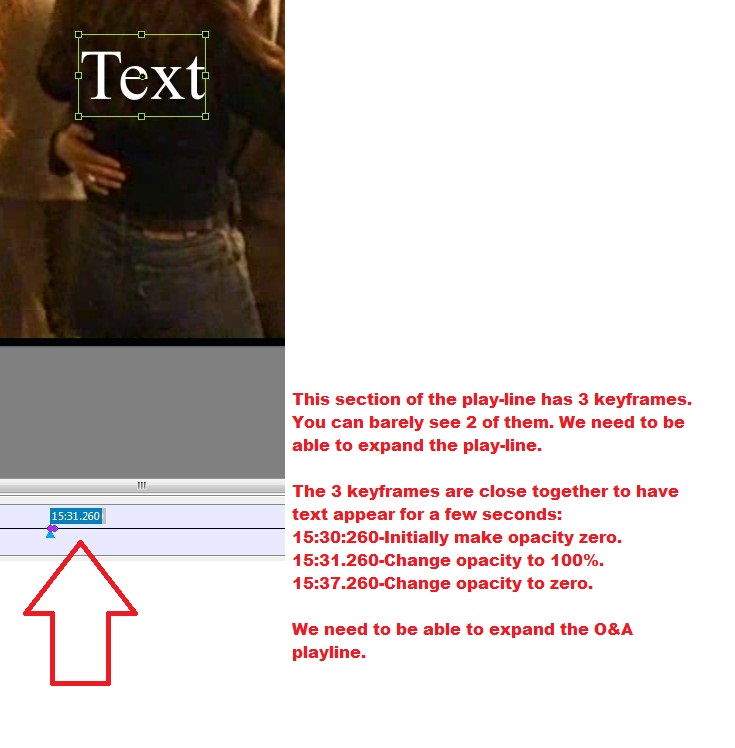
========================= Lin, Your clarification that the first keyframe is always set to 100% opacity helps me understand what to do. I tried your steps and it worked. But I may be doing it a bit different, though. I inserted a Text block. I moved the Text block's keyframe to a new position in the video clip where I wanted it to appear and made its opacity to be 0%. I then cloned that keyframe but did not move it and made its opacity to be 100%. I did not move it but it seems that PTE automatically nudges it a bit down the play-line, so the Text block appears nicely at that point. Then I cloned that 2nd keyframe and move it down the play-line to where I wanted the Text block to disappear and set its opacity to 0%. BUT, from the 2nd keyframe (opacity=100%) to the 3rd keyframe (opacity=0%), the Text is slowly fading-out during the entire segment. What is controlling the fade-in and fade-out of the Text blocks? I still find it extremely difficult to 'adjust' the 3 keyframes that are needed to accomplish this because the O&A play-line is so compressed. See the attached. But I have another question. In trying to adjust these 3 keyframes using the 'iterative' approach, I am confused by the differences in what the 'Keyframe' shows and what the 'Animation/Key Frame Time' shows. For example, for several Text blocks that I put in: The Keyframe shows 15.37.516 but the Key Frame Time shows 937516. The Keyframe shows 23:48.414 but the Key Frame Time shows 1428414. The Keyframe shows 14:59:000 but the Key Frame Time shows 899000. Only the bolded numbers correspond. How do I interpret this when I am trying to make adjustments to the Keyframes and they are not exactly the same numbers? Is this a bug? Gary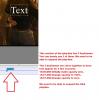
-
Adding Cloned Keyframes to a long video clip...
goddi replied to goddi's topic in General Discussion
==================================== Eric, I am not sure what you mean. I am basically using PTE to add Text into a video clip, or insert an image somewhere in the video clip for a few seconds. I have two issues. If the video is long, say 35 minutes, and you view it in O&A, the full 35 minutes is displayed in the O&A window. This makes it difficult to animate the Text because play-line in O&A is so compressed. Very difficult to fine-tune the animation. I'd like to be able to expand it as we can expand the Timeline by using the Shift/mousewheel. My question is, can this be done? But the other strange thing is that if you add Text or a graphic to a video clip it always starts at the beginning of the clip, not where you want to have it appear, say, in the middle of the clip, even if you move its Keyframe. Gary -
Adding Cloned Keyframes to a long video clip...
goddi replied to goddi's topic in General Discussion
================================== Lin, Is there any technical reason that would prevent being able to use the "Shift/Mouse Wheel" to expand/contract the O&A play-line as we can do in the Timeline? That would solve the problem. I think I'd rather use the Animation/Key Frame Time to adjust the Text block. Get it close, then adjust with it. This is difficult because the play-line is so compressed but it worked with the Text block I had at the beginning of the video. But I also have a question about putting Text in the middle of a video clip. I was able to put some Text in the beginning of my video, and animate it and make it fade-out. I was just tinkering around and tried to put Text so that it would appear only in the middle of the video for a few seconds. I could not. It always would appear at the start of the video and I could not get it to 'pop-up' somewhere in the middle of the video, even if I moved the Text's Keyframe. Is this, too, not possible??? Gary -
Greetings, Normally, when I have inserted a video clip, it has not been at the beginning of the show. However, I just started creating a show with a long video clip at the beginning and I want to put in Text in the intro to the video and animate it and fade it out after a few seconds. The initial video is 35 minutes long. So when I put in Text and then Clone the Keyframe to do some animation, it is very difficult to see and adjust the Cloned Text Keyframe. The entire 35 minute video is fitted into the O&A's play-line.There seems to be no way of 'expanding' the O&A play-line to be able to easily see/move/adjust the Cloned Text Keyframes by small amounts (as you can in an audio editor, like Audacity). When I try to drag the Cloned Text Keyframe by just a tiny bit, it snaps back to the left's beginning spot. I have manually entered Key Frame Time to move the Cloned Text Keyframe but it is hit and miss because the Cloned Text Keyframe is sitting practically on top of the original beginning keyframe. Is there an easier way of working with this type of situation or a way to expand the O&A's play-line to see the keyframes more clearly? Gary
-
Frame Engine Exception Error in 7.06 & 7.5Beta7
goddi replied to goddi's topic in General Discussion
=========== Igor, Thanks for the confirmation. Gary -
Frame Engine Exception Error in 7.06 & 7.5Beta7
goddi replied to goddi's topic in General Discussion
================= Fingers faster than brain... Gary -
Frame Engine Exception Error in 7.06 & 7.5Beta7
goddi replied to goddi's topic in General Discussion
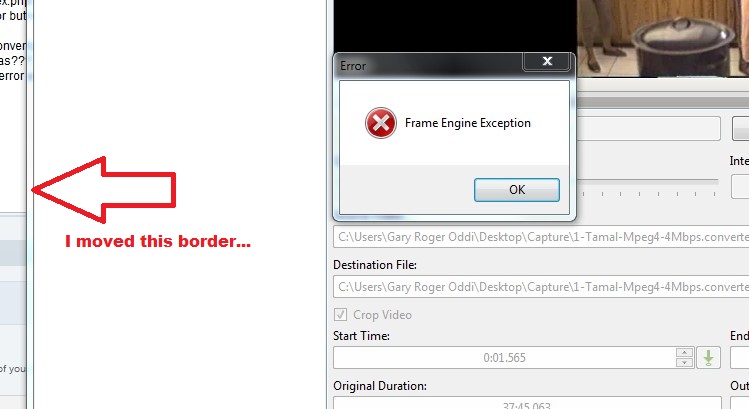
=============================== DG, errrr....nobeefstu, Yes, you are correct. I moved the VideoConverter program window. OK...I opened the VideoConverter in 7.06, by itself, and started a conversion. While it was converting, I moved the left side of the VideoConverter program's window to the right. The error occurred. So it is happening in the VideoConverter program, as you posted. Thanks for narrowing it down. Wonder if it can happen to others? I just happen to move the border to widen the cropping line. Gary -
Frame Engine Exception Error in 7.06 & 7.5Beta7
goddi replied to goddi's topic in General Discussion
========================= DG, I still have 7.06 and, I guess, never downloaded 7.07. But...since it originally happened in 7.5Beta7, I figure that it has not been 'cured' yet. The error message has occurred first in 7.5Beta7, and then in 7.06. Gary -
Frame Engine Exception Error in 7.06 & 7.5Beta7
goddi replied to goddi's topic in General Discussion
================= Could be, but the conversion process was finished and I was about to close the window. But I just tried moving the left border just to see what would happen, and I got the error again. Gary -
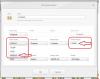
Greetings, I had received a Frame Exception Error in 7.5Beta7 and mentioned it this posting: http://www.picturest...7-bugs-75beta7/ I had also posted about an Assertion Error but nothing was resolved about the Frame Exception Error. I let it go because I thought it was just part of the Assertion Error problem. However, I was just doing a PTE Video Convert process in 7.06. And I got the same error. See attached. During the Convert process, I only moved the left border of the Convert window and the error popped up. Any ideas??? The conversion seemed to continue on to completion. And I noticed that even after the conversion was complete, and I moved the left border again of the Convert window, the error popped up again. Gary

-
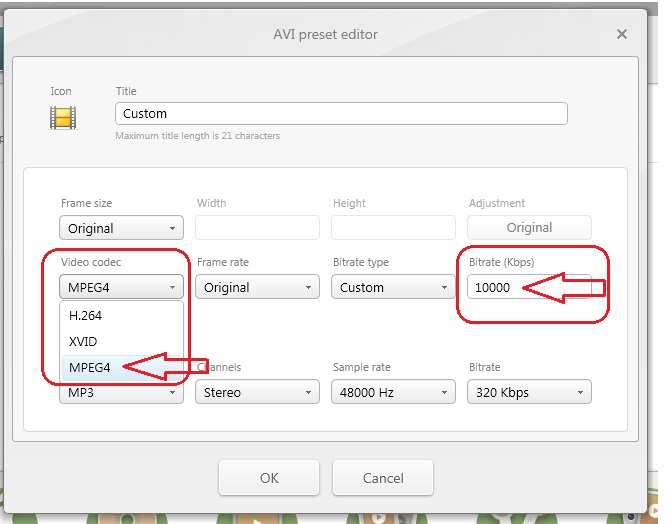
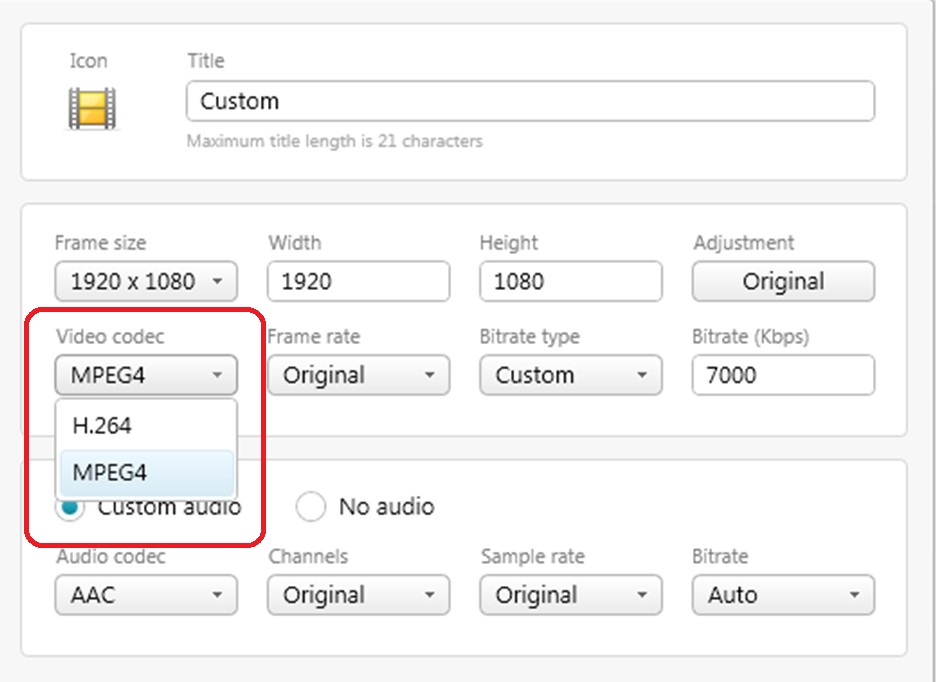
================================== Claudio, In addition to reducing the size of your still images, you have to be more concerned with the size of your video files if you want to make smaller exe files.'s Most people use PTE converter process which converts a video to an AVI file format that works well with PTE. However, many times, this process will create a file larger than the original video. In addition to trimming out the excess video portions, I prefer to have more control over the conversion process with the ability to reduce the original file size and still work well with PTE. I have been using Freemake Video Converter program, which is a free program: http://www.freemake....ideo_converter/ If you download this program (any many other programs), be sure to uncheck any extra programs they want give to you also, and usually, you don't want. What I like about this program is that I can choose not only the format, but I can choose the bitrate and the codec for the conversion process. After much testing and use of the Freemake program, I would suggest you try it out and select the AVI format, the MPEG4 codec and choose a lower bitrate. The MPEG4 codec will play better than the H.264 codec in PTE (at least that is what we have found so far). The bitrate seems to be the key to size of the video file. For example, if I start out with a 60Mb MOV video file that has a 20 Mbps bitrate, and I convert it using a 10 Mbps bitrate, you can cut the size of the video file about in half to about 30Mbs. The nice thing is that you can play around and try different bitrates. I have gone down to a bitrate of 7 and 5Mbps and the quality is still very acceptable. And of course, all this depends on what you are playing the final exe with. There are a lot of variables but give this a try. See the attached file. I hope this helps. Gary P.S. But I would always compare the results you get with Freemake with the results from the PTE conversion process.
-
===================== Greetings All, After poking around the Freemake site for a while, I just came across a page on their site that is entitled, "Reducing Video: When Size Does Matter:" http://www.freemake....ze-does-matter/ For those interested in taking more control over reducing the size of their video files, it is interesting. It makes the point about reducing the bitrate and using the H.264 video codec, things we have been kicking around in this post. Food for thought. Gary
-
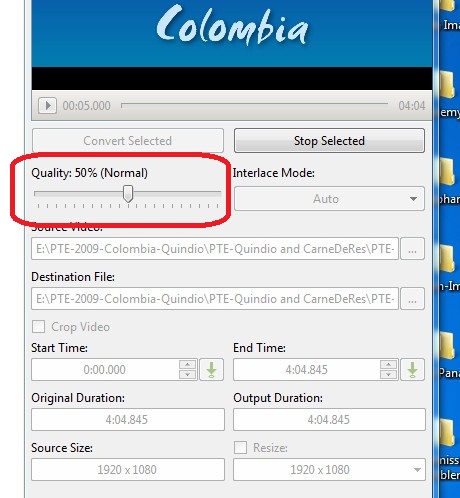
============================== Lin, I think we've beat this horse to death already. For me, the 'Quality' slider means nothing. Why not have a 'Advance' button to bring in any advanced features? At least with bitrate, you know what you have done and can learn what a good number is for your purposes and you are dealing with a known video factor. If you think setting the bitrate is 'dinking', that is what I feel when I am using the 'Quality' slider. I have not idea what it is doing. If setting the bitrate too low adversely affects the quality, at least you know why and you can gradually increase the bitrate with a better understanding of what is going on. You said to use the 'custom features' to manually modify the video. Where are these 'custom' features in the PTE conversion window? All I see is the 'Quality' slider. If PTE users are not concerned with the ultimate file size when they are inserting video, then you are right to stick with the 'Quality' slider. But...I think we need something to help bring down the file size and the only function that is easily available and eventually understandable is being able to adjust the bitrate. Just my 2 cents. I am pretty much in the dark about all this but I figured out what the affects are when adjusting the bitrate. Gary
-
============================ Lin, Thanks for the link. It helps me see that I am not the only one that thinks this is a 'black box'. There are a lot of factors working here that we can't nail down. But...it still leaves me with the question why PTE increased the size of the 77mb file so dramatically to 336mb during its conversion process. As you and the video link said, exceeding the 'source' bitrate does not generally improve quality. But I have found that reducing it without going too far retains quality and reduces the file size. Since there is no way to take into account all the other 'things' that are involved, I can only work with what I know and can control and that is the bitrate. All I am saying is, to me, the video's file size is important and the only control I seem to have in addition to trimming it, is to reduce the bitrate. I'd like PTE to have that functional choice in the conversion process. We would be able to fiddle with the bitrate until be see any reduction in quality, and let the 'CPU and GPU' do whatever it needs to do, because that we can't immediately factor in or tinker with. Gary
-
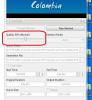
==================== Dave, No. What I am referring to is the 'Quality' setting that you can adjust for the PTE conversion process, see attached. I have no idea what it is doing. I'd like to have a Bitrate slider to help reduce the file size, if needed. Nobody seems to think that size matters, but when people start putting in video clips, from my experience, the only way to do it (besides actually trimming off portions of the video) is to reduce the bitrate. Otherwise, we are going to have gigantic sized slideshows. Gary
-
============================== Lin, Thanks for the info on bitrate. I will not challenge it because I have zero understanding of how the bitrate of an original video can be increased. I know it is done but it is way above my head. But then I wonder why video cameras shoot at such a high bitrate and therefore take up so much space when they could just take the video at a very low bitrate and have a process to increase the bitrate afterwards with no 'degrade' of the video. Just wondering.... But, I can not accept the fact that if a 77mb original video is put through the PTE converter, and it comes out to be 336 mb, that this is a good thing. I would like better controls on the output. It is sort of like when I want to compress a jpg, I want to be able to have a choice as to how much compression. Thanks... Gary
-
==================== Greetings Peter, I will have to try that test later when I have more time. But I have never had any problem playing any of the souped-up PTE file that have come from Lin or you or the others who have made some of the 'heavy duty' shows. But I don't see why PTE is taking it upon itself to 'change' the bitrate of my video file. It should not compress or un-compress the video. It does not do it with our jpgs. Converting a video to a better 'container' or 'codec' so that it works better within PTE might be ok, but it does not know what I am going to do with it as far as the need to change the bitrate. Why not just put in the ability for us to change the bitrate which would normally be less, not more. Videos that come out of the camera are usually quite high and I would not think there is a reason to increase them. And what is the effect of increasing the bitrate? Does it degrade the image as the compression of a jpg does??? Duno. I hope you can bend Igor's ear and take out the 'Quality' and put in 'Bitrate' as a control. Thanks.... Gary
-
=========================== Greetings Lin and others, I just did a test using Freemake Video Converter to convert an original MP4 file, size 76mb, bitrate 2609 kbps. Interesting results: Test 1- Converted original file to MP4 container, using the MPEG4 Video Codec, bitrate came out as 2756 kbps. Size came out at 80.3mb. (Larger size probably due to slight increase in bitrate). Test 2- Converted original file to MP4 container, using the H.264 Video Codec, bitrate came out as 2860 kbps. Size came out at 83.3mb. (Larger size probably due to slight increase in bitrate). Test 3- Converted original file using PTE's conversion process to AVI, defaults settings. The original size of 73mb jumped to 336mb. Why? I notice that the PTE converted file's bitrate shows 16060 kbps. So, keeping the bitrate relatively the same, the file size stays relatively the same. The Video Codecs did not have much effect, in this case. But the bitrate does have a major effect. I think this is my biggest problem with the PTE conversion process. I don't know how to control the bitrate. Why would the bitrate jump to 16060 kbps from the original 2609 kbps??? I also ran the original MP4 file through Freemake to convert it to an MP4 and set the bitrate to 16060 kbps and the file size jumped to 246mb. So, I hope that Igor will put in some kind of control where we can select what the bitrate is when the PTE conversion process is used. The 'Quality' setting leaves me cold. Size matters! Gary
-
============================= Dave, I just looked more closely at those two files, one the original MP4 and the PTE converted AVI file. The only difference I see is that the original MP4 file (77mb) shows a codec of 'H.264' and the PTE converted file (336mb) shows a codec of 'MPEG4'. I will do a test in Freemake. I will convert one with the 'MPEG4' codec and one with the 'H.264' and see what the size difference is. Gary
-
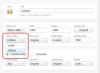
========================= Xaver, Great. Getting closer to an understanding. The 'container' explanation helps. So it is the Video Codec that is more responsible for the size of the video file. Ok. So then, can you explain what the difference is between the two Video Codecs that I can choose from in the Freemake Video Converter's MP4 container: 'MPEG4' and 'H.264', as seen in the attachment? Thanks... Gary
-
=================== Dave, I just let it run through with the default settings, 50%. Weird.... Sometimes the converted file is smaller, most times it is bigger. I just can't get a handle on what it is doing what it does, so I don't use it. But I am getting a bit frustrated. None of the replies so far have addressed my real question about selecting the Video Codec for an MP4 conversion in Freemake. Why do I need to select a codec? Which one should I select? What is the effect of one vs. the other? Everyone is dancing around all of the other aspects of a video question, but not my main point. I am sure not too many people have run across this choice except, maybe, those who have used Freemake, and maybe most have never noticed it. I have not seen it in any other video conversion program nor in PTE's converting process. I am just trying to understand what effect these two choices might have with converting a video. Gary
-
============================== Dave, My original request for info was not referring to Video Output from PTE. It had to do with a choice that I find in the converting menu of Freemake Video Converter. After I have selected the conversion format of MP4, it lets me choose a 'Video Codec' of 'MPEG' or 'H.264'. This is my confusion...what does this mean? What is the effect of one vs. the other? Why choose one vs. the other? As I have mention in my reply to Peter, my goal in converting my video files is to reduce their size but retain quality. Sure, I have tried the PTE Video Converter, but many times it make the file size even bigger than the original size. And I don't know what the 'Quality' choice means. I don't know what it is doing so I just avoid using it. Nor does it allow changing the bitrate, which seems to be the main factor in reducing video file size. Gary Added later: I just did a test and converted an MP4 video file using PTE's converting process. It converted a 77Mb MP4 to a 345 mb AVI. Not acceptable.
-
======================== Peter, You said you want acceptable quality. I have said the same thing. No argument there. But if I can get similar quality with a smaller sized file, that is what I want to achieve. When I want to upload a video to Beechbrook, I don't want to stretch my welcome with a gigantic file. And, people have complained when the file size exceeds their predetermined limits. Some have lower download speeds then others, so I try to accommodate these concerns. It seems that I have been adding video to my PTE shows a bit more than most and, perhaps, this has not been a noticeable problem for most PTE users, yet. Sure, I can let PTE 'convert' my video files but this process makes them even bigger than the original files. My original question is not a question of to-convert-or-not-to-convert. It has to do with an additional choice that I can make while using the Freemake Video Converter program that lets me choose a 'Video Codec', which gives me the choice of 'MPEG' and 'H.264'. I am wondering which one is better or what the reason is to choose one vs. the other. This is more of a technical question that comes up within this conversion process. I see that there is much discussion about 'MPEG (H.264)', so I don't understand why I can have the additional option to choose 'MPEG' or 'H.264' separately, under the MP4 format. Gary
-
======================= Dave, I have several cameras that take video: a Nikon D7000 (MOV; 22000kps bitrate; 23 fps); a Nikon AW100(MOV; 14000kbp; 29 fps); and a GoPro (MP4; 15000kps bitrate; 29 fps). Why convert? My main purpose to convert is to reduce the size of the videos I insert into PTE. After much trial and error, I seem to find that if I convert them to the MP4 format AND reduce the bitrate, the file size dramatically reduces and I don't see any loss in quality. I think a bitrate of less than 7000kps seems to be close to a visible loss in quality but that is just my benchmark. I see people say that using PTE's convert process to the AVI format puts less stress on the video processing. That might be true, but I get a larger sized file and I have not seen any problem using the MP4 format with my system. But...a few days ago, at a computer seminar, I tried one of my PTE shows that contain a lot of video and it really was a mess. Very jerky. It was played on the instructors laptop from my thumbdrive. I don't know if it was the thumbdrive or her laptop causing the problem, but maybe her laptop could not handle the higher requirements of the MP4??? Duno. So that is why I convert my video files and I like to use Freemake Video Converter to convert my original video files. I get smaller file size with the MP4 format AND I can reduce the bitrate. But, the Freemake program also lets me choose the 'Video Codec'. But I just don't understand why I would choose one over the other (MPEG vs. H.264). I usually see them together as 'MPEG (H.264). But here, I can choose one or the other when I have selected the MP4 format. Just confused... Gary
-
=========================== Dave, I took a look but I don't see any 'Video Codec' choices in Custom. I posted the question in the general Forum. Gary