goddi
-
Posts
3,596 -
Joined
-
Last visited
-
Days Won
27
Everything posted by goddi
-
======================== Greetings Deepak, I have had the pleasure of watching both Sightsavers 1 & 2. You are telling a super great story. Much appreciated and wonderful photography. These are the kind of shows that make an impact. Thanks... Gary
-
=================================== Greetings, Nice show and interesting. My only comment is that I wished you had said where the Prison is located. I had to use Google to figure it out. I have seen other shows by others who do not provide more precise location info in the show and that is a big question that makes the viewer, at least me, wonder why it was not stated in the show. Other than that, very informative and well done. Thanks... Gary
-
============================ Lin, Good to know I was close. Thanks for the clarification on the second Keyframe. I really wish we could 'expand' the O&A timeline. That would really be a help. Thanks... Gary
-
====================== Eric, I was not going to add a reply because I thought you might have posted this in the wrong Forum, since it is for 'Ideas...'. Maybe it will be moved to a more appropriate Forum. But anyway, I am intrigued with your question so I will take a chance and ask it here. I would like to know how you are adding an image into the middle of a video. I find it cumbersone. When I try to add or insert a still image in the middle of the video in the Timeline, the image takes over the entire length of the video from the insertion point. The audio stays but the still image sits on top of the video to the end of the video's length. So, I then tried to add a still image in the video sequence in O&A. I can add the image using Keyframes to make it appear and dissapear. But I have to use 4 Keyframes. The first to make the opacity '0'; the next to make it 100%; the next to be placed at the end of the time I want the still image to be displayed; and the last Keyframe to make it disappear by setting the opacity back to '0'. If the image is to be displayed for a short time, the Keyframes practically sit on top of each other and it is difficult to work with them, especially with a long video sequence. I have made a suggestion to be able to expand the Timeline in O&A so we can 'see' the Keyframes better. But is this how you are doing it? I can't see any other way. It would be great if we could just add an image over a video sequence and input a custom length for the image and it would appear and dissapear accordingly, without the need for 4 Keyframes. Thanks... Gary
-
========================== Dave, Using an external drive is a great idea. Just didn't think of it. One day, I will give it a try on my Samsung 40" TV. Right now, I am re-doing a lot of my older shows, hopefully to make them better. When done, this will be a good thing to try out. Thanks... Gary
-
========================= Dave, I can't argue with what you say. I'd like to see the difference when a show is projected, but I have not had that opportunity, yet. I just created MP4s of a show. The 'low quality' was 364Mbs, while the 'high quality' was 863Mbs. Since I tend to put both the exe and the MP4 on thumbdrives (to watch the MP4 on my TV with my WD mediaplayer), even my 16GB thumbdrive gets filled up pretty quickly. But, when I get a chance to project a show, I will see what the difference might be with a 'low' vs a 'high' quality MP4 show. Thanks... Gary
-
============================= Greetings, If I understand your question, and you have the 'Settings/Table View of File List' unchecked, you can increase/decrease the size of the thumbnails by using the Ctrl + mousewheel. Then you can increase/decrease the area of the File List's window as Dave showed. Gary
-
================================ Dave, Thanks for clearing that up for me. 'Size' to me usually means file size. I always use 'Low Quality' to keep the file size down since I can not tell the difference between 'low' and 'high' quality. Maybe when it gets played on a larger screen, it might make a difference, but so far I can't tell the difference between 'low' and 'high' outputs. I am glad you made your point because I have played an exe that worked fine on my PC but was jerky on the other person's laptop. I should have switched to the MP4 file and always have one on hand, just in case..../> Gary
-
======================= Dave, When you say make an 'MPEG4', do you mean use the 'Publish Show/HD Video' process in PTE to create the MP4 files? What throws me is you say 'of the same size'. Usually, the MP4 comes out quite larger than the exe. If we are referring to the same process, what parameters do you change to make the MPEG4 the same size? Even selecting 'low quality' creates a larger sized file. Do you use Custom settings? What settings work for you? Thanks... Gary
-
========================== Thanks, Igor. Looking forward to it. Gary
-
Zoom in/out on main window timeline slider?
goddi replied to [email protected]'s topic in General Discussion
=========================== You can also use Ctrl + Mousewheel to do the same thing in the Timeline. Gary -
========================== Eric, Yes, quite peaceful. Sort of the quiet before the storm? ;)/> I just uninstalled my IE10 so that it would revert back to IE9, which it did. I was hoping that would do something...but not. Anyway, I will just live with this 'thing'. One day it might 'heal' itself. Gary
-
========================= Eric, I followed every link on that site that I could find, and I also did a search of the that forum. But nothing shows up. If you have a specfic link that you think pertains to the problem, it would be helpful if you would bring your screenshot into a program such as Paint and drawn an arrow or circle it. I have looked and looked, but nothing has been found. Thanks... Gary
-
====================== Eric, Thanks for the screenprint, but I did see that. That postings seems to be about a Win7 64bit update. I have Win7 32 bit. And I don't connect anything there with the HTML5 problem. Though it seems hopeless, I am still checking around to see if there is any light at the end of this tunnel. Only after Googling around a lot, I did come across the way to get the HTML5 out of Firefox. Maybe persistent will work to find a way to get it out of IE. :D/> Gary
-
============================= Eric, I searched through the Flickr Group but didn't find anything that related to this HTML5 problem. Frustrated? Yep. It is very frustrating when you create a problem and then you can not get a fix for it. I tend to stick with Firefox and Thunderbird for my browser and my email client. Just trying to use IE gets my blood pressure up. But this HTML5 thing really is a problem that should not have happened and you'd think there would be a way of reversing it. I could in Firefox but not in IE. :(/> Thanks, Gary
-
======================== Thanks, Brian... Gary
-
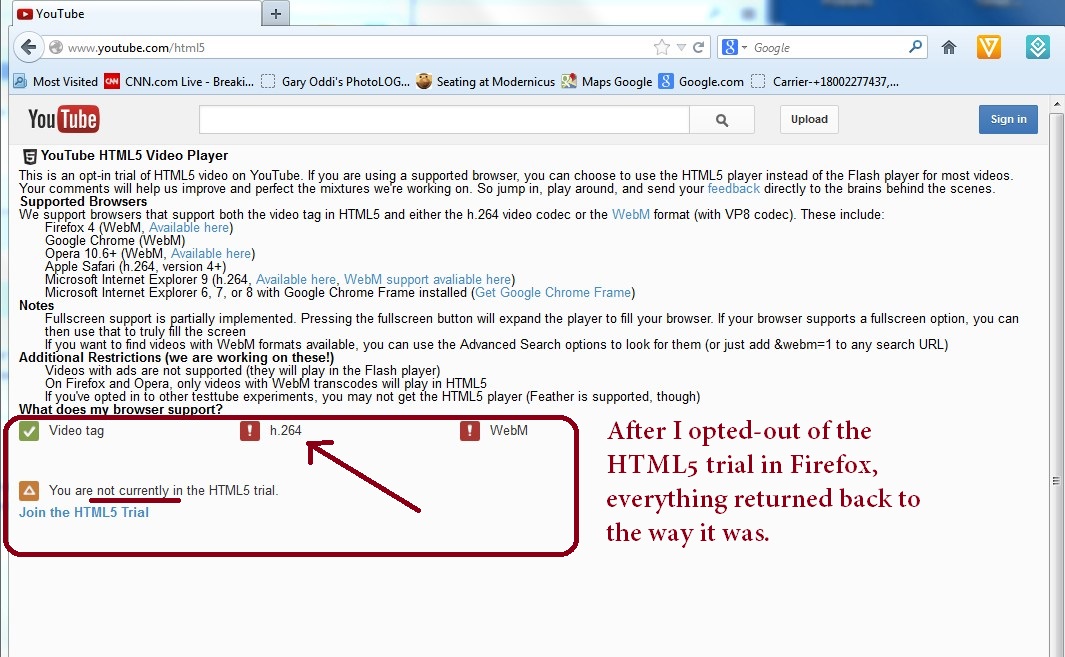
================================ Greetings Brian, Thanks for the information. When I opted-in for the HTML5 trial, since I was in Firefox, I thought it would only take effect in Firefox. But I also noticed that it stated that IE 9 was listed under the Supported Browsers. I was able to clear the HTML5 out from Firefox but, as you said, it is a bag of worms when it comes to IE. The good news is that I rarely use IE but I don't like having these problems hanging around. I have done a lot of searching for a remedy but so far it has been fruitless. All this started because Firefox will not work with the latest version of Adobe Flash (at least on my Win7). A tech person pointed me to using the HTML5, but it did not work without some problems. So I finally got it out of Firefox and back to using Adobe Flash 10.3. But IE is another story....or nightmare. Thanks for the info. Gary
-
======================= Eric, Yes, I have. But I want to try that as a last resort because I don't want to inadvertently mess anything else up....:blink:/> yet. Gary
-
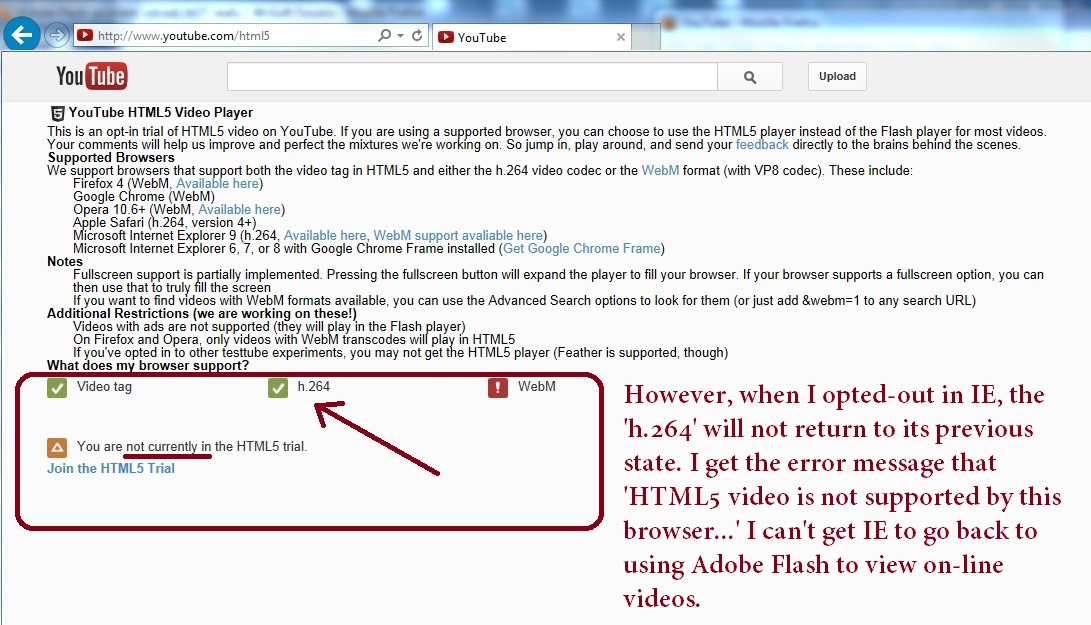
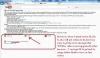
================================== Ken, I took a look at all of these but they are not addressing the actual problem I am trying to fix. Those sites are referring to creating pages in HTML5 code so that they will be readable in different browsers. Take a look at the attached screen shots. The problem started when I opted-in to the YouTube HTML5 trial at the www.youtube.com/html5 site, thinking that this will solve my problem not being able to view YouTube videos when I updated my Adobe Flash to the current version. Once I did update to the latest Adobe Flash version and when I opted-in to the HTML5 Trial, I could view YouTube videos, but then it prevented me from viewing other videos, such as new clips on other sides. So it fixed one problem, but created another. So I opted-out in Firefox and got everything back to 'normal' using an older version of Adobe Flash. However, I can not get my IE back to 'normal'. Even though it shows I have opted-out in IE (see attached), I can not get it to stop using HTML5 to view videos. I want it to go back to using Adobe Flash. I hope I have made this more understandable. It has been driving me a bit nutty. To get my Firefox back to normal, I had to type 'about:config' in the seach window and change the 'media.webm.enable' to 'false'. I am not sure what to do to get IE back to normal. Gary
-
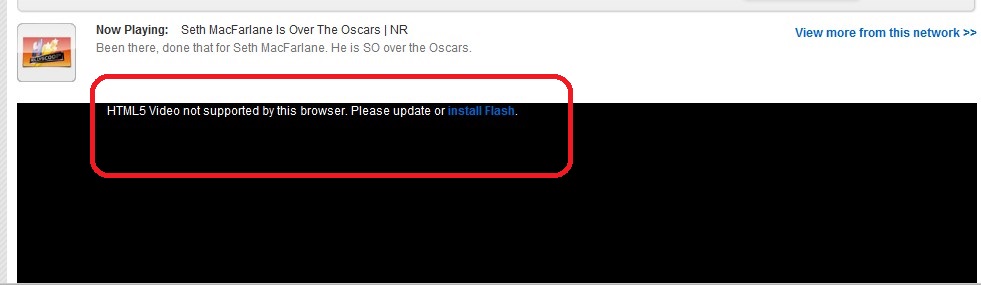
-================================ Brian, Do you have any idea how to get the 'HTML5' out of IE so I can get Adobe Flash to work? See the attached. This is the error message I get when I try to play an on-line video in IE. I have Adobe Flash installed but it won't play. Gary

-
======================== Greetings Brian, If I understand your posting, you are using Multi-Media Players to play flv files outsideof the browser. However, I need to be able to play videos within browsers. You need it to play YouTube videos. You also need it to create JibJab videos on line. Also to see online news video feeds. I have not looked into Pale-Moon yet but I don't think I want to get into a different browser than Firefox. I've got too much invested in its setup. But I found that the HTML5 was still in Firefox even though I thought I had taken out by disabling the trial in the YouTube.com/HTML5 site. I found a way to get it out, finally, to get back to using the older Adobe Flash 10.3. However, I still have the HTML5 stuck in IE and I can't seem to get it out. Online videos will not play on it. I will be poking around to do that next. It is a shame that Adobe Flash is causing so much trouble. So at this point, I recommend not to try the YouTube's HTML5 unless you want to play around with a bit of trouble. Gary
-
============================ Ken, Thanks but my Windows is 32 bit. Now that I removed the 'HTML5 Trial' in Firefox, it seems to have stayed stuck in IE so now, the videos don't play in IE. What a pain!!!!! I've got my Firefox 19.0 + Adobe Flash 10.3 working fine. Can't figure out why I can't get my IE back to 'normal'. Gary
-
================================= Ken, I don't think the Adobe Flash issue has anything to do with Java, at least as far a I can tell. I did go to your site and I do have the latest version of Java running. I think it is just an issue between Firefox and Adobe Flash. I have searched the Internet and I am not the only one but there does not seem to be a fix, yet. Thanks... Gary
-
================================== Greetings, Yes, I understand that I am using HTML5, and not Adobe Flash. But I just discovered another problem. After updating my Adobe Flash, when I try to watch the news videos on my Verizon homepage, the Flash crashes. There is something that Firefox and the lastest Adobe Flash will not work together. So I reinstalled the 10.3 version of Adobe Flash and every thing works now in Firefox. I will just have to live with whatever will not play on the older version of Flash. This really is a bag of worms that I am sure Firefox knows about but just can't fix. I will just have to live with the security issues that come with using the older version of Flash. Gary
-
Greetings, Back in September, I had posted a problem that, after I had updated my Adobe Flash, I could not play YouTube videos. I figured out that if I uninstalled the Version 11 and went back to Version 10, the problem disappeared. However, today I was playing with the Drivesharp program, given out by USAA to improve your driving skills, and this program would freeze up while playing the video game. To make a long story short, the tech people at Drivesharp solved this problem. He told me to update my Adobe Flash. He was familiar with my previous problem with playing YouTube videos with the latest Adobe Flash update, because he had had the same problem. I updated my Adobe Flash as he instructed and, of course, it cause the same problem...YouTube videos did not play. Then he said to go to the www.youtube.com/html5 site and click on the 'Join the HTML5 Trial' link, I think is what it said. It is a link at the bottom of a lot of text information on that page. After I did this, the YouTube videos now work with the updated Adobe Flash. He said this will work with Firefox and Chrome, but not to do it with IE. Anyway, this was news to me and hope that this information will help anyone else with the Adobe Flash problem. My Firefox version now it 19.0 and the Adobe Flash version is 11.6.602.171. Gary