Lin Evans
-
Posts
8,206 -
Joined
-
Last visited
-
Days Won
12
Everything posted by Lin Evans
-
Hi JT, What might be useful is if you could write a page on perhaps Euler angles and Tait-Bryan angles and how they might relate to the 3D transform angles in PTE, we could slightly modify the verbiage in the Wiki and link to your explanation which would be housed under another category which you could suggest a title for? This way more sophisticated users as well as beginners could benefit from not only the simplistic but also from detailed explanations of the purpose of the X and Y axis manipulations in PicturesToExe. Best regards, Lin
-
Hi JT, Technically, that's correct but it may be a bit esoteric for the user guide and perhaps better to explain the intricacies in tutorials dealing specifically with the axis of rotation variables. It the explanation in the user guide gets too complex, many first time users may lose interest. Best regards, Lin
-
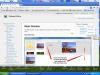
Hi Mike, Since it's a work in progress, it will essentially always be in the process of being updated so there will not be a "single" PDF file to download however you can download any segment by using the PDF tool found on the far right side of your screen. See screen capture below: Best regards, Lin
-
Hi Ken, Settings - File List Sort Order gives you a choice of Name, Extension, Date, Size or Reverse Order. To my knowledge that's it other than manually arranging... Best regards, Lin
-
Hi Folks, I would like to thank Igor, Dave and Jeff for their consistent hard work and dedication to this project. My part in this thus far has been very limited, but I intend to contribute more as time goes on. I would encourage others who have the time and skills to participate to please do so and together we can all make this project an even greater shining example of what cooperative efforts can achieve. Best regards, Lin
-
Hi Barry, I'll make a quick video of doing that and upload it in a few minutes - I have a capture going right now which should end up in about 15 minutes then I'll capture the steps in a quick video - it can be used for future users so I'll probably post it on the SlideshowClub site as well. After testing, I find that I can "replace" an entry, but not delete an entry - I'll talk to Bill and see if we can get this resolved. I have updated by deleting, but if there is no file uploaded as a replacement, the message says: "You must upload a file to continue" so right now I think the process is broken - stay tuned.... Best regards, Lin
-
Hi Barry, At the bottom of the page, click "Edit" then click on the show and a "Delete" will be offered... Best regards, Lin
-
A Strategy For Tutorials with SlideshowClub
Lin Evans replied to Lin Evans's topic in Tutorials & Video Lessons
Hi Bill, Thanks, I hope other tutorial writers when they have several uploaded will create an index and upload that so that new users can quickly find the ones which best fit their needs. Having names such as Tutorial 1, Tutorial 6, etc., with explanations after in the SlideshowClub or PTE forum section means that users have to scroll to and click on and read each entry to try to find the desired content. Having an index allows them to quickly scan the content then go directly to the desired tutorial. It's such a small step for the writer and such a huge convenience for the user that I fail to see why anyone who writes tutorials would object to this small extra step. Creating an index with links is extremely easy with PTE folks, let's use the software we have been blessed with to optimize the learning curve!! Thanks, Lin -
Hi Tony, You may have a problem, but perhaps not. The 1929x1080 resolution is far greater than what is supported by either NTSC or PAL resolutions. Both these resolutions are less than 800x600 so you will never see anything remotely resembling HD resolution on a DVD. In addition, neither is 16:9 aspect ratio and both are essentially designed for older television receivers. Only BluRay right now, or AVCHD for smaller shows supports HD quality in an optical media. You can create an MP4 h264 video and display it on your HD tv at full resolution via a USB flash device assuming your TV receiver supports this via HDMI. A little more information would be necessary to be certain what is causing the pale picture, but the resolution on a DVD will never be anywhere close to your mp4 h264 video quality. Best regards, Lin
-
Hi Jose, I had meant to get back to you because when I opened the zipped archive, these files were missing - if you could send these to me I'll have a look. I've been pretty tied up with some personal issues lately and have just recently gotten back to the forum: Picture: J:\F - PTE PARA TESTES\MAPA ÍNDIA\02A xx MÁSCARA TOTAL CORRIGIDA.jpg Picture: J:\F - PTE PARA TESTES\MAPA ÍNDIA\03 xx MÁSCARA 1 DELHI - JAIPUR.jpg Picture: J:\F - PTE PARA TESTES\MAPA ÍNDIA\MEIO CÍRCULO PRETO.png Picture: J:\F - PTE PARA TESTES\MAPA ÍNDIA\04 xx MÁSCARA 2 JAIPUR - SAWAI.jpg Picture: J:\F - PTE PARA TESTES\MAPA ÍNDIA\05 xx MÁSCARA 3 SAWAI - CHITTAURGARH.jpg Picture: J:\F - PTE PARA TESTES\MAPA ÍNDIA\06 xx MÁSCARA 4 CHITTAURGARH - UDAIPUR.jpg Picture: J:\F - PTE PARA TESTES\MAPA ÍNDIA\07 xx MÁSCARA 5 UDAIPUR - JAISALMER.jpg Picture: J:\F - PTE PARA TESTES\MAPA ÍNDIA\08 xx MÁSCARA 6 JAISALMER - JODHPUR.jpg Picture: J:\F - PTE PARA TESTES\MAPA ÍNDIA\09 xx MÁSCARA 7 JODHPUR - BHARATPUR.jpg Picture: J:\F - PTE PARA TESTES\MAPA ÍNDIA\10 xx MÁSCARA 8 BHARATPUR - AGRA.jpg Thanks, Lin
-
A Strategy For Tutorials with SlideshowClub
Lin Evans replied to Lin Evans's topic in Tutorials & Video Lessons
HI John, That (Wiki) actually will be used for PTE's online documentation (user guide, manual etc.) but that's really not what this post is all about. This is about the tutorials which individuals write to help users learn specifics about PTE which go beyond the basics of the User Guide and the perceived need to carefully index them to facilitate finding the pertinent information quickly and efficiently. It's not the location of the tutorials which is important, different users will actually house their tutorials in different places. Several of us have our own servers, for example, and already have gigabytes of tutorials in various formats already stored and backed up. Trying to transfer them to some common place would be an enormous time sink. Some users will create PDF type help while others will create video tutorials. For instance, though I personally find PDF type tutorials which could easily be stored in the Wiki format very helpful for users, I can create ten video tutorials in the same time span in which I could write only one PDF type tutorial. My time is limited so I won't change my own methods. I can't speak for others, but I'm fairly certain that Barry, for example, has the same situation. It's just way too difficult to take the hundreds of already created files and try to convert them to some common format which is amenable to a particular system. What is important, in my way of thinking, is that the information be organized in such a way that the user can quickly sort through an index or glossary to find the particular help that they need. It really isn't important at all where the information resides, what is important is that links to that information are organized in such a way so as to prevent frustration for the new PTE user. Many will use web-based services such as Vimeo and YouTube to house their video examples and tutorials. Of course there is a downside to that as well. If the user doesn't have web access at the time they need help, it would be convenient to have the information resident on their own system. So downloads also need to be available. Here where I live, a significant number of people have very slow internet. Though they can slowly download a file overnight, watching a lengthy video online is problematic and aggravating. Eventually, it might be possible to place indices and links to tutorials on Wiki along with the User Guide and that might be a very good place to also link to them. But that too actually will be facilitated if those who write tutorials provided a usable index to keep things tidy. Best regards, Lin -
Absolutely magnificent Jean!!! You have carried the concept to a whole new level - I posted a sample of it on both SlideshowClub and here on the PTE forum. Congratulations !! You have demonstrated some of the remarkable possibilities possible with this program in an impressive way!! Best regards, Lin
-
Here's a PC and MacIntosh version of Jean-Cyprien's new Rubik's Cube Style - This is a most excellent job Jean - Bravo !! MacIntosh Link 8 meg Windows PC Link 8 meg Lin
-
A Strategy For Tutorials with SlideshowClub
Lin Evans replied to Lin Evans's topic in Tutorials & Video Lessons
HI Bill, Yes, once I discovered that my problem with url links was my own fault and not that of PTE (thanks Igor), I was able to create a tiny file which the user can download which links to both tutorials and their index as well as samples, Wnsoft and the Wnsoft Fora. It's probably not nearly as important for those who only have a few tutorials, but in my case the number of tutorials, samples and associated files is close to 70 and it would be difficult for the new user of PTE to have to scroll through each link to find one which might match their need. Having an index just greatly simplifies things. Hopefully, if each person who creates tutorials can provide an index of what each is about - specifics rather than generalities - it could be that eventually we could create an alphabetic index tutorial index containing links to everyone's tutorials which could be updated with links as new tutorials are added. It's so easy and quick to do with PTE that actually creating such is a relatively easy job. Creating a search might be more difficult because that would entail a database approach. It would be possible with a MySQL or Access database, but I don't know whether the SlideshowClub software has the necessary hooks for such. Even without this, if the index is in alphabetical order, it would be much easier for the new user to quickly find what they need. It's much easier to get ahead of it now before things get unwieldy I think.... Best regards, Lin -
Hi folks, As more users create tutorials and upload them to various places including Youtube, this forum and to the new SlideshowClub site, the problem of easy access for the new user becomes more apparent. If your tutorials are individually uploaded without an index, it requires the user to scroll through potentially hundreds of separate files searching for that single download which will help them understand how to accomplish their goal. My suggestion is for each user who creates tutorials to create an index of their work which can be updated as time passes and more tutorials are written. PTE makes it exceedingly easy to do this. By creating a small executable file with a list of your tutorials and links to them both for MacIntosh and Windows based systems, the user need then only search through the index to find the link to the proper tutorial. Whether your tutorials are housed on SlideshowClub, on YouTube, the Wnsoft Forum or on your own server, with this approach, the user can simply download "one file" and run it to access all your tutorials. Rather than search through the hundreds of individual tutorials to find the particular one they need, they can just download your index with links and click on that particular link to be immediately whisked to the proper source and download. So if you are creating multiple tutorials, please consider this method because it will make life so much easier for the new user. Anyone who needs instructions on how to do this please message me and I'll provide a brief example and instruction. Best regards, Lin
-
Have a microphone - How do I add voice track
Lin Evans replied to tom95521's topic in General Discussion
Hi Tom, That's why I suggested putting a blank 10 or 15 second image temporarily at the beginning of your show. Once you have finished with the recording live, you then just delete this and adjust the start time by subtracting the 10 or 15 seconds from the audio by altering the start time of the audio portion from the zero default. Of course you could also just trim the silence from the audio which was recorded during the temporary blank slide, but it's very easy to just precisely start the audio in conjunction with your first slide, or where your wish by adjusting start time. If you want your background music to play while your audio comments play, you just need to put them on separate tracks and play the tracks simultaneously by adjusting the position of the audio track on the timellne. Just drag the track with the background music to start where you want. That way you can easily adjust the volume of the background music while you speak, etc. Best regards, Lin -
Hi Mick, There is no accurate way to predict the exe file size because of the inclusion of video, whether or not multiple mp3 files are concatenated into a single file, etc. You can do only rough estimates but even this will probably not be close enough to be of significant value. Essentially, if you add up the combined file sizes of your video{s) and each jpg compressed image and mp3 file then add about 1.5 meg for the basic exe code itself, you will be about as close as you will be able to get. The feature was removed from PTE because it could no longer be really accurate once these new features became available. Best regards, Lin
-
Have a microphone - How do I add voice track
Lin Evans replied to tom95521's topic in General Discussion
Great - probably it would be a good idea to turn every feature on by default then let the user disable any which are not wanted. That issue has come up several times already.... Best regards, LIn -
Have a microphone - How do I add voice track
Lin Evans replied to tom95521's topic in General Discussion
Hi Tom, The very first thing to do is go to settings and click everything so you will be certain to have the Audio record available while you play your show on the mini-viewer. Next, assuming you have your microphone plugged into the USB port and the light on the microphone is on, click on the start button for the mini-viewer and immediately click the "Add Audio Or Voice" button (next to the Preview icon) and immediately click on "Record" and your microphone will be live and recording. It helps if you start the show with a blank slide with about 15 seconds which you can remove later. Continue to comment as the show is running and when you are finished, just save and then adjust the audio stream position for start if necessary in the timeline and use the start time to remove any silence at the beginning. Best regards, Lin -
Hi Jerry, I thought that might be what you had in mind. It's exceedingly easy with PicturesToExe. How you might want to proceed is to go to this link and download the very first tutorial. Just scroll down past the red index to the PZR (Pan, Zoom Rotate) and download the AVI video. Essentially you just go to the Objects and Animations screen where you set keyframes. The first keyframe is automatically inserted so you decide how you want the image to look when first viewed by your audience, then drag it with the bounding rectangles to that size and position. Then along the timeline you create additional keyframes and different zooms or pans and PTE takes care of creating the pans, zooms, rotates, etc. as show progresses. Download and watch the first tutorial. Even though many of these tutorials were made many iterations ago they are still perfectly relevant in that they will explain exactly how to proceed. If you have further questions, just post them and I or someone else on the forum will walk you through the process. The above link is taking you to the Tutorials Section which is a sub-category of the Frequently Asked Questions section of the forum. Specifically, the link is taking you my own selection of 40 plus tutorials on different aspects of PTE. Best regards, Lin
-
The link has been pinned since it was first created - just click here: Lin
-
Hi Jerry, Could you elaborate a bit on what it is you would like to do? Any type of Ken Burns effect is extremely easy to do with PIcturesToExe. If you could give us a bit more details about the specifics of what you want to accomplish, maybe we can help you achieve you goal. Best regards, Lin
-
Hi Jt, A very good and fair analysis of the product as it evolves and becomes better with each iteration I think. Thanks! Lin
-
Hi John, Not to answer for JT49, but the zoom is initially set "per single line" (or another way to express this is per the bounding rectangle) so that if the number of lines changes, the zoom numbers change accordingly. Try this: Create a new blank slide and type in some text on a single line and then type the zoom number to 10. Now add a second line of text without changing the zoom number and it will automatically default to 20. Add a third line and the zoom will change to 30. So what we see is that the zoom value represents the "block" of the text object rather than the individual text line. So when you begin your fist line of text, if you copy that value and use it for subsequent text the individual characters will maintain their proper size even though the zoom numbers change. Your best strategy is to copy the zoom of the first "line" of text and apply to subsequent lines; then let the automatic features of PTE take care of changing the value to suit the number of lines of text in the text object. Best regards, Lin
-
Hi John, Just to clarify a bit what JT49 has said, but in verbal rather than math terms. Once you have sized a line or lines of text in a specific font and, in the case of multiple lines of text with a specific line spacing, you can then just copy and paste the zoom value(s) found in the Animations Tab and apply that to each subsequent line or lines of new text objects to keep everything consistent in size. Best regards, Lin