All Activity
- Past hour
-
Perhaps the "Integrated Loudness (LUFS)" and "True Peak (dB)" values are set significantly different (or not) for the music compared to the sound effects? Just a thought.
-
Thanks, Dave, will try this.
- Today
-
Bruno, thanks for your suggestion.
-
You can already add your own sound files to your projects - just use the "Add Sound" button (not Sound Library) and select your local audio files. We plan to expand our built-in sound library. However, we only include sounds under CC0 (Creative Commons Zero) license - meaning they must be in the public domain and free for everyone to use without restrictions.
-
Hi, Thanks, I reproduced the issue by replacing the Sound file. We'll fix it. Temporary workaround: remove the existing Sound object and add a new one.
-

Changing the speed of a video is broken in several ways.
Igor replied to mhwarner's topic in PTE AV Studio 12 Beta
Hi Mary, Thanks for checking video editing functions. Please send me this video file which causes freezing and incorrect speed. Better with a project file (.pte). Write me a personal message with a link. I found a couple of issues with editing of video speed and duration. We'll fix it. -
Gary, Frame interpolation is always applied to the entire video object, from start to end. For example: A. The original video is 30p. Your display operates at 60 Hz (or you are creating a 60p video export). Video speed is original, 100%. PTE will generate intermediate frames (1 real frame + 1 blended/interpolated frame) for the video object. B. The original video is 60p. Your display operates at 60 Hz (or you are creating a 60p video export). Video speed is set as 10% / 0.1x. In this case, PTE will generate 9 intermediate frames (1 real frame + 9 blended/interpolated frames) for the video object.
-
I initially applied loudnorm normalization (for all sound files in the library) using the EBU R128 standard with a target level of -16 LUFS. loudnorm с I=-16 in FFmpeg. I noticed a problem - some quiet sounds get to the same level as loud sounds, destroying the natural dynamic range. Probably I'm wrong and I can try again. UPD. I normalized all audio files in the sound library in future Beta 4.
-
Me too I agree, the volume is too low, even at a setting of 200% 🤮
-
Thank you, the best time is the rising tide in the morning. The birds are busy preening and feeding and a slow, gradual creep up allows me to get closer. If you move slowly, the larger birds are more accepting but the smaller birds are always more flighty. Cheers Mark
-
Thanks John, glad you liked it. I probably have a few others from other cities in Europe from the trip. Amsterdam was early. Time and more recent imaging are preventing it from happening. Cheers Mark
- Yesterday
-
They will, if you use a frame and DO NOT ALTER THE PAN X VALUE dg
-
Thanks, Dave, I will look at frames as these are not something I have ever used before!
-
Thanks, Jill. It appears that I have to manually get it right the first time, and that PTE will not align the text boxes to each other!
-
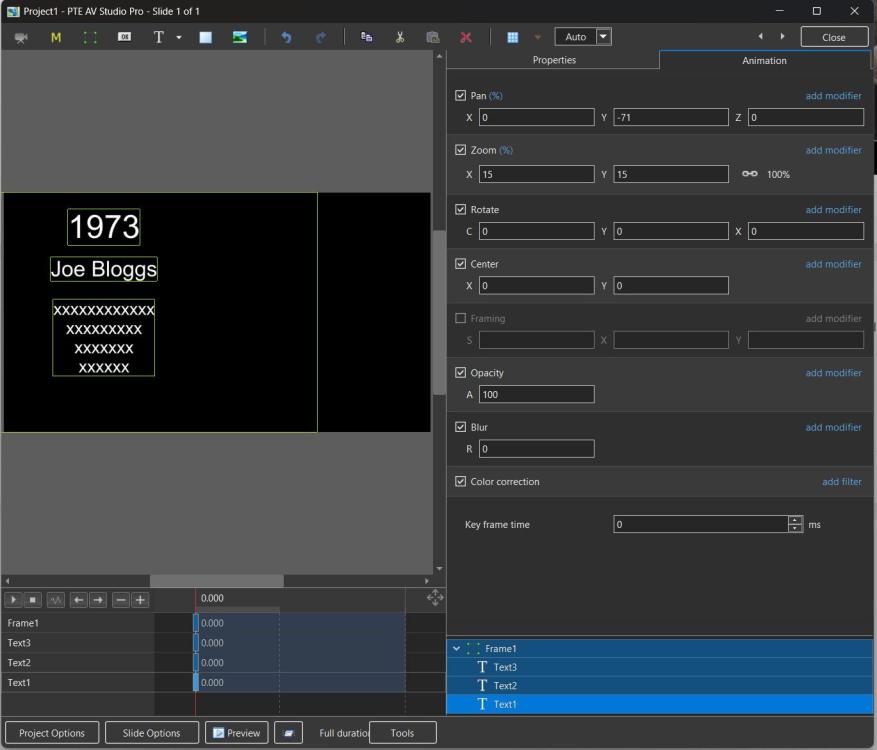
Try adding a frame and adding your text boxes to the frame. When you have the first one set up you can pan the FRAME to the left with everything maintaining its position. Save as a Style or Quick Style. DG
-
Get it right for the first slide, then copy and paste onto all the other slides. You can do this in one go by using a quick slide style. Then you just have to change the text for each slide. Jill
-
Nicely put together. Also nice the birds co-operated and stayed still long enough to get the images
-
Very nicely done Mark. Nice infrared effect in the vegetation.
-
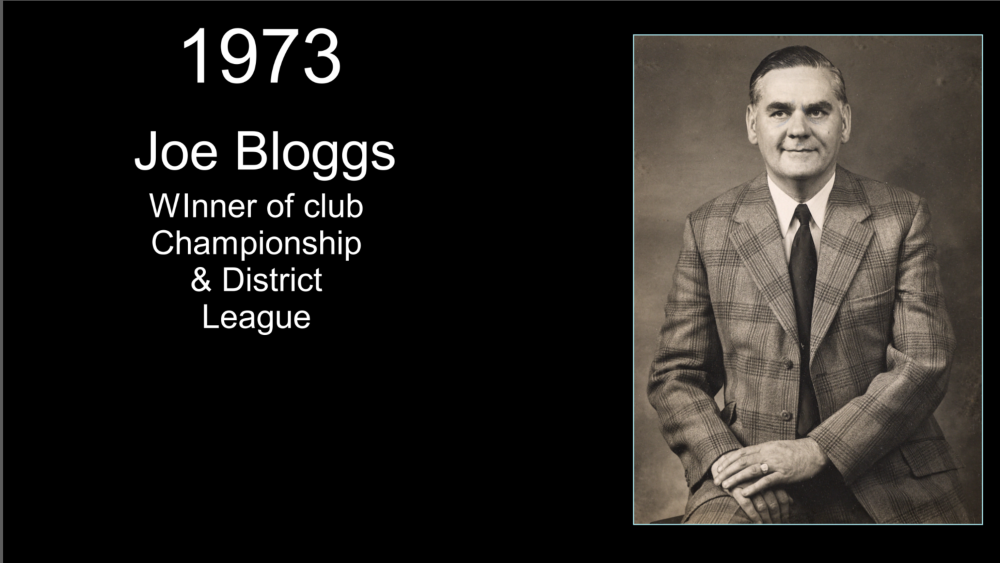
Dave, thanks for the reply and information. Perhaps I am mistaken, but my understanding is that this will only align the text within each individual box/object. I may not have explained my issue properly, but I am looking to have each text box aligned vertically above each other on the slide. I have tried selecting three text boxes, and while I can get each box to have the text aligned within its own box, the boxes are not aligned on the page. Hope this makes some sense! Have added a screenshot to try and explain what I wish to achieve.
-
In O&A / Properties /Alignment, choose Centre. Yes, the alignment can be incorporated into a Style or Quick Style and once applied the Text can be edited. DG
-
I am looking to produce a show (1920x1080 px) with a slide for each of the 160 presidents of a local club! This has involved photographing some very old prints (some from the 1870s). Each image will have its own slide along with individual text boxes stating the year and name of the individual. Other text boxes may be included depending on available information about the individual. Is there a way to align the centre of these text boxes so they appear neatly on screen? The size of the "name" text box will obviously vary per individual. Can this alignment be incorporated into a style once achieved? I am looking to make a "style" to incorporate the name of the club and the foundation date on every slide. Thanks for any help.
-

Rather low volume of new sound effects
AleAle5025 replied to CorVdK's topic in PTE AV Studio 12 Beta
In any program, whether it’s Premiere Pro or DaVinci Resolve, after adding a sound effect, the main background audio needs to be reduced to 75 percent. If the sound effect is barely audible, you can boost the audio file in Audition or find a similar file online with higher volume. Otherwise, the sound effects will not be heard. In version 11, I reduced the background sound. Yes, some sounds are very quiet. -
Hi, I agree the volume of the effects are low. Denis
-
When creating a transition, the sound is set and running. You cannot replace an audio file from a folder or from a transition in documents. The audio file. 2 seconds. The pre-installed audio files work perfectly.
-
 I added a single clip. Changed the speed to 200%. It changed the stated video duration but it did not speed up the clip. Also, I could not publish the show to an .mp4. The publish window just sat there and never did anything. It did create a 1KB file with the name but that's all. I went back in and tried to change the speed from 200% back to 100%. Moved the slider then manually typed in the number. Closed the window and PTEAV just locked up and I had to "End Process". I started over with another clip. I changed the speed to 50%. That worked ok but then I tried to trim the end of the video and the window never showed me the end. I could go in and trim the video first and then set the speed to 50% and that worked fine. Just for the record, I experiment with ticking the "Interpolation" box for this video, but the video then became quite blurry. Apparently the interpolation is only intended for extremely slow videos. I tried again with the second clip and trimmed in first then set to 200% speed. Duration changed, but not speed. Went back and again attempted to reset speed to 100% and the little display window went black and then when I closed the Trim and Adjust Speed window, PTEAV once again locked up and I had to shut it down. I tried one more time and trimmed first and adjusted speed to 200%. Duration changed, actual video speed did not. This one did publish. Setting video speed definitely has some issues. Let me know if you need further information. I did go into V11 and set the speed on both videos I had tried to 200% speed and they did indeed speed up and I was able to save them. FYI, I am on a PC running Win 24H2 with 64 GB memory.