Rosemary A
-
Posts
435 -
Joined
-
Last visited
-
Days Won
5
Everything posted by Rosemary A
-
Finding where to change text in a style
Rosemary A replied to Rosemary A's topic in General Discussion
Thank you guys. You have given me lots of options. I, especially like your suggested program, Jienense. Gives me lots of "homework" I have been complaining about the text model in PTE since version 9 but nothing much has changed that I can see. Rosemary -
Finding where to change text in a style
Rosemary A replied to Rosemary A's topic in General Discussion
Thank you Dave I got the slidestyle to work. I also found lots of ways to change it up for different effects. Sorry I got the wrong author though. I think this style was made for version 9 but not sure. Rosemary -
Finding where to change text in a style
Rosemary A replied to Rosemary A's topic in General Discussion
You are correct, Jill and I often change the text used in slidestyles. Unfortunately I just don't see how I can do this with this slide style. Thank you - Rosemary -
Hi, I am attempting to make a slideshow about Mt. Etna and I thought that a slidestyle made for Version 10 by Lin Evens (RIP) that has text strokes around a flame would be appropriate as an intro. My problem is that I cannot find where to change the text! Can someone help please? Rosemary Fire filled text.pte
-
Thank you Jill. That is what I wanted. I never thought of using Pan Z Rosemary
-
Hi, can someone tell me how to make a slide style to simulate forward movement please. I have managed left to right movement or right to left but not straight ahead as in a vehicle moving forward. I hope this makes sense! Thanks, Rosemary
-
Thank you. These are great and very useful, Rosemary
-
Thank you, Alex for sharing this slidestyle. Much appreciated. Rosemary
-
PTE AV Studio 12 transferring styles and transitions [SOLVED]
Rosemary A replied to Rosemary A's topic in General Discussion
Thank you Igor and Dave for hanging in with me. I printed out the preference screen from both programs and eventually noted that PTE 11 was on One Drive! All fixed now and again, Thank you. Rosemary -
PTE AV Studio 12 transferring styles and transitions [SOLVED]
Rosemary A replied to Rosemary A's topic in General Discussion
Thank you Dave for all your hard work. Yes I am on a PC Windows11 I shall keep trying! Rosemary -
PTE AV Studio 12 transferring styles and transitions [SOLVED]
Rosemary A replied to Rosemary A's topic in General Discussion
Dave, thank you for getting back to me. I can't see any difference in the folders for 11 and 12. I have removed 12 again and redownloaded. Still no styles or transition transfer and no option to carry them over from 11. I seem to remember with previous versions that transfer was offered. Rosemary -
I have just bought PTE AV Studio 12. I didn't see the option to transfer my slide styles or transitions from PTE 11 to PTE12. Is this possible or am I missing something (again) Thanks, Rosemary
-
Hi Will there be video help with the new features of PTE AV Studio 12? I for one would greatly appreciate one especially on how to see the slide styles. Whatever I have done, I can only see the option of choosing the number of slides ie 2 or 3 etc. No names no examples. Thank you, Rosemary
-
Thank you Dave. I really appreciate your help too. Rosemary
-
Thanks Igor. I know nothing about programming. All I know is that in other programs one just selects the text size, the font and colour. Line spacing is an option too. Easy for me to say I realize but the option would be great. Good luck. Rosemary
-
Thanks Jill,. I shall have a play with this. It doesn't stop me from hoping for the option to set a text size though. I shall live in hope. Rosemary
-
Hi Jill, Thank you for getting back to me. Thank you for the tip about copying the text object in O&A. I tend to use a lot of text, usually a slide worth to explain what or where we were. I find that after a few years I forget where the picture is from or about! I feel that if the text isn't the same size throughout the show, it looks untidy. The intro and credits can be different text or size but the main body text, I feel, should be uniform just like a book or newspaper text. I long for the day when one can just select a size for the text and that is it - no copying and pasting needed. Thanks again Jill, Rosemary
-
Is the ability to choose a font size and maintain it throughout the show going to be available in PTE AV Studio 12? At present one has to copy and paste the original slide and delete its text and replace it with the new text. I find it unwieldy especially in such a sophisticated program. Rosemary
-
Happy New Year to everyone. I hope 2026 brings us world peace and lots of photos to use in PTE 12. Rosemary
-
Thank you Alex for this beautiful Christmas show. Thank you for all that you contribute to this forum and for your generosity throughout the year. Merry Christmas and a Happy New Year to you and yours. Rosemary
-
Hi Digatral, Thank you for sharing these two beautiful videos and for the information about them. Always great to learn about other bird species. Rosemary
-
Thank you 2007 for sharing this beautiful show. Autumn is truly beautiful and you captured the season so well. Rosemary
-
Thank you AleAle 5025. Yes I downloaded the cube style. It was because of my lack of computer skills and nothing to do with the style download. BTW, I really appreciate your work and your willingness to share with us less skilled PTE users. Thank you, Rosemary
-
Thank you. I have managed to download the style. Rosemary
-
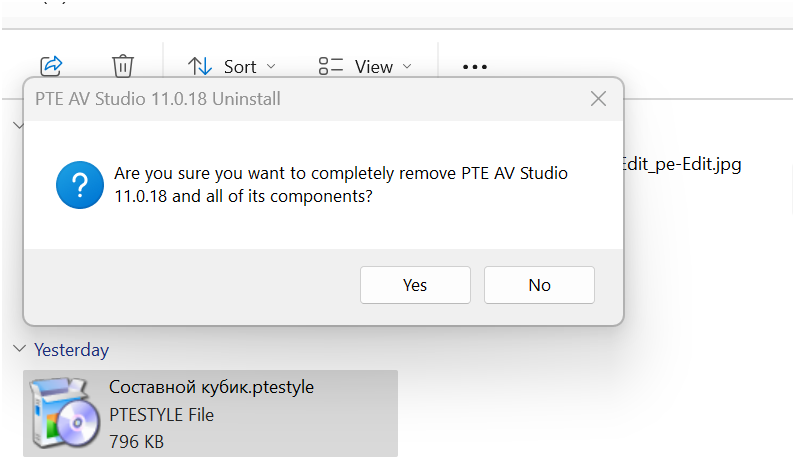
Hi, When I try to download Ale Ale 5025's composite cube 3D I get a screen asking me if I wish to completely remove PTE! I am assuming that the style is a Zip as PTE does not show the download when I try to access it through Tools, Import Style. I would be grateful if someone can help. Rosemary