All Activity
- Past hour
-
 arthurjw joined the community
 -
JKB, thanks for your quick response (and Christmas greeting!) Happy New Year Everybody! Following up on your tips I can update as follows: I have rescaled my pan images to 72 dpi. No improvement. (Should have remembered to do this - very rusty!) I made a test sequence with just one of the pans in it and it still stutters at the requisite duration. If I give it much longer duration it becomes acceptably smooth. (This very basic test has presumably got no acceleration modifier in it - I didn't put one in, anyway!.) I'm working in the latest Windows version of Studio Pro. The stutter is in O&A, and in mini preview, and in full screen preview, and also in published sequences (i.e. videos made in various different settings, and an executable). So, apart from longer duration test I've still got the same problem! Any help would be most gratefully received! Time is running out! 😬
-
Thank you, Igor. I wish you and your team a Happy New Year. I’m looking forward to seeing what v12 has to offer.
- Today
-
Congratulations on the new version. It runs very well on my Mini PC with Core i 5. We'll be spending quite a bit of time with it. Warning: highly addictive! I would like to see various instructions for the updates posted online (especially for saving transitions and themes so that they can be restored). I'm already looking forward to the final version. Best regards
-
Apologies for posting this in the wrong place initially!
- Yesterday
-
Happy New Year! Merry Christmas! May this year bring joy, happiness, and fulfillment of your wishes! The slide has been compiled. In the latest version PTE.
-
Hi Andrew, You need to post this under Troubleshooting, not the Forums & website Section. I think you should be able to move it. It sounds like your files are very large, you don't need 300dpi - 72 dpi is fine. You say the stutter seems to occur as they accelerate, so are you using an Accelerate Modifier on the Pan? Can't remember are you Windows or Mac? Also is the stutter in O&A, Mini Preview or Fullscreen Preview? Also try to Publish these Slides & see if it still happens. Hope this is of some help. Merry Christmas Jill
-
I have been using PTE for a good many years now but I have just encountered a problem that's new to me. I have created a sequence which starts with four long panoramas. The first one is my title sequence and it runs just fine at around 33 seconds long and it's overlaid in O & A with title text and a bit of video. The following three images were assembled in PhotoShop into a row from a series of single shots, and they have all got a problem with 'stutter'. They are quite simply used, though they're wider than the title image - the only image in each slide is the composite image, and they are shorter in duration than the title pan at around 20 to 25 seconds each. They are all 1080px high and @ 300 resolution. To be precise the respective widths and times are as follows: Title 2727px, 33.4 seconds duration; Slide A is 8146px wide, 20.75 seconds; Slide B is 6691px wide, 26.25 duration and Slide C is 6554px wide, 21.6 sec duration. (There is no vertical movement - it's set to 0.0 on every keyframe.) I have tried juggling them in in all sorts of ways but I can't find out how to stop this very irritating stutter which seems to occur as they accelerate. CoPilot has given me all sorts of advice which doesn't seem to make total sense! Any thoughts please? There is some urgency as I want to submit this sequence for a forthcoming competition.
-
Many thanks for your responses and first impressions of V12. Happy holidays!
-
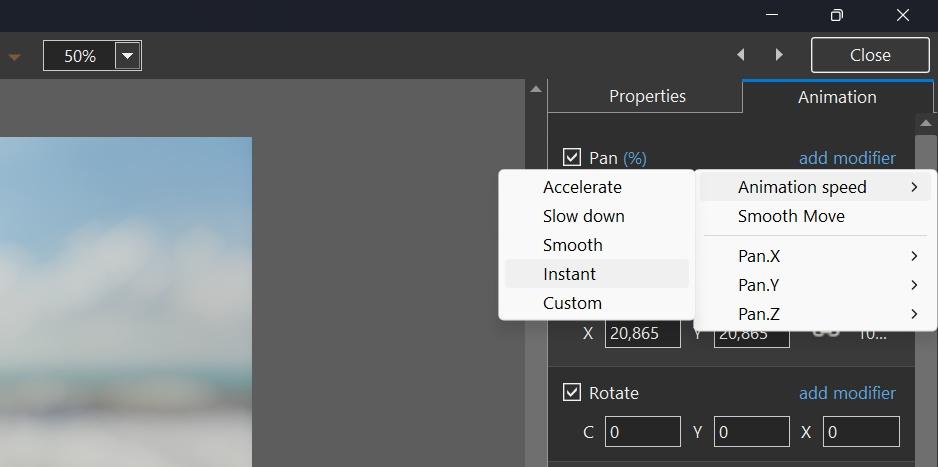
Hi, In PTE AV Studio 12 we added a new speed modifier - "Instant". It allows you to achieve an instant change of any animation parameter between 2 keyframes (without smooth interpolation).You can apply it to Pan, Zoom, Rotate, Opacity and other animation parameters. If you have 2 keyframes, add the "Instant" modifier to the 1st keyframe. Download a demo project: Instant Animation.zip Video example: Instant Animation.mp4 Screenshot:
-
Igor. Congratulations to you and your team on creating the new version of the program! I wish you continued success and new exciting projects! Merry Christmas! Happy New Year! Warmth, joy, and new achievements! I checked out all the new features added to the program. Everything works great. I inserted a five-second clip. Everything worked perfectly, from acceleration to complete video stop. Thank you very much for your work.
- Last week
-
Merry Christmas Slideshow ID 13122025
AleAle5025 replied to Bad Dancer's topic in Slideshows & AV Shows
Thank you for the slideshow. As always, it is a beautiful and interesting piece of work. -
The amount of work and time spent "under the hood" is quite remarkable. Thank you, Igor and team. Merry Christmas and good luck in the New Year, Kieron
-
Thanks to Igor and the whole team for the new version! I haven't yet figured out how to speed up and slow down video using keyframes. I'd be happy to see a tutorial on how to use this. I really like the AV1 format. The output file is about 1.5 times slower than MP4, but its size is twice (or more) smaller than H.264. Great! I wanted to ask if this version of the program will feature video looping (within a slide). We've been talking about this for a while now. Merry Christmas and Happy New Year! I wish you and the entire WnSoft team joy, happiness, love, health, and success in all your endeavors!
-
Random picture (EXE) slideshow
PrimusThe3rd replied to PrimusThe3rd's topic in Suggestions for Next Versions
Ok. Thanks for clearification. I understand now. Maybe in the future there could be some new, simplified, lite (just for pictures) edition? With random pictures feature, of course. 😅 Regards. Primus -
Hi, We wish you a Merry Christmas and Peaceful New Year! Warm regards, Igor,
-
New transitions added in PTE AV Studio 12: Spots, Rotating Linear Wipe, Push Smooth Click to play video sample: New Transitions in V12.mp4
-

Random picture (EXE) slideshow
Igor replied to PrimusThe3rd's topic in Suggestions for Next Versions
I understand how important this option for you (dynamic random slide order). We removed this feature in 2013 (since version 8.0) for 2 main reasons: 1. Technical complexity - this option made it very difficult to add new features to PTE. It created problems with: - Project duration (when "Keep full slide duration" is enabled); - Audio files linked to slides; - Linked video clips; And possibly other issues. 2. Modern workflow - most users now create video files instead of EXE shows, and random order is not applicable for video files at all. As an alternative, we added a new command that randomly shuffles slides once when you edit a project. I understand this doesn't meet your needs, but unfortunately we can't bring back the old feature due to these technical limitations. I'd be interested to hear what other users think about this. P.S. I moved your original message to a new topic here. -
Congratz on v12 version. I know the app is focused a lot on video editing, nowdays. But still. Random picture (EXE) slideshow (if no video is involved) is a great (must) feature to me. And thankfully as such it was implemented from day one in PTE ... till v7.0?. So in some way it's a downgrade to me... Best regards, Primus
-
Hi Mary, Thanks for your wishes and response! We haven't yet updated Sample Project for the new effects in V12. It will be done later before the final version. Hi Aleina, Thanks for your first impressions on PTE 12 Beta! We hope to add more new functions and effects before the final version. Try new built-in transition "Spots". It uses a new Gradient displacement map effect added in V12. You can recreate the same effect in a custom transition or slide style. We added a new preset/template for a mask stencil - "Spots" (when you choose "Gradient map" mode. Setting "Width %" parameter around 1-5 in the Mask container object you can reach more sharp edges of this effect. Also I recommend to try a new modifier in Animation speed > Instant. It disables smooth animation of parameter (Pan, Zoom, Rotate, etc) between 2 keyframes.
-
... Good luck Ghulya
-
Well, finally, we've finally got it! Thanks to Igor and the team for the pre-holiday surprise! I loved all the new features, each one is useful and improves the functionality of our favorite program! I especially appreciated the sound object, as it's been a long-awaited need. I think we'll get some interesting transitions with sound! I also really liked the ability to use video with keyframes, it's fantastic! I also really liked the RGB displacement effect (hello, glitches)! And you can definitely create something beautiful with the gradient map! Overall, thank you for your work! We'll try out all the new features and write more about them. Merry Christmas and Happy New Year!
-
Absolutely love the sample project included with the new beta! Will be wonderful to explore many of the new features by going through those images and transitions. Much easier than aimlessly clicking buttons or printing out Igor's description sheet and looking for the updates. Great job and beautiful images, Barry Beckham! And I love the winking koala at the end! One of the changes that stands out to me so far is the ability to use a parent object to change the colors and opacity of it's associated children. Having to modify those settings for each one of those child images / objects in the past was a bit annoying.
-
Hi Jeff, I have missed seeing your videos with your dogs! Most of the videos on here are typically posted to YouTube with a link so it's probably their rules that apply. Here's a link to another free music source that I posted almost a year ago. They really do have a good variety of music and it is all royalty free. The link for the $59 membership in that posting is still valid. You might check it out and see if it works for you, assuming it is in your budget. It beats the heck out of those monthly subscription sites.
-
Merry Christmas to you and your team Igor! Thanks for the early Christmas present! I look forward to working with this new exciting version!