Igor
-
Posts
13,676 -
Joined
-
Last visited
-
Days Won
288
Everything posted by Igor
-
We just finished moving of the forum to a new server. Thanks for your patience! Known issues (will be resolved soon): - Mobile view of the forum doesn't work. - Only English language. - Right-side panel with recent posts on the index page doesn't work.
-
We didn't move the forum yet. We're seting up new server now.
-
We'll move the forum to another server. This may take 24 hours. I apologize for possible access problem during this time.
-
I think, next week.
-
Thanks! I remember many users asked for audio volume control. So I can drink my cup of chocolate
-
Since Version 7.0 (Beta 2 or a little later) we'll introduce a new Navigation bar in slideshows. It includes: Play/Pause button Next/Previous slide buttons Control for rewinding Mute audio button Audio volume control Current time position Duration of show
-
Peter, If I make a new modern interface, a half of PTE users will hate me
-
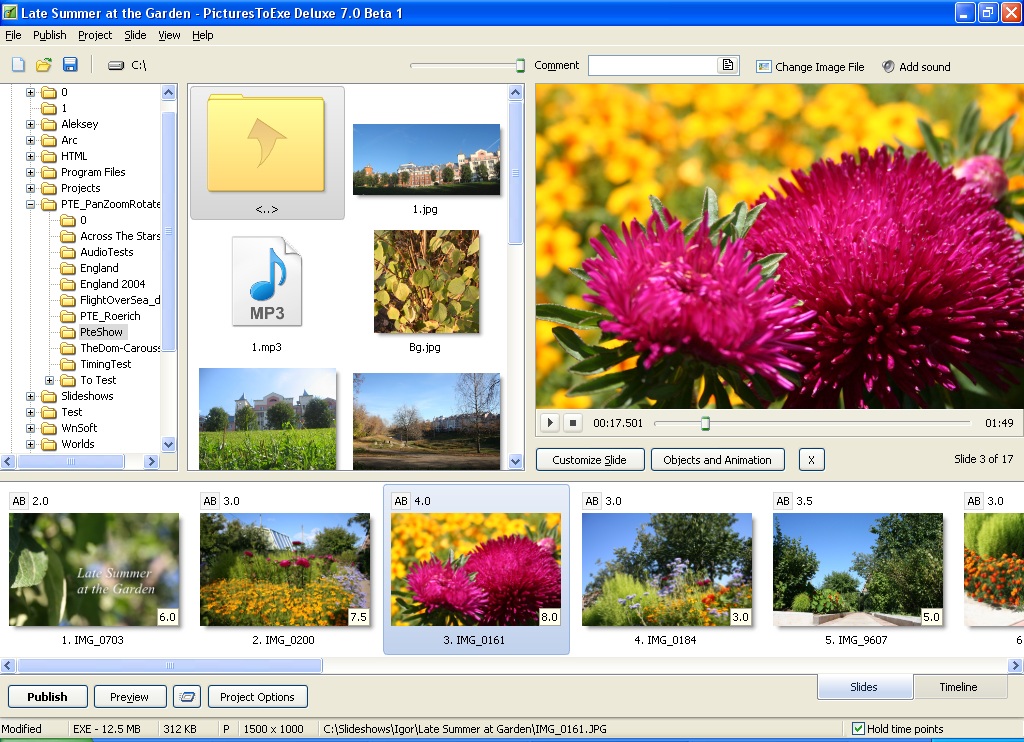
Lin, You've raised a good question. But I'm afraid that there is a problem with "Classical" and "Vertical" views. So I kept only one view shown on this screenshot. The problem is logical - new tabs for Slides/Timeline will not fit with other design of the main window. Slide list now should be located at the bottom-right part of the main window.
-
OK, I'll find place for this icon (digital lightbox). Also we plan vastly improve the interface of the all program in future version 7.5
-
Thanks for your responses! We tried make the new interface simple and intuitive. It still possible call "Fullscreen view of Slide list" ("Digital lightbox") by pressing F4 key on the keyboard or call this function from the Main menu | View sub-menu.
-
Thanks, Daniel for the sample file! Currently PicturesToExe 7.0 Pre-Beta can't correctly work with this file. We're trying fix this issue. We discovered that some video players with build-in decoder (VLC) also have prolems with playback.
-
We've reworked the main window in PicturesToExe 7.0 1. Tabs to switch between Slide list and Timeline modes. 2. Slide list now displays times of slides. You can edit time of one or several selected slides right here. 3. Slide list displays transition effect time and AB button to choose effect. You can also edit these values. 4. File list displays audio files. You can drag'n'drop audio file(s) into Slide list to add background music (Project options window | Music tab will appear). 5. File list displays video clips. It possible to drag'n'drop video clips into Slide list as slides (also you can use Objects & animation editor to add video clip objects). 6. Updated elements of user interface (UI). P.S. I can add an option to hide time values in the Slide list if you prefer old style of the Slide list.

-
Henri, Only global unsharp mask for entire slide. Mark, Not published yet.
-
Another significant improvement will be a vasly reworked main window of PicturesToExe.
-
Daniel, I would be very grateful if you could give me a link to a sample file. I'll check up.
-
Done in version 7.0 Beta 1. Soon.
-
Tom, Yes, even my second 7 year's old PC (described above) capable for smooth playback of 1280x720 30p video (MPEG4-ASP) in real time in EXE file.
-
PicturesToExe Deluxe 7.0 will recognize and work directly with a wide range of video formats in added video clips. Supported Video Files: Video formats: H.264, MPEG2, DIVX, XVID, MPEG4 ASP, etc. File containers: AVI, MP4, MOV, MPG, FLV, DIVX, XVID, etc. Output to Video If you produce DVD disc, YouTube/Facebook, HD video for PC/Mac, for iPad/iPhone PicturesToExe will work with original source video files and then perform only one conversion into final video format. Output to Executable File (EXE) Despite the fact that PicturesToExe is able to include almost any source video file into EXE file, there will be several recommended formats for the best smoothness of playback on wide range of PCs: MPEG4-ASP, XVID, DIVX and MPEG2. Built-in convertor to the program will perform optional converting. We didn't choose H.264 as best format because this format is very heavy for decoding. Only a half of video cards capable perform full hardware decoding of this video. Others should use CPU. For this reason we recommend MPEG4-ASP, XVID, DIVX and MPEG2. File is larger but CPU loading in times more low. Because EXE file created for a wide range of PCs it better choose optimal format with good performance on all PCs. For example, one of our old PCs has CPU one-core Athlon XP 3000+ (2 Ghz) and video card ATI Radeon 9600 Pro 128 MB (also quite old). On this PC: Playback of H.264 video at 1280x720: 100% of CPU loading (and still very jerky!). Playback of MPEG4-ASP or DVIX video at 1280x720: 30% of CPU (and smooth as silk). We implemented partial hardware decoding for all video formats by video card. For this reason CPU loading during playback of video in PicturesToExe is lower in TWO TIMES than in nearest competitor. And PicturesToExe honestly shows video at original resolution (for example 1280x720). Interlaced Video PicturesToExe detects interlaced video clips and perform de-interlacing on the fly show 50 or 60 frames per second.
-
I just informed our web hoster about this problem.
-
Roderick, I just performed this refund. I'm not sure about all amount because I didn't refund orders with CD option yet. Please write me when you check up credit card history. And thank you again for your patience and understanding! We're trying improve our service now. P.S. I recommend to hide (or modify) your email address from your posts above to make it unavailable for spam-scanners.
-
Roderick, I can refund your second order (March 9, 2011), because you already purchased PicturesToExe. Please confirm this, before I begin.
-
Dear Roderick, I really apologize that you faced with these difficulties! Please check up your email box, I just sent again the license key. We understand that a long text of a license key isn't the best variant, but we're plan use short product keys very soon. We send license keys within 1-3 minutes after purchasing. We use own server for license keys for one reason - RegNow doesn't support our protection system. When we switch to short product keys, we'll send to RegNow a list (or generator) of product keys and it will solve these issues completely.
-
Beta is almost ready. A couple of last bugs to fix.
-
I didn't experience this problem. If you want I can send a request to a web hoster of the forum.
-

Problem obtaining my registration code (SOLVED)
Igor replied to michaelhing's topic in General Discussion
Dear Michael Hing, We're sorry about this problem! I just sent you again the email with license key. Please let me know when you receive it.