Igor
-
Posts
13,618 -
Joined
-
Last visited
-
Days Won
266
Everything posted by Igor
-

Big Black Box appears in discussions....? [SOLVED]
Igor replied to goddi's topic in General Discussion
I apologize for this problem! First of all we will update the forum to latest version (today-tomorrow). And then if the problem remains here I will forward this issue to the Invision Power Board support. -
Vimeo has changed the API for new uploads and PicturesToExe temporarily can't publish slideshows on this place. We're working on this issue and the update will be available through auto update for all versions of PicturesToExe when you start Vimeo upload in PicturesToExe Deluxe. Temporal solution: create MP4 video file for PC/Mac and then upload to Vimeo on their website. We're sorry for this inconvenience!
-
Available in Beta 8: http://www.picturestoexe.com/forums/index.php?showtopic=11802&view=findpost&p=77236
-
PicturesToExe Deluxe 6.5 Beta 8 is available Download link: http://www.wnsoft.com/apr/picturestoexe-beta.zip (7 MB) Changes in this beta: + You can choose and save default font for new text objects. See "Save and Use by Default" link in Properties tab of Text object in the Objects and animation editor. + Improved smoothness/fluidity of animation on a slide with large PNG, GIF or BMP images. * Fixed bug (Beta 5-7) in the floating window with properties of a selected audio clip. A sound "click" might occur at the beginning of playback. * An error message "A component named MusicPlayerFrame already exists" might appear in the Project options window | Music tab (Beta 7). * The up/down arrow buttons on the scroll bar in the Project options | Music tab did not function (Beta 1-7). * Fixed problem with some text object in an executable slideshow. An error message appeared during a show. * Fixed bug with preview of text comments in the Project options. It didn't display underline font style in preview area. * Minor improvements in text renderer.
-
Done in Beta 8. Tomorrow. We've found a good solution how to implement this feature. I hope you will love it.
-
Peter, Thank you! It will be fixed in Beta 8. Dominique, Thanks, we've fixed it for the next Beta 8.
-
PicturesToExe Deluxe 6.5 Beta 7 is available Download link: http://www.wnsoft.com/apr/picturestoexe-beta.zip (7 MB) Changes in this beta: + Added video output for iPad and iPhone 4. * Fixed bug (Beta 1-6) with zero length of WMA/OGG audio files as sound comments in projects created with previous versions of PicturesToExe. * Fixed bug (v6.0-v6.5 Beta 6) with an incorrect view of a text object which contains some symbols in specific fonts. * Fixed bug (Beta 5-6) with incorrect work of waveform of the timeline if a project has an option "Play songs in random order". * Fixed bug (Beta 1-6) when sound comment disappears if open Slide properties window and then click OK button. * Fixed minor bug (Beta 1-6) with "Set defaults" button in Slide properties window. It didn't clear personal music playlist. * Fixed two visual bugs (Beta 1-6) in Project options window, Music tab and in the main window (in some languages). * Fixed bug (Beta 1-6) with incorrect calculation of audio clip duration in Project options | Music tab.
-
David, Thank you, we've fixed this bug for the next Beta 7.
-
John, Thanks! We just fixed it for next Beta 7. Cor, Thank you, all 3 issues will be fixed in Beta 7.
-
Trouble buying PicturesToExe--purchase scam? [SOLVED]
Igor replied to Bgrady's topic in General Discussion
Hello Bruce! I bring you our apologies for this problem! Usually our server automatically sends registration keys within several minutes after purchasing. Probably Gmail email address which you've used in the order has blocked the second email with the key for PicturesToExe. I just sent you again two emails for both address (on Gmail and on the second one you've pointed above). For the next PicturesToExe version 7.0 we plan to use absolutely new short product keys which will be sent in a text of the first registration email. That should solve such issues. Please let me know how you've sent us a support request? By email or through special support form which is quoted above: Technical support: http://wnsoft.com/support.htm ? The email address is read-only and used by automated system to send registration keys only. Please use the support form to contact us. -
Peter, Like mode SlideList/Timeline, the option "Show/hide waveform" stores in the program settings. I thought both options associated with settings of PicturesToExe. Do you think this option should be stored in a project file?
-
I just re-uploaded updated Beta 6 with one more fix for the problem described here: http://www.picturestoexe.com/forums/index.php?showtopic=11975&view=findpost&p=76955
-
This issue has been completely solved in version 6.5 Beta 6. Download Beta 6: http://www.wnsoft.com/apr/picturestoexe-beta.zip The problem was in a damaged MP3 audio file used as a sound comment for the 2nd slide. The file is unfinished and ends suddenly. We've added a protection to the code of PTE against such situation.
-
PicturesToExe Deluxe 6.5 Beta 6 is available Download link: http://www.wnsoft.com/apr/picturestoexe-beta.zip (7 MB) Changes in this beta: + Improvements in the main window of PicturesToExe: New/Open/Save buttons on the toolbar under the main menu. And a new button to change a drive for the file list below. + The program remembers a state of the waveform on the timeline (show/hide) after restarting. + New key shortcuts (F11/F12) to go to Next/Previous slide in the Objects and Animation editor and in the Slide properties window. * Fixed bug (Beta 1-5) with waveform on the timeline if start a new project. * Fixed bug (Beta 1-5) when call of "Run slideshow" command might cause crash of a slideshow with a specific text objects. * Fixed bug (v6.0-v6.5 Beta 5) with a error message "Not executable file or file corrupted" which appears if call "Run slideshow" command and then terminate the show by Esc key. * Fixed bug (v6.0-v6.5 Beta 5) with "Run application/slideshow on exit" commands which call a slideshow with a startup window. These commands launched two copies of a slideshow. * Fixed bug (Beta 1-5) of loading of some old projects which contained audio files. PicturesToExe mistakenly loaded zero length for music files.
-
Thanks, I've reproduced this problem with sound comments in v6.0 and v6.5 Beta. We'll fix it soon.
-
Thanks, Dave! I confirm this bug.
-
OK, I can add say F11/F12 keys. There is also one more way. Do you have an usual keyboard or multimedia keyboard with additional keys for Internet browsing)? If the second one, you can use <- and -> key to go Next/Previous slide.
-
These keystrokes already exist in version 6.5 Beta. Press Alt+PgUp/PgDown You can see them in a related hint. By the way, same keystroke also available in the Slide properties window to quickly switch between slides.
-
Peter, Done. In the coming Beta 6.
-
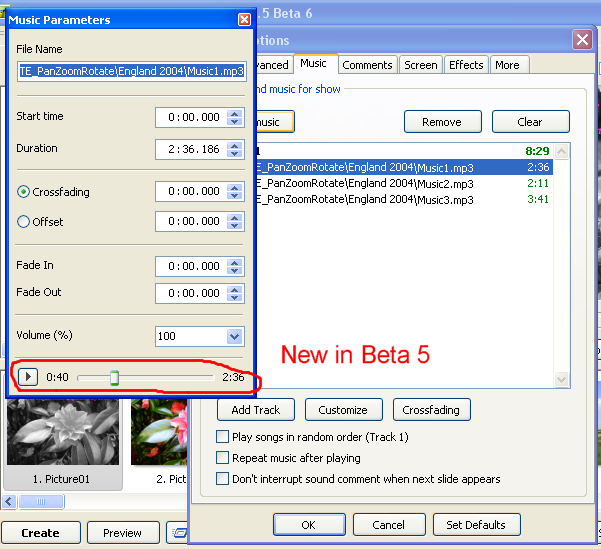
Probably you have noticied appearing of Play/Pause controls in the floating window of audio clip. Nearest beta releases will have new significant improvements for audio editing and manipulations.
-
Waveform won't display with more than one track?
Igor replied to uuderzo's topic in General Discussion
Fixed for the next Beta 6. -
Waveform won't display with more than one track?
Igor replied to uuderzo's topic in General Discussion
Umberto, OK, I'll wait. You're right. I'll fix it in the Beta 6. Thank you! -
PicturesToExe Deluxe 6.5 Beta 5 is available Download link: http://www.wnsoft.com/apr/picturestoexe-beta.zip (7 MB) Changes in this beta: + Added Play/Pause buttons and rewinding to a floating window of selected audio clip. * Fixed problem (Beta 1-4) with incorrect playback of some MP3 mono audio files in Mac executables under Mac OSX 10.6.x. * Fixed bug (Beta 1-4) with "Play songs in random order" option (Project options | Music tab). An order of songs didn't change in every run of executable slideshow. * Fixed bug with appearing of an error message during creating of a project template. * Fixed bug (Beta 1-4) when background music started in a startup window of a slideshow.
-
Waveform won't display with more than one track?
Igor replied to uuderzo's topic in General Discussion
I can't reproduce this issue with waveform. Please send me a test project with these two audio files to illustrate the problem. Sorry, I'm not sure about your second question. Tracks intended to play simultaneously two or more audio clips. -
Thanks, I just fixed it for next Beta 5.