Igor
-
Posts
13,676 -
Joined
-
Last visited
-
Days Won
289
Everything posted by Igor
-
I think will be at least several beta versions. I hope we will release v5.00 in 3 or 4 weeks (when will solve all current problems).
-
Markus, Richard, Thank you for the help! Newest Beta 12 fully solves this problem with synchronization.
-
PicturesToExe Deluxe v5.00 Beta 12: http://www.wnsoft.com/apr/apr-deluxe_beta.zip (4 MB) New features in v5.00 http://www.picturestoexe.com/forums/index.php?showtopic=4327 New features in Beta 12: + Visual improvements in Screen tab of Project options window. + "Perspective correction for Zoom" option is set by default for all objects. + Various small improvements. * Fixed problem with synchronization on some sound cards. * Fixed problem with cropping of left side of Text object with some fonts. Please post bug-reports in special topic: http://www.picturestoexe.com/forums/index.php?showtopic=6455
-
We removed customization of text comment for some slide because you can do it in Objects and Animation editor now. And you see result immediately on the screen.
-
Matrox video card far not so fast as NVIDIA or ATI. Matrox good in 2D, but work in 3D mode is very slow. And large 1600x1200 screen resolution too difficult for slide show with Pan/Zoom effects.
-
Colin, I apologize for this problem and delay! You mistakenly placed order for Personal license ($24) instead of "Upgrade to Deluxe" ($20). I just refunded this order. Please order it again ("Upgrade to Deluxe"). This mistake happened because earlier it was necessary to manually choose "Upgrade to Deluxe" from a list when you opened registration web page. Now in latest beta 11 we corrected the registration link and it automatically sets "Upgrade to Deluxe". I just sent you your VideoBuilder registration key.
-
Barry, I just posted new article "Windows Vista and PicturesToExe" to "Tutorials and Articles" section of the forum: http://www.picturestoexe.com/forums/index....st=0#entry41106
-
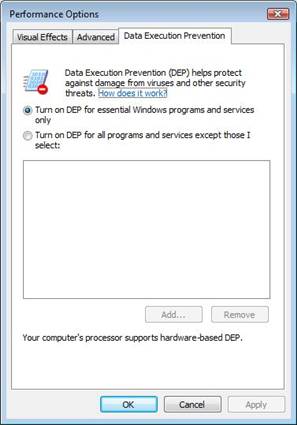
Windows Vista and PicturesToExe PicturesToExe v5.00: Slide shows: + Created EXE files with slide shows perfectly work under Windows Vista. Main program of PicturesToExe: + Version v5.00 better support new graphical inteface of Windows Vista: 3D animation of minimizing/restoring of windows. - If main program of PicturesToExe doesn't work and crashes when you try to run PicturesToExe. It happens if you or 3rd party security program set "Data Execution Prevention" option for all programs. By default this option turned on only for some programs, not for all. (Control Panel | System | Advanced | Performance). Please set this option to default value as shown on attached below screenshot and restart Windows. We'll try to fix it. This problem happens because we use protection of PicturesToExe against fraudulent registration keys. PicturesToExe v4.48: Slide shows: + Created EXE files with slide shows perfectly works under Windows Vista. - "Transition effect to desktop"/"Transition effect from desktop" options are not supported. In fact created slide show plays as it created without this option. (It's result of limitation of Windows Vista.) Main program of PicturesToExe: - If main program of PicturesToExe doesn't work and crashes when you try to run PicturesToExe. It happens if you or 3rd party security program set "Data Execution Prevention" option for all programs. By default this option turned on only for some programs, not for all. (Control Panel | System | Advanced | Performance). Please set this option to default value as shown on attached below screenshot and restart Windows. - Main program of PicturesToExe doesn't support smooth animation of a window on minimizing/restoring window (3D effect when Aero Glass interface of Windows Vista used).
-
Peter, We'll optimize several moments in next beta 12 and I think is slide show started from menu slide will start and play better. Please try in next beta 12 again. Does this problem with wrong mouse cursor always happen on your PC or rarely? Will it occur if create a show with only one slide and one text or button?Will this problem if set windowed mode for this slide show? Let me know, please, what version of Windows you have installed?
-
Alain, I leave it for the next versions and move this topic to "Suggestions and Ideas" forum.
-
Markus, Thank you! I hope final MusicTest5 will fully help: http://www.wnsoft.com/test/apr-deluxe_beta12_Musictest5.zip (2 MB)
-
Please try this Beta 12 MusicTest2 http://www.wnsoft.com/test/apr-deluxe_beta12_musictest2.zip (2 MB) It should solve problem with synchronization.
-
Please try newest pre-beta 12 MusicTest 3 (Three) http://www.wnsoft.com/test/apr-deluxe_beta12_MusicTest3.zip (2 MB) Thanks in advance!
-
Please say me, how you consider, can this moment be leaved for the next version 5.10? I think it can take additional vast time.
-
In Windows Vista this option "Show transition effect to desktop after slide" in fact doesn't work. Slide show will play as without this option. Also even under Windows XP with hardware acceleration used in v5.00 this option could work with short flashing. Because of this we didn't included it to v5.00
-
We will try to optimize work of two hardware accelerated slide shows simultaneously. Please wait for beta 12.
-
Richard, Markus, Please try this Beta 12 MusicTest2 http://www.wnsoft.com/test/apr-deluxe_beta12_musictest2.zip (2 MB) It should solve problem with synchronization.
-
We didn't realize adjusting of text color for highlighted and pressed states. Is it necessary to implement?
-

Question about key and whats Deluxe version?
Igor replied to sbmongoose's topic in General Discussion
Simon, I'm sorry about this problem with reg. key! A couple days ago we had a problem with key server. I just sent you your registration key. -
Howard, Ron, Just choose a slide, click "Objects and animation" button and press Delete button - it will delete main image and slide will be blank.
-
Yes, PTE doesn't support MP3 Pro and may play it with not maximal quality, because MP3 Pro format created with back partial compatibility with old MP3 players. But in this case it's another problem. Problem with synchronization happens because some sound card play music a little faster or a little slowely (on 3 seconds faster every 5 minutes of playback). It's a reason of this problem. We'll try to find some solution.
-
By the way, fully rewritten slide show engine (EXE) of v5.00 - 275 KB (instead of 254 KB of v4.48) Only on 20 KB larger. All included to 275 KB - built-in support of JPEG, built-in MP3 player, built-in PNG, GIF, two graphical engines (Direct 3D and CPU based engines). Also Aleksey and Pavel created compact and small libraries of code - result of several year's work.
-
Thanks! We'll try to solve this problem in Beta 12.
-
I just uploaded updated Beta 11A: + Added "Desktop" link in file tree (PicturesToExe and VideoBuilder). * Fixed bug with background music when "Stop after last slide" option choosed. * Fixed bug when PicturesToExe didn't accepted Deluxe registration key. * Fixed bug when "Hide Navigation bar at startup" always was enabled even if uncheck it.
-
Markus, Richard, 1) Please download and run this special music test: http://www.wnsoft.com/test/MusicTest1.zip (260 KB) Open that MP3 file which used in your slide show and play it during 5 minutes. Close utility and please send me generated log file. 2) Also what parameters of your MP3 file? 16 bit, Stereo, 44,1 KHz? 3) I just prepared special build of PicturesToExe: http://www.wnsoft.com/test/apr-deluxe_musictest.zip (2 MB) Will it solve problem with synchronization? Please use this beta only for this test, it's test version.