mhwarner
-
Posts
674 -
Joined
-
Last visited
-
Days Won
11
Everything posted by mhwarner
-
I have also added my 2 cents to dpReview!
-
Jeff, A masterful job. Your narration was "spot on" and the maps were quite useful in following the journey. Loved the integration of the waterfall videos. No matter how great a still shot of a waterfall is, a video really provides the experience of being there. The only tiny criticism I have is that a couple of water shots might need a tiny bit of straightening the horizon. This is definitely a show to add to my "KEEP" collection! Thanks for sharing.
-
While I have tried to follow all the details of the new additions and changes to Pictures to Exe 8 here in this forum, I know I have missed some things and probably not quite grasped the meanings of others. Barry, I really appreciate your efforts to simplify those aspects which many of us are most likely to use in your downloadable tutorials. I have sampled the free ones and purchased several of the others and look forward to watching them and applying the included tips to my work. I am especially glad that they are downloadable and I don't have to wait to receive a disk in the mail. The price is quite reasonable as well. Thanks again!
-
Igor and Team, Congratulations on a job well done! I have been a Pictures to Exe user since version 1 and I am so impressed with how it has evolved into such a great piece of software over the years. With version 8, you have outdone yourselves! While it has always been possible to create sophisticated and impressive slideshows, it did take a bit of work and some serious research into the more techincal aspects of the program. But with version 8, it has become extremely easy. I had the need to create several slideshows quickly during the last few days. With only a few clicks and drags I was able to apply some of the new included slide styles to easily animate my slideshow. Not only that, I was able to add a music track and trim, crossfade and precisely position the songs without ever leaving the timeline. Fantastic! I created some reasonably sophisticated slideshows with a minimum of effort. Thanks again for a wonderful product and for giving us the opportunity to upgrade at a reasonable low price!
-
Dom, You are amazing and very creative! Can't wait to get the template!
-
Mark, Great selection of beautifully composed, sharp pictures. You captured some incredible lighting. The simple, gentle transitions were most appropriate. I especially liked the rocks with all of the erosion holes and lake in late afternoon light. Reminded me a bit of some of the formations in the US Southwest (minus the water, of course). Thanks so much for sharing!
-
Manuel, Nicely done! I would love to have a template.
-
Once again, Maureen, a most enjoyable show! Excellent photography by your son and a beautifully created slide show by you. Thanks to both of you for sharing!
-
What he said!!!
-
Peter, This is not as elegant as Dom's and you might have to play with it a bit depending on the size of your slides, but I did post a page flipping transition here: http://www.picturestoexe.com/forums/index.php?/topic/15631-flipping-book-page-transitition-could-we-have-a-new-section-for-custo/
-
Maureen, Just beautiful! Your work on the transitions was quite masterful. They are very subtle, but very effective. Of course, the photography was just fantastic. I loved the castle! To be honest, it almost felt as if I were watching some sort of "fairy tale" movie. Thanks again for sharing!
-
Technically, they are not free. Adobe says they only posted to help legal owners of the software after they deactivated the registration server. You should read this explanation first and decide if you really want to proceed: http://forums.adobe.com/message/4974662#4974662 Of course, at this point, I'm not sure there's much they can do about it. And the question is then whether they will hassle folks who actually download and register the software using the provided serial numbers even though they never purchased it.
-
Just a quickly put together wish to all my fellow PTE forum friends (not the fastest server so best to download first) ... http://www.mhwarner.com/fireworks.mp4 Right click the link and choose "Save" to save the file locally.
-
Absolutely incredible! Not only am I amazed that this show was made with PTE, I am also totally impressed at your wonderful imagination to have created such a thing. And I have to admit, the little matchstick girl/doll part brought tears to my eyes. Thank you for sharing this lovely creation with us!
-
 Ken, Is this directed at me? If so, I took the "plunge" back at PTE version 2 or so. I have been making and selling slideshows using PTE for well over 10 years now -- using my own and other's templates. I was just trying to offer a simple custom transition here that somebody might be interested in.
 -
Indeed he did, Ken. In fact, he has 4 or 5 of them for sale in his store. I think I have purchased all of them. The only problem is that to use any of them templates, it is necessary to rename your slides to fit his scheme, or go in and edit every single object animation to load your own files. Also, there is quite a bit of overhead because there are masks and secondary pages and covers, etc. etc. While the end result of using the templates, which I have done on many occasions, is quite elegant and professional, I have been trying to come up with somewith quick and easy which gives a similar effect and can be implied as a simple transition. Anyway, maybe somebody will find it useful.
-
My attempt at creating a flipping book/page transition without masks or auxilliary files. The edges of this look strange if your slides and your project aspect ratio don't match. When created I didn't resize my slides and my aspect ratio was set to 16:10; the edges of the "pages" were the thickness of the black margin at the right side of the screen. When I changed the aspect ratio in the project options to 3:2 to match the slides, the edges of the turning page were more or less paper thin. Was just wondering if we could have a section somewhere to share these custom transitions so they would be easy to find and share. Marybook1.zip
-
Riding the Zambezi River-New Show on Beechbrook
mhwarner replied to goddi's topic in Slideshows & AV Shows
Well, I rafted the Colorado River through the Grand Canyon last April and we had some pretty good rapids, but I don't think any of them were quite like the ones in your video. Very cool! I hope you weren't one of the people who fell out of the raft. Thanks for sharing. Can't believe you went back and did it a second time. Good for you! -
Lions, the Kings - New Show on Beechbrook
mhwarner replied to goddi's topic in Slideshows & AV Shows
Gary, That was amazing! I thought I was watching Animal Planet! You were so fortunate to have been able to witness that spectacle in person. And it is so great that you can now easily view your old movies on the computer or TV. The clarity was great at the small size and not all that bad if I made it full screen (and probably even less noticeable at a distance from a TV). The little cubs were so adorable -- especially the one who walked beneath the big guy and attempted to play with his leg. I did almost puke when then big guy was eating the intestines. And I liked the nuzzling between the lionness and "The King". Regarding the show itself, I did find the white shadow effect a bit distracting and I would personally have used a colored background instead of black (maybe some sort of beige paper-looking graphic). With that small size video I think it would be less distracting, but of course, that's my 2 cents. I'm guessing that you have lots more movies where this came from. Can't wait to see some of them! -
Minor problem with pte7.5 - please can you help?
mhwarner replied to Photofanatic's topic in General Discussion
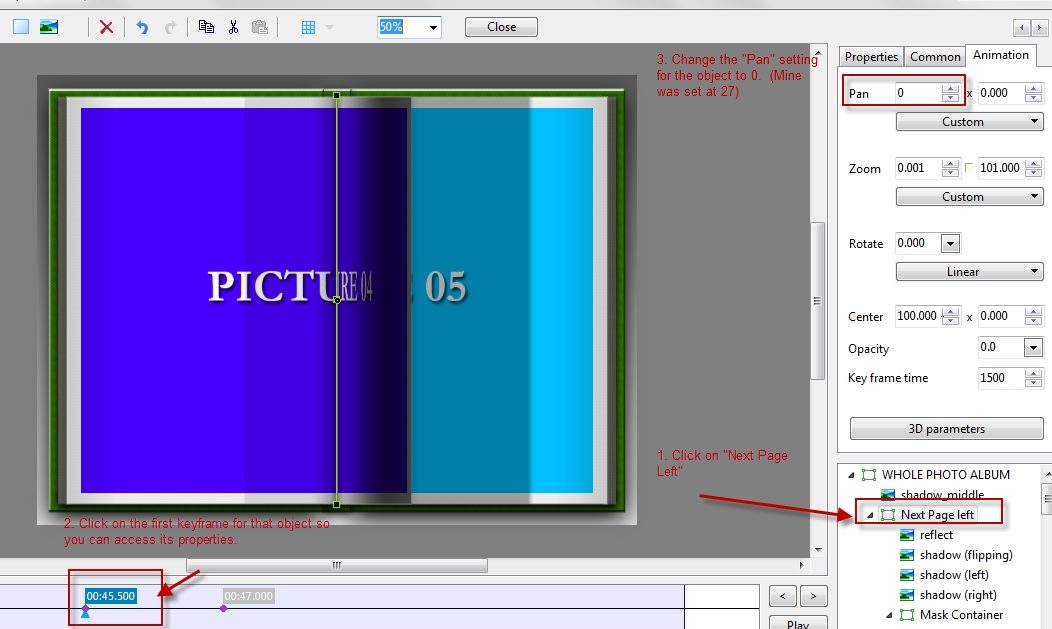
Hi Joy, I'm sure you will hear from Dom in due time, but in the meantime, you should probably remove that template download as I believe it was not one of Dom's free templates but one that he sells. Having said that, I did not download it because I had purchased it a while back. I took a look at my version and see the same annoying off-center line. I experimented a bit and here's the fix I came up with. Open the first photo in O&A. (1) Click on the object called "Next Page left". (2) Click on the very first keyframe for that object, which should allow you to edit its properties. (3)On the "Animation" tab, change the left number for the "Pan" to 0. On my copy it was 27 for some reason. That's it! Unfortunately, you will have to do this for each set of "pages" (or you can do it once and copy that slide and replace the images). Hope this is helpful.
-
Maureen, Beautifully done (as usual)! I loved the music -- so much in fact that I immediately went to Amazon and downloaded it for myself. I loved the mix of distant landscapes and close-ups of small details. The icebergs were razor sharp but had such delicate shapes as well. The animation was just enough to make me feel I was cruising right alongside of you on the ship and the little dingies. Thank you so much for sharing your memories of a very special area that I will probably never get to visit. On the other hand, the show made me anxious for the spring when we plan to depart for another "voyage" in our RV to Alaska which has some similar scenery.
-
Hi Steven, I missed your first show so I don't have a comparison, but I'd say that the time you spent learning PTE was well spent! To begin with, you have a lovely "backyard". I thought the music was well chosen also -- nice and relaxing. You did a good job with the animations (the moving clouds were a nice touch too). I would have liked to have seen some more closeups or details of the beautiful leaves mixed in with the landscapes, though. I thought the show was a bit too long for what was included. I think you could perhaps edit a bit more selectively (many of the shots were almost identical) and resize the show to the length of only the first piece of music. But that is just my 2 cents. Thanks for sharing and don't be afraid to post more of your creations!
-
I am seeing the last video I watched on youTube as well -- a tutorial on Camera Raw in CS6.
-
Several Serious Bugs with Creating an EXE
mhwarner replied to mhwarner's topic in General Discussion
My show did not contain any videos, so I don't think that is a common thread. As I said, I resized all my photos and the problem went away. When I have a few minutes, I will see if I can duplicate the problem again with a smaller version of the show and post the template. -
Several Serious Bugs with Creating an EXE
mhwarner replied to mhwarner's topic in General Discussion
Peter, You can change this topic to "RESOLVED" if you wish. I don't seem to be able to modify the topic title now. Thanks!