Rosemary A
-
Posts
428 -
Joined
-
Last visited
-
Days Won
5
Everything posted by Rosemary A
-
I for one am looking forward to it! Looks great. Rosemary
-
Thank you everyone. Some great advice given. Paul your "Deselect the container" worked like a charm. I have a similar Style for PSP but couldn't convert it for PTE. Now I don't have to worry. Rosemary
-
Thank you Paul for this great style. My German is about on a power with my PTE ability so could someone please tell me where to put a background? I have tried putting it at the very bottom but it comes in as a child in frame 2. Thank you, Rosemary
-
Thank you Tom. This transition is going to be very useful. Rosemary
-
My suggestion for a name for the new section would be something like "Shows, Tips and Constructive Feedback" Rosemary
-
I would love this feature. It could be a powerful learning tool. Constructive, non judgmental critique is always good. Rosemary
-
The photo album style would be fantastic. Looking forward to the finished result. Rosemary
-
I haven't managed to crash it yet! I am new so you can guess my commands are not always according to plan! Rosemary A
-
Dom, I live on Vancouver Island. We have been lucky here with few cases. Rosemary
-
Great show and very clever. Stay safe. We start cautiously on the pathway to normal on the 19th. Rosemary
-
JJB 45, as a newbie I can say "been there done that"! Click Project Options. In the screen that comes up, click Transitions, then click Manage Transitions, then click Import transition. This takes you to your downloads folder. Find your transition (Wiggle Dissolve PTEEFF FILE) I hope this helps, Rosemary
-
Thank you Tom. This is going to be very useful.
-
Problem with Syncronization of object - zoom x Zoom Y
Rosemary A replied to Rosemary A's topic in General Discussion
I was reasonably competent with Producer and keyframes. There was always a style for that! I am enjoying PTE though, thanks to your tutorials. Without those I would be lost and would of given up some time ago. Thank you, Rosemary -
Problem with Syncronization of object - zoom x Zoom Y
Rosemary A replied to Rosemary A's topic in General Discussion
Thank you Barry. Your second option was obviously the one I was thinking of. Problem solved. The joys of being a beginner with a program. Rosemary -
Problem with Syncronization of object - zoom x Zoom Y
Rosemary A replied to Rosemary A's topic in General Discussion
Thanks Lin, The only way I can think of is to send you a screen shot. I can get the zoom to work by holding the shift key as advised but I thought that by breaking the chain and placing and dragging the zoom either vertically or horizontally on the bounding selection, it should work. Am I wrong in thinking that one must always use the shift key whilst Zooming asymmetrically? I have the chain broken. Rosemary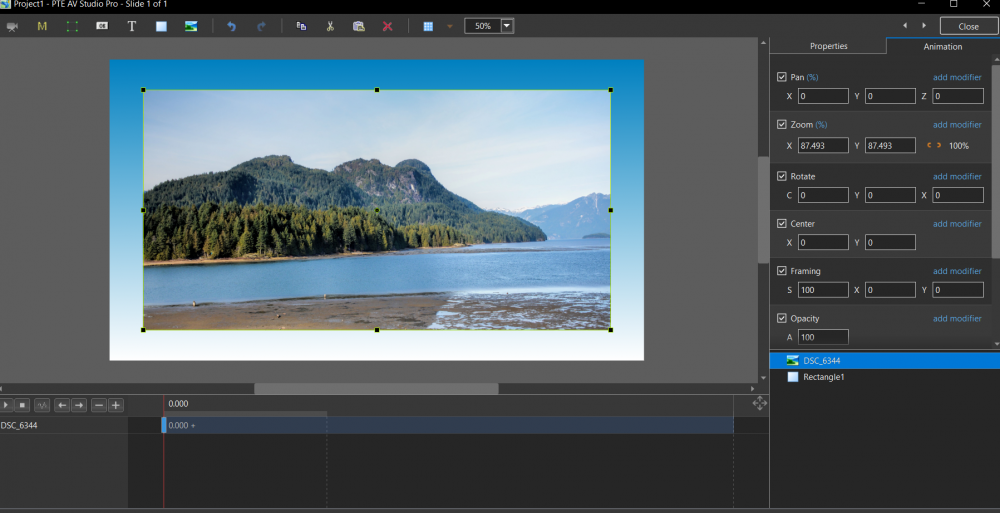
-
Hi, I am having a problem with the Syncronization link (the chain link) It does not disconnect the zoom when I break the link. The Picture still zooms from all sides. I am wondering if I remove PTE Studio 10 and reinstall, would I lose all my slide styles? Thanks, Rosemary
-
Thank you Barry and Wideangle. Holding the shift key worked a charm. I think what I shall do is reinstall PTE and see if that fixes the problem of the synchronization chain. Rosemary
-
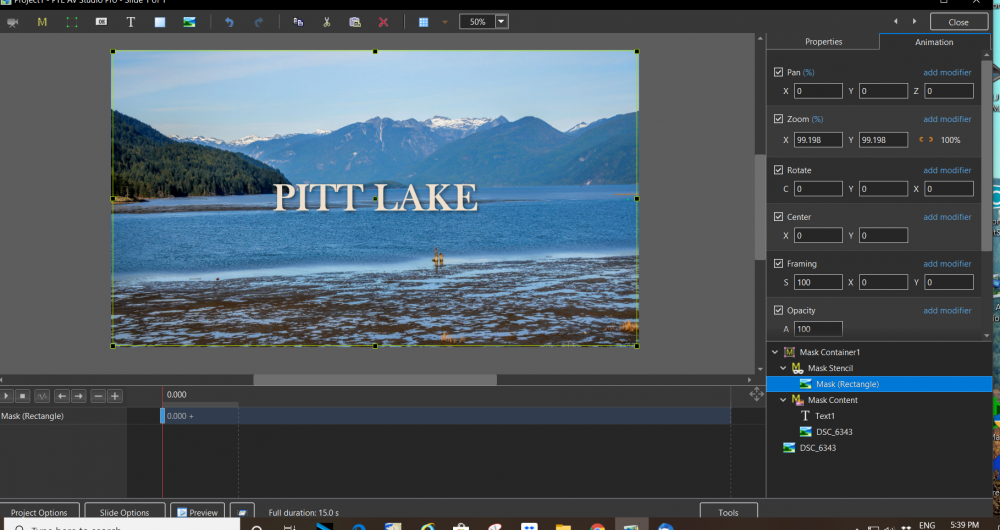
Thanks Barry firstly for all the excellent tutorials. I have learned a lot from them. My problem is that when I try to adjust the mask over the text, the mask decreases in size symmetrically even though I have "broken" the chain. Do you have any suggestions as I have encountered this problem before? Thank you Rosemary
-
pathway to PTE AV Studio 10 slide styles
Rosemary A replied to Rosemary A's topic in General Discussion
Thank you Mary. This is exactly what I wanted. I was taking a wrong turn! Rosemary -
Hi, I am trying to follow Barry Becham's tutorial about Masks. My problem arises when I try to adjust the mask. It is supposed to just cover the text. I have broken the synchronization chain but the mask still moves as if the chain wasn't broken. What am I doing wrong or what am I missing? Thanks, Rosemary Rosemary
-
Hi, I have been trying to follow advice and place my slidestyles in a separate folder. The problem is that I cannot find the pathway. PTE is on my C Drive but when I go to WnSoft and click on it there is no option to see the slidestyles. What am I doing wrong? Rosemary
-
Music format supported by PTE AV Studio 10
Rosemary A replied to Rosemary A's topic in General Discussion
Thanks DaveGee. I have converted the WMA CD in question to MP3 and it is fine. Igor pointed out that some WMA files have different codes incorporated in the format. This is true because some of my other WMA files work just fine. Rosemary -
Music format supported by PTE AV Studio 10
Rosemary A replied to Rosemary A's topic in General Discussion
Thank you Igor. I agree that some WMA files work just fine. I tried several that I have and they work. I spent yesterday afternoon converting the problem WMA to MP3. I shall send you the offending WMA. Thanks, Rosemary -
Music format supported by PTE AV Studio 10
Rosemary A replied to Rosemary A's topic in General Discussion
Thank you jt49. I was surprised when PTE would not play my WMA music. Now I can only assume that there is a problem with the recording. Rosemary -
Music format supported by PTE AV Studio 10
Rosemary A replied to Rosemary A's topic in General Discussion
Thank you DG. When I follow your instructions all I see when I click the down arrow at the bottom of the Open screen is Audio files or video files. I wanted to know what format files PTE accepts and whether it recognizes WMA or what others does it accept. Rosemary