goddi
-
Posts
3,593 -
Joined
-
Last visited
-
Days Won
26
Everything posted by goddi
-
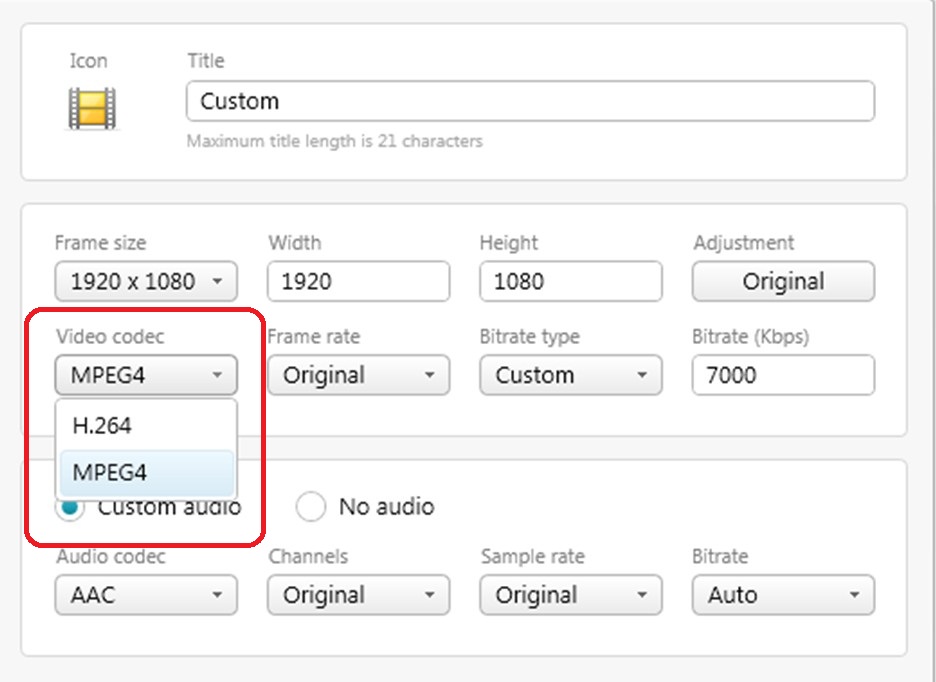
====================== Dave, Since you have been talking about "MPEG4", I have a question about this that has puzzled me for some time. I use Freemake Converter to convert my MOV video files to MP4. I don't convert to AVI because the MP4 format seems to always give me smaller sized files. Anyway, my question is, when I select 'MP4' as the format I want to convert to, I then have the choice to choose the 'MPEG4 video codec' (see attached). I have the choice of 'H.264' or 'MPEG4'. I see that you talk about 'MPEG4 (H.264)', so I am confused as to what video codec should be used or why one would be better then the other. Can you shed some light on which Video Codec is 'better'? Thanks... Gary
-
Igor, Fantastic! Thanks. I have been looking for this capability. Now it is 'undocumented'. Now, if you can let it search for mp4 and avi files, it would be easier to input the video file. But who's complaining. I would guess the new version will make it perfectly clear and easy!!! Thanks... Gary
-
======================= Greetings Dave, I just looked into "Premiere" and the full version of the 'Adobe Premiere Pro CS6' is about $799. A bit too much for just doing my audio fades. However, I notice that they also have an 'Adobe Premiere Elements 10' for $99.99. More reasonable. I would think it has the audio capabilities. When I have a bit of time, I might download the trial to see. But I had forgotten that I have used the 'Windows Live Movie Maker' to do audio fade-ins/outs. I don't like it because it will save only as a larger sized .wmv but I can convert it to a smaller MP4 using 'Freemake Video Converter' (my go-to trimmer program). So I will wait for Igor to present the next version to see what it will do. I am sure all of these audio facilities that we are looking for are very complex but what an improvement it would be. I will try to modify my 'jarring' portraits. It is hard to get out of an established pattern that I think is 'OK', but you offer some good suggestions. Who knows, maybe I can come up with something that will work and be more pleasing. It is good to get such feedback and try new methods. Thanks... Gary
-
============================== Snapcam, Yes, it was a good trip. But we were very disappointed in the lack of wildlife in the rest of our two week trip in Costa Rica. This is probably why I put in as many wildlife shots as I did. The crocs were probably saying..."Just another tourist..." Yea, that red flower as a vertical; I see what you mean. Sometimes, after spending a humongous amount of time getting the music to time exactly with all the slides and videos, I hate to fool with it. But, good point. It is never 'done.' Yes, it is easy to add a sound track. But I want to be able to reduce the volume of the sections of the added music tracks so the 'jungle' sound effects can be heard. The current version does not allow for that...yet. And it does not allow to fade-in or fade-out of the sound track of added video clips. Doing it outside PTE is a pain. For example, I wanted to fade-in/out the sound track associated with the landing of the airplane. I had to strip out its sound track from the video clip and make it an individual mpg. And then use Audacity to fade-in the beginning and fade-out the end. Then, I put the mpg back in its own track. If I did not, the video's sound track would have started and ended too abruptly. Gary
-
========================== Greetings Snapcam, After 100 views, it is nice to get a critique. It is always nice to see how others see your work. I agree that it would have been nice to put in some 'jungle' sound effects and fade out the music. With the current version, I don't think this is an easy process. I am hoping the upcoming version will make such audio adjustments an easy function. One of my hopes is that we will also be able to adjust the volume of the audio in an added video clip, too. I had wished the sky in the toucan shots was better. I just had to keep them in because they are such beautiful birds and not too easy to get close-ups. It was such a wonderful site...you had to be there. I just could not leave them out. I zoomed in on them in O&A and I should have used their higher resolution images. I have been told before that some viewers do not like vertical shots. I take the opposite view. I like them because they break up the monotony of landscape shots. And, many shots just have to be vertical. Suggestions of putting an image behind the vertical to 'soften' the vertical just does not sit well with me...yet. Yea, the crocodile clip was not the greatest. But I liked it because you can see how they can bury themselves in the mud and see mostly only their eyes. I should have taken out the last jerky movement and made the last good part of the video a still image and leave that on for a couple seconds. But having been there...it was an exciting moment for me....up close and personal! I am learning that taking good video is a real challenge! At a certain point of editing a show, I get PTE'd-out and I just have to stop. I know I can go back and fiddle and fiddle with it and it, really, never ends. But that is the great point of getting comments, even though I have only received on comment. Much appreciated... It will keep me on my toes. Gary
-
==================================== Igor, This is good news. But what I am looking for is to be able to adjust the audio levels of an added video clips. Will this be possible...ever? Gary
-
Location: Tortuguero National Park, Costa Rica. Year: June 2012. Aspect ratio: 16:9. Screen resolution: 1920x1080. Videos: Yes. Size of file: 178 Mbs. Run time: 8:04. Manual control (yes/no): Yes. Camera and lens: Nikon D7000 (stills and video), 18-200mm; GoPro Hero2 video camera. Any other info that you can provide: The Tortuguero National Park was a highlight of our two-week vacation to Costa Rica. Hope you enjoy the journey. Comments and critiques are welcomed. http://www.beechbrook.com/pte/ Gary Oddi
-
======================= Greetings Lin, What I did was remove the entire sound track from the video clip using Freemake Video Converter. Then I put this 13 second video clip in the Slide List. I then recorded a 5.72 second audio portion of the original video with All Sound Recorder Vista. I pulled that short audio section into Audacity to fade-in the beginning and fade-out the end sections. In the 'Add Sound...', I used an 'Offset' of 6 seconds to push it toward the end of the 13 second video. Since in the past I have added short 'sound effects' using the 'Add Sound...' function, and it has always worked. I checked the 'Do Not Interrupt...' just in case the added sound bled over to the next slide. I did not think of your suggestion. I just tried it and it looks like it is working. I put the 5.72 second MP3 in a 'Track 2' with an Offset of 1:05 minutes that put it just about in the same location as I had originally it. Thanks for the suggestion. I am wondering why the 'Add Sound...' did not work. Never had a problem in the past. I like it because it is a bit easier to locate exactly which slide it should be applied to and you can still make adjustments to its Properties. Thanks... Gary
-
Greetings, There were recent postings concerning the Add Sound Comment not working. I read then but it seems that my problem might be a bit different. I have a video that I have added to the slideshow. I removed the sound from this video, using an external program. I then added a short mp3 sound file to this video. The problem is that the Added Sound Comment mp3 plays only when I play the video in the Miniplayer and only if I start playing the slideshow from this video in the Miniiplayer. If I play the video in Preview, the Added Sound Comment mp3 does not play. More specifics: The video is 13 seconds. The Added Sound Comment mp3 is 5.72 seconds. The Offset for the Added Sound Comment is 6 seconds. I have checked the 'Do Not Interrupt Sound Comment...' I don't have KFSL checked. Any ideas??? Gary
-
Zoom Animation-Causes Shifting-Change Default
goddi replied to goddi's topic in Suggestions for Next Versions
============================= Dave, I am confused. When Xaver mentioned 'speed option', I assumed he was talking about when you select the 'Setting up...' option for the animation parameters. It appears to me that this 'Speed option...' can apply to any of the parameters ( Linear, Accelerate, Slow down and Smooth). However, you seem to be saying that it only applies to Linear and Accelerate. Can you clarify what you were saying??? I am pretty much in the dark about how to use this setting but I'd like to understand what you and Xaver are talking about. Thanks... Gary -
Zoom Animation-Causes Shifting-Change Default
goddi replied to goddi's topic in Suggestions for Next Versions
======================== Xaver, I have not used the Speed option so I have to leave my suggestion up to those who understand the complications and ramifications of fixing one problem and its unintended consequences. I would hope Igor and the more experienced users, like you, can come up with a fix. Thanks... Gary -
Zoom Animation-Causes Shifting-Change Default
goddi replied to goddi's topic in Suggestions for Next Versions
======================== Dave, I can't disagree with you. But I was really not sure how to title the posting. All I can say is that the shifting problem happened when I tried a Zoom with Panning. I am not technical enough to figure out all of the other possibilities. But, I would hope that the solutions I recommend will solve all of the combinations of using different settings for PZR. If you can make a change to the title of this posting, please do. Just not sure what the right words are. Thanks... Gary -
Greetings, The problem is that I have noticed if you select a Zoom animation (and it includes some Panning), for example, for an image and you only change the Zoom's setting (Linear, Accelerate, Slow Down or Smooth), the animation can cause an unwanted slight shifting of the image during the animation. This problem is explained more clearly with an example in the following posting: http://www.picturest...ng-to-left-bug/ The solution, giving by Lin, is to set the Pan, Zoom and Rotate to the same linearity or non-linearity parameter. This shifting problem is solved if all three animations choices (Pan, Zoom and Rotate) are set to the same parameter (Linear, Accelerate, Slow Down or Smooth). This does solve the problem. My suggestion is the make the default so that when one of the animation (Pan, Zoom or Rotate) parameters (Linear, etc.) is changed for a particular keyframe, then the parameter for each of the other animations are automatically changed to that parameter. My suggestion is to have the parameter for each animation (PZR) linked so that if someone wants the original flexibility to input a different parameter for each of the animations, then the parameters for each animations can become unlinked. I have seen this strange 'shifting' in an image for many years and only recently figured out what was going on. I don't think most users would know that it is important to make the parameters to be the same for each animation (Pan, Zoom and Rotate) to avoid this 'shifting' problem. Gary
-
====================== Peter, I am not suggesting to not keep the current flexibility. What I am suggesting is that the 'default' should be that when you select one of the settings (Linear, etc.) for a particular keyframe, then the settings would automatically change for all three (Pan, Zoom and Rotate). This would remove the possibility for the 'shift' problem to occur. Lin's solution to set all three animations to the same setting to avoid the 'shift' problem works. I am just suggesting to make this action to be the 'default'. Who would know you needed to do this unless someone told them? But I also said that there should be a way to override this default for those who wanted to retain the flexibility of the current menu's structure. It seems to me that most people would want the results from having all three settings to be set to the same choice as the default. All that has to be done is to have them linked so that a change in one will change the other two. And also have the ability to unlink them to get back the current 'flexibility'. Doesn't this make sense? Gary
-
====================== Lin, Ok...I did not know if my idea would float or not. Just because it makes sense to me does not mean it would be a good idea. I'll give it a try in the Suggestions forum. It seems to have passed your 'sniff' test. Thanks... Gary
-
======================== Dave and Lin, I am better understanding what is happening, now. When I did the Zoom, I used the Zoom's up/down arrows to set the initial Zoom parameter. However, when I 'moved' the map to reposition it after setting the Zoom, I just clicked and dragged the map over to where I wanted it to end up. I wasn't thinking that I was actually 'Panning' the map over to that position. So I now understand the Pan/Zoom movement explanation and see it is the combination of the two. Maybe there is a good reason for being able to select different settings for Pan, Zoom and Rotate a keyframe, but why is it not the default to have Pan, Zoom and Rotate automatically retain the same setting (with the option to undo the default), and then allow the user to be able to be override the default, if that is what one wishes? For example, if one choose Slow Down for either Pan, Zoom or Rotate, they would all change to that setting. This would avoid these 'shifting' problem without having to understand the non-intuitive way to avoid it, but allow for the flexibility that in now has. Thanks... Gary
-
====================== Peter, The reason I would call it a 'bug' is that the shifting does not occur if you select the Linear or the Slow Down settings, but it does in the other two options. Lin has the easy 'solution'. I just don't think users should be jumping through hoops to stop the Zoom from doing strange things with non-intuitive steps. Your steps might be a remedy but I don't want to get too complicated when trying to do a simple Zoom. Thanks... Gary
-
Dave, I was in the middle of making the arrow to have an Opacity of zero at the beginning and going to 100% midway. I just was not finished with it and eventually will be 'fixed'. Work in progress.... Gary
-
================== Greetings Lin, Well, I must have missed that tutorial. I have noticed this funny movement problem for many years. I always thought it was something I was inputting. Thanks for the tip. I tried it (setting Pan, Zoom and Rotate to the same linearity setting) and it stopped the shifting. This is a pretty strange effect and seems to be a 'bug' because who would have thought that this is the way to 'fix' the problem? It must be a technical hurdle to fix, but thanks for the work-around. Gary
-
Greetings, I have seen this problem before but I could not figure out where it was coming from. But now I have found what is producing it. The problem is that when I have selected Accelerate or Smooth of the Animation/Zoom, the image (the map in this example) will shift slightly to the left and then back to the right as it is doing the Zoom animation. It does not do this with Linear or Slow Down. I have attached a PTE sample with just 2 slides. The second slide is a map that I have set to Zoom with Accelerate. The shift is more pronounced with Accelerate, but it also shows up with the Smooth setting. Is this a bug? If not, how can I prevent these 'shifts'? I could increase the map's size beyond the 100% to help hide the shifting but I don't want to just mask the problem. Thanks... Gary ADDED LATER...and if you notice if you select Smooth, the map will, after shifting back to the right, makes a tiny shift back to the left at the end of the Zoom. Tortuguero-Test Animation_Jul24-2012_11-35-47.zip
-
============================= Greetings, I agree. Sure there are many ways to go search and create arrows and other shapes outside PTE. I, sometimes, like to add an arrow or a comment shape and have to go to the Internet to find something. It would be so nice, and convenient, to have a pallet of shapes (such as in Paint, but with more flexibility) right in PTE. This is something I have also wanted for a long time. Gary
-
========================== Greetings, Yes, there used to be a faint blue line indicating the end/beginning of a piece of music. Initially, I asked that it be made more visible because it was a bit hard to detect if you were scrolling too fast in the Timeline. Then it disappeared. I asked several times to bring it back but I never got any response. Maybe it is just us two who are missing it but I hope someone will bring it back!!! http://www.picturest...h__1#entry88178 Hopefully, Gary
-
New slideshow posting, "In Search of the Quetzal": http://www.beechbrook.com/pte/ Location: Costa Rica Year: June 2012 Aspect ratio: 16:9 Screen resolution: 1920x1080 Videos: None Size of file: 46 Mbs Run time: 3:07 Manual control (yes/no): Yes Camera and lens: Nikon D7000, 18-200mm Any other info: The "In Search of the Quetzal" is a slideshow of one morning in Costa Rica where we looked for the elusive quetzal. We were in the high altitudes, almost 9,000 feet, of the Cerro de la Muerte area. We were fortunate to find a baby quetzal who was just about to leave its nest. The father with the long tail feathers was nearby and had a beetle in his beak. The images of the quetzals were with the lens at 200mm; lighting conditions were not good; camera was hand-held. So the images are nothing to write home about but I am happy I got what I got. Hope you enjoy it. Comments and critiques are welcomed. Gary Oddi
-
========================================== Jill, I brought this topic up back in '08 when I mostly used Autospread because the Timeline was a bit scary at first. To have to go to Arrange All Points to actually show it it the Timeline did not make much sense to me then, and it still does not. I was a beginner then and it confused me a bit. Now, I am more into using the Timeline. But, if I remember right, even though you choose Autospread and then Arrange All Points, and the Timeline goes 'greyed-out', you can still adjust the display times of individual slides along the Timeline. My posting in '08 didn't get much attention then. Seems there is more agreement with your posting now. I tend to use the Timeline function now. I can use the Autospread/Arrange All Points just to get them spread out for the start of the processing with some music thrown in, and then I switch to Timeline for the serious processing. But I agree that beginners would not necessarily find that ticking Arrange All Points after choosing Autospread is intuitive. I certainly did not. But once you learn the quirks, one just accepts it. Learning curve... http://www.picturest...h__1#entry57219 Gary
-
Daniel, Quote- to have the possibility of multi soundtracks and multi sounds (comments + sound effects or others...) associated with slides by using the "Add Sound or Voice" button ; Yes. ========================================== Igor, Speaking of 'sound', have you or are you going to put in a feature that will let us adjust the volume level of the audio track from added video? Gary