davegee
-
Posts
9,323 -
Joined
-
Days Won
59
Everything posted by davegee
-
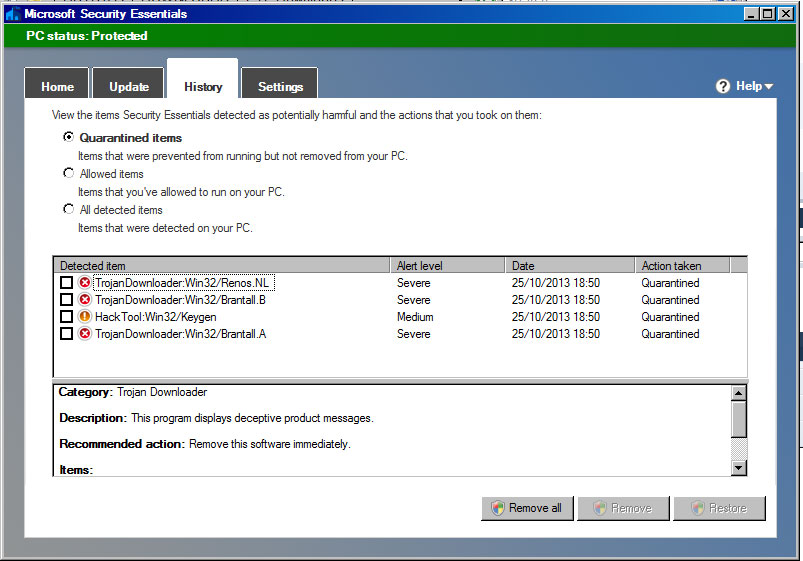
It is very strange that Peter's MSE did not pick it up when mine did immediately on extracting the ZIP file. For safety's sake I then abandoned the whole thing. Needless to say I was not very happy when I posted above. Peter, is it possible that MSE has quarantined these files on your PC and "kept quiet" about it? DG
-
Last page DVD creation. DG
-
Don't download unless your Anti Virus is effective and up to date. Lapiovra - I am not happy that you have posted this!! I will go no further with it. DG
-
Yes, I'm wise and she disagrees! DG :rolleyes:/>
-
ARTY STYLE Drag a 16:9 image into a 16:9 Slide Line and apply this Style. Works best with a White or textured BG. ARTY BORDER.ptestyle Edited to add BG. DG
-
ON A LIGHTER NOTE: We should all be careful when correcting each other's spelling mistakes and/or grammatical errors. Its Klingon = It's Klingon = It is Klingon Your wrong = You're wrong = You are wrong Just some examples which may or may not have appeared above. BTW I get the MAC vs PC debate on a daily basis. My Daughter-in-law is a Graphic Designer and works in a MAC environment. Sometimes her arguments make sense and sometimes not. We agree to disagree. DG
-
Lapiovra, Can you make a Project available as a "Backup in ZIP" with just a few slides showing the problem so that someone can take a look at it?? DG
-
Hang on a second, does Microsoft not make a MAC version of Powerpoint and does that not suggest that it should work? The problem described was not a Powerpoint problem, surely? :)/> DG
-
Stu, I have never had to associate the ISO with any particular software. On my last two machines double clicking always brought up Roxio after it was installed. On my current machine the pre-installed software must have set the association because I have never set it. I have always assumed that these softwares do this automatically and sometimes ask you to confirm it. NX2 automatically associates NEF files etc. DG
-
I don't get the problems that you describe when I play previously made DVDs via a BR Player and HDMI so I cannot comment. I have always used the presets to make MPEG4 and ISO files. Therefore, in my case I don't have a problem to relate to. However, what I can say is that the DVD quality is not as good as the MPEG4 quality. DG
-
Some random thoughts. Don't forget that your original resolution (1920x1080??) becomes 768x576 when you make a PAL DVD? That's a lot of interpolation downwards and it is then interpolated back up to 1920x1080 to play on the TV. You don't magically get all of the quality back which is lost in the downward interpolation. That applies to any Slide Show software. A BlueRay DVD Player with a HDMI connection to TV will (IMHO) give you a better viewing experience with ordinary DVDs than an "old fashioned" non-upscaling DVD Player via Scart. The MPEG4 will give you the best viewing experience on TV via either a USB device or your method. I gave up on DVDs a LONG time ago and if the recipients of any of my family shows can't play them as MPEG4 files then I just apologise - sorry, I don't do DVDs. I will supply a CD with four variations. EXE for PC. EXE for MAC. MPEG4 for TV. MPEG4 for iPAD 3/4. But that's just me - it's a good job that we aren't all the same? DG
-
That "possibly" means that you don't have a programme capable of doing it. My PC came loaded with Cyber-Link Power 2 Go. That does it for me. W7 64 Bit. Roxio does it. WXP, Vista and W7 - never had a problem. I have always avoided Nero - no particular reason. The MPG file that you mentioned "should" load into whatever version of PTE works for you and you could try burning the result - although it is a long shot. DG P.S. This: http://www.imgburn.com/ has been mentioned here more than once.
-
Double click on the ISO - if you have a suitable programme it should open. DG
-
Morasoft, Excellent work. You have broadened the horizons for PTE users. DG
-
Phew, that's a relief :)/> Thanks Lin. DG
-
I took ten minutes off from my current project and and tweaked the Perspectives EXE just a little. Having been there (it's in Innsbruck)I can say that it looks not too shabby. Perspective.zip DG
-
Exactly (I think?). DG
-
You guys never cease to amaze me! I am demonstrating a principle and not how close to perfection I was able to make it. OK, your third party software is blilliant and does a far better job, but having done that job will it then do this?: Perspective.zip BTW, once again this is quick and dirty - perfection takes a little longer. DG
-
Tom, That might be a little unfair to ShiftN? Don't forget that your original is a screen shot. DG
-
Thanks Igor, It was an interesting excercise. DG
-
Tom, I would say that at the project resolution of the images in PTE there is nothing to choose between them. The PTE version would be adequate for my needs in a PTE Show - I wouldn't be ashamed of the quality. DG
-
A little. You have probably noticed that the building leans in two different planes. The centre of the X-Axis had to be be at the bottom. By using two frames I was able to rotate the building and perform the X-Axis movement at the same time. The combination of both gave the result I wanted. And saved me £1200. DG
-
Whoops!!!! I probably did!! I will correct that. Done. DG
-
Ernie, Which version are you using V7.5.10 or V8? In V8 it is easy to drag the clips into the timeline and then drag them sideways to produce the "gap". In V7.5.10 you would use Separate tracks and the OFFSET control in Project options / Audio. DG
-
Hi Ron, I no longer use Adobe products. I have been weaning myself off Adobe products for a LONG time. I just wanted to see if PTE would do the job. For anyone wanting to Print the result then PTE would not be the tool to use. But for PTE projects I will let the results speak for themselves. DG