Igor
-
Posts
13,669 -
Joined
-
Last visited
-
Days Won
287
Everything posted by Igor
-
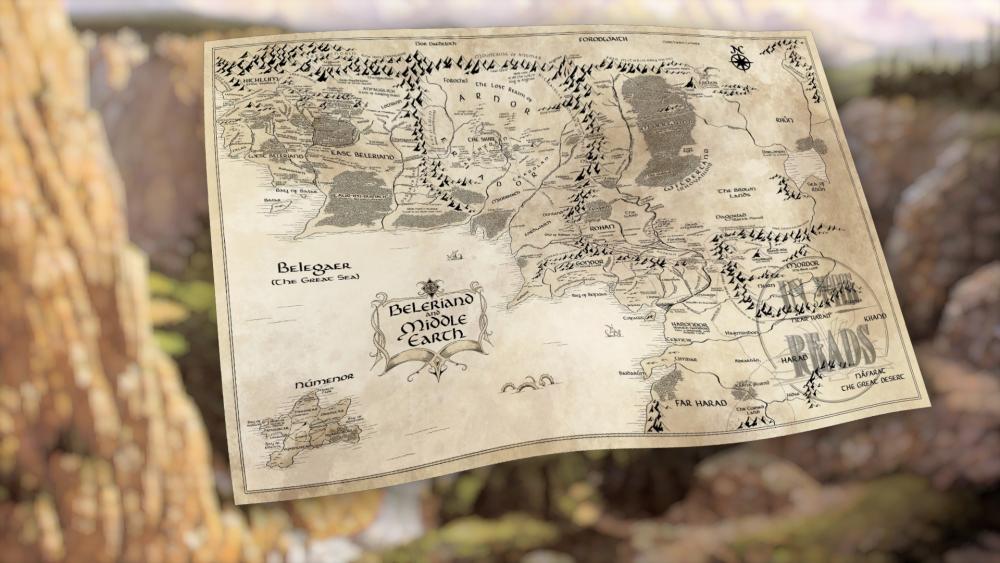
Simulation of a curved paper map using a Displacement Map effect in PTE AV Studio 11. I used a new built-in preset Circles Waves which will appear in Beta 5. To be honest, this tool is not ideal for this task, because the Displacement Map effect was optimized for a fullscreen images, and without rotation in 3D space.
-
Very good simulation of water waves!
-
Jill, Try the following solution. When you open this project, click Save button. It should fix file names for missing files in a .pte project file. If the problem still occur, call Save As command in the same folder. Keep only one slide where you see missing images, remove other slides. Restart PTE, if you still observe this problem, please send me this modified .pte project and images which should be located on this slide.
-
Hi, Firstly, I recommend to make a backup of your folders where you store Templates and Styles/transitions. in PTE AV Studio 11. Check in the Preferences > Templates tab where are located folders for Templates and for Styles/transitions. If you didn't change these paths, they should be located in Documents > PicturesToExe Usually when you install any new version (including Beta version) PTE suggest you import settings from a previous version. It's the most easy and simple way to transfer all settings from PTE 10 to PTE 11. If you earlier change a location for templates/styles in PTE 10, after import of settings, PTE 11 will use the same location for your templates/styles. So you can simply uninstall PTE 11 Beta and reinstall again and accept import of settings from PTE 10.
-

Fullscreen Filelist not displaying used files - Beta 4 [SOLVED]
Igor replied to jkb's topic in PTE AV Studio 11 Beta
Thanks, Jill, I confirm this. -
Hi, Please add English translation of your question. Or you can ask on Diapositif forum (French): http://diapositif.org/forum/
-
Hi, PTE AV Studio 11 Pro introduces a new feature - Quick Style. Using a Quick Style you can immediately copy all objects with animations from one slide to another slide or slides. Transition, synchronization and duration of a target slide will be untouched. Main image file name also will be remained original. See the Main menu > Slide > Create Quick Style (Shift + Ctrl + N) / Apply Quick Style (Shift + Ctrl + Q)
-
We'll add 2 new built-in presets in the next Beta for a Displacement Map effect: - Horizontal/vertical Waves - Circle Waves A number of waves will be customizable.
-
I'm grateful for all your payments. Thanks! If you pay more, we get more. Thanks for any your support of our work on PTE AV Studio.
-
Hi, In PTE AV Studio 11 we introduced a new option in the Preferences > Project tab: Save a copy of .pte project file in a .bak file Currently, it's not ticked by default. You'll always get a previous copy of .pte project file before last Save command in a .bak file. It's a renamed project file. In case of any problem with .pte project file, you always have a copy of a project from one previous step.
-
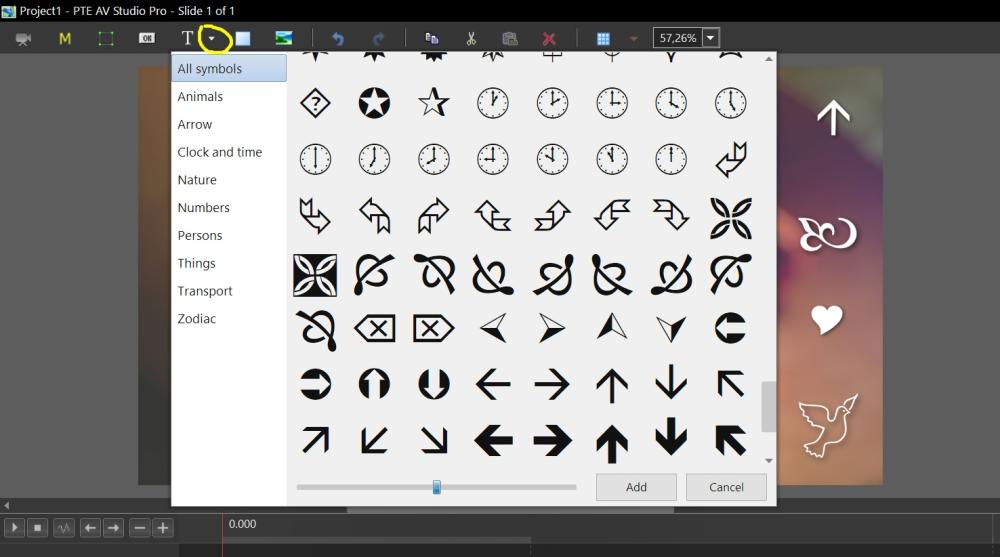
Mark, We added 440 vector icons/symbols. They all are from Webdings and Wingdings fonts. Only these 2 fonts available in all versions of Windows and macOS. So a project created on Mac can be transfered to a Mac. Also we manually sorted these 440 icons to add categories for fast search. Probably we'll add more icons in future version(s) from another source.
-
Hi Alex, These vector icons are based on special fonts included in Windows and macOS. In this version we don't plan to add more icons.
-
Hi Pascal, Thanks for using a new Directional Blur to simulate a Motion blur effect!
-
Hi, In PTE AV Studio 11 Beta we introduced 440 monochrome vector icons. They can be scaled to any size without loss in quality. Change a color and adjust a shadow. Vector icons will help decorate your slides. Show a popup menu in the Objects and animation editor > Add > Symbol
-
Barry, We improved it in Beta 4 of PTE AV Studio 11.
-
Beta 4 is available See the download links above. Fixed problem with nested color filters. Fixed problem with some video clips with alpha channel. The size of the Trim Video window is remembered now. Read more Video file becomes available immediately after video encoding. Read more Added a new slide style: Circles in Wedding category. Special thanks to Aleina Show
-
Tom, Thanks for this info!
-
Slide Option Transition in Project Option Transition [SOLVED]
Igor replied to tom95521's topic in PTE AV Studio 11 Beta
Thanks, Tom -
It's done for future Beta 4. You can check Pre-Beta 4 now: https://files.wnsoft.com/test/tmp/pteavstudio-setup.exe
-
Barry, Please try Pre-Beta 4: https://files.wnsoft.com/test/tmp/pteavstudio-setup.exe We fixed this problem with color filters. If everything is OK, we'll release official Beta 4 soon.
-
PTE AV 11 (beta) alpha channel display problem [SOLVED]
Igor replied to Aleina Show's topic in PTE AV Studio 11 Beta
Hi, Please try Pre-Beta 4. We fixed the problem with video clips with alpha channel which you've sent me: https://files.wnsoft.com/test/tmp/pteavstudio-setup.exe -
Hi, I'm glad that you like this new feature!
-
Barry, thanks, I reprodued this problem with "Nested color filters" option turned on for a parent object. I didn't tick a Nested opacity option. We'll check the code.
-
V. 11.0 Beta 2 - Export Slides to Images-file size?
Igor replied to goddi's topic in PTE AV Studio 11 Beta
Gary, PNG is a lossless compression and for photos resulting file weights much more than JPEG. You can try to save the same picture in Photoshop and you will get a similar file size. For JPEG you can adjust Quality (compression) parameter to set a balance between a file size and visual quality. -
OK, Barry