

JudyKay
-
Posts
703 -
Joined
-
Last visited
-
Days Won
4
Everything posted by JudyKay
-
I just wish it would work well on the newest version of Win 10. Adobe took months to figure out a licensing issue for me when traveling in many countries--whereby I got locked out of Lightroom and Photoshopped--entirely, repeatedly. It finally is resolved. Now, I have the issue of being unable to reach Adobe from some locations without a VPN, but Creative Cloud often rejects connections through VPN's. Good grief. What next. I still have to carry an ancient version of PS to be safe. LR is up for grabs. Just venting.
-
Suggestions: 1. Have suggested Style Category Names from available existing categories to prevent mis-typing. 2. Allow import of multiple styles simultaneously.
-
Groan. I just spent almost two hours completely restoring my styles and categories only to have Categories repeat. Then I try to move one style to a new category and half a dozen move with it. Then, a whole series of styles disappears altogether. I think they exist, but won't show up as style in a category (User Styles seems to be the main culprit). Trying to reimport a style asks if I want to replace existing style. But the style isn't showing up! This is hitting me at a bad time. These things happen. Do I start all over a second time? I didn't actually do a PTE uninstall, reinstall. [Edit] The panic is over. I deleted all 2 userstyle*.ini files and reimported all styles. Took less than an hour to import and recreate categories. All is well now. And much cleaner and more streamlined. No original work (a lot) was lost. All's well that ends well!
-
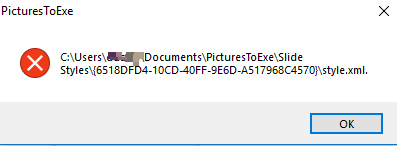
Thanks for your help Dave. I think I will delete everything, reinstall and start over. I just can't seem to clean up the mess. Exporting styles and then reinstalling them and deleting the old one seems to work. Yet, when I then try to change style categories, I get this warning even though the category in fact actually changes. Maybe this is normal but I also note that I have to close and re-open a category to see the change. Anyway, I am making workable progress. I have a huge project ahead!
-
I have had an issue like this: After reinstalling (not updating) P2E, I am unable to modify or move my own custom styles that previously existed. Duplicate Style Categories exist. I haven't tried getting in under the hood--no time, but is there is an obvious fix? I think the origin of this may be that when I upgraded to an SSD, I reinstalled Win 10 and all software from scratch, but restored my documents files from backup. Could that have caused it? I see in the slide styles folder that I have both usestyles.ini and usestyles_v9.ini Could PTE be picking up duplication between these? For now everything works, I just can't modify names or locations of some older styles/categories. Newly created ones work fine. If I manually alter category names in the ini file, will I create havoc?
-
That is amazing. I almost grasp it. I still end up using trial and error. There is HUGE potential there. I still dream of simplification, a simple 3D bezier curve. Lay points on a 3D space. Arrange the curves between them and then have an object follow that path.
-

One Of The Neat Things Possible With PTE 9
JudyKay replied to Lin Evans's topic in Tutorials & Video Lessons
I can only imagine sleeping in til 9:01. What a dream! -
Or have a brief list of recently used fonts at the top.
-
5 seconds on first load. 1-2 seconds on repeat loads. Seems consistent. From East Asia through VPN surfacing in America and somehow finding its way back to France.
-
Working great for me through a VPN from East Asia.
-
Manuel, now that is very interesting!
-
Odd. Similarly, I tried really hard to get Davinci Resolve on my PC, but never could get it to start. It works fine on my Laptop, but I want it on my PC! PS. I found Davinci Resolve to be amazing, but a nightmare of a learning curve.
-
@goddi Filmora is working flawlessly for me. I think you found some old versions. You want: filmora_setup_full1901.exe Try that. The Filmora preview player is fairly low-quality, 512 X 288, to keep it speedy. It doesn't look nice, unlike PTE. On export from Filmora, the quality is as full as expected. I always marvel at the amazing thing Igor has done with PTE that no one else matches. @Lin Evans I have never played with PTE's green screen chroma key processes. That will be soon on my to-do list. I also learned from Filmora the amazing capability of running two videos and masking parts of each (for example to have a person talking to themselves--two characters simultaneously--or 100 more-practical applications). I realize how much more robust PTE would be in this process, but haven't actually tried it yet. Has anyone else? The possibilities for this in PTE would seem to eclipse Filmora.
-
Thank you all very much. I am spending a couple days trying all kinds of things and going through tutorials on each. I am still leaning toward Filmora because it seems most intuitive to me and does a lot and produces could video. I am not impressed with the image stabilization though. Maybe no software image stabilization is really good--that is it minimally degrades quality of the original video. I guess that is a tradeoff between stable and sharp.
-
Amazing as PTE is, there are still times I want a video editor to create clips for PTE. I have played with various freebies and Adobe Premiere Elements. Video editing isn't intuitive for me and I have done as little as possible over the years using Adobe PE, VideoPad, Handbrake, etc. I dislike them all. I want simple, fast, easy, low learning curve and cheap. PTE does most of what I do, and I don't need full blown Adobe Premier Pro or anything like that. I am sniffing strongly at Wondshare Filmora. Suggestions?
-
Was there recently. This is well done. Thanks.
-
Congratulations to her! Nice show for her.
-
Thanks. Still wish PTE allowed moving an object along a Bezier curve. The curve would be on a layer and could be resized, copied and pasted and included in a style.
-
I won't keep posting on this subject, but Adobe still can't figure out how to fix the Lightroom CC problem. I am abandoning it for now. Lightroom Classic still works fine.
-
My frustration with Adobe products mounts. Again. In Czech Republic, I get the "Lightroom CC access token expired" error. Nothing will fix it. Not even VPN. I need it badly and no cure. So off to other software. Adobe is still best, but really frustrating for those of us who switch locations a lot. Adobe can fix it...eventually, but too late for now.
-
Pretty cool, but I keep having to go hunt for Dehaze. I like the update, especially in LR.
-
Great suggestions that I appreciate and find helpful. Thanks to you all.
-
If I am creating slide shows really quickly. I grab images from folders here and there and drag them onto the PTE timeline. I have image links going to who knows where. But, once I back the whole thing up to a Zip file, all the images with links to the zipped folder (not the original folder) are properly redirected. Right? I have been spending a lot of time selecting images and putting them in folders for each slideshow. FAster is just to drag the image from wherever I find it to the PTE timeline. I am wanting to trust that everything works if I do this and then zip it up to "fix" all the links for archiving. I could test it, but if anyone knows offhand I thought it quicker to ask.
-
I have been working a lot in PTE recently. I am just amazed and very, very grateful for this amazing, refined software. Igor, thank you. JK
-
I think a Properties tab "Mute Slide" might have some value. I have needed it once in my life, so maybe not. The O&A window mute is necessary to mute individual videos when there may be several in a slide. Mute Slide would be at a different location, although an intuitive location and would mute all videos on a slide. I suppose Mute slide ("mute all videos on this slide") could also be on an O&A. That might also meet JKB's wants. Would it? My application is that I sometimes throw in a few seconds of video clip, or an arrangement of them, but don't want the video audio. The method we presently have works for me, but would be a chore if there were a lot of video clips. In my present case, I only have 18.